Compact PCs have less room for airflow mistakes, so the right fan must balance physical clearance, cooling performance, noise, and power compatibility. A slim 80mm or 92mm model may fit where a standard fan cannot, while USB-powered options work well for cabinets, consoles, routers, and other enclosed equipment.
We compared 10 computer cooling fans for compact builds across common sizes, connection types, speed controls, and installation needs. Use the guide below to narrow the list by case clearance, airflow priorities, and how hands-on you want the installation to be.
Best 10 Computer Cooling Fans for Compact Builds Picks for 2026
Quiet High-Pressure Pick

- 120mm pressure-optimized design
- 4-pin PWM control up to 1700 RPM
- Up to 25.1 dB(A), six-year warranty
Best For: CPU coolers, radiators, and chassis airflow
Slim RGB Space-Saver
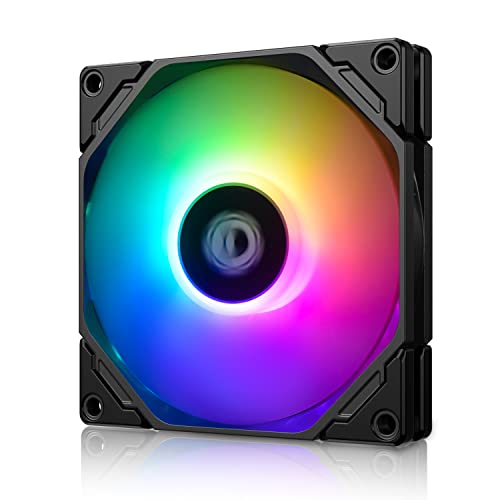
- Slim 92x92x15mm form factor
- 800–2500 RPM PWM adjustment
- 5V 3-pin motherboard ARGB sync
Best For: ITX, HTPC, and low-profile builds
USB Cooling for Electronics

- USB-powered 120mm fan
- Manual multi-speed controller
- 52 CFM with listed 18 dBA noise
Best For: Consoles, AV equipment, cabinets, and USB-powered cooling
Two-Fan USB Value Pack

- Two 80x80x25mm fans included
- USB-powered 5V operation
- 2600 RPM and listed 30 CFM per fan
Best For: DIY PC, printer, router, and equipment cooling
Best Dual-Fan Option

- Two 80mm fans deliver 52 CFM combined airflow.
- Adjustable speed controller helps balance cooling and noise.
- USB-powered design supports flat or upright placement.
Best For: Compact builds needing two flexible USB cooling fans
Best High-Airflow Pick

- 120mm size produces 56.7 CFM of airflow.
- Three speed settings provide basic control.
- Includes protective and mounting hardware.
Best For: Compact setups with room for a larger, high-airflow fan
Best Single-Fan Quiet Pick

- Compact 80mm footprint fits tight spaces.
- 17 dBA operation is the quietest listed option.
- Speed controller and dual-ball bearings add flexibility.
Best For: Quiet, targeted cooling for a single compact device
Flexible USB Cooling

- USB-powered for PCs, consoles, routers, and cabinets
- Three speeds reach up to 2000 RPM
- Anti-vibration feet support flexible placement
Best For: Versatile USB cooling around compact setups and electronics
Portable USB Cooling
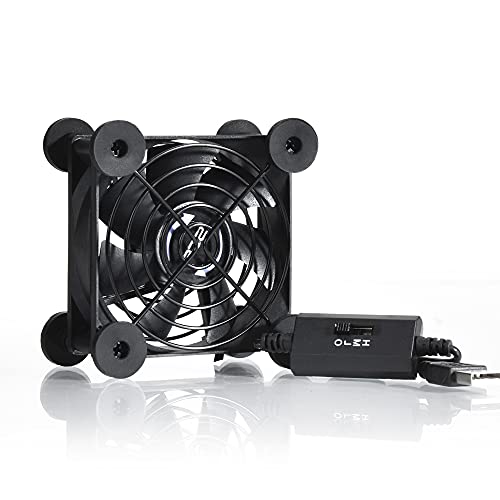
- 5V USB power works with consoles and electronics
- Three speeds include a 21dB low setting
- 33 CFM airflow with flat or upright placement
Best For: Quiet, portable cooling for compact electronics and cabinets
Quiet High-Pressure Pick – Noctua NF-P12 redux-1700 PWM
For computer cooling fans for compact builds, the Noctua NF-P12 redux-1700 PWM is a strong 120mm option when you need focused airflow in a standard 25mm-thick fan format. Its 4-pin PWM control can automatically balance cooling performance and noise.
Best For: Compact desktop builds using CPU air coolers, water-cooling radiators, or chassis ventilation.
Pros:
- Pressure-optimized design supports CPU coolers and radiators.
- PWM speed control reaches up to 1700 RPM.
- Rated for up to 25.1 dB(A) with a 150,000-hour MTTF.
- Includes a six-year manufacturer’s warranty.
Cons:
- The 120x120x25mm size may not fit especially narrow enclosures.
- It does not include built-in lighting.
This is a practical choice for builders prioritizing dependable, directed cooling and automatic motherboard control over RGB features or ultra-slim dimensions.
Slim RGB Space-Saver – ID-COOLING TF-9215 ARGB
Among computer cooling fans for compact builds, the ID-COOLING TF-9215 stands out with a slim 15mm profile. It combines PWM speed adjustment with 5V 3-pin addressable RGB, making it suitable when both clearance and lighting matter.
Best For: ITX systems, HTPCs, low-profile coolers, and other space-restricted desktop applications.
Pros:
- 15mm thickness helps preserve space in compact enclosures.
- PWM control adjusts from 800 to 2500 RPM.
- Supports motherboard-synchronized 5V 3-pin ARGB.
- Provides up to 44.3 CFM of airflow.
Cons:
- Noise is listed up to 33.4 dB(A) at higher speeds.
- Its 92mm footprint provides less area than a 120mm fan.
This fan is a good fit when a conventional 25mm fan will not clear nearby components and you still want controllable airflow plus synchronized RGB lighting.
USB Cooling for Electronics – AC Infinity MULTIFAN S3
The AC Infinity MULTIFAN S3 is a convenient alternative for computer cooling fans for compact builds when you need USB power rather than a motherboard fan header. Its external speed controller lets you tune the balance between airflow and noise.
Best For: USB-powered cooling around computers, game consoles, AV equipment, receivers, and cabinets.
Pros:
- USB plug works with USB ports on computers and other electronics.
- Multi-speed controller allows manual airflow and noise adjustment.
- Dual-ball bearings support horizontal or vertical placement.
- Produces 52 CFM at a listed 18 dBA noise level.
Cons:
- USB power is less suitable for motherboard-controlled internal case cooling.
- Its 120mm frame still requires adequate mounting or placement space.
This is best treated as a flexible supplemental cooler for a compact setup or enclosed electronics, especially where simple USB operation is more useful than standard PC fan integration.
Two-Fan USB Value Pack – AITRIP 80mm 5V Fans
For computer cooling fans for compact builds, the AITRIP two-pack offers two small 80x80x25mm fans with USB connectors. The 5V design is useful for DIY cooling projects involving PCs, printers, routers, or other equipment with accessible USB power.
Best For: DIY cooling, compact computer cases, 3D printers, routers, and radiator or equipment ventilation.
Pros:
- Two fans are included for flexible placement or added airflow.
- USB connectors simplify 5V power delivery.
- 80mm footprint suits smaller spaces than standard 120mm fans.
- Rated for 2600 RPM and up to 30 CFM per fan in the product bullets.
Cons:
- They lack stated PWM or motherboard speed control.
- Listed noise is 26 dBA per fan.
- Hydraulic bearings have a listed working life of 40,000 hours.
This pack makes sense when you need two straightforward, USB-powered fans for a custom cooling project and can manage speed through the USB power setup rather than a standard 4-pin header.
Best Dual-Fan Option – AC Infinity MULTIFAN S5
For computer cooling fans for compact builds, the AC Infinity MULTIFAN S5 provides two 80mm USB-powered fans in a compact setup. Its adjustable controller lets you balance airflow and noise, while the included stand and flat-placement options make it practical for tight electronics spaces.
Best For: Compact builds and electronics that need broader cooling coverage from two small fans.
Pros:
- Dual 80mm fans provide a combined 52 CFM of airflow.
- Multi-speed controller supports adjustable airflow and noise levels.
- Dual-ball bearings are rated for a 67,000-hour lifespan.
- USB power and upright or flat positioning simplify installation.
Cons:
- The dual-fan design takes more space than a single 80mm fan.
- USB power may be less suitable for builds requiring a standard internal fan connector.
The S5 is the stronger choice when a compact setup benefits from two fans and flexible placement. Its 18 dBA noise rating and speed control also make it a practical option for quieter environments.
Best High-Airflow Pick – 120mm 5V USB Cooling Fan
This 120mm USB fan is a practical choice for computer cooling fans for compact builds when airflow is the priority. It delivers 56.7 CFM at 23 dBA and includes a protective net, mounting hardware, and a long USB cable for straightforward placement around small PCs and electronics.
Best For: Compact computers, routers, consoles, and enclosed electronics spaces that can accommodate a 120mm fan.
Pros:
- 120mm fan provides 56.7 CFM of airflow.
- USB connection makes installation simple without a dedicated fan header.
- Includes a protective net, foot columns, mounting screws, and nuts.
- Three speed settings allow basic cooling adjustment.
Cons:
- Its 120mm size is larger than the 80mm alternatives in this roundup.
- The sleeve bearing has a shorter stated life than the dual-ball-bearing models.
- At 23 dBA, it is rated louder than the AC Infinity options.
Choose this model when your compact build has room for a 120mm fan and needs strong airflow. The included mounting accessories make it especially convenient for external or enclosure-based cooling.
Best Single-Fan Quiet Pick – AC Infinity MULTIFAN S1
For computer cooling fans for compact builds where space and noise matter, the AC Infinity MULTIFAN S1 offers a single 80mm USB fan with adjustable speed control. Its 3.2-inch footprint, 17 dBA rating, and flexible flat-or-upright placement suit small computers and surrounding electronics.
Best For: Single-device cooling in compact, noise-sensitive builds.
Pros:
- Compact 80mm design measures 3.2 by 3.2 by 1 inch.
- 17 dBA noise rating supports quiet operation.
- Multi-speed controller allows airflow and noise adjustment.
- Dual-ball bearings are rated for a 67,000-hour lifespan.
Cons:
- Its 26 CFM airflow is lower than the dual-fan S5 and 120mm model.
- It provides only one fan, so coverage is more limited.
- USB power may not integrate directly with standard internal fan headers.
The S1 is the simplest fit for a compact build that needs targeted cooling rather than maximum airflow. It combines a small footprint with the lowest stated noise level among these options.
Flexible USB Cooling – 120mm 3-Speed USB Fan
For computer cooling fans for compact builds and nearby electronics, this 120mm USB model offers flexible placement without requiring a traditional motherboard fan header. Its three-speed controller and anti-vibration feet make it practical for cabinets, cases, routers, consoles, and other USB-equipped devices.
Best For: USB-powered cooling in compact cases, cabinets, entertainment setups, and small workspaces.
Pros:
- USB connection works with PCs, servers, routers, consoles, TVs, and other USB-equipped devices.
- Three speed settings provide a choice between quieter operation and stronger airflow, up to 2000 RPM.
- Eight anti-vibration feet support horizontal or vertical placement while helping reduce vibration.
- Dual-ball bearings are designed to balance airflow with quieter operation.
Cons:
- USB power may be less suitable than a dedicated internal fan connection for a fully integrated PC build.
- The 120mm size requires sufficient mounting or placement space.
This is a versatile choice when simple USB power matters more than motherboard-controlled fan management. It fits cooling tasks across compact setups, though buyers should confirm that the available space can accommodate its 120mm frame.
Slimline PWM Cooling – Thermalright TL-8015W 80mm Fan
For computer cooling fans for compact builds, the Thermalright TL-8015W uses an 80mm by 15mm slim profile to fit spaces where standard-thickness fans may not. Its 4-pin PWM connection enables automatic speed adjustment through a compatible motherboard, while the 2200 RPM maximum speed supports targeted case or CPU-cooler airflow.
Best For: Slim desktop cases, tight clearances, radiators, and downward CPU-cooler installations with a 4-pin PWM header.
Pros:
- 15mm-thick design is suited to restricted spaces in compact cases.
- 4-pin PWM control allows compatible motherboards to adjust speed according to temperature.
- Provides up to 28.4 CFM airflow at a maximum 2200 RPM.
- Vibration-damping pads and S-FDB V2 bearings support quieter operation and durability.
Cons:
- Requires a compatible 4-pin PWM connection and a 12V desktop setup.
- Its 80mm frame moves less air than a larger fan may provide.
This fan is especially compelling when clearance is the main constraint. Its slim dimensions and PWM control suit compact builds, but verify the case mounting pattern and available motherboard header before purchase.
Portable USB Cooling – Quiet 80mm 3-Speed USB Fan
This 80mm USB fan is a practical option for computer cooling fans for compact builds, especially when you need a portable solution for a cabinet, router, console, or flat-panel setup. It runs from 5V USB power, offers three speed levels, and can rest either flat or upright.
Best For: Quiet USB cooling for compact electronics, gaming consoles, routers, and computer cabinets.
Pros:
- Three speed settings let you tune airflow and noise for the setup.
- Low-speed operation is rated at just 21dB.
- USB plug can draw power from compatible electronics and game-console ports.
- Dual-ball bearings, seven blades, and a rated 33 CFM airflow support effective cooling.
Cons:
- At 3.64 inches square and 1.81 inches deep, it may need more room than an ultra-slim internal fan.
- It uses a 2-pin USB connection rather than motherboard PWM control.
Choose this model when easy USB operation and low-speed quietness are priorities. Its protective iron grills and shockproof feet add convenience for exposed or flexible placement, while the 80mm format remains suitable for many compact electronics setups.
How We Picked the Best Computer Cooling Fans for Compact Builds
We focused on fans suited to restricted spaces and small enclosures, including slim 15mm models, compact 80mm and 92mm fans, and standard 120mm options where clearance allows. We also considered connection type, speed control, stated noise-conscious design, installation flexibility, and whether each fan is intended for an internal PC header or external USB power.
The selection includes PWM fans for motherboard-controlled cooling, USB fans with inline speed controllers, dual-fan units, and low-profile models for builds where depth is the main limitation. Because airflow results depend heavily on case layout, filters, grilles, and temperature, specifications should be treated as a starting point rather than a guarantee.
Quick Comparison
| Best for | Recommended type | What to prioritize |
|---|---|---|
| Small gaming or workstation PC | 120mm PWM fan | Airflow, motherboard control, and mounting compatibility |
| Very tight CPU or case clearance | 80mm, 92mm, or 15mm slim fan | Frame size, thickness, and connector access |
| Routers, consoles, receivers, and cabinets | USB-powered fan | Power source, speed controller, and placement |
| Broad or awkward ventilation openings | Dual-fan USB unit | Coverage, cable length, and available USB power |
Key Buying Factors for Computer Cooling Fans for Compact Builds
Measure Size and Thickness First
Check the mounting pattern and available depth before comparing airflow. A 15mm-thick fan can solve a clearance problem, but it may not move the same volume of air as a deeper model. Confirm whether your enclosure accepts 80mm, 92mm, or 120mm mounting points, and account for brackets, fan guards, filters, and nearby cables.
Match the Power Connection
PWM and other motherboard-header fans are better suited to internal PC builds because system software or BIOS settings can regulate speed. USB fans are simpler for external cooling and electronics without spare fan headers, but they typically rely on an inline controller or fixed USB power. Do not assume a USB model can replace a header-connected fan without checking voltage and connector requirements.
Balance Airflow, Noise, and Control
Higher maximum speed can improve heat removal, yet compact systems often sit close to the user. A speed controller or PWM support makes it easier to run quietly during light use and increase cooling under load. Also consider whether the fan will draw air through a restrictive grille or filter, since resistance can reduce real-world performance.
Who Should Buy Which Computer Cooling Fans for Compact Builds?
Choose a PWM Fan for an Internal PC Upgrade
Pick a motherboard-connected PWM model when you need coordinated case or CPU cooling, automatic speed control, and a cleaner permanent installation. This is generally the best route for gaming PCs, workstations, and compact custom builds.
Choose a Slim Fan When Clearance Is the Problem
Look at 15mm-thick 80mm or 92mm designs for cramped cases, low-profile builds, and spaces behind panels or near heatsinks. Verify mounting dimensions before ordering.
Choose USB for Flexible External Cooling
USB models are practical for routers, consoles, DVRs, AV receivers, network cabinets, and DIY enclosures. Choose a single fan for focused airflow, a dual-fan unit for broader coverage, and a controller-equipped model when you want to tune noise without changing the power source.