Choosing the right fan can make a noticeable difference to PC temperatures, noise levels, and long-term component stability. This roundup compares 10 computer cooling fans under $200, from compact USB models to high-airflow AC-powered options.
Whether you are upgrading a gaming case, cooling a server, or improving airflow around a console or network device, the best choice depends on compatibility, power requirements, noise, and installation space.
Best 10 Computer Cooling Fans Under 200 Picks for 2026
Quiet Performance Pick

- 1700 RPM pressure-optimised 120mm fan
- 4-pin PWM speed control
- 25.1 dB(A) rating and six-year warranty
Best For: Quiet desktop cooling for CPU coolers, radiators, and cases
Large-Case Airflow Pick
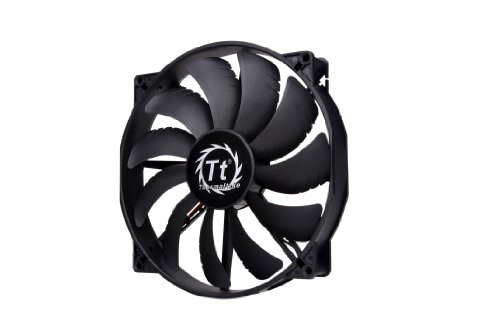
- 200x30mm design for compatible cases
- Stated airflow of 129.64 CFM
- 3-pin connection and 800 RPM maximum speed
Best For: High-volume ventilation in cases with 200mm fan mounts
USB Versatility Pick

- USB-powered dual 120mm cooling kit
- Three adjustable speed settings
- USB Type-C and broad device compatibility
Best For: External cooling for PCs, consoles, power banks, and electronics
Enthusiast High-Airflow Pick

- Up to 72.44 CFM and 3.01 mmH2O pressure
- 2100 RPM premium FDB design
- Loopin connectors simplify daisy-chained builds
Best For: High-performance gaming and rendering PCs
Adjustable AC Cooling

- 700–2800 RPM adjustable speed
- AC plug with included controller
- Up to 95.8 CFM airflow
Best For: Outlet-powered cooling for PCs, cabinets, routers, and electronics
USB Device Cooling

- Dual 80mm fan design
- Three adjustable speed settings
- USB plug-and-play power
Best For: Quiet external cooling for routers, consoles, and electronics
RGB Case Upgrade

- Three standard 120mm case fans
- Up to 56.98 CFM airflow each
- Eight cycling lighting graphics
Best For: Desktop builders adding airflow and coordinated RGB-style lighting
Maximum Airflow Pick

- 169 CFM airflow at 4,100 RPM
- Variable-speed controller included
- Dual ball bearing construction
Best For: High-airflow DIY, server, and workstation cooling
Best Simple Pick
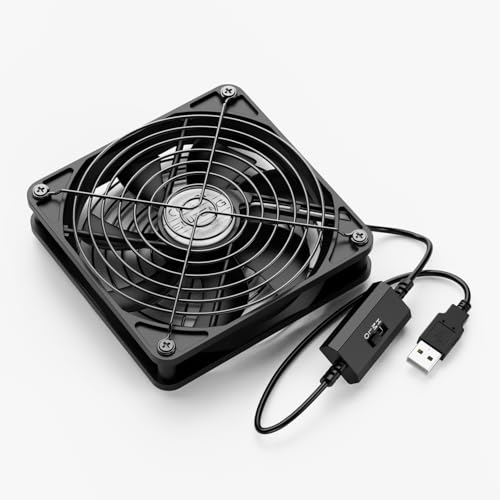
- 5V USB-powered for flexible placement
- Three selectable speed settings
- 56 CFM airflow with dual ball bearings
Best For: External cooling for consoles, routers, and electronics
Quiet Performance Pick – Noctua NF-P12 redux-1700 PWM
For computer cooling fans under 200, the Noctua NF-P12 redux-1700 PWM is a strong choice when you want effective airflow without excessive noise. Its pressure-optimised design suits CPU coolers, radiators, and case ventilation, while 4-pin PWM control lets compatible motherboards adjust fan speed automatically.
Best For: Quiet, automatically controlled cooling in desktop PCs, including CPU coolers, radiators, and case airflow setups.
Pros:
- 1700 RPM maximum speed with strong airflow and static pressure.
- 4-pin PWM connection supports automatic motherboard speed control.
- Rated noise level is a moderate 25.1 dB(A), with a six-year manufacturer warranty.
Cons:
- It is a standard 120mm fan, so it may not fit cases designed for larger or smaller mounts.
- The 4-pin PWM connector may be less convenient for systems limited to 3-pin fan headers.
This is a well-rounded 120mm option for builders prioritizing dependable cooling, PWM flexibility, and a quieter operating profile over decorative lighting.
Large-Case Airflow Pick – Thermaltake Pure 20 200mm
Among computer cooling fans under 200, the Thermaltake Pure 20 stands out for its large 200mm format and high stated airflow. Its 30mm thickness, airflow-focused blade design, and anti-vibration mounting system are intended to move substantial air through compatible desktop cases at a low maximum speed of 800 RPM.
Best For: Compatible desktop cases that support a large 200mm intake or exhaust fan.
Pros:
- Large 200mm fan size delivers a stated 129.64 CFM airflow.
- 800 RPM maximum speed is designed for quieter high-volume ventilation.
- Includes an anti-vibration mounting system and a long-life sleeve bearing.
Cons:
- The 200mm size requires a case with matching mounting support.
- Uses a 3-pin connector rather than motherboard-controlled 4-pin PWM.
- Its 28.2 dB noise rating is higher than some smaller quiet-focused fans.
Choose this model when your case supports a 200mm mount and you want broad, low-speed airflow. Confirm the mounting dimensions before buying, since compatibility is more restrictive than with a standard 120mm fan.
USB Versatility Pick – ELUTENG Dual 120mm USB Fan
This ELUTENG kit is a practical alternative to internal motherboard fans for computer cooling fans under 200. The dual 120mm ventilator uses USB power, offers three speed settings, and can work with computers, power banks, chargers, consoles, set-top boxes, DVRs, and other electronics.
Best For: External or supplemental cooling for electronics when USB power and adjustable speeds are more useful than internal PC fan control.
Pros:
- USB-powered design works with computers, power banks, and chargers.
- Three adjustable speeds provide flexibility for different cooling needs.
- Dual USB connectivity includes a modern USB Type-C interface.
- Stated noise level is 14.4 dB.
Cons:
- USB power makes it less suited to standard motherboard fan-header installation.
- The supplied notes do not specify an airflow rating.
- Compatibility is listed for laptops and external devices rather than a specific internal desktop mounting standard.
For flexible, plug-and-play cooling, this kit is easier to deploy than a conventional 12V case fan. It is particularly useful for external device ventilation, portable setups, or systems without an available fan header.
Enthusiast High-Airflow Pick – HAVN H12 120mm
The HAVN H12 is aimed at demanding desktop builds seeking high airflow in a standard 120mm format. It combines a 2100 RPM maximum speed, up to 72.44 CFM airflow, 3.01 mmH2O static pressure, and a fluid dynamic bearing for cooling CPUs, GPUs, VRMs, and case interiors.
Best For: Gaming or rendering PCs where high airflow, static pressure, durable construction, and cleaner multi-fan cabling matter.
Pros:
- Up to 72.44 CFM airflow and 3.01 mmH2O static pressure.
- Triple-groove fluid dynamic bearing is designed for smooth, long-term operation.
- Loopin passthrough connectors support daisy-chaining multiple fans.
- Glass-fiber-reinforced PBT construction and rubber pads help limit vibration.
Cons:
- Its 32.2 dB noise rating is not the quietest among the listed options.
- Uses a 3-pin connector, so it does not provide the supplied notes’ 4-pin PWM control.
- Only one fan is included.
This is a compelling choice for performance-focused builders who want strong 120mm cooling and simplified cable routing. Its higher noise rating makes it better suited to airflow-oriented systems than ultra-quiet builds.
Adjustable AC Cooling – 120mm Variable-Speed Fan
For computer cooling fans under 200, this 120mm model is a practical choice when you need adjustable airflow and direct AC-outlet power. Its included controller supports speeds from 700 to 2800 RPM, making it suitable for cooling PCs, servers, DVRs, routers, game consoles, and other equipment.
Best For: Users needing flexible, outlet-powered cooling for electronics, cabinets, or equipment without a standard PC fan connection.
Pros:
- Variable speed control supports airflow adjustment for cooling or quieter operation.
- AC plug design simplifies setup from a wall outlet.
- 120mm frame delivers up to 95.8 CFM of airflow.
- Dual-ball bearings are rated for a 50,000-hour lifespan.
Cons:
- Its 41 dB noise rating may be more noticeable than quieter case fans.
- The 2-pin connector and AC-powered design may require more installation planning in a desktop case.
This fan stands out for adaptable, high-airflow cooling rather than a traditional plug-and-play PC installation. Choose it when the controller and AC plug are useful features for your setup.
USB Device Cooling – Dual 80mm Whisper-Quiet Fan
Among computer cooling fans under 200, this dual-fan USB unit is convenient for devices that need extra airflow without internal rewiring. It uses plug-and-play USB power, offers three speed settings, and can sit horizontally or vertically beside routers, consoles, TV boxes, hard-drive enclosures, and similar equipment.
Best For: Quiet external cooling for USB-equipped electronics, gaming consoles, routers, and compact workspaces.
Pros:
- Two connected 80mm fans provide stronger combined airflow than a single small fan.
- Three adjustable speeds allow you to balance cooling and noise.
- USB-powered setup requires no complicated wiring.
- Rubber shock absorbers and protective metal grilles improve stability and safety.
Cons:
- It is an external USB cooling solution rather than a conventional internal case fan.
- The listed maximum airflow is 31.98 CFM per fan, so it is better suited to targeted device cooling than high-performance PC case ventilation.
This is a strong fit when ease of placement and quiet operation matter more than maximum airflow. Its dual-fan format makes it especially useful for cooling warm external devices.
RGB Case Upgrade – 120mm RGB Fan 3-Pack
For shoppers comparing computer cooling fans under 200, this three-pack combines standard 120mm case compatibility with colorful lighting. Each fan reaches up to 1650 RPM, moves up to 56.98 CFM, and uses a 4-pin connector, while the blade lighting cycles through eight graphics.
Best For: Desktop builders who want multiple case fans with low listed noise and integrated RGB-style visual effects.
Pros:
- Three 120mm fans provide coverage for multi-fan desktop cases.
- Listed noise level is up to 21.6 dBA for quieter operation.
- Eight lighting graphics cycle automatically for a customizable-looking build.
- Anti-vibration pads help reduce movement and noise.
Cons:
- The lighting effect automatically changes graphics every 20 seconds, limiting manual control according to the supplied details.
- A 4-pin connector may require compatible motherboard or controller connections.
This pack is a sensible choice for a coordinated case refresh, especially when you need three fans at once. It balances useful airflow with decorative lighting, though buyers should confirm connector compatibility before installation.
Maximum Airflow Pick – High-CFM 120mm AC Fan
For computer cooling fans under 200, this 120mm AC-powered model is a high-output option for demanding setups. It reaches up to 4,100 RPM and delivers 169 CFM, while the included controller lets you adjust the fan from off to full speed.
Best For: Server cabinets, mining rigs, workstations, gaming equipment, and DIY electronics cooling where maximum airflow matters.
Pros:
- Very high airflow capacity of 169 CFM at full speed.
- Variable-speed control supports fine-tuning from 3V to 12V.
- Dual ball bearings support flat or upright mounting and a stated six-year life.
- Protective grills are included on both sides.
Cons:
- Its 50 dB noise level may be noticeable at full speed.
- Uses AC power and a 5.5×2.1mm female plug rather than a standard PC motherboard connector.
- The 120mm × 38mm profile is thicker than many standard case fans.
This is a specialized cooling solution rather than a typical internal PC case fan. Choose it when airflow is the priority and you have room for its thicker frame, AC connection, and external speed controller.
Quiet RGB Build Pick – Thermalright TL-M12Q Case Fan
Among computer cooling fans under 200, the Thermalright TL-M12Q is designed for balanced case cooling with PWM control and an ARGB mirror-light effect. Its 2,000 RPM speed, 68.9 CFM airflow, and rated noise level of up to 28.2 dB(A) suit performance-focused desktop builds.
Best For: Desktop PC builders who want a PWM-controlled case or CPU-cooler fan with ARGB lighting and simplified fan-to-fan cable management.
Pros:
- Delivers 68.9 CFM airflow at up to 2,000 RPM.
- 4-pin PWM connection supports motherboard-based speed control.
- ARGB lighting uses a 5V 3-pin interface.
- Soft silicone corner pads help reduce vibration, while wireless splicing can simplify wiring.
Cons:
- Only one fan is included.
- Wireless splicing requires correct pin-side connection for the control cable.
- ARGB lighting requires a compatible 5V 3-pin connection.
The TL-M12Q is a strong all-around choice for a modern desktop build where cooling, PWM control, and coordinated lighting are all important. Its exhaust-oriented blade design makes airflow direction worth checking during installation.
Best Simple Pick – ELUTENG 120mm USB Cooling Fan
This ELUTENG model is a convenient choice among computer cooling fans under 200 when you need portable, USB-powered cooling. It connects to a 5V USB port, offers low, medium, and high speed settings, and can be placed flat or upright around computers and other electronics.
Best For: Game consoles, routers, receivers, DVRs, tablets, TVs, and compact electronics that need flexible external cooling.
Pros:
- USB power works with many computers, consoles, and USB power sources.
- Three speed settings make airflow easy to adjust.
- Dual ball bearings are rated for a 45,000-hour lifespan.
- Aluminum grills protect fingers and cables on both sides.
Cons:
- Its 1,500 RPM and 56 CFM output are lower than the high-CFM AC model.
- It is an external USB fan, not a standard internal motherboard-connected case fan.
- The stated low-speed noise is 23 dB, while the listed product noise level is 29 dB.
Choose the ELUTENG when simple installation and broad device compatibility matter more than maximum airflow. Its compact, dual-position design makes it practical for narrow spaces and electronics cabinets.
How We Picked the Best Computer Cooling Fans Under 200
We selected these fans for their range of use cases, specifications, and installation formats rather than treating every model as a standard PC case fan. The lineup includes 120mm and 80mm fans, a 200mm case fan, USB-powered kits, PWM-controlled models, RGB options, and higher-output AC-powered fans.
We also considered bearing design, speed control, airflow potential, mounting flexibility, cable management, and noise-related features. Before buying, confirm the fan’s dimensions, connector, voltage, and mounting pattern because these details determine whether it will work with your system.
Quick Comparison
| Fan type | Best suited for | What to check |
|---|---|---|
| 120mm PWM case fan | Gaming PCs and general desktop builds | Motherboard header, RPM range, static pressure |
| 200mm case fan | Large cases needing broad airflow | Case clearance and mounting holes |
| USB fan | Portable or external cooling | USB power availability and cable length |
| AC-powered fan | Servers, electronics, and high-airflow projects | Voltage, controller, safety, and mounting |
| RGB fan | Visible PC builds | Lighting connector and controller compatibility |
Key Buying Factors for Computer Cooling Fans Under 200
Size and Installation Space
Fan size affects airflow, noise, and compatibility. A 120mm fan is a common fit for modern cases, while an 80mm model suits compact enclosures or targeted cooling. A 200mm fan can move substantial air at lower rotational speeds, but only if the case supports its mounting pattern and depth.
Power and Connector Type
Standard PC fans commonly use 3-pin DC or 4-pin PWM connectors. PWM models offer finer automatic speed control through a compatible motherboard header. USB fans are convenient for routers, consoles, laptops, and other devices, but they may not integrate with motherboard fan curves. AC-powered models require extra care: verify the input voltage and use appropriate electrical protection.
Airflow, Static Pressure, and Noise
High airflow is useful for ventilated cases and open areas, while static pressure matters when pushing air through dust filters, radiators, or restrictive grilles. Bearing type, blade design, and maximum RPM also influence noise. A slower fan is often quieter, whereas a high-speed or thick fan can provide more cooling at the cost of acoustics.
Control and Extras
Look for adjustable speed controls when you need to balance cooling and noise. Features such as anti-vibration mounts, long cables, daisy-chain systems, and addressable RGB lighting can simplify installation, but they should not replace checking core compatibility.
Who Should Buy Which Computer Cooling Fans Under 200?
Choose a PWM 120mm model for a conventional gaming or productivity PC where motherboard-based control and balanced acoustics matter most. A 200mm fan is a strong choice for a compatible full-size case that benefits from broad, low-speed airflow.
USB-powered fans suit portable setups, external device cooling, and simple plug-and-play projects. Select an RGB model when appearance is a priority and your case supports the required lighting connection. For servers, receivers, consoles, or demanding electronics-cooling projects, an AC-powered or thicker high-output fan may be more appropriate—but verify voltage, mounting, and electrical safety before installation.