Choosing among computer cooling fans is easier when you match the fan type, power connection, noise level, and airflow to your setup. The options below cover desktop cases, gaming laptops, servers, receivers, routers, and other electronics.
We’ve included quiet PWM fans, USB-powered cooling systems, multi-fan laptop stands, ARGB case fans, and high-airflow models so you can find a practical fit without paying for features you do not need.
Best 10 Computer Cooling Fans Picks for 2026
Best Quiet Performance

- 4-pin PWM speed control
- Up to 120.2 m³/h airflow
- 25.1 dB(A) rated noise
Best For: Quiet desktop cooling, radiators, and CPU heatsinks
Best Portable Laptop Pad
KeiBn S039 Dual-Fan Laptop Cooler

- Two-fan airflow design
- Five adjustable height settings
- Two USB 2.0 ports
Best For: Laptops up to 15.6 inches at home or in the office
Best External Electronics Cooling
AC Infinity MULTIFAN S7 Dual USB Fans

- Two 120mm USB fans
- 104 CFM combined airflow
- Multi-speed controller
Best For: Consoles, AV equipment, cabinets, and external cooling
Best Full-Coverage Laptop Cooling
Kootek 5-Fan Laptop Cooler Stand

- Five selectable cooling fans
- Six adjustable height settings
- Fits 12- to 17-inch laptops
Best For: Large laptops needing adjustable cooling and stand support
Adjustable AC Cooling

- AC-plug operation with included speed controller
- Up to 95.8 CFM airflow and 2800 RPM
- Dual-ball bearings rated for 50,000 hours
Best For: Equipment cabinets, electronics, and setups needing adjustable outlet-powered airflow
ARGB Five-Pack Value
Thermalright TL-C12C-S 120mm Fans

- Five 120mm fans for case or cooler upgrades
- 4-pin PWM speed control up to 1550 RPM
- ARGB lighting with up to 17 effects
Best For: Desktop builders needing multiple PWM-controlled, illuminated fans
USB Dual-Fan Cooling
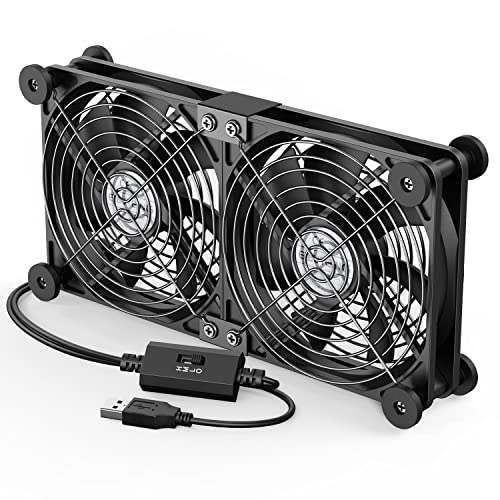
- Two 120mm fans run from one USB connection
- Three selectable speeds up to 1500 RPM
- Protective grilles and rubber shock absorbers
Best For: External cooling for laptops, consoles, routers, and USB-equipped electronics
Best Multi-Fan Value
Thermalright TL-C12C X3 ARGB PWM Fans
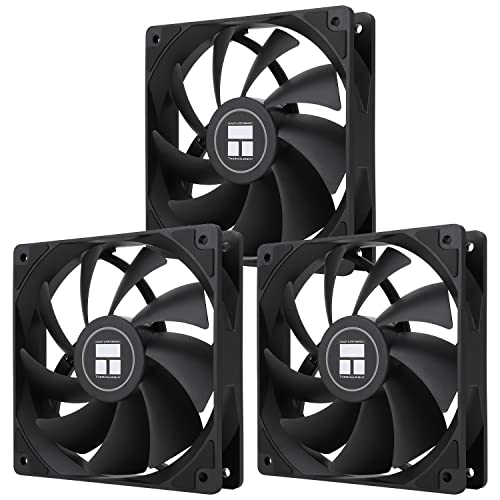
- Three 120mm fans with up to 66.17 CFM airflow each
- 4-pin PWM speed control and S-FDB bearings
- ARGB lighting with up to 17 modes
Best For: Adding three matching PWM fans to a compatible desktop build
Best USB Setup

- USB-powered 5V design for simple installation
- 56.7 CFM airflow at 1500 RPM
- Includes protective net and mounting hardware
Best For: Cooling routers, consoles, and other USB-accessible electronics
Best 12V Replacement
120mm 2-Pin Dual-Ball-Bearing Fans

- Two 120mm fans rated for 12V operation
- 1800 RPM speed with about 66 CFM airflow
- Protective mesh covers and dual-ball bearings
Best For: Compatible 12V devices using a 2-pin XH2.54 connector
Best Quiet Performance – Noctua NF-P12 redux-1700 PWM
For desktop builders comparing computer cooling fans, the Noctua NF-P12 redux-1700 PWM is a strong choice for air-based CPU coolers, radiators, or chassis ventilation. Its 4-pin PWM connection allows compatible motherboards to adjust speed automatically, balancing airflow and noise.
Best For: Desktop PCs needing pressure-optimized cooling with PWM speed control.
Pros:
- High static pressure and up to 120.2 m³/h airflow.
- 1700 RPM maximum speed with a rated noise level of 25.1 dB(A).
- 6-year manufacturer’s warranty and more than 150,000 hours MTTF.
Cons:
- Single-fan package may require additional units for full-case airflow.
- Requires a compatible 4-pin PWM motherboard connection for automatic speed control.
This is a practical, streamlined Noctua option when dependable cooling and controlled acoustics matter more than bundled accessories or lighting.
Best Portable Laptop Pad – KeiBn S039 Dual-Fan Laptop Cooler
The KeiBn S039 gives laptop users a simple way to add airflow during extended work or gaming sessions. These computer cooling fans sit beneath laptops up to 15.6 inches, while the adjustable stand and metal mesh surface help improve positioning and ventilation.
Best For: Home or office users who want laptop cooling, adjustable height, and extra USB connectivity.
Pros:
- Two fans and a metal mesh surface promote airflow.
- Five adjustable height positions support a more comfortable viewing angle.
- Includes two USB 2.0 ports and a hideable phone holder.
Cons:
- Compatibility is specified for laptops up to 15.6 inches.
- USB 2.0 hub connectivity may be limited for high-speed peripherals.
Choose this pad if you want cooling and stand functionality in one lightweight unit, particularly for a standard-size laptop workstation.
Best External Electronics Cooling – AC Infinity MULTIFAN S7 Dual USB Fans
The AC Infinity MULTIFAN S7 is a flexible pair of computer cooling fans for electronics beyond a traditional PC case. Its USB power, speed controller, and upright-or-flat installation make it useful for consoles, AV equipment, cabinets, and other components that need supplemental airflow.
Best For: Cooling game consoles, receivers, DVRs, cabinets, and other USB-powered electronics.
Pros:
- Two 120mm fans provide 104 CFM of combined airflow.
- Multi-speed controller lets you adjust noise and airflow.
- Dual-ball bearings support flat or upright placement and a 67,000-hour lifespan.
Cons:
- Designed as an external USB-powered cooling solution rather than a standard internal PC fan.
- Maximum rotational speed is 1300 RPM.
With a listed 19 dBA total noise level and noise-absorption pads, the MULTIFAN S7 suits users who need adaptable, low-noise cooling without opening their equipment.
Best Full-Coverage Laptop Cooling – Kootek 5-Fan Laptop Cooler Stand
The Kootek laptop cooler combines five computer cooling fans with an adjustable stand for broad airflow across larger notebooks. It supports 12- to 17-inch laptops, offers selectable fan operation, and adds two USB ports for peripherals.
Best For: Users with 12- to 17-inch laptops who want adjustable cooling coverage and an ergonomic stand.
Pros:
- Five built-in fans provide broad cooling coverage.
- Two switches let you select one, four, or all five fans.
- Six height settings, front stoppers, and two USB hubs add practical flexibility.
Cons:
- Requires a 5V 1A adapter for best performance, according to the supplied guidance.
- At 1.16 kg, it is heavier than more basic laptop pads.
- Blue LEDs may not suit every desk setup.
This model is a good fit for larger laptops and users who value adjustable cooling intensity, elevation, and connectivity in a single stand.
Adjustable AC Cooling – Variable-Speed 120mm Fan
For setups that need flexible power options, this computer cooling fan connects to an AC outlet and includes a controller for adjusting speed. Its 120mm axial design delivers up to 95.8 CFM and can suit PCs, servers, DVRs, routers, game consoles, and other equipment.
Best For: Users needing an AC-powered, speed-adjustable fan for varied electronics or equipment cabinets.
Pros:
- Includes a 3V-to-12V multi-speed controller for adjustable operation.
- Provides up to 95.8 CFM of airflow with a 700–2800 RPM range.
- Dual-ball bearings are rated for a 50,000-hour lifespan.
- Works with a broad range of PCs, consoles, appliances, and entertainment equipment.
Cons:
- Its AC-plug design may be less convenient than a standard internal motherboard fan.
- Noise is listed at under 41 dB, so it may not be the quietest option at high speed.
This is a versatile choice when outlet power and manual speed control matter more than a conventional PC case installation. Confirm that the 120mm size and external power arrangement fit your setup.
ARGB Five-Pack Value – Thermalright TL-C12C-S 120mm Fans
This five-pack is a practical way to add several computer cooling fans to a desktop case, CPU cooler, or radiator. Each 120mm fan uses 4-pin PWM control for automatic speed adjustment, while ARGB lighting and a rated noise level of 25.6 dBA add a quieter, customizable presentation.
Best For: Desktop builders expanding case airflow with PWM control and synchronized ARGB lighting.
Pros:
- Five 120mm fans provide strong value for multi-fan builds.
- 4-pin PWM control lets the motherboard adjust fan speed based on temperature.
- S-FDB bearings are designed to reduce blade shake and operating noise.
- ARGB lighting supports up to 17 effects and motherboard synchronization.
Cons:
- Maximum speed is 1550 RPM, which may be less aggressive than some high-speed fans.
- ARGB synchronization requires a compatible motherboard connection.
- The 4-pin PWM connector is intended for desktop installations rather than general USB use.
For a desktop upgrade, this pack balances quantity, automatic control, airflow, and lighting. It is especially useful when you need several matching fans for a case, radiator, or CPU cooler.
USB Dual-Fan Cooling – Adjustable 120mm Fan Pair
This dual-fan computer cooling fan provides plug-and-play airflow through a 5V USB connection. Three speed settings, protective metal grilles, rubber shock absorbers, and horizontal or vertical placement make it suitable for laptops, routers, receivers, game consoles, hard-drive enclosures, and other USB-equipped devices.
Best For: External cooling for USB-equipped electronics where simple placement and adjustable airflow are important.
Pros:
- Two 120mm fans operate together for added airflow.
- USB-powered design avoids internal wiring and supports plug-and-play use.
- Three speed settings provide a choice of 900, 1200, or 1500 RPM.
- Protective grilles, rubber feet, and cable protection support safer, steadier use.
Cons:
- It is an external USB cooling accessory rather than a standard internal case fan.
- Reported noise ranges from 25.6 dB to 32.5 dB depending on speed.
- USB power may be unsuitable for installations without an accessible USB port.
This is a convenient option for cooling devices that have USB power but lack a straightforward fan connection. Its dual-fan layout and adjustable speeds make it flexible for desk, shelf, or cabinet use.
Best Multi-Fan Value – Thermalright TL-C12C X3 ARGB PWM Fans
For builders needing several computer cooling fans, this three-pack combines 4-pin PWM speed control with 120mm airflow and subtle ARGB lighting. It is suited to compatible desktop cases and CPU coolers where synchronized lighting and automatic fan-speed adjustment are useful.
Best For: Desktop builders adding three PWM case or cooler fans with ARGB lighting.
Pros:
- Three 120mm fans provide up to 66.17 CFM of airflow each.
- 4-pin PWM control lets a compatible motherboard adjust speed based on temperature.
- S-FDB bearings are designed to reduce blade wobble and keep noise at or below 25.6 dBA.
- ARGB blades support up to 17 lighting modes and motherboard synchronization.
Cons:
- Requires a compatible 4-pin PWM connection and ARGB motherboard port for the listed controls and lighting.
- At 1550 RPM, it is not the highest-speed option in this selection.
This is the most versatile choice here for a standard desktop build, especially when you need three matching fans rather than a single replacement. Check your case space, motherboard headers, and ARGB compatibility before buying.
Best USB Setup – 120mm 5V USB Cooling Case Fan
This USB model is a practical pick among computer cooling fans when you need simple power from a USB port rather than a standard motherboard header. Its 120mm frame can help ventilate routers, mini PCs, consoles, home-theater equipment, and other enclosed electronics.
Best For: USB-powered cooling for routers, consoles, AV equipment, and compact computer setups.
Pros:
- USB connection makes installation straightforward with compatible 5V power sources.
- 120mm design delivers rated airflow of 56.7 CFM at 1500 RPM.
- Rated noise is 23 dBA, and the package includes a protective net, feet, screws, and nuts.
- Suitable for a broad range of electronics, including routers, DVRs, modems, and gaming consoles.
Cons:
- It uses a sleeve bearing rather than the S-FDB or dual-ball-bearing designs in the other options.
- USB 5V power is not a direct replacement for a standard 12V motherboard fan connection.
- The listing describes one fan, so it is less convenient for multi-fan desktop builds.
Choose this fan when convenience and device compatibility matter more than motherboard integration. It is especially useful for adding airflow around electronics that have an accessible USB port and limited internal mounting options.
Best 12V Replacement – 120mm 2-Pin Dual-Ball-Bearing Fans
These computer cooling fans are intended for equipment that accepts a 12V 2-pin XH2.54 connection. The two-pack offers 1800 RPM operation, dual-ball bearings, and protective mesh covers, making it a useful replacement option for compatible amplifiers, refrigerators, servers, and other ventilation applications.
Best For: Replacing compatible 12V equipment fans in appliances, amplifiers, servers, and specialty enclosures.
Pros:
- Two 120mm fans provide a convenient replacement pair.
- 1800 RPM speed and approximately 66 CFM airflow support active ventilation.
- Dual-ball bearings are suited to replacement applications requiring a durable bearing design.
- Mesh covers help prevent contact with the blades and block dust.
Cons:
- The 2-pin XH2.54 connector is not compatible with standard computer fan interfaces.
- Wiring requires correct polarity: red connects positive and black connects negative.
- Noise is listed below 33 dB, so it may not be the quietest option for a noise-sensitive desktop.
This pair makes sense when connector type and voltage match the original fan. Confirm the device uses a 12V 2-pin XH2.54 connection before ordering, since it is designed as a specialty replacement rather than a typical motherboard fan.
How We Picked These Computer Cooling Fans
We selected models across the main cooling categories: 120mm case fans, PWM replacement fans, USB-powered auxiliary fans, laptop cooling pads, and AC-powered utility fans. Our priorities were compatibility, controllable speed, expected airflow, noise-conscious operation, installation convenience, and useful extras such as stands, USB ports, lighting, or included multi-packs.
Because cooling needs vary widely, this list is not ranked by one universal specification. A quiet fan for a desktop case has different requirements from a portable USB fan for a router or a laptop pad designed to improve airflow underneath a gaming notebook.
Quick Comparison
| Best For | Recommended Type | What to Look For |
|---|---|---|
| Desktop case upgrades | 120mm PWM fan | 4-pin control, suitable RPM range, bearing quality |
| Quiet PC builds | Low-noise premium fan | Acoustic design, smooth bearings, speed control |
| Gaming laptops | Multi-fan cooling pad | Adjustable height, laptop-size support, USB connectivity |
| Receivers, routers, and consoles | USB-powered fan | 5V compatibility, adjustable speed, simple placement |
| Servers or high-heat equipment | AC or high-RPM fan | Power compatibility, airflow, controller, safe mounting |
Key Buying Factors for Computer Cooling Fans
Size and Mounting
Confirm the available space before buying. A standard 120mm fan may fit many PC cases, but thickness, screw-hole spacing, clearance around graphics cards, and radiator compatibility still matter. Laptop pads should support your screen size and leave vents unobstructed.
Power and Connector Type
Desktop fans commonly use 3-pin DC or 4-pin PWM connectors. PWM models allow compatible motherboards or fan controllers to regulate speed more precisely. USB fans typically draw 5V power and work with laptops, power banks, routers, and other USB sources. AC-powered models require particular attention to voltage and plug compatibility.
Airflow, Pressure, and Noise
Higher RPM can move more air, but it may also produce more noise. Case fans intended for open ventilation prioritize airflow, while radiator or heatsink fans benefit from stronger static pressure. Look for adjustable speed when you want a balance between cooling and acoustics.
Features and Longevity
Bearings, speed controllers, lighting, included fan packs, adjustable stands, and extra USB ports can improve value, but they should not replace basic compatibility checks. For a constantly running system, favor a reputable bearing design and a fan with a suitable operating speed rather than choosing solely by peak RPM.
Who Should Buy Which Computer Cooling Fans?
Choose a quiet 120mm PWM model for a conventional desktop upgrade or a multi-pack when you are populating several case positions. An ARGB PWM fan is better if appearance and synchronized lighting are part of your build. Laptop owners should choose a cooling pad with adjustable height and a supported size range, especially for gaming notebooks that need improved underside airflow.
For receivers, routers, DVRs, consoles, and other equipment without a standard motherboard header, a USB-powered fan is usually the simplest option. Select an AC-powered or high-RPM model for server cabinets and unusually warm equipment only after verifying voltage, connector requirements, and safe mounting space.