A good desktop phone tripod does more than hold your phone upright. It can improve framing, reduce shake, and make video calls, livestreams, and recording much easier.
In this roundup, we focused on stable, desk-friendly options with useful adjustability, easy setup, and features that match real-world use.
Best 10 Desktop Phone Tripod Picks for 2026
Best for Height Adjustment
DIMONCOAT Adjustable Phone Stand for Desk

- 8.66" to 14.96" height range
- 180° tilt and 360° rotation
- Weighted metal base with non-slip pads
Best For: Desk users who want a stable, adjustable stand for calls, reading, and recording.
Best for Flexible Mounting
Amazon Basics 10-inch Flexible Tripod

- Flexible legs grip uneven or awkward surfaces
- Includes wireless remote for hands-free shooting
- Works with phones, GoPros, webcams, and small cameras
Best For: Creators and casual users who want a compact tripod with flexible placement options.
Best for Stable Desk Calls
COOPER ChatStand Adjustable Phone Stand

- Adjusts from 9 to 13 inches for eye-level viewing
- Weighted metal base improves stability on desks
- Fits iPhone, Samsung, Android, and similar phones
Best For: Remote workers and creators who need a stable desk stand for calls and casual filming.
Best for MagSafe Desk Setup
OMOTON TP06-E Magnetic Phone Tripod
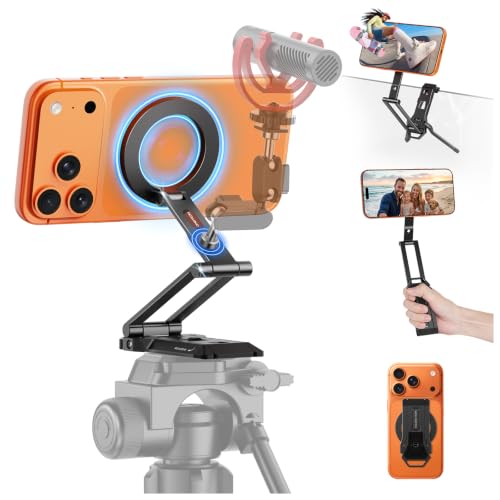
- 20-magnet MagSafe-style hold
- 3-axis angles for desk and overhead use
- Lightweight, fold-flat travel design
Best For: iPhone users and creators who want a compact magnetic tripod for desk viewing and portable shooting.
Best for Desk Content Creation

- Flexible metal legs for stable tabletop positioning
- Includes wireless remote for hands-free shots
- Fits phones, cameras, and GoPro-style action cams
Best For: Creators and remote workers who need a compact desktop stand for flexible shooting.
Best for Magnetic Mounting
OMOTON TP06 Pro Magnetic Tripod

- Magnetic back for fast attach-and-shoot convenience
- 360° rotation and 3-axis adjustment for flexible framing
- Compact foldable body with lanyard for easy carry
Best For: Creators and active users who want a compact magnetic desktop phone tripod with extra mounting flexibility.
Best with Extra Features

- Flexible legs for desk use and wrap-around mounting
- Includes phone holder, action cam adapter, and cold shoes
- 360° swivel with 90° tilt for easy angle changes
Best For: Creators who want a compact desktop phone tripod with flexible mounting options.
Best for MagSafe Flexibility
OMOTON TP02 360° Magnetic Tripod

- N52 magnetic hold with quick 1-second attachment
- 360° rotation and 3-axis adjustment for easier framing
- Lightweight aluminum body folds compact for travel
Best For: iPhone users and MagSafe case owners who want a compact tripod for desk, travel, and gym use.
Best Simple Pick
OMOTON TP03 Ultra-Slim MagSafe Tripod

- MagSafe-style magnetic grip for fast phone placement
- 360° rotating head with adjustable arms
- Ultra-slim, lightweight build for desk or travel use
Best For: iPhone users who want a slim magnetic tripod for desk setups, travel, and flexible shooting.
Best for Height Adjustment – DIMONCOAT Adjustable Phone Stand for Desk
If you want a desktop phone tripod alternative that’s more stable than a flimsy plastic stand, this DIMONCOAT holder is built for desk use. Its adjustable height and angle make it a practical pick for calls, reading, recording, and keeping your screen at a more comfortable eye level.
Best For: Anyone who wants a sturdy, adjustable desk stand for video calls, content recording, and everyday viewing.
Pros:
- Height adjusts from 8.66 to 14.96 inches for better ergonomics
- 180° tilt and 360° rotation for flexible viewing angles
- Weighted metal base with non-slip pads improves stability
- Thick-case-friendly clamp fits a wide range of phones
Cons:
- Not as portable as a lightweight foldable stand
- Better for desk setups than on-the-go use
Overall, this is a strong desktop phone tripod-style option if your priority is comfort, stability, and angle control at a workspace. It’s especially useful for people who spend long hours on calls or want a dependable stand for filming from a desk.
Best for Flexible Mounting – Amazon Basics 10-inch Flexible Tripod
Amazon Basics Portable and Flexible Tripod with Wireless Remote and Smartphone Clamp, 10-inch, Black
Check Price On AmazonIf you need a versatile desktop phone tripod for quick shots, calls, or content creation, this Amazon Basics model covers the essentials without adding bulk. The flexible legs make it easy to position on uneven surfaces or wrap around poles, while the included remote helps you trigger photos from a distance.
Best For: Creators, travelers, and casual users who want a compact tripod that can stabilize a phone, GoPro, or small camera in lots of different setups.
Pros:
- Flexible legs can wrap around railings, branches, poles, and more
- Wireless remote works up to 30 feet away for easier solo and group shots
- Universal clamp supports smartphones up to 3.7 inches wide
- Simple portrait/landscape switching with the side knob
Cons:
- 10-inch size is better for portability than full-height framing
- Flexible design is less rigid than a traditional fixed tripod
As a desktop phone tripod, it stands out most for adaptability rather than maximum height, making it a practical pick when you want a small support that can move from desk use to on-the-go shooting fast. If you value convenience and flexible placement, this is an easy one to recommend.
Best for Magnetic Desk Mounting – OMOTON VC07 360° Rotating Phone Mount
If you want a desktop phone tripod alternative that does more than just hold your phone, the OMOTON VC07 is built for hands-free video calls, webcam use, and quick angle changes on a monitor, laptop, TV, or desk setup. Its magnetic design makes it especially convenient for MagSafe iPhones, while the included ring expands compatibility for Android phones and non-magnetic cases.
Best For: Creators, remote workers, and anyone who wants a fast magnetic mount for desk-based filming, calls, or continuity camera use.
Pros:
- Strong magnetic hold with one-hand placement and MagSafe support
- 360° rotating base plus 180° angle adjustment for flexible framing
- 1/4″ screw base adds extra mounting versatility for compatible gear
- Works across iPhone, Android, Mac/iMac, and other desktop setups
Cons:
- Not a traditional tripod, so it won’t replace a full-height stand
- Best performance depends on using the magnetic system correctly
- Desk and monitor mounting is the main use case, not floor-level shooting
This is a smart pick if you want a desktop phone tripod-style solution with a cleaner, more stable magnetic workflow. The VC07 is less about portability and more about fast, repeatable positioning for productive desk use.
Best for Stable Desk Calls – COOPER ChatStand Adjustable Phone Stand
If you want a desktop phone tripod that feels more like a desk accessory than a flimsy clip, the COOPER ChatStand is built for steady, face-level viewing and recording. Its adjustable height and weighted metal base make it a practical pick for video calls, livestreams, and hands-free content creation.
Best For: Remote workers, creators, and anyone who wants a stable desk stand for Zoom, FaceTime, TikTok, or filming at home.
Pros:
- Adjusts from 9 to 13 inches for better eye-level framing
- Weighted, non-slip metal base helps prevent tipping and slipping
- Wide phone holder fits iPhone, Samsung, Android, and similar devices
- Useful for calls, recording, and hands-free desk use
Cons:
- Not a true portable travel tripod for on-the-go shooting
- More suited to desk use than overhead or highly flexible camera angles
Overall, this is a straightforward desktop phone tripod for people who care more about stability and comfort than extra features. It does the basics well, especially for work-from-home setups and casual filming.
Best for MagSafe Desk Setup – OMOTON TP06-E Magnetic Phone Tripod
If you want a desktop phone tripod that can also leave the desk, the OMOTON TP06-E is a flexible pick with strong MagSafe-style magnetic mounting, 3-axis adjustability, and a foldable design that travels easily. It works well for hands-free viewing, quick creator setups, and overhead angles without adding much bulk.
Best For: iPhone users, creators, and remote workers who want a compact magnetic tripod that doubles as a desk stand and travel mount.
Pros:
- Strong 20-magnet hold for fast one-handed mounting
- 3-axis adjustment supports portrait, landscape, and overhead shots
- Very portable at 107g and just 2.1cm folded
- Arca-Swiss and 1/4" threads add accessory flexibility
Cons:
- Best results are with MagSafe-compatible phones or the included metal ring
- No microphone or other accessories are included
As a desktop phone tripod, this model stands out for users who want a magnet-first setup that is easy to grab, adjust, and pack away. It is especially appealing if you switch between desk viewing, selfie shots, and lightweight content creation.
Best for Desk Content Creation – UBeesize Phone Tripod Pro S
If you want a desktop phone tripod that does more than just hold a phone upright, the UBeesize Phone Tripod Pro S is a practical pick for casual filming, video calls, and tabletop content. Its flexible legs, included wireless remote, and broad device compatibility make it useful for everyday desk setups.
Best For: Creators, students, and remote workers who need a flexible desktop stand for phones, cameras, or GoPro use.
Pros:
- Flexible metal legs help it wrap around or stabilize on different surfaces
- Wireless remote makes selfies, group shots, and desk recordings easier
- Supports phones up to 3.54 inches wide plus cameras and action cams
- Metal ball joint and non-slip feet improve stability for tabletop use
Cons:
- Best suited to light-to-medium setups rather than heavier gear
- Flexible legs are handy, but not as rigid as a traditional full-size tripod
- Remote range is useful, but mainly aimed at short-distance shooting
As a desktop phone tripod, this model stands out for versatility more than size, giving you a compact way to shoot, stream, or video chat without taking up much space. It is a strong fit if you want one small stand that can handle both phone and camera tasks at a desk.
Best for Magnetic Mounting – OMOTON TP06 Pro Magnetic Tripod
If you want a desktop phone tripod that does more than sit on a table, the OMOTON TP06 Pro is built for flexible shooting. Its magnetic back, 360° rotation, and 3-axis adjustability make it easy to switch from desk use to handheld filming or quick metal-surface mounting.
Best For: Creators, travelers, and gym users who want a compact magnetic tripod that doubles as a desktop stand and handheld selfie stick.
Pros:
- Strong MagSafe-style magnetic hold with included ring for wider phone compatibility
- 360° rotation plus multi-axis adjustment for easier framing in portrait or landscape
- Works as a desktop stand, selfie stick, and hook-style mount in one compact tool
- Lightweight folding design with lanyard makes it easy to carry every day
Cons:
- The hook-style mounting approach may not suit every setup
- Best magnetic performance depends on using compatible phones or the included ring
- Not as tall or robust as a full-size tripod for dedicated studio work
This is a strong pick if you want a desktop phone tripod that stays portable without giving up mounting flexibility. It’s especially useful for quick content, hands-free viewing, and on-the-go shots where magnets and compact size matter most.
Best with Extra Features – NEEWER Flexible Phone Tripod
If you want a desktop phone tripod that can do more than sit on a table, the NEEWER TP34 is a strong pick. Its flexible aluminum-wire legs add stability on flat surfaces while also letting you wrap the stand around poles, handlebars, and other supports for more shooting options.
Best For: Creators who need a compact, versatile phone tripod for desk use, vlogging, and lightweight camera or action cam mounting.
Pros:
- Flexible legs offer stable tabletop use plus wrap-around mounting options
- Supports phones, action cameras, and compact gear with included adapters
- 360° swivel and 90° tilt make portrait and landscape changes easy
- Portable build works well for travel, streaming, and quick setups
Cons:
- Not as rigid as a full-size tripod for heavier camera rigs
- Best suited to lightweight setups rather than demanding pro use
This desktop phone tripod stands out for flexibility more than raw size, giving you a practical all-in-one option for desk recording and improvised mounting. If you want one compact stand that can handle a phone, action cam, and quick angle changes, it’s a very capable choice.
Best for MagSafe Flexibility – OMOTON TP02 360° Magnetic Tripod
If you want a desktop phone tripod that also works well on the go, the OMOTON TP02 stands out for its strong magnetic hold, 360° rotation, and broad angle adjustment. It’s built for quick setup, stable framing, and easy switching between desk, gym, travel, and metal-surface use.
Best For: iPhone users, MagSafe case owners, and anyone who wants a compact tripod that can move from desktop recording to travel and gym setups.
Pros:
- Strong N52 magnetic attachment for fast, secure phone mounting
- 360° rotation plus 3-axis adjustment for flexible framing
- Lightweight aluminum build folds small for travel and storage
- Extends for tripod mode and includes a magnetic ring for wider compatibility
Cons:
- Magnetic hold is most convenient for MagSafe-compatible phones and cases
- May be more feature-rich than needed if you only want a basic desk stand
- Best performance depends on using it on a stable surface or metal mount
Overall, this is a practical desktop phone tripod if you want one compact stand that can handle casual filming, hands-free calls, and portable shooting without feeling bulky. The magnetic design makes it especially appealing for people who value speed and convenience.
Best Simple Pick – OMOTON TP03 Ultra-Slim MagSafe Tripod
If you want a desktop phone tripod that does more than sit on a table, the OMOTON TP03 is built for flexible shooting. Its MagSafe-style magnetic grip, rotating head, and compact foldable design make it easy to switch between desk use, handheld shots, and travel-friendly setups.
Best For: iPhone users and creators who want a slim magnetic tripod that works well on a desk, on the move, or with extra mounting options.
Pros:
- Strong magnetic phone hold with quick one-hand placement
- 360° rotation plus adjustable arms for flexible angles
- Very slim and lightweight, so it’s easy to carry daily
- Includes 1/4" screw and hook-style grip for added versatility
Cons:
- Magnetic features are strongest for MagSafe phones and cases
- More of a compact creator tool than a full-size tripod
For shoppers who want a desktop phone tripod with a modern magnetic setup, the TP03 stands out for convenience and angle control. It’s especially appealing if you want one small stand that can handle desk calls, casual content, and light travel use without taking up much space.
How We Picked These Desktop Phone Tripods
We prioritized stability, adjustment range, magnet strength or clamp security, build quality, and how well each model fits common desk use cases like video calls, content creation, and hands-free viewing. We also looked for compact designs that are easy to reposition on a crowded workspace.
Quick Comparison
If you want the simplest setup, look for a rigid stand with height and angle adjustment. If you move your phone often, a magnetic model can save time. Flexible-leg designs are better for quick positioning and softer surfaces, while monitor-mounted options are ideal for continuity camera use.
Key Buying Factors for a Desktop Phone Tripod
Stability
A Desktop Phone Tripod should stay planted while you tap the screen, rotate the phone, or adjust the angle. Heavier bases and well-engineered hinges usually perform best on desks.
Adjustment and Framing
Look for tilt, rotation, and height changes if you film, attend calls, or switch between portrait and landscape. More adjustability makes the stand more versatile, but it should still lock firmly.
Mounting Style
Magnetic mounts are fast and convenient for compatible phones and cases. Clamp-style holders are more universal. Flexible legs are useful for unusual angles, while fixed stands tend to feel more polished for everyday desk use.
Compatibility and Accessories
Check whether the stand supports MagSafe, includes a wireless remote, or works with 1/4-inch accessories. These extras matter if you plan to use the same Desktop Phone Tripod for streaming, webcams, or lightweight cameras.
Who Should Buy Which Desktop Phone Tripod?
Choose a magnetic Desktop Phone Tripod if you want the fastest setup and frequently reposition your phone. Pick an adjustable clamp stand if you need broad compatibility and a secure hold. Go with a flexible mini tripod if portability matters or you want an easy secondary stand for travel, a nightstand, or a small desk.
For creators and remote workers, the best choice is usually the model that balances height, angle control, and grip security without taking over your workspace.