A reliable docking station with an Ethernet port can turn a laptop into a more capable desktop setup, adding wired internet, display outputs, charging, and connections for accessories through one hub.
We selected 10 options ranging from compact USB-C adapters to multi-monitor docks, with practical differences in port selection, display support, power delivery, and portability to help you choose confidently.
Best 10 Docking Station with Ethernet Port Picks for 2026
Best Compact Value
8-in-1 USB-C Hub with Ethernet

- Eight ports with Ethernet, HDMI, USB, and card readers
- Up to 100W PD charging and 5Gbps USB 3.0
- Compact aluminum design for compatible USB-C devices
Best For: Everyday laptop expansion and portable wired networking
Best for Windows Dual Displays
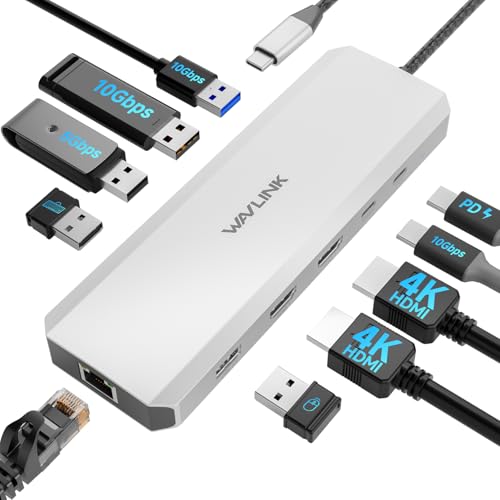
- Dual HDMI with up to 4K output for Windows systems
- Gigabit Ethernet and three 10Gbps USB ports
- Up to 85W laptop charging from 100W input
Best For: Windows dual-monitor desks with fast peripherals
Best Simple Everyday Hub

- Ethernet, HDMI, USB-C data, and two USB data ports
- Supports 4K HDMI at 30Hz
- 65W pass-through charging in an 82g aluminum hub
Best For: Compact home-office and travel connectivity
Best for Triple Displays

- HDMI, dual DisplayPort, Gigabit Ethernet, and card readers
- Supports one 4K display or three 1080p displays at 60Hz
- Up to 85W laptop charging with broad device compatibility
Best For: Multi-monitor Windows workstations and presentation setups
Best Compact Ethernet Hub
UGREEN Revodok 6-in-1 USB-C Hub

- 1000Mbps Gigabit Ethernet
- 4K HDMI at 30Hz
- Three 5Gbps USB-A ports
Best For: Portable USB-C laptop setups needing wired networking and essential expansion
Best Dual-Monitor Ethernet Dock
MOKiN 13-in-1 USB-C Docking Station

- Dual 4K at 60Hz support
- 1000Mbps RJ45 Ethernet
- 13 ports with 100W charging
Best For: Desk-based dual-monitor workstations with many connected devices
Best All-Around Ethernet Hub
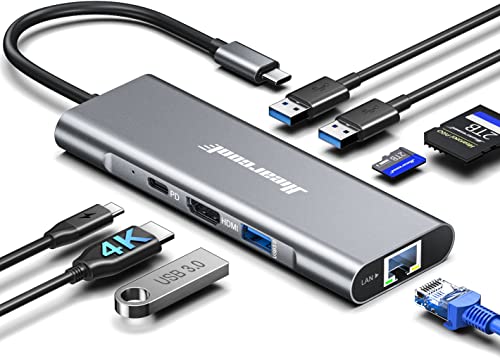
- 4K HDMI at 60Hz
- 1Gbps Ethernet
- SD, TF, and three USB-A ports
Best For: Remote work, travel, and creator setups needing versatile everyday connectivity
Compact Dual-Display Pick
Anker 8-in-1 USB-C Docking Station

- 1Gbps Ethernet plus dual HDMI
- Up to 85W pass-through charging
- SD and microSD card readers
Best For: Compact dual-monitor USB-C setups
High-Resolution Connectivity Pick

- Dual 4K@60Hz or single 8K@30Hz HDMI
- 1Gbps Ethernet and SD/TF readers
- Up to 85W laptop pass-through charging
Best For: High-resolution multi-display workstations
Maximum-Port Expansion Pick
LIONWEI 13-in-1 Docking Station

- Dual HDMI plus DisplayPort output
- Gigabit Ethernet and 10Gbps USB
- Triple-display support on Windows
Best For: Windows multi-monitor workstations with many peripherals
Best Compact Value – 8-in-1 USB-C Hub with Ethernet
If you need a compact docking station with ethernet port for everyday laptop expansion, this 8-in-1 USB-C hub combines wired networking, display output, charging, and card reading in one lightweight adapter. Its RJ45 port supports speeds up to 100Mbps, while HDMI supports 4K output at 30Hz.
Best For: MacBook, Dell, HP, Lenovo, iPad, and other USB-C users who need basic desktop connectivity, card readers, and wired internet.
Pros:
- Eight ports include RJ45 Ethernet, 4K HDMI, USB-A, USB-C, SD, and TF card connectivity.
- Supports up to 100W PD charging for compatible USB-C devices.
- Lightweight aluminum design with plug-and-play operation.
- USB 3.0 supports data transfer speeds up to 5Gbps.
Cons:
- Ethernet is limited to speeds up to 100Mbps rather than Gigabit Ethernet.
- HDMI output is limited to 4K at 30Hz.
- The USB-C PD port is for charging only, not data transfer.
This is a practical, travel-friendly choice when you want several commonly used ports without a full-size dock. Confirm that your USB-C device supports DisplayPort Alt Mode if you plan to use HDMI.
Best for Windows Dual Displays – 10-in-1 Gigabit Dock
This Windows-focused docking station with ethernet port is designed for a more capable desk setup. It includes Gigabit Ethernet, dual HDMI outputs, three 10Gbps USB ports, and power delivery for connecting displays, peripherals, and wired networking through one USB-C connection.
Best For: Windows users with Dell, HP, or Lenovo laptops who need dual-monitor support, fast USB transfers, and Gigabit Ethernet.
Pros:
- Provides Gigabit Ethernet for fast wired network connectivity.
- Dual HDMI supports 4K at 60Hz plus 4K at 30Hz for Windows systems.
- Includes two 10Gbps USB-A ports and one 10Gbps USB-C port.
- Supports up to 100W input and 85W laptop charging.
Cons:
- Not compatible with Mac OS computers.
- Charger is not included.
- Maximum laptop charging is 85W, and the host must support charging and video output.
For a Windows workstation, this dock offers a strong combination of display expansion, high-speed USB, and wired networking. Check your laptop’s DP 1.4 and DSC support before expecting the stated display resolutions.
Best Simple Everyday Hub – Anker 6-in-1 Ethernet Adapter
The Anker 6-in-1 USB-C hub is a straightforward docking station with ethernet port for adding wired networking and essential peripherals to a laptop or tablet. It offers Ethernet, HDMI, USB-C data, two USB data ports, and pass-through charging in a compact aluminum enclosure.
Best For: Home offices and mobile users who want a dependable hub for Ethernet, one external display, USB accessories, and laptop charging.
Pros:
- Combines Ethernet, HDMI, USB-C data, and two USB data ports.
- HDMI supports external displays up to 4K at 30Hz.
- Pass-through charging supports a 65W wall charger.
- Includes an 18-month warranty and weighs 82 grams.
Cons:
- It has fewer ports than larger 8-in-1 or 10-in-1 docks.
- Display output is limited to one HDMI connection at up to 4K 30Hz.
- The supplied notes do not specify the Ethernet speed.
This hub makes sense if you prefer a small, uncomplicated accessory instead of a full desktop dock. It covers the core connections for a typical home-office setup while remaining compatible with laptops and tablets across several operating systems.
Best for Triple Displays – 12-in-1 USB-C Dock
For a multi-monitor workstation, this 12-in-1 docking station with ethernet port adds Gigabit Ethernet alongside HDMI, dual DisplayPort, USB ports, card readers, audio, and laptop charging. On compatible Windows systems, it can support a single 4K display or three 1080p displays at 60Hz.
Best For: Windows professionals, programmers, analysts, and presenters who need multiple displays plus wired networking and broad peripheral support.
Pros:
- Includes HDMI, dual DisplayPort, Gigabit Ethernet, SD/TF readers, audio, and USB ports.
- Supports one 4K display at 60Hz or three 1080p displays at 60Hz under DP 1.4.
- Provides up to 85W laptop charging from 100W PD input.
- Broad compatibility includes Windows, macOS, Chrome OS, Linux, iPadOS, and Android devices with OTG.
Cons:
- Charger and charging cable are not included.
- The host USB-C port must support video output and charging.
- On Mac OS-based computers, the three extended displays can only be the same.
This dock is the most connection-rich option in the group and is well suited to a permanent workstation. Its display capabilities depend heavily on the host device, so verify USB-C, DP 1.4, and charging support before buying.
Best Compact Ethernet Hub – UGREEN Revodok 6-in-1 USB-C Hub
If you need a compact docking station with ethernet port, the UGREEN Revodok combines wired networking, display output, charging, and USB expansion in a portable six-port design. Its Gigabit Ethernet connection supports up to 1000Mbps, while HDMI provides 4K output at 30Hz.
Best For: Laptop users who want a lightweight USB-C hub for reliable wired internet, basic 4K display expansion, and everyday peripherals.
Pros:
- Gigabit Ethernet supports up to 1000Mbps for a stable wired connection.
- 4K HDMI output at 30Hz works for meetings, presentations, and media.
- Includes three USB-A 3.0 ports with data speeds up to 5Gbps.
- Supports up to 85W pass-through charging from its 100W PD input.
Cons:
- HDMI output is limited to 30Hz at 4K.
- The USB-C port is for charging only and does not support data or video.
- HDR and 3D are not supported.
This is a practical choice when portability matters more than a large port selection. It covers the core needs of a USB-C laptop workstation, though users seeking dual-monitor support or faster display refresh rates should consider a larger dock.
Best Dual-Monitor Ethernet Dock – MOKiN 13-in-1 USB-C Docking Station
The MOKiN 13-in-1 is a docking station with ethernet port designed for a more complete desk setup. It pairs two HDMI outputs with a 1000Mbps RJ45 connection, multiple USB ports, and USB-C charging, making it suitable for laptops that need several displays and peripherals from one connection.
Best For: Home-office and productivity users who want dual 4K monitors, wired networking, extensive USB expansion, and laptop charging.
Pros:
- Supports dual 4K displays at 60Hz with a compatible laptop using DisplayPort 1.4.
- 13-in-1 design includes two HDMI ports, four USB-C 3.0 ports, four USB-A ports, Ethernet, and USB-C charging.
- 1000Mbps RJ45 Ethernet supports stable video calls, downloads, and online gaming.
- Dedicated screen-lock button can quickly turn off connected displays.
Cons:
- Dual-display performance depends on a compatible full-function USB-C or Thunderbolt laptop and DisplayPort 1.4 support.
- Its larger port selection may be more than needed for simple travel setups.
- The supplied notes do not specify an included power adapter.
For a stationary workstation, this dock offers the broadest expansion of the three options. Confirm your laptop’s USB-C video capabilities before buying, especially if dual 4K at 60Hz is a priority.
Best All-Around Ethernet Hub – Hiearcool 8-in-1 USB-C Dock
The Hiearcool 8-in-1 is a versatile docking station with ethernet port for laptops, tablets, and compatible USB-C devices. It offers 4K HDMI at 60Hz, 1Gbps wired networking, three USB-A 3.0 ports, and SD and microSD readers in a compact aluminum enclosure.
Best For: Remote workers, travelers, and creators who need wired internet, a high-refresh 4K display, USB accessories, and convenient memory-card access.
Pros:
- 4K HDMI output at 60Hz is well suited to work, presentations, and streaming.
- 1Gbps Ethernet provides a stable alternative to wireless networking.
- Three USB-A 3.0 ports support peripherals and data transfers up to 5Gbps.
- Built-in SD and TF card slots simplify photo and video transfers.
Cons:
- It provides one HDMI output rather than dual-monitor connectivity.
- The supplied notes do not specify the maximum charging wattage delivered to the host device beyond 100W PD pass-through support.
- Compatibility depends on a device having a full-function USB-C port.
This hub strikes a useful balance between portability and functionality. It is a stronger fit than a basic adapter for users who regularly handle memory cards or want smoother 4K display output, while still keeping the setup compact.
Compact Dual-Display Pick – Anker 8-in-1 USB-C Docking Station
If you need a docking station with ethernet port for a USB-C laptop, Anker’s 8-in-1 hub combines wired networking with dual HDMI, USB data ports, charging pass-through, and SD/microSD readers. It supports one 4K display at 60Hz or two displays at 4K@30Hz, making it a practical choice for a compact desk setup.
Best For: USB-C laptop users who want dual-monitor support, 1Gbps Ethernet, and card-reading ports in a small hub.
Pros:
- Includes a 1Gbps Ethernet port, two HDMI ports, and SD/microSD card readers.
- Supports up to 85W USB-C Power Delivery pass-through with a suitable 100W charger and cable.
- Works with USB-C, USB4, and Thunderbolt connections on compatible Windows and ChromeOS systems.
Cons:
- MacOS mirrors the same content on both external monitors.
- Linux is not supported.
- Charger and USB-C cable are not included.
Anker’s hub is a well-rounded option when desk space and portability matter. Check your laptop’s DP Alt Mode and Power Delivery support before buying, especially if you plan to use two monitors.
High-Resolution Connectivity Pick – UGREEN 10-in-1 USB-C Dock
UGREEN’s 10-in-1 dock is a strong docking station with ethernet port for users who want wired networking alongside high-resolution display support. Its RJ45 port, dual HDMI outputs, USB ports, card readers, and USB-C Power Delivery make it suitable for expanding a compatible laptop at one connection.
Best For: Laptop users seeking dual 4K@60Hz displays, fast USB transfers, 1Gbps Ethernet, and pass-through charging.
Pros:
- Supports two displays up to 4K@60Hz or one display up to 8K@30Hz through HDMI.
- Provides 1Gbps Ethernet, SD/microSD readers, and USB-C and USB-A ports with up to 5Gbps data transfer.
- Accepts up to 100W input for up to 85W laptop pass-through charging.
Cons:
- MacBook external displays show the same content because of macOS limitations.
- The USB-C PD port is for charging only, not data or video.
- USB-A and USB-C data ports do not provide charging or video output.
This dock offers broad connectivity without sacrificing high-resolution HDMI options. Confirm that your laptop supports the required USB-C video features, and remember to allow 15W for the dock’s own operation when calculating charging capacity.
Maximum-Port Expansion Pick – LIONWEI 13-in-1 Docking Station
For a feature-rich docking station with ethernet port, the LIONWEI 13-in-1 model adds dual HDMI, DisplayPort, multiple USB-C and USB-A connections, audio, and 100W Power Delivery support. It can drive a triple-display setup on supported Windows systems, while Mac users can extend to one external monitor.
Best For: Windows users who need extensive peripheral connectivity, triple-display capability, Gigabit Ethernet, and fast USB transfers.
Pros:
- Offers dual HDMI, DisplayPort, Gigabit Ethernet, audio/mic, and eight USB ports.
- Supports up to 4K@60Hz through HDMI and DisplayPort with a DP 1.4 source.
- Provides 10Gbps data transfer on compatible USB-C 3.1 connections and up to 87W laptop charging from 100W input.
Cons:
- Triple-display MST and SST support is limited to Windows systems.
- MacOS can extend to only one monitor.
- The dock uses 13W, leaving up to 87W for laptop charging.
LIONWEI’s dock is aimed at users who want to replace several adapters with one broad expansion hub. It is particularly compelling for Windows-based multi-monitor desks, but Mac users should plan around the single-extended-monitor limitation.
How We Picked the Best Docking Station with Ethernet Port
We focused on the features that matter most in daily use: Ethernet speed, USB-C compatibility, display outputs, charging support, port variety, and overall flexibility. The lineup includes compact 6-in-1 and 8-in-1 hubs as well as larger docks designed for dual- or triple-monitor workstations.
Because laptop compatibility varies, we also considered whether a dock is better suited to travel, home-office use, or a permanent desk setup. Display capabilities can depend on the computer’s USB-C port, operating system, graphics hardware, and whether the dock uses DisplayLink, so buyers should verify those requirements before ordering.
Quick Comparison
| Best For | Look For |
|---|---|
| Travel and minimal setups | Compact hub, Gigabit Ethernet, HDMI, and pass-through charging |
| Home-office productivity | Multiple display outputs, USB 3.0 ports, and strong power delivery |
| Triple-monitor workspaces | Three video outputs and confirmed operating-system support |
| Creative file transfers | SD or TF card readers plus fast USB data ports |
| Single-cable desk setups | High-wattage USB-C PD and a broad selection of downstream ports |
Key Buying Factors for a Docking Station with Ethernet Port
Ethernet Speed and Reliability
Gigabit Ethernet is the practical target for fast downloads, video calls, large file transfers, and stable remote work. A wired connection is especially useful when Wi-Fi is congested or unreliable.
Display Compatibility
Check the number and type of outputs—HDMI, DisplayPort, or both—as well as supported resolution and refresh rate. A 4K label does not automatically mean every laptop can drive multiple 4K displays.
Power Delivery
Pass-through charging helps reduce cable clutter. Match the dock’s advertised wattage with your laptop’s charger requirements, remembering that the dock itself uses some of the available power.
Ports and Portability
USB-A remains useful for older peripherals, while USB-C data ports support newer accessories. SD and TF readers are valuable for photographers and content creators. Compact hubs travel easily; larger docks generally offer better desk connectivity.
Who Should Buy Which Docking Station with Ethernet Port?
Choose a compact USB-C hub if you mainly need wired networking, one external display, charging, and a few accessories while traveling. Anker, UGREEN, and Hiearcool options are well suited to streamlined everyday setups.
For a home office with two monitors, prioritize a dock with dual HDMI or a combination of HDMI and DisplayPort, along with adequate power delivery. The WAVLINK, MOKiN, Anker, and UGREEN multi-display models are aimed at this use case.
If you need three monitors, start with a triple-display dock and confirm compatibility with your laptop and operating system before buying. For a permanent workstation, favor more ports and higher charging capacity; for occasional use, a smaller adapter may provide better value and easier storage.