A well-designed keyboard tray can clear valuable desk space while placing your keyboard and mouse at a more comfortable height. The best models add useful adjustability, stable mounting, and enough room for everyday accessories.
We compared 10 keyboard trays with mouse platforms across mounting styles, dimensions, adjustability, materials, and ergonomic features to help you find the right fit for your desk and work habits.
Best 10 Keyboard Trays with Mouse Platforms Picks for 2026
Best Clamp-On Option
BONTEC Pull-Out Keyboard and Mouse Platform

- No-drill C-clamp installation
- Large 25.6-by-11.8-inch platform
- Supports up to 11 pounds
Best For: Clamp-on home-office and gaming setups
Best Adjustable Drawer
Fellowes Office Suites Keyboard Drawer

- Three height-adjustment choices
- Mouse tray tucks into the platform
- Fits keyboards up to 20 inches wide
Best For: Standard keyboards and organized office desks
Best Ergonomic Adjustability
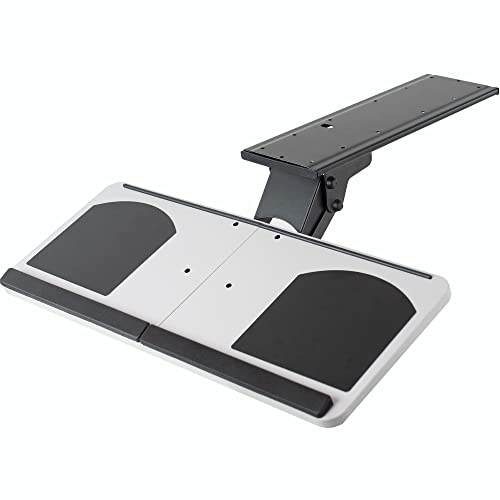
- 5 inches of height adjustment
- Tilts and swivels 360 degrees
- Includes removable plush padding
Best For: Adjustable typing posture and standard peripherals
Best Left- or Right-Handed Setup

- Mouse platform mounts on either side
- Ball-bearing slides extend up to 10 inches
- Includes wrist rest and lifetime warranty
Best For: Wood or MDF desks with flexible mouse placement
Best Adjustable Clamp-On Pick
VIVO MOUNT-KBST1 Adjustable Keyboard Tray

- Five height positions with 2.4 inches of adjustment
- C-clamp installation avoids drilling
- Includes keyboard and mouse wrist-support accessories
Best For: Non-permanent desk setups needing flexible positioning
Best Rotating Mouse Platform
Ciao Stilista Steel Sliding Keyboard Tray

- Steel tray with a 360-degree swiveling mouse platform
- Mouse surface conceals beneath the keyboard tray
- Quiet 14-inch galvanized slide rails
Best For: Users wanting a sturdy sliding tray with a stowable mouse surface
Best Premium Adjustable Option
VIVO MOUNT-KB27P-B Keyboard Tray

- 6.3 inches of height adjustment
- Full side-to-side rotation for positioning
- Large surface fits standard keyboards and mice
Best For: Workstations needing a spacious, highly adjustable tray
Most Adjustable

- 5.8-inch height adjustment with 360-degree swivel
- 43-degree vertical tilt and front-to-back movement
- Includes wrist rest and mouse pad
Best For: Highly adjustable office, gaming, and home workstations
Largest Platform

- 26.77-by-11.81-inch large surface
- Under-desk design frees desktop space
- Built-in wrist rest and easy-clean surface
Best For: Home offices prioritizing surface area and simple installation
Best Warranty Coverage

- Lift-adjustable height and adjustable tilt
- 360-degree swivel with under-desk storage
- Gel wrist rest and reversible precise mouse pad
Best For: Sturdy, warranty-conscious workstation setups
Best Clamp-On Option – BONTEC Pull-Out Keyboard and Mouse Platform
The BONTEC is a spacious choice among keyboard trays with mouse platforms, using no-drill C-clamps to move your keyboard and mouse below the desktop. Its 25.6-by-11.8-inch platform supports up to 11 pounds, but careful desk measurements are essential.
Best For: Home offices, gaming stations, and users who want a clamp-on installation without drilling.
Pros:
- No-drill installation for desktops up to 1.97 inches thick
- Large platform accommodates standard keyboards and mice
- Protective clamp pads help reduce scratches and improve grip
- Pulls out for use and slides beneath the desk afterward
Cons:
- Not suitable for curved, beveled, rounded, or obstructed desk edges
- Requires at least 31.3 inches of width and 11.8 inches of underside depth
- Vertical, oversized, or split ergonomic keyboards may require clearance checks
Choose the BONTEC when a broad surface and reversible clamp mounting matter most. Verify the underside dimensions and clearance before ordering.
Best Adjustable Drawer – Fellowes Office Suites Keyboard Drawer
The Fellowes Office Suites is a compact keyboard tray with mouse platforms that installs under the desk and offers three height settings. Its integrated mouse tray tucks into the keyboard platform, helping clear desktop space while keeping mouse movement within reach.
Best For: Standard keyboards and desks with enough unobstructed underside space for screw mounting.
Pros:
- Three mounting-bracket height choices for positioning flexibility
- Accommodates keyboards up to 20 inches wide and 7 5/8 inches deep
- Mouse tray extends to provide a 7.25-by-7.5-inch surface
- Mouse tray stores within the keyboard platform when not needed
Cons:
- Requires screw installation with Philips rounded-head screws
- Needs 23.5 inches of width and 14.5 inches of underside depth
- Installation area must be free of crossbars and other obstructions
The Fellowes stands out for users who value adjustable mounting height and a neatly stowed mouse surface. Confirm the required underside depth and prepare for a permanent screw-mounted installation.
Best Ergonomic Adjustability – VIVO Adjustable Keyboard Tray
The VIVO combines a 25-by-10-inch tray with several ergonomic adjustments, making it a flexible option among keyboard trays with mouse platforms. The platform tilts, swivels 360 degrees, adjusts through 5 inches of height, and slides on an 18-inch track.
Best For: Users prioritizing adjustable typing posture and compatibility with most standard keyboards and mice.
Pros:
- 5 inches of height adjustment for customized positioning
- Tilting mechanism and 360-degree swivel support flexible posture
- Removable plush padding adds wrist support
- Includes mounting hardware and a limited three-year warranty
Cons:
- The 18-inch slide track requires underside clearance
- At 13 pounds, the tray is relatively substantial
- Its 25-by-10-inch surface may be limiting for oversized setups
The VIVO is a strong fit when adjustability is more important than a large work surface. Measure for the full 18-inch track before installation.
Best Left- or Right-Handed Setup – Mount-It! Keyboard Drawer
The Mount-It! keyboard drawer is a screw-mounted option among keyboard trays with mouse platforms, featuring ball-bearing slides, a wrist rest, and a mouse platform that can mount on either side. Three height settings help tailor the platform to the desk.
Best For: Wood or MDF desks, including home-office, classroom, and gaming setups that need flexible mouse placement.
Pros:
- Mouse platform mounts on either the left or right side
- Ball-bearing tracks extend the tray up to 10 inches smoothly
- Integrated wrist rest and keyboard locking clamp add support
- Includes mounting hardware, instructions, and a lifetime warranty
Cons:
- Designed for wood or MDF desktops, not glass or metal
- Requires bolted screw installation rather than clamp mounting
- Height adjustment is limited to three settings within a 1.25-inch range
Pick the Mount-It! when handedness, secure screw mounting, and smooth ball-bearing movement are priorities. Its desktop-material restriction makes compatibility checking especially important.
Best Adjustable Clamp-On Pick – VIVO MOUNT-KBST1 Adjustable Keyboard Tray
For shoppers comparing keyboard trays with mouse platforms, the VIVO MOUNT-KBST1 stands out as a clamp-on option with adjustable height and width. Its split tray includes room for a keyboard and mouse, along with wrist-support accessories, while keeping the setup below the desktop.
Best For: Users who want a non-permanent clamp-on tray with flexible positioning and included wrist rests.
Pros:
- Height adjusts through five positions across 2.4 inches.
- Sturdy C-clamps fit desks up to 3.4 inches thick without drilling.
- Includes a keyboard wrist pad, mouse pad, and mouse wrist rest.
- Holds up to 11 pounds and extends up to 8.5 inches from the desk edge.
Cons:
- Not compatible with desktops that have beveled edges.
- The tray width and depth depend on the selected adjustment settings.
This is a practical choice when you want an adjustable keyboard and mouse surface without permanently attaching hardware to the desk. Check the desk-edge shape and available thickness before ordering.
Best Rotating Mouse Platform – Ciao Stilista Steel Sliding Keyboard Tray
This Ciao Stilista model combines a solid-steel keyboard shelf with a 360-degree rotating mouse platform, making it a focused option among keyboard trays with mouse platforms. The mouse surface tucks beneath the tray when it is not needed, and the drawer-style rails provide smooth under-desk operation.
Best For: Buyers who prioritize a concealed, swiveling mouse platform and a sturdy metal tray.
Pros:
- Made from a 1 mm thick steel plate for a stable, durable surface.
- 360-degree mouse platform rotates out for use and conceals under the tray.
- Three preset height settings provide up to 1.4 inches of adjustment.
- 14-inch galvanized slide tracks are designed for smooth, quiet movement.
Cons:
- Installation requires screws and a drill for pilot holes.
- Not compatible with glass, marble, or desks with drawers.
- Height adjustment is limited to three preset positions.
The rotating platform gives this tray a space-conscious design, especially for users who want the mouse area out of sight between tasks. Confirm that the desk material and underside layout support screw-mounted installation.
Best Premium Adjustable Option – VIVO MOUNT-KB27P-B Keyboard Tray
The VIVO MOUNT-KB27P-B is a premium under-desk choice for keyboard trays with mouse platforms, offering a broad 26.8-by-11.2-inch surface for a standard keyboard and mouse. Its full side-to-side rotation and substantial height range make it useful when you need more control over typing position.
Best For: Users who want a spacious under-desk keyboard-and-mouse tray with extensive height adjustment.
Pros:
- Provides 6.3 inches of height adjustment for customized positioning.
- Allows full side-to-side rotation for flexible alignment.
- Fits standard desks and corner desks.
- Includes plush foam padding for added typing comfort.
Cons:
- The total tray weight is 12 pounds, so the desk must support the mounted load.
- Requires a minimum recommended desktop thickness of 0.7 inches.
- Its 27-inch format may require more clearance beneath the desk.
This model is suited to workstations where adjustability and a larger surface matter more than a compact installation. Measure the underside clearance and verify the desk can support the tray before mounting it.
Most Adjustable – Full-Motion Keyboard Tray
Among keyboard trays with mouse platforms, the EUREKA ERGONOMIC model stands out for users who want extensive positioning control. Its 25-by-9.13-inch platform supports a keyboard and mouse, while height, swivel, tilt, and front-to-back adjustments help tailor the setup to your chair and desk.
Best For: Users seeking highly adjustable keyboard and mouse positioning for office work, gaming, or home setups.
Pros:
- Adjusts 5.8 inches in height, swivels 360 degrees, and tilts 43 degrees vertically.
- Includes a wrist rest and mouse pad for added support and tracking.
- Can help free desktop space and also accommodates some small laptops, iPads, or electronics.
- Supports up to 6.6 pounds and works with compatible desks that are at least 0.71 inches thick.
Cons:
- Requires substantial clearance and a desk meeting the specified size and thickness requirements.
- Not compatible with plastic, stone, or glass desktops according to the supplied specifications.
- Its 6.6-pound capacity may limit heavier equipment.
This is the most feature-rich option here for fine-tuning posture and mouse placement, provided your desk meets the installation requirements.
Largest Platform – Clamp-On Keyboard Tray
This TECLUK model is a straightforward choice among keyboard trays with mouse platforms, offering a roomy 26.77-by-11.81-inch surface. Its under-desk drawer design helps clear desktop space, while the clamp-on mounting approach is intended to simplify installation for a home office.
Best For: Home-office users who want a large, space-saving tray with a simple clamp-on installation design.
Pros:
- Large platform provides room for a keyboard and mouse.
- Under-desk design helps keep the desktop organized and open.
- Built-in wrist rest supports a more comfortable typing position.
- Surface is designed to resist dirt and be easy to clean.
Cons:
- The supplied notes do not specify height, tilt, or swivel adjustments.
- The notes do not provide a stated weight capacity or detailed desk-compatibility limits.
- Clamp-on installation may not suit every desk configuration.
Choose this tray if platform size and uncomplicated home-office organization matter more than advanced ergonomic adjustments.
Best Warranty Coverage – 3M Adjustable Keyboard Tray
The 3M AKT90LE combines keyboard and mouse support with practical ergonomic adjustments. Among keyboard trays with mouse platforms, it offers lift-adjustable height, tilt, side-to-side swiveling, and a platform that stores under the desk when not in use.
Best For: Users who want a sturdy, established tray with adjustable positioning, a gel wrist rest, and long warranty coverage.
Pros:
- Height adjusts by lifting the platform, with tilt adjustment for a more comfortable working position.
- 360-degree side-to-side swivel allows flexible positioning and under-desk storage.
- Includes a gel wrist rest and precise mouse pad that can be positioned on either side.
- Warranty coverage includes the keyboard arm, platform, and gel wrist rests.
Cons:
- The 23-inch track and platform dimensions may provide less surface area than the larger TECLUK option.
- Lift-based adjustment may be less convenient than a continuously height-adjustable design.
- The supplied notes do not state a weight capacity.
This 3M tray is a sensible fit for buyers who value sturdy construction, flexible mouse placement, and unusually extensive warranty coverage.
How We Picked the Best Keyboard Trays with Mouse Platforms
We focused on practical features that affect daily comfort and usability: mounting security, tray size, mouse-platform placement, height and tilt adjustment, slide performance, wrist support, and installation requirements. We also considered whether each design suits a fixed workstation, a compact home office, or a shared desk that needs flexible positioning.
Because desks vary widely, there is no single best configuration. Clamp-on models can be easier to install and remove, while under-desk screw-mounted trays typically provide a more permanent setup. Weight capacity, clearance, and the available space beneath your desktop are equally important.
Quick Comparison
| Best For | Look For | Notable Features |
|---|---|---|
| Small desks | Compact dimensions and smooth slides | Pull-out storage with minimal clearance |
| Flexible positioning | Clamp-on or swiveling mounts | Easy adjustment without permanent drilling |
| Ergonomic setups | Height, tilt, and wrist-support options | More precise keyboard positioning |
| Large keyboards and mice | Wider trays and extended platforms | Extra room for full-size equipment |
Key Buying Factors for Keyboard Trays with Mouse Platforms
Mounting Method and Desk Compatibility
Measure the underside of your desk before choosing a tray. Screw-mounted designs need a suitable surface and enough clearance for hardware, whereas C-clamp models require an accessible desk edge and adequate clamp depth. Check for drawers, support rails, cable channels, or crossbars that could interfere with installation.
Tray Size and Mouse Space
Confirm that the tray accommodates your keyboard, especially if you use a full-size or ergonomic model. A separate or rotating mouse platform may save space, but it should still provide enough room for comfortable movement. Pay attention to the total width and how far the platform extends when fully opened.
Adjustment and Ergonomics
Height and tilt adjustment can help keep your wrists straighter and your shoulders relaxed. A wrist rest may improve comfort, but it should not force your hands into an awkward angle. Swivel features are useful when alternating between typing, writing, and other desk tasks.
Stability and Movement
Look for sturdy steel or reinforced construction, reliable slide hardware, and a locking or stable mounting system. A tray that wobbles during typing can be more distracting than helpful. Ball-bearing slides generally provide smoother extension, while swiveling parts should move deliberately rather than loosely.
Who Should Buy Which Keyboard Trays with Mouse Platforms?
- Choose a compact pull-out tray if you want to free desk space without adding a large under-desk assembly.
- Choose a clamp-on model if you rent, change workstations, or prefer installation without drilling.
- Choose an adjustable or swiveling tray if several people use the desk or you frequently change your working position.
- Choose a wide reinforced tray if you use a full-size keyboard, a larger mouse, or an ergonomic keyboard with unusual dimensions.
- Choose a model with wrist support and tilt adjustment if typing comfort and posture are your main priorities.
Before ordering, compare the listed dimensions with your keyboard, desk thickness, legroom, and preferred sitting position. The right tray should slide smoothly, keep both input devices stable, and leave enough clearance for your knees.