The right laptop mount can free up desk space, raise your screen to eye level, and make a laptop-and-monitor setup more comfortable. This roundup compares 10 options for home offices, professional workstations, and in-vehicle use.
We included adjustable desk arms, monitor-and-laptop combinations, universal trays, and a truck-specific mount so you can match the design to your workspace, laptop size, and preferred installation method.
Best 10 Laptop Mounts Picks for 2026
Best 2-in-1 Desk Pick
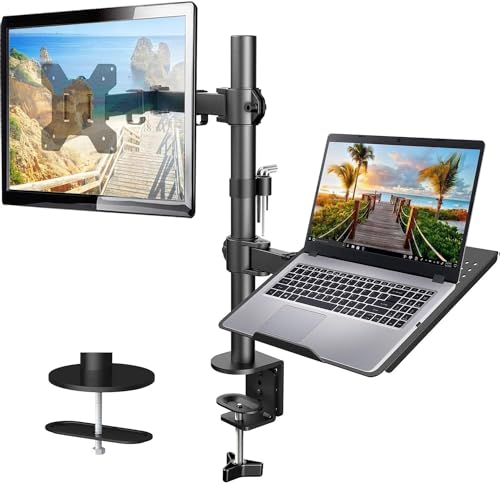
- Ventilated 14 x 12-inch laptop tray
- Supports 13-32-inch VESA monitors
- Articulating arm with cable management
Best For: Dual-device home office workstations
Best Truck-Specific Mount
RAM MOUNTS No-Drill Ford Laptop Mount

- Uses existing passenger-seat bolts
- Fits 10-16-inch-wide laptops
- Dual articulating swing arm
Best For: Compatible Ford truck owners needing a vehicle mount
Best Large-Laptop Desk Mount
VIVO Adjustable Notebook Stand

- Fits laptops up to 17 inches
- Supports up to 22 pounds
- C-clamp or grommet mounting
Best For: Large-laptop desk setups requiring flexible adjustment
Best Universal Tray
RAM MOUNTS Tough-Tray Laptop Holder

- Spring-loaded fit for 10-16-inch laptops
- Adjustable rubber-grip side arms
- Shock- and vibration-dampening ball system
Best For: Custom vehicle or modular mounting setups
Versatile Heavy-Duty Pick
WALI 2-in-1 Laptop and Monitor Mount

- Supports laptops up to 17 inches and monitors up to 34 inches.
- Full-motion arm extends up to 19.3 inches.
- Clamp and grommet bases are included.
Best For: Flexible laptop-or-monitor workstation setups
Cooling-Focused Choice

- 240-hole tray fits laptops up to 17 inches.
- Removable tray converts the mount for 15- to 32-inch monitors.
- Includes cable clips and two installation methods.
Best For: Ventilation-conscious, organized desk setups
Adjustable Value Pick

- Supports laptops up to 17 inches and 22 pounds.
- Offers 16 inches of height adjustment and 360-degree rotation.
- C-clamp fits desks up to 4 inches thick.
Best For: Laptop-first setups needing broad desk compatibility
Best Versatile Pick

- Supports laptops up to 17 inches and monitors up to 34 inches.
- Full-motion arm with tilt, swivel, rotation, and height adjustment.
- Ventilated tray plus clamp and grommet mounting options.
Best For: Flexible laptop-and-monitor workstation setups
Best Heavy-Duty Choice

- Supports laptops up to 17 inches and monitors up to 32 inches.
- Offers up to 19.8 pounds of monitor capacity.
- Wide tilt, swivel, rotation, and height adjustment range.
Best For: Adjustable home-office, gaming, and multitasking setups
Best 2-in-1 Desk Pick – HUANUO Laptop and Monitor Arm
If you want laptop mounts that can also support a separate display, this HUANUO model combines a ventilated laptop tray with a single monitor arm. Its adjustable positioning and cable management make it a practical choice for a cleaner, more flexible desk setup.
Best For: Home offices and workstations that use both a laptop and a VESA monitor.
Pros:
- Supports laptops on a 14 x 12-inch ventilated tray and monitors from 13 to 32 inches.
- Offers tilt, swivel, rotation, and up to 17 inches of height adjustment.
- Includes C-clamp and grommet mounting options for compatible wooden desks.
- Integrated cable management helps keep wires organized.
Cons:
- Mounting hardware is intended for wooden desks only.
- Monitor compatibility depends on VESA size, screen size, and weight limits.
This is one of the more versatile laptop mounts for a dual-device desk, especially when you want to elevate both a notebook and an external monitor. Confirm your desk material and monitor specifications before installation.
Best Truck-Specific Mount – RAM MOUNTS No-Drill Ford Laptop Mount
For drivers seeking laptop mounts for a Ford truck, this RAM MOUNTS system uses existing passenger-seat bolts instead of requiring vehicle drilling. Its dual swing arm and universal tray allow flexible positioning for compatible laptops.
Best For: Owners of specified Ford F-150, F-250, F-350, F-450, F-550, and F-150 Lightning trucks.
Pros:
- No-drill installation uses the existing passenger-seat bolts.
- Dual articulating swing arms allow flexible laptop placement.
- Accommodates laptops from 10 to 16 inches wide and screens up to 17 inches.
- Uses powder-coated steel and marine-grade aluminum construction and includes a lifetime warranty.
Cons:
- Compatibility is limited to specified vehicle applications.
- The listed maximum weight capacity is 2 pounds.
- Passenger-seat mounting may not suit every cabin layout.
This is a specialized solution rather than a general-purpose laptop mount. Verify your truck year and model, laptop dimensions, and weight before choosing it for mobile work.
Best Large-Laptop Desk Mount – VIVO Adjustable Notebook Stand
This VIVO stand is a strong option among laptop mounts for users with larger notebooks. Its ventilated tray fits laptops up to 17 inches, while the articulated arm provides broad adjustment for ergonomic desk positioning.
Best For: Desk users with laptops up to 17 inches who want substantial height and angle adjustment.
Pros:
- Ventilated 14 x 11.8-inch tray supports laptops up to 17 inches and 22 pounds.
- Provides tilt, swivel, and 360-degree rotation adjustments.
- Mounts with either a C-clamp or grommet on suitable surfaces.
- Includes detachable cable clips and hardware for installation.
Cons:
- The mounting options require a surface within the stated thickness limits.
- The tray is designed for laptops and may require separate compatibility checks for monitors.
Choose this model when a large laptop and flexible positioning matter more than a compact footprint. Its 22-pound support rating and broad articulation make it a capable desk-mounted platform.
Best Universal Tray – RAM MOUNTS Tough-Tray Laptop Holder
If you need laptop mounts with adaptable retention, the RAM MOUNTS Tough-Tray uses spring-loaded side arms to fit a range of notebooks. Its adjustable clamps can be repositioned to clear ports and accommodate different laptop thicknesses.
Best For: Users who need a universal laptop tray with adjustable side clamping arms.
Pros:
- Spring-loaded tray accommodates laptops from 10 to 16 inches wide and can fit 17-inch screens.
- Four rubber-grip arms adjust vertically and horizontally for a custom fit.
- Perimeter mounting holes can accommodate GPS units, phones, and other devices.
- RAM’s ball-and-socket system is designed to isolate and dampen shock and vibration.
Cons:
- This listing describes the tray itself, so a separate compatible mounting system may be needed.
- The tray depth is 10 inches, which may not suit every laptop design.
- Port clearance still depends on how the adjustable arms are positioned.
The Tough-Tray is a practical foundation for a modular mounting setup, particularly when laptop sizes and accessory needs vary. Check the tray dimensions and plan for the appropriate RAM mounting hardware.
Versatile Heavy-Duty Pick – WALI 2-in-1 Laptop and Monitor Mount
Among laptop mounts, the WALI GSMP001NLP stands out for supporting either a laptop or a larger monitor. Its detachable tray, full-motion arm, and clamp or grommet installation make it a flexible way to raise your screen and reclaim desk space.
Best For: Users who want one mount for a laptop or monitor, including screens up to 34 inches.
Pros:
- Supports laptops up to 17 inches and monitors from 17 to 34 inches.
- Offers tilt, swivel, rotation, height adjustment, and up to 19.3 inches of extension.
- Includes clamp and grommet mounting options for desks 0.39 to 2.76 inches thick.
- Ventilated tray holes help promote airflow around the laptop.
Cons:
- Its 6.4-pound build may be more than needed for a basic laptop-only setup.
- The monitor capacity varies by use, with up to 26.4 pounds supported for compatible screens and up to 22 pounds for laptops.
This is a strong choice when flexibility and a broad monitor-size range matter. The articulating arm and dual mounting methods make it well suited to an adaptable workstation.
Cooling-Focused Choice – HUANUO Laptop Desk Mount
The HUANUO HNCM16 is one of the more practical laptop mounts for users who prioritize airflow and a tidy desk. Its 240-hole tray, cable clips, and removable design let you use it as either a laptop stand or a monitor arm.
Best For: Laptop users who want extra ventilation, cable management, and an easy switch to monitor use.
Pros:
- Ventilated 13.8-by-11.8-inch tray fits laptops up to 17 inches.
- Removable tray supports monitors from 15 to 32 inches with 75-by-75mm or 100-by-100mm VESA compatibility.
- Provides tilt, swivel, 360-degree rotation, and a 15-inch pole for positioning flexibility.
- Includes cable-management clips and C-clamp or grommet mounting options.
Cons:
- The maximum weight capacity is 22 pounds.
- The mounting thickness ranges differ between the C-clamp and grommet options.
Choose this model if cooling and workspace organization are priorities. Its generous ventilation and included cable-routing clips add useful everyday convenience without limiting it to laptop duty.
Adjustable Value Pick – WALI M00LP Laptop Desk Mount
The WALI M00LP offers a straightforward approach to laptop mounts, pairing a ventilated tray with broad height and positioning adjustments. It supports a laptop or compatible monitor and includes mounting hardware for a range of desk thicknesses.
Best For: Buyers seeking a flexible, laptop-first mount with wide desk compatibility and a 16-inch height adjustment range.
Pros:
- Fits laptops up to 17 inches and supports up to 22 pounds.
- Provides 16 inches of height adjustment, plus tilt, swivel, and 360-degree rotation.
- Includes a C-clamp for desks 0.4 to 4 inches thick and a grommet mount for desks 0.4 to 2.2 inches thick.
- Ventilation holes and a raised tray lip help support laptop placement and airflow.
Cons:
- Its tilt range is limited to plus or minus 15 degrees.
- The tray measures 14 by 11 inches, which may be a consideration for larger laptop footprints.
- Monitor use requires compatible 75-by-75mm or 100-by-100mm mounting holes.
This WALI is a sensible option for a laptop-centered workspace where height adjustment and desk compatibility matter most. It provides useful ergonomic positioning while keeping the setup relatively focused and uncomplicated.
Best Versatile Pick – HUANUO 2-in-1 Laptop Mount
If you want laptop mounts that can adapt as your setup changes, the HUANUO 2-in-1 model supports either a notebook or a VESA-compatible monitor. Its adjustable arm, ventilated tray, and two mounting options make it a flexible choice for a home office or multitasking desk.
Best For: Users who want one mount for a laptop and a monitor, with broad screen-size compatibility.
Pros:
- Supports laptops up to 17 inches or monitors from 13 to 34 inches.
- Offers ±45° tilt, ±90° swivel, 360° rotation, and up to 18.1 inches of arm extension.
- Includes a ventilated tray, anti-slip pads, Velcro straps, and clamp or grommet installation.
Cons:
- The counterbalanced arm may rise when the laptop is removed, so it should be handled slowly.
- Monitor and laptop use require switching between the tray and VESA mounting setup.
The HUANUO stands out for its unusually wide monitor range and flexible adjustment. It is a strong option when desk space is limited and you want the freedom to change between notebook and monitor modes.
Best Cable-Managed Option – UPGRAVITY Laptop Desk Mount
Among laptop mounts for a cleaner desk, the UPGRAVITY model combines a detachable laptop tray with integrated cable clips. It supports notebooks up to 17 inches and monitors up to 32 inches, while its articulated arm allows you to adjust the viewing position.
Best For: Workstations where cable organization and flexible laptop-or-monitor use are priorities.
Pros:
- Holds laptops up to 17 inches or VESA-compatible monitors up to 32 inches.
- Provides 90° tilt, 180° swivel, 360° rotation, and height adjustment along the center pole.
- Detachable cable clips help route power and AV cables along the arm and pole.
- Includes both drill-free C-clamp and grommet mounting options.
Cons:
- Its stated weight capacity is up to 17.6 pounds, lower than some alternatives in this roundup.
- The C-clamp fits desks up to 1.97 inches thick, which may exclude some thicker desktops.
The UPGRAVITY is a practical choice if you want an adjustable mount without leaving cables loose across the desk. Its detachable tray also makes it easy to switch between a notebook and a VESA monitor.
Best Heavy-Duty Choice – MOUNT PRO Laptop Arm Mount
The MOUNT PRO is one of the more capable laptop mounts for users who want a broad adjustment range and a higher stated monitor capacity. Its aluminum arm supports a laptop or VESA monitor, while the ventilated tray and built-in cable guides help keep the workstation functional and tidy.
Best For: Home offices, gaming setups, and multitaskers who want a sturdy 2-in-1 mount with extensive movement.
Pros:
- Supports laptops up to 17 inches and monitors from 13 to 32 inches.
- Holds up to 19.8 pounds for compatible monitor configurations.
- Offers -45° to +90° tilt, 180° swivel, 360° rotation, and height adjustment up to 16.9 inches.
- Ventilated tray, anti-slip pads, Velcro straps, and cable-management guides improve everyday usability.
Cons:
- The tray should not be rotated to a vertical position when carrying a laptop.
- Grommet installation requires a compatible hole diameter, and desk thickness limits vary by mounting method.
With its 19.8-pound maximum monitor capacity and wide movement range, the MOUNT PRO is a compelling pick for demanding desk setups. Choose it if you value adjustability and a secure, ventilated laptop platform.
How We Picked the Best Laptop Mounts
We evaluated these Laptop Mounts by looking at compatibility, mounting style, adjustability, weight support, and the type of workspace each model is designed for. Desk-mounted options were compared for their clamp or base requirements, range of motion, laptop tray dimensions, and monitor compatibility. We also included a vehicle-specific model for drivers who need a secure solution away from a traditional desk.
Because laptop dimensions and mounting hardware vary, confirm the manufacturer’s specifications before buying. Pay particular attention to maximum laptop weight, tray width, monitor size limits, and whether your desk or vehicle supports the proposed installation method.
Quick Comparison
| Best For | What to Look For |
|---|---|
| Dual-screen desk setups | A monitor arm with a dedicated laptop tray and sufficient weight capacity |
| Small or flexible workspaces | A C-clamp mount with compact dimensions and broad adjustment |
| Large laptops | A tray rated for up to 17-inch notebooks and the correct weight limit |
| Truck use | A vehicle-specific, no-drill mount designed for your exact model |
| Universal placement | A sturdy tray with ventilation space and adjustable positioning |
Key Buying Factors for Laptop Mounts
Compatibility and Weight Capacity
Check both screen size and actual laptop weight, including a case or accessories if you plan to use them. A mount rated for a 17-inch notebook may still be unsuitable if the computer exceeds its tray or arm capacity.
Mounting Method
C-clamp mounts attach to the rear edge of many desks and are usually easy to remove. Grommet mounts can provide a cleaner, more permanent installation but require a suitable hole. Vehicle mounts need extra attention to fit, clearance, and stability.
Adjustment Range
Look for height, tilt, swivel, and rotation adjustments that suit your posture and desk layout. Full-motion arms are useful when you alternate between sitting and standing or regularly reposition the laptop.
Tray Design and Airflow
A tray should support the laptop securely without blocking ports or ventilation openings. Raised lips, retaining edges, and a broad platform help prevent movement, while open areas can improve airflow during demanding tasks.
Who Should Buy Which Laptop Mounts?
Choose a monitor arm with a laptop tray if you want a cleaner dual-screen workspace and frequent position changes. A compact C-clamp model is a practical choice for standard desks, dorm rooms, and shared offices. Buyers with larger notebooks should prioritize a tray rated for 17-inch systems and verify the weight limit rather than relying on screen size alone.
For a pickup truck, choose the vehicle-specific RAM MOUNTS option instead of adapting a desk mount. If your priority is maximum flexibility, select a full-motion arm with broad monitor and laptop compatibility. For a simple, stable platform, a universal laptop tray may be the better value.