Working from airports, trains, hotels, and shared offices can expose sensitive emails, documents, and presentations to nearby viewers. A laptop privacy screen narrows the visible viewing angle while helping reduce distracting glare during travel.
This roundup compares 10 popular privacy screens across common 14-inch and 15.6-inch laptop formats. Before buying, confirm your display size, aspect ratio, resolution, bezel design, and preferred mounting method.
Best 10 Laptop Privacy Screens for Business Travel Picks for 2026
Best Magnetic Pick
SightPro 14-Inch 16:10 Privacy Screen

- Magnetic, removable attachment
- Side-view blackout privacy
- Includes webcam cover and storage folder
Best For: Frequent travelers needing quick, reusable installation
Best for Larger Screens
Magicmoon 15.6-Inch 16:9 Privacy Filter

- Built for 15.6-inch 16:9 screens
- Blocks side views beyond 60 degrees
- Slide-on/off or mounted installation
Best For: Travelers with 15.6-inch 16:9 laptops
Best Four-Way Coverage
STARY 14-Inch 16:10 Privacy Screen

- Four-way privacy coverage
- Glossy and matte viewing sides
- Slide-in or adhesive installation
Best For: Professionals needing broader privacy in public spaces
Travel-Ready Eye Comfort
Yamaya 15.6-Inch Privacy Screen
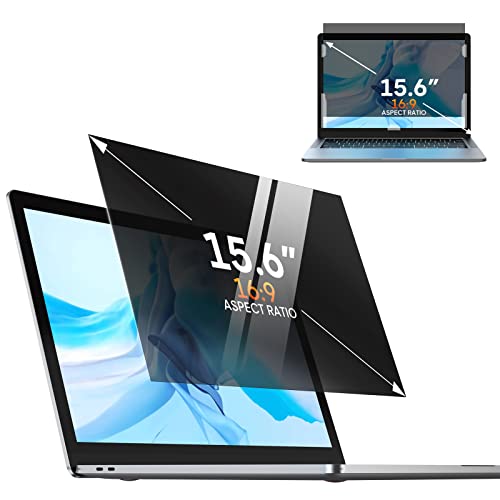
- 30-degree side-angle blackout
- Adhesive or slide-in installation
- Reversible matte/glossy surface
Best For: 15.6-inch 16:9 laptops used while traveling
Business Compliance Pick
SightPro 14-Inch 16:10 Privacy Filter

- Fits 14-inch 16:10 displays
- Two attachment options
- Section 889 and TAA compliant
Best For: Business and regulated-workplace travel
Fast On-and-Off Protection
LUSA Design 14-Inch Magnetic Filter

- Adhesive-free magnetic mounting
- 30-degree side-angle privacy
- Includes storage clip
Best For: Frequent travelers needing quick, removable protection
Best Removable Design
14-Inch Nano-Suction Privacy Screen
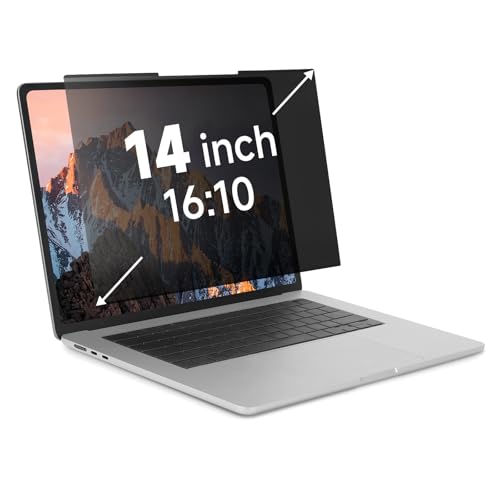
- Quick nano-suction attachment
- Removes easily for screen sharing
- ±30° side-view privacy protection
Best For: 14-inch 16:10 laptop users who need a travel-friendly removable filter
Best Simple Pick
15.6-Inch 16:9 Magnetic Filter

- Fast magnetic attachment and removal
- ±26° side-angle privacy protection
- Washable, reusable, and travel-ready
Best For: Non-touchscreen 15.6-inch 16:9 laptop users who travel frequently
Best Magnetic Pick – SightPro 14-Inch 16:10 Privacy Screen
For business travelers who want laptop privacy screens for business travel without permanent adhesive, the SightPro uses a magnetic attachment that snaps on and removes easily. Its 14.1-inch 16:10 filter is designed for a range of laptop brands, but measure the visible screen before ordering.
Best For: Frequent travelers and mobile workers who need a reusable, easy-to-remove privacy filter.
Pros:
- Magnetic attachment avoids messy adhesive and supports quick removal.
- Blacks out side views while maintaining clear front-facing visibility.
- Includes a webcam cover, storage folder, and cleaning cloth.
- Offers UV and blue-light reduction and is listed as Section 889 and TAA compliant.
Cons:
- Not optimized for touchscreen laptops.
- Does not block visibility from directly behind you.
- Requires careful width and height measurements for fit.
The magnetic design is particularly convenient when moving between an airplane, hotel, and office. Choose it when quick attachment and removal matter more than touchscreen compatibility.
Best Flexible Installation – Protescreen 14-Inch 16:10 Filter
The Protescreen is a practical option among laptop privacy screens for business travel, offering both slide-mount and adhesive installation. Its 14-inch 16:10 filter is sized for many HP, Dell, Lenovo, Acer, Asus, LG, Toshiba, and Samsung laptops, subject to measurement verification.
Best For: Laptop users who want a choice between removable and more permanent installation.
Pros:
- Micro-louver design limits the viewing angle to about 30 degrees on either side.
- Reversible glossy and matte surfaces provide privacy or glare-reduction options.
- Includes adhesive strips, slide-mount tabs, cleaning supplies, and a cloth.
- Designed to reduce blue light, UV light, and reflected glare while helping resist scratches.
Cons:
- The listed adhesive installation guidance also references 16:9 laptops, so confirm compatibility carefully.
- Requires mounting hardware or adhesive strips rather than a magnetic attachment.
- Fit depends on the laptop’s actual visible dimensions, not diagonal size alone.
Its dual installation approach makes this a versatile choice for travelers who sometimes want a removable filter and sometimes prefer a fixed setup. Confirm the aspect ratio and screen measurements before purchase.
Best for Larger Screens – Magicmoon 15.6-Inch 16:9 Privacy Filter
For travelers using a larger 15.6-inch laptop, this Magicmoon filter is one of the laptop privacy screens for business travel built for a 16:9, 1920 x 1080 display. Measure the visible screen area carefully because it is not compatible with 16:10 or touchscreen laptops.
Best For: Users of 15.6-inch, 16:9 laptops who work in airports, airplanes, trains, or open offices.
Pros:
- Designed for 15.6-inch 16:9 displays measuring approximately 344 by 194 mm.
- Blocks side visibility outside its stated 60-degree viewing angle.
- Offers slide-on/off and mounted installation options.
- Glossy and matte surfaces provide different viewing preferences, with some blue-light and scratch protection.
Cons:
- Not compatible with 16:10 displays.
- Not compatible with touchscreen laptops.
- Provides only 30% blue-light reduction according to the supplied notes.
This is a straightforward match for the correct 15.6-inch 16:9 laptop, especially when larger display coverage is the priority. Its strict size requirements make measurement essential before ordering.
Best Four-Way Coverage – STARY 14-Inch 16:10 Privacy Screen
The STARY stands out among laptop privacy screens for business travel with claimed four-way coverage, blocking views from the top, bottom, left, and right. It fits 14-inch 16:10 laptops measuring about 302 by 188 mm, but it is not compatible with MacBook or Surface devices.
Best For: Professionals seeking broader privacy protection in planes, cafés, and open offices.
Pros:
- Designed to block visibility from all directions outside a 30-degree angle.
- Reversible glossy and matte sides offer stronger privacy or reduced glare.
- Supports removable slide-in installation or adhesive attachment.
- Includes accessories and is designed to reduce blue light and UV exposure.
Cons:
- Not compatible with MacBook or Surface laptops.
- Requires exact 14-inch 16:10 dimensions for proper fit.
- Adhesive installation may be less convenient to remove than the slide-in method.
Choose the STARY when privacy from more than just left and right angles is important. Its broad coverage and two installation methods suit high-traffic travel environments, provided your laptop is compatible.
Travel-Ready Eye Comfort – Yamaya 15.6-Inch Privacy Screen
For shoppers comparing laptop privacy screens for business travel, the Yamaya 15.6-inch filter combines side-angle privacy with flexible installation and a reversible viewing surface. Confirm that your laptop uses a 15.6-inch, 16:9 display with a visible area measuring approximately 13.57 by 7.64 inches before ordering.
Best For: 15.6-inch 16:9 laptops used in airports, hotels, coffee shops, and open offices.
Pros:
- Micro-louver design obscures the screen beyond a 30-degree viewing angle.
- Adhesive strips and slide-in tabs support permanent or removable installation.
- Reversible matte/glossy surfaces address glare and color-clarity preferences.
- Claims up to 95% blue-light and 92% UV reduction, plus a thin scratch-resistant design.
Cons:
- Not compatible with MacBook screens.
- Requires careful size and aspect-ratio measurement before purchase.
- Permanent adhesive installation is less convenient for users who frequently remove the filter.
The Yamaya is a practical option for travelers who want removable mounting, glare flexibility, and added eye-comfort features. Its main limitation is the strict 15.6-inch 16:9 fit and stated MacBook incompatibility.
Business Compliance Pick – SightPro 14-Inch 16:10 Privacy Filter
Among laptop privacy screens for business travel, the SightPro stands out for its 14-inch 16:10 format, two attachment methods, and positioning for corporate and regulated workspaces. Measure the display’s visible width and height rather than relying only on the diagonal measurement.
Best For: Business travelers, healthcare workers, commuters, and organizations seeking a 14-inch 16:10 filter.
Pros:
- Designed for a wide range of laptop brands, including Lenovo, HP, Dell, Acer, Asus, and Samsung.
- Clear adhesive strips and slide mount tabs allow fixed or removable use.
- Multi-layered film blacks out side views while remaining clear from the front.
- Includes a microfiber cloth and is described as Section 889 and TAA compliant.
Cons:
- Not optimized for touchscreen laptops.
- Does not block visibility from someone directly behind you.
- Requires exact width and height matching for the 16:10 screen format.
The SightPro is a strong fit for professionals who need a broadly compatible, removable privacy solution and value its stated compliance credentials. It is less suitable for touchscreen users or situations where rear visibility is also a concern.
Fast On-and-Off Protection – LUSA Design 14-Inch Magnetic Filter
LUSA DESIGN Laptop Privacy Screen 14 Inch Magnetic(16:9 Aspect Ratio) Removable
Check Price On AmazonFor travelers who frequently move between private and public workspaces, the LUSA Design magnetic filter offers a quick, adhesive-free way to add privacy. Check that your laptop has a 14-inch 16:9 display with an image area measuring about 12.2 by 6.9 inches.
Best For: Users who want a detachable privacy screen for compatible 14-inch 16:9 laptops.
Pros:
- Magnetic attachment makes installation and removal quick without adhesive residue.
- Includes a storage clip for carrying the filter between locations.
- Designed to black out side views at a 30-degree angle while maintaining front clarity.
- Claims 95% blue-light and 92% UV reduction, with anti-glare and 9H hardness features.
Cons:
- Compatibility depends on the exact displayable image-area measurements.
- Designed for 14-inch 16:9 screens, limiting fit across other formats.
- The supplied notes do not list specific compatible laptop models beyond general brand examples.
The LUSA Design is appealing for business travel because its magnetic mounting and storage clip make repeated removal convenient. Its key buying requirement is precise measurement, since a 14-inch diagonal alone does not guarantee compatibility.
Best Overall Fit – 15.6-Inch 16:9 Privacy Screen
For shoppers comparing laptop privacy screens for business travel, this 15.6-inch 16:9 model is a practical choice when your laptop matches its listed dimensions. Its matte finish, side-angle privacy protection, and electrostatic installation suit work in airports, coffee shops, offices, and other public spaces.
Best For: Travelers using compatible 15.6-inch 16:9 HP, Lenovo, Dell, Acer, ASUS, or Samsung laptops who want privacy plus glare and blue-light reduction.
Pros:
- Limits side-angle visibility starting at ±25° while retaining the direct viewing angle.
- Matte anti-glare surface reduces reflections, fingerprints, and smudges.
- Claims 95% blue-light and 99% UV reduction.
- Electrostatic installation includes cleaning accessories and works with touchscreens.
Cons:
- Not designed for MacBooks.
- Requires a 15.6-inch 16:9 display measuring approximately 13 9/16 by 7 5/8 inches.
- Directly behind the user remains visible, and brightness affects privacy and clarity.
This is a well-rounded option for business travelers who need a larger 15.6-inch filter with viewing comfort features. Confirm the screen ratio and dimensions before ordering, since fit is specific.
Best Removable Design – 14-Inch Nano-Suction Privacy Screen
This 14-inch 16:10 privacy filter stands out among laptop privacy screens for business travel because it attaches with nano-suction and can be removed without extra hardware. The snap-on design is useful when you alternate between private work and sharing your display during travel.
Best For: Users with compatible 14-inch 16:10 laptops who want quick attachment, easy removal, and a compact storage clip for airports, trains, cafés, and other shared spaces.
Pros:
- Nano-suction installation snaps on quickly without additional attachment hardware.
- Removable design makes screen sharing and storage convenient.
- Blocks visibility beyond approximately ±30° from the front viewing angle.
- Matte anti-glare surface provides 50% blue-light and 98% UV blocking, according to the supplied specifications.
Cons:
- Not suitable for MacBooks.
- Requires a 14-inch 16:10 display with a 12-inch by 7.5-inch viewable area.
- Nano-suction strength can decrease when dirty and may need cleaning with water or alcohol.
The removable mounting system is the main advantage for travelers who do not want a permanently attached filter. Check the viewable screen dimensions carefully, and clean the suction strip as needed to maintain adhesion.
Best Simple Pick – 15.6-Inch 16:9 Magnetic Filter
For business travelers who prioritize fast setup, this magnetic 15.6-inch 16:9 filter attaches in about a second and stores in its included folder. It combines side-angle privacy with a washable, reusable design for laptops used on planes, in cafés, libraries, and other public settings.
Best For: Owners of compatible 15.6-inch 16:9 non-touchscreen laptops who want a reusable magnetic filter that is easy to remove and pack.
Pros:
- Magnetic attachment installs and removes quickly without leaving adhesive residue.
- Provides approximately ±26° side-view privacy while maintaining front clarity.
- Matte surface reduces glare and reflection, with stated 98% blue-light and 99% UV blocking.
- Washable and reusable design includes a storage folder for travel.
Cons:
- Not compatible with MacBook or touchscreen laptops.
- Requires a 15.6-inch 16:9 display measuring approximately 13 9/16 by 7 5/8 inches.
- Direct rear viewing is not blocked.
This is a strong fit for travelers who frequently attach and remove a privacy filter. Its magnetic design and storage folder make it convenient to carry, but compatibility must be verified because touchscreen laptops are excluded.
How We Picked the Best Laptop Privacy Screens for Business Travel
We focused on practical features that matter when you work away from a private office: accurate size and aspect-ratio compatibility, side-view privacy, removable installation, glare reduction, and portability. The selection includes magnetic, adhesive, and nano-suction designs, along with options for common 16:10 and 16:9 displays.
Because laptop screens can share the same diagonal measurement but use different proportions, fit is treated as a priority rather than an afterthought. Buyers should verify the laptop’s actual screen dimensions and resolution before ordering.
Quick Comparison
- Best for newer 14-inch laptops: 16:10 models designed for 1920 × 1200 displays.
- Best for traditional 15.6-inch laptops: 16:9 filters, often designed around 1920 × 1080 screens.
- Best for frequent removal: Magnetic or nano-suction models that can be detached without leaving permanent adhesive.
- Best for glare-prone travel: Filters that combine privacy with matte or anti-glare treatment.
- Best for flexible installation: Removable designs with multiple mounting options or a reusable attachment system.
Key Buying Factors for Laptop Privacy Screens for Business Travel
Screen Size, Aspect Ratio, and Resolution
Start with the manufacturer’s stated display size, then confirm whether the panel is 16:10 or 16:9. A 14-inch 16:10 filter is not interchangeable with a 14-inch 16:9 filter, and a mismatched screen can leave edges exposed or interfere with the webcam and bezel.
Privacy Angle and Screen Brightness
Privacy filters work by limiting visibility from the sides, but this can also make the display appear darker. If you regularly work in bright terminals or near windows, prioritize a model with strong anti-glare performance and enough brightness adjustment range.
Attachment and Portability
Magnetic filters are convenient for frequent removal, while nano-suction designs can offer a clean, reusable fit. Adhesive tabs may be secure but are less convenient when switching between private and public workspaces. Check whether the filter stores safely in your laptop bag without bending.
Extra Protection Features
Anti-glare, blue-light filtering, and scratch resistance can improve comfort and durability, but they should not replace accurate sizing. Also check whether the filter affects touchscreens, stylus input, webcam placement, or the ability to close the laptop fully.
Who Should Buy Which Laptop Privacy Screens for Business Travel?
Choose a 14-inch 16:10 model if you use a newer productivity laptop with a taller display, such as a 1920 × 1200 panel. Choose a 15.6-inch 16:9 model for many conventional Windows laptops using 1920 × 1080 screens.
Frequent travelers should favor removable magnetic or nano-suction designs. Users who work outdoors or under harsh lighting should look for anti-glare treatment. Buyers prioritizing a discreet, secure fit should compare attachment points with the laptop’s bezel and check return policies in case the stated compatibility does not match the actual display.