Choosing the right laptop for coding is about more than raw specs. The best laptops for programming need to handle IDEs, browsers, databases, containers, and video calls without slowing down your workflow.
In this roundup, we focused on dependable performance, comfortable displays, solid battery life, and practical features that matter for developers, students, and remote teams.
Best 10 Laptops for Programming Picks for 2026
ThinkPad Powerhouse
Lenovo ThinkPad T14 Gen 6 for Programmers

- Core Ultra 7 with 32GB DDR5 RAM
- 1TB SSD and dual Thunderbolt 4 ports
- Windows 11 Pro, fingerprint reader, backlit keyboard
Best For: Professional programmers who want a portable business laptop
Budget Everyday Pick

- 15.6-inch FHD display with numeric keypad
- Ryzen 5 7520U and 512GB SSD
- Onsite service and adaptive thermals
Best For: Students and casual coders who want a budget-friendly laptop
High-RAM Value Pick
Lenovo V14 with i7 and 40GB RAM
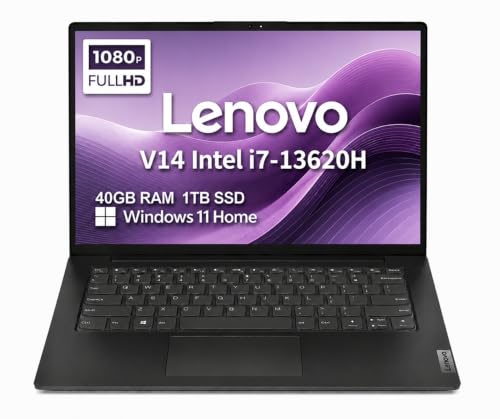
- Intel Core i7-13620H processor
- 40GB RAM and 1TB NVMe SSD
- Lightweight 14-inch design with Wi-Fi 6
Best For: Coders who multitask heavily and want extra memory headroom
AI Productivity Choice

- Ryzen 7 7730U with 16GB RAM
- 512GB PCIe Gen4 SSD and Wi-Fi 6
- Copilot key plus 15.6-inch IPS display
Best For: Students and everyday developers who want a balanced AI-ready laptop
Budget Student Business Pick
HP 14" Win 11 Pro Productivity Laptop

- Quad-core Intel N150 for light multitasking
- Windows 11 Pro and Office bundle included
- 128GB UFS plus 500GB external storage
Best For: Students and basic programming tasks
Power-First Office Pick
HP 255 G10 15.6" Ryzen 7, 32GB/1TB

- 32GB RAM handles heavy multitasking well
- 1TB SSD offers fast storage for projects
- Ryzen 7 7730U brings 8 cores and 16 threads
Best For: Developers who need strong multitasking and lots of storage
Balanced Budget Choice
Lenovo V15 Gen 4 Ryzen 5, 8GB/512GB

- Ryzen 5 7430U suits everyday productivity
- 15.6-inch FHD IPS panel is anti-glare and 300 nits
- USB-C, HDMI, and ethernet improve connectivity
Best For: Students and entry-level coders on a budget
Value Pro Workhorse
Lenovo V15 Ryzen 5, 16GB/512GB Pro

- 16GB RAM is a better coding baseline
- Ryzen 5 5500U has 6 cores and 12 threads
- HDMI and RJ45 support wired setups
Best For: Developers who want a practical midrange work laptop
ThinkPad Powerhouse – Lenovo ThinkPad T14 Gen 6 for Programmers
For laptops for programming, the Lenovo ThinkPad T14 Gen 6 is built for developers who want a fast, secure, and travel-friendly machine. Its Intel Core Ultra 7 processor, 32GB of DDR5 RAM, and 1TB SSD give you plenty of headroom for IDEs, containers, browser tabs, and multitasking.
Best For: Professional programmers, remote developers, and anyone who needs a compact business laptop with strong multitasking and docking support.
Pros:
- 32GB DDR5 RAM and 1TB NVMe SSD support heavy coding workloads and fast project loads.
- Two Thunderbolt 4 ports plus HDMI make it easy to connect monitors and peripherals.
- 14-inch FHD+ anti-glare display and backlit keyboard suit long work sessions.
- Fingerprint reader, privacy shutter, and Windows 11 Pro add business-friendly security.
Cons:
- 14-inch screen may feel small if you prefer a larger built-in display.
- Integrated graphics are fine for coding, but not aimed at demanding GPU work.
- Premium business hardware may be more than casual users need.
The T14 Gen 6 stands out as the most balanced option here for serious programming work, especially if you value portability, pro features, and external monitor expansion.
Budget Everyday Pick – Dell 15 Ryzen 5 Work Laptop
If you want laptops for programming on a tighter budget, the Dell 15 is a straightforward everyday machine for lighter development tasks. The Ryzen 5 7520U, 512GB SSD, and roomy 15.6-inch display make it practical for coursework, web-based tools, and general coding sessions.
Best For: Students and casual developers who want an affordable 15.6-inch laptop for basic programming and everyday use.
Pros:
- 15.6-inch FHD display gives you more room for code and documents.
- Numeric keypad and calculator hotkey are useful for productivity work.
- Adaptive thermals help it stay comfortable on a desk or lap.
- Onsite service adds convenient support if something goes wrong.
Cons:
- Ryzen 5 7520U is better for everyday computing than demanding development workloads.
- Windows 11 Home lacks the business-focused features of Pro.
- Wi-Fi 5 is older than the Wi-Fi 6E found on higher-end options.
This Dell is the most value-oriented choice in the group, but it fits best when your programming needs are light to moderate rather than intensive.
High-RAM Value Pick – Lenovo V14 with i7 and 40GB RAM
Among laptops for programming, this Lenovo V14 stands out for sheer memory capacity and strong general performance. With an Intel Core i7-13620H, 40GB of RAM, and a 1TB SSD, it is well suited to running multiple apps, large projects, and browser-heavy workflows without feeling cramped.
Best For: Programmers, students, and remote workers who want a compact laptop with unusually high RAM for multitasking.
Pros:
- 40GB RAM is excellent for multitasking, VMs, and large development environments.
- Intel Core i7-13620H offers strong speed for productivity and coding tasks.
- 14-inch anti-glare display and 3.15 lb design make it easy to carry.
- USB-C, HDMI, Ethernet, and Wi-Fi 6 provide flexible connectivity.
Cons:
- Intel UHD graphics are integrated, so it is not meant for graphics-heavy work.
- Windows 11 Home is less enterprise-focused than Pro.
- 14-inch screen may be tight for users who prefer more vertical workspace.
This V14 is a strong pick if you care more about RAM and responsiveness than premium extras, making it a smart option for coding-heavy multitasking.
AI Productivity Choice – Acer Aspire Go 15 for Coding
For laptops for programming that also lean into AI features, the Acer Aspire Go 15 pairs a Ryzen 7 7730U with 16GB of memory and a 512GB PCIe Gen4 SSD. It is a sensible all-rounder for writing code, joining calls, and handling everyday development tasks with a roomy 15.6-inch display.
Best For: Students and everyday developers who want a balanced laptop with Copilot support and a full-size screen.
Pros:
- Ryzen 7 7730U delivers solid everyday performance for coding and multitasking.
- 16GB RAM and Gen4 SSD help keep apps responsive.
- Wi-Fi 6, HDMI 2.1, and USB-C improve connectivity.
- Copilot key, AcerSense, and PurifiedVoice add useful productivity features.
Cons:
- 16GB RAM is good, but less expandable headroom than the 32GB and 40GB options here.
- Integrated graphics limit suitability for GPU-heavy development tasks.
- Windows 11 Home is not as business-oriented as Pro.
The Aspire Go 15 is a practical middle-ground choice: more modern than a basic budget laptop, but without the premium business focus of the ThinkPad.
Budget Student Business Pick – HP 14" Win 11 Pro Productivity Laptop
If you’re comparing laptops for programming on a tight budget, this HP 14-inch model is better suited to light coding, web apps, and everyday productivity than heavy development workloads. The quad-core Intel N150, Windows 11 Pro, and included Office bundle make it practical for students or office users who want a compact machine for notes, browsing, and remote work.
Best For: Students, basic programming tasks, and general business productivity
Pros:
- Quad-core Intel N150 processor supports everyday multitasking and web-based work
- Windows 11 Pro adds business-focused security and a more work-ready setup
- 14-inch anti-glare display is easier to use in bright rooms
- Large bundled storage setup includes 128GB UFS plus a 500GB external drive
Cons:
- 4GB RAM is modest for demanding IDEs, containers, or heavier multitasking
- 1366 x 768 resolution is low for coding compared with Full HD options
- Best for lighter workloads rather than intensive development projects
This is a value-first option for users who need a simple, portable laptop for programming basics and schoolwork. The tradeoff is clear: it offers useful extras and a secure Windows setup, but the limited memory and lower-resolution screen keep it in the entry-level category.
Balanced Coding Performer – NIMO 15.6" Ryzen 5 6600H Laptop
For laptops for programming, this NIMO 15.6-inch model is the strongest fit in the group for day-to-day coding, multitasking, and remote work. The Ryzen 5 6600H, 16GB DDR5 RAM, and 512GB SSD give it the headroom to handle IDEs, browser tabs, meetings, and file work without feeling entry-level.
Best For: Programmers, students, and remote workers who want stronger all-around performance
Pros:
- Ryzen 5 6600H offers 6 cores and 12 threads for smoother multitasking
- 16GB DDR5 memory and 512GB SSD provide a solid starting point for coding work
- 15.6-inch Full HD display gives more room for split-screen productivity
- Backlit keyboard and USB-C power support are useful for study and travel
Cons:
- Integrated Radeon 660M graphics are fine for everyday use, not heavy GPU work
- At 3.58 pounds, it is less portable than smaller ultrabooks
- Not aimed at creators who need a dedicated graphics card
This is the most balanced choice here if your priority is practical coding performance without moving into premium pricing territory. It has the memory, processor, and screen size that make programming work more comfortable, while still leaving room to upgrade later.
Premium AI Productivity Choice – HP OmniBook 5 16" AI PC
If you want laptops for programming with a more premium feel, the HP OmniBook 5 stands out for its 16-inch 2K touchscreen, 16GB LPDDR5x memory, and Intel Core Ultra 5 platform. It is a strong fit for coding, documentation, meetings, and multitasking, especially if you like a larger display and AI-assisted productivity features.
Best For: Developers and power users who want a larger premium laptop with AI features
Pros:
- Intel Core Ultra 5 chip adds AI Boost NPU support for productivity tasks
- 16GB LPDDR5x RAM and 512GB Gen4 NVMe SSD support fast everyday performance
- 2K 16-inch touchscreen offers more space and clearer visuals for work
- Noise reduction, camera shutter, and mic mute improve call quality and privacy
Cons:
- Windows 11 Home is less business-focused than Windows Pro
- Integrated graphics are fine for productivity, not demanding graphics work
- Larger 16-inch design may be less convenient for frequent travel
This is a polished all-rounder for users who want a more refined coding and productivity setup. The stronger display and AI-focused features make it attractive for modern workflows, though it is best viewed as a premium general-purpose machine rather than a specialized developer rig.
Power-First Office Pick – HP 255 G10 15.6" Ryzen 7, 32GB/1TB
If you want laptops for programming that can keep up with heavy multitasking, the HP 255 G10 is built for exactly that kind of workload. With a Ryzen 7 7730U, 32GB of RAM, and a 1TB SSD, it has the headroom for large codebases, multiple browser tabs, IDEs, and local tools without feeling cramped.
Best For: Developers who want a roomy, Windows 11 Pro business laptop with strong multitasking capacity.
Pros:
- 32GB RAM is well suited for running IDEs, browsers, and other tools at the same time.
- 1TB PCIe SSD gives you fast boot times and plenty of storage for projects and files.
- Ryzen 7 7730U offers 8 cores and 16 threads for demanding everyday development work.
- Windows 11 Pro adds business-focused features and remote desktop support.
Cons:
- Integrated Radeon graphics are fine for coding, but not for graphics-heavy workloads.
- Display brightness is rated at 250 nits, which is modest in bright environments.
Overall, this HP is the strongest configuration in the group for programmers who value memory, storage, and a business-ready feature set more than portability or premium display specs.
Balanced Budget Choice – Lenovo V15 Gen 4 Ryzen 5, 8GB/512GB
For shoppers comparing laptops for programming on a budget, the Lenovo V15 Gen 4 aims for practical everyday productivity rather than flashy extras. Its Ryzen 5 7430U, 8GB of RAM, and 512GB SSD are a sensible baseline for coding, web work, notes, and lighter multitasking.
Best For: Students and entry-level coders who want an affordable business laptop with solid core features.
Pros:
- Ryzen 5 7430U is positioned for quiet, efficient productivity.
- 15.6-inch FHD IPS display with 300 nits and anti-glare helps with everyday viewing.
- Privacy shutter and TPM 2.0 add useful security-minded features.
- Good port selection includes USB-A, USB-C, HDMI, audio jack, and ethernet.
Cons:
- 8GB RAM is workable, but not ideal for heavier multitasking or large development projects.
- 512GB storage is adequate, though less generous than higher-capacity options.
This Lenovo makes sense if you want a straightforward, well-connected machine for coding tasks, but it is the least future-proof of the three for memory-intensive development.
Value Pro Workhorse – Lenovo V15 Ryzen 5, 16GB/512GB Pro
If you want laptops for programming with a better memory baseline than entry-level models, this Lenovo V15 is an appealing middle ground. The Ryzen 5 5500U, 16GB RAM, and 512GB NVMe SSD give it enough capacity for coding projects, browser-heavy workflows, and general business use.
Best For: Programmers who want a practical Windows 11 Pro laptop with a stronger RAM setup and useful wired connectivity.
Pros:
- 16GB RAM is a more comfortable starting point for development work than 8GB systems.
- Ryzen 5 5500U delivers 6 cores and 12 threads for solid everyday performance.
- Includes HDMI and RJ45, which is handy for monitors and wired networking.
- Windows 11 Pro provides business-oriented features for work environments.
Cons:
- 512GB SSD is useful, but not especially large for bigger project libraries or local VMs.
- Integrated graphics and clamshell design keep it focused on productivity rather than versatility.
As a programming laptop, this Lenovo lands in the practical sweet spot: enough RAM for smoother multitasking than the 8GB model, plus Windows 11 Pro and wired ports that many developers still appreciate.
How We Picked the Best Laptops for Programming
We prioritized real-world coding performance over flashy marketing claims. That means enough CPU headroom for compilers and multitasking, at least 16GB of RAM for most users, fast SSD storage, and displays that are easy to work on for long sessions. We also looked at port selection, keyboard quality, webcam usefulness, and whether each model makes sense for everyday Laptops for Programming use.
Quick Comparison
For most developers, the sweet spot is a balanced 14- to 15.6-inch machine with a modern Ryzen 5/Ryzen 7 or Core Ultra chip, 16GB to 32GB of memory, and a 512GB SSD or larger. If you run virtual machines, large projects, or multiple containers, step up to 32GB RAM and a stronger H-series or business-class CPU. If portability matters most, a 14-inch model is easier to carry; if you code for long hours, a 15.6-inch display can feel less cramped.
Key Buying Factors for Laptops for Programming
Processor
Look for a current-generation CPU with enough cores and strong sustained performance. U-series chips are efficient and fine for web development, scripting, and lighter app work. H-series chips are better for heavier builds, local servers, data tools, or creative workflows mixed with coding.
Memory and Storage
16GB RAM is the practical baseline for most developers. If you use Docker, Android Studio, VMware, or large IDEs, 32GB is safer. A 512GB SSD is workable, but 1TB gives more breathing room for projects, packages, and test data.
Display and Keyboard
A Full HD IPS panel is a strong minimum, and higher-resolution screens can improve comfort for reading code. Since you may type for hours, prioritize a keyboard with good key travel, a sensible layout, and a backlight if you work at night.
Ports, Battery, and Build
USB-A, USB-C, HDMI, and Wi-Fi 6 keep your setup flexible. Battery life matters if you move between classes, offices, or meetings. A durable chassis is worth paying for if you travel often or want a laptop that lasts through years of daily use.
Who Should Buy Which Laptops for Programming?
If you want the best all-around choice, go for a business-class laptop with 32GB RAM and a modern Core Ultra or Ryzen 7 processor. Students and budget shoppers can save money with a simpler 16GB model, especially for web development and coursework. Power users, data engineers, and anyone running multiple VMs should focus on the highest-memory options in this list. For the most portable setup, choose a 14-inch model; for comfort and split-screen coding, a 15.6-inch or 16-inch screen is often the better fit.