Choosing the right laptop in 2026 means balancing speed, battery life, display quality, storage, and the features you’ll actually use every day.
From affordable everyday models to higher-performance options with more memory and storage, this roundup makes it easier to find a laptop that fits your budget and workload.
Best 10 Laptops Picks for 2026
Editor's Pick
Apple MacBook Neo 13-inch with A18 Pro

- Up to 16 hours of battery life
- A18 Pro chip with Apple Intelligence
- 13-inch Liquid Retina display
Best For: Students and Apple users needing a lightweight, long-lasting laptop.
Value Workhorse

- AMD Ryzen 5 for everyday computing
- 512GB SSD and 15.6-inch display
- Full-size keyboard with numeric keypad
Best For: Users wanting a practical 15.6-inch Windows laptop for daily tasks.
Student Budget Pick
Lenovo Essential 15.6 FHD Laptop

- 3.42-pound design with 15.6-inch FHD display
- Wi-Fi 6, Bluetooth 5.2, and USB-C
- 128GB storage with Microsoft 365 Personal
Best For: Students and casual users who want a lightweight everyday Windows laptop.
Flexible 2-in-1 Choice
QikPulse 15.6 Touchscreen Convertible

- 360° convertible laptop and tablet design
- 15.6-inch Full HD touchscreen
- 16GB RAM with expandable storage
Best For: People who want a convertible touchscreen laptop for everyday use.
Budget Student Office Laptop

- Intel N150 quad-core CPU
- 4GB DDR5 RAM, 628GB storage bundle
- Windows 11 Pro with Office included
Best For: Students and light office work
High-Memory Productivity Pick
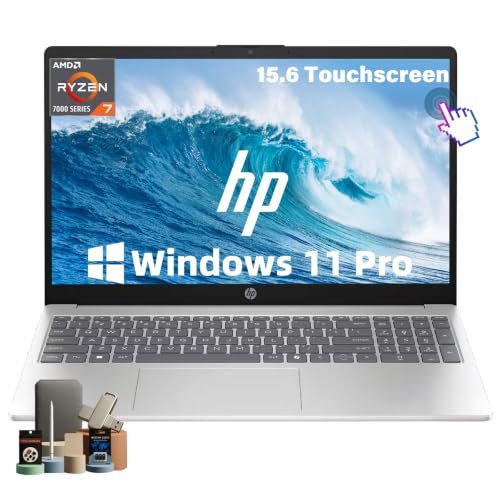
- 32GB RAM and 1TB NVMe SSD
- AMD Ryzen 7 7730U with 8 cores
- 15.6-inch FHD IPS touchscreen
Best For: Heavy multitaskers and remote work
Everyday Reliability Laptop

- Intel Core 3 100U with 8GB RAM
- 512GB SSD and Wi‑Fi 6 support
- 15.6-inch FHD matte display
Best For: Daily school, work, and home use
Portable Everyday Laptop
HP 14 inch Intel N150 4GB/128GB

- Slim 0.71-inch chassis and 3.24 lb weight
- 14-inch 1080p display with anti-glare coating
- USB-C, USB-A, HDMI, Wi-Fi, and Bluetooth
Best For: Light productivity, students, and frequent carry
Large-Screen Work Laptop

- Ryzen 5 CPU with 16GB RAM for everyday multitasking
- 17.3-inch anti-glare display and numeric keypad
- 512GB SSD plus up to 12 hours battery life
Best For: Desk-based productivity, spreadsheets, and multitasking
Slim Student Laptop
HP 14 Intel N150 4GB/128GB Copilot

- 3.24 lb slim design for easy portability
- Wi‑Fi 6, Bluetooth 5.4, and versatile ports
- Copilot key, 720p camera, and dual-array mics
Best For: School, casual browsing, and travel-friendly use
Editor's Pick – Apple MacBook Neo 13-inch with A18 Pro
If you want a premium-feeling laptop for school, everyday productivity, and light creative work, this MacBook Neo keeps the focus on portability, battery life, and AI-assisted tools. The 13-inch Liquid Retina display, 1080p camera, and Apple Intelligence features make it a polished option for students who want a compact laptop that still feels capable.
Best For: Students and Apple users who want a lightweight laptop with long battery life and built-in AI features.
Pros:
- Up to 16 hours of battery life for all-day use
- A18 Pro chip and Apple Intelligence support everyday assignment work
- 13-inch Liquid Retina display with 1 billion colors
- 1080p FaceTime HD camera plus dual-mic array for calls and class sessions
Cons:
- 8GB unified memory may feel limiting for heavier multitasking
- 256GB SSD storage is modest if you keep lots of files locally
- Best fit for Apple workflows, not Windows-specific software
This is a strong pick if you value battery life, portability, and a smooth macOS experience over maximum specs. It is especially appealing for students who spend most of their time in notes, documents, video calls, and browser-based tasks.
Value Workhorse – Dell 15.6 AMD Ryzen 5 Laptop
This Dell 15.6 laptop is built for practical everyday computing, with a larger screen, a full-size keyboard, and hardware aimed at staying productive. For shoppers comparing laptops for work, school, and general home use, it offers a balanced set of features including a Ryzen 5 processor, 512GB SSD, and onsite service support.
Best For: Budget-minded users who want a roomy 15.6-inch laptop for everyday tasks and video calls.
Pros:
- AMD Ryzen 5 7520U is suited to everyday computing
- 512GB SSD gives you solid local storage
- 15.6-inch 1080p display with 120Hz refresh rate
- Full-size keyboard with numeric keypad and ergonomic lifted hinges
Cons:
- Weighs 4.2 pounds, so it is less portable than lighter laptops
- Radeon 610M graphics are basic, not meant for demanding creative work
- Wi-Fi 5 is older than newer wireless standards
Overall, this Dell is a straightforward choice if you want dependable day-to-day performance without extra frills. The combination of a large display, roomy keyboard, and included onsite service makes it easy to recommend for practical home or student use.
Student Budget Pick – Lenovo Essential 15.6 FHD Laptop
The Lenovo Essential is aimed at everyday laptops buyers who need a simple Windows machine for browsing, assignments, streaming, and video calls. Its 15.6-inch FHD anti-glare screen, Wi-Fi 6, lightweight build, and included Microsoft 365 Personal make it a sensible option for students or home users who want essentials covered.
Best For: Students and casual users who need a lightweight laptop with the basics already included.
Pros:
- Lightweight 3.42-pound design is easy to carry
- 15.6-inch Full HD anti-glare display helps reduce reflections
- Wi-Fi 6 and Bluetooth 5.2 for faster wireless connectivity
- Privacy shutter, USB-C, HDMI, and SD card reader add useful flexibility
Cons:
- 128GB UFS storage is limited for larger file libraries
- Windows 11 Home in S mode may require switching modes for some apps
- Intel N150 is focused on efficiency rather than heavier workloads
This Lenovo makes sense if you want a no-nonsense laptop for schoolwork and everyday use. It stands out more for convenience and portability than raw speed, so it is best matched to light productivity and online tasks.
Flexible 2-in-1 Choice – QikPulse 15.6 Touchscreen Convertible
If you want laptops that can switch between notebook and tablet-style use, this QikPulse 2-in-1 gives you that flexibility in a large 15.6-inch format. The 360-degree convertible hinge, touchscreen, backlit keyboard, and upgradeable storage make it appealing for note-taking, browsing, streaming, and general productivity.
Best For: Users who want a convertible laptop for work, study, and touchscreen convenience.
Pros:
- 360° convertible design works in laptop or tablet mode
- 15.6-inch Full HD touchscreen supports versatile use
- 16GB RAM helps with everyday multitasking
- 256GB SSD with up to 2TB expansion adds storage flexibility
Cons:
- Core i3-10100Y is modest for demanding workloads
- 2.2 kg weight is not especially light for a 2-in-1
- DDR3 RAM is older than what many modern laptops use
As a flexible everyday machine, this model is best when touchscreen interaction and convertible design matter more than top-tier performance. It suits shoppers who want a practical hybrid for notes, meetings, browsing, and entertainment.
Budget Student Office Laptop – HP 14" Lavender Productivity
This HP 14-inch laptop is built for everyday laptops use where portability, office apps, and cloud work matter more than raw power. It pairs an Intel N150 processor with 4GB DDR5 memory, a 128GB UFS drive, and a 500GB external storage add-on, making it a practical pick for school, basic business tasks, and light multitasking.
Best For: Students, home users, and small business buyers who want a compact Windows 11 Pro laptop with bundled productivity extras.
Pros:
- Intel N150 quad-core processor is designed for efficient everyday performance.
- 4GB DDR5 RAM and 628GB total storage help with light productivity and file keeping.
- 14-inch anti-glare display and 720p camera suit classes and video meetings.
- Includes Windows 11 Pro, Lifetime Microsoft Office, and a 6-in-1 accessory bundle.
Cons:
- 4GB RAM is modest for heavier multitasking.
- 1366 x 768 resolution is basic for a 14-inch screen.
- Best suited to everyday use rather than demanding creative workloads.
Overall, this is a value-focused Windows laptop with a lot of bundled extras, but its hardware is clearly aimed at light productivity instead of power users.
High-Memory Productivity Pick – HP 15.6" Ryzen 7 Touchscreen
For buyers comparing laptops for work, school, and multitasking, this HP 15.6-inch model stands out with much stronger specs than a typical entry-level machine. The combination of 32GB RAM, a 1TB NVMe SSD, and an AMD Ryzen 7 7730U processor makes it a strong fit for handling lots of open tabs, office apps, and day-to-day productivity.
Best For: Students, professionals, and remote workers who want a roomy touchscreen laptop with plenty of memory and storage.
Pros:
- 32GB RAM supports smooth multitasking across many apps and browser tabs.
- 1TB SSD provides fast storage and plenty of room for files.
- Ryzen 7 7730U with 8 cores and 16 threads is built for demanding daily workflows.
- 15.6-inch FHD IPS touchscreen adds versatility for work and media.
Cons:
- Integrated graphics limit gaming and heavy creative work.
- 45% color gamut suggests a standard rather than color-critical display.
- At 3.52 lb, it is portable but not especially lightweight.
This HP is a strong productivity-first laptop if you want generous memory, large storage, and a touchscreen without moving into workstation pricing.
Everyday Reliability Laptop – Dell 15 Core 3 Value Pick
This Dell 15.6-inch laptop is aimed at everyday laptops buyers who want a straightforward machine for school, work, and entertainment. With an Intel Core 3 100U processor, 8GB RAM, and a 512GB SSD, it covers the basics well while adding practical comfort features like a numeric keypad, lifted hinge design, and anti-glare display.
Best For: Students and everyday users who want a dependable Windows 11 Home laptop for basic productivity and general use.
Pros:
- Intel Core 3 100U and 8GB RAM handle routine daily tasks.
- 512GB SSD offers solid storage for documents and media.
- 15.6-inch FHD matte display and ComfortView help reduce eye strain.
- Full-size keyboard with numeric keypad improves typing and spreadsheet work.
Cons:
- No touchscreen support.
- 8GB RAM is fine for basics but not ideal for heavier multitasking.
- 4.2-pound weight makes it less travel-friendly than thinner rivals.
As a practical Dell option, this model focuses on comfort, everyday speed, and useful usability features rather than premium specs.
Portable Everyday Laptop – HP 14 inch Intel N150 4GB/128GB
If you want a straightforward laptop for light everyday use, this HP 14-inch model keeps the focus on portability and basic productivity. It has a slim 0.71-inch profile, weighs 3.24 lb, and includes the core ports most laptop buyers still need, making it easy to move between home, office, and school-style tasks.
Best For: Students, commuters, and budget-minded users who need a compact Windows laptop for browsing, office work, and video calls.
Pros:
- Lightweight 14-inch design is easy to carry.
- Includes USB-C, USB-A, HDMI, Wi-Fi, and Bluetooth.
- 1080p display and anti-glare coating help with everyday viewing.
- Comes with Windows 11 and one year of Microsoft 365.
Cons:
- 4GB RAM is modest for heavier multitasking.
- 128GB SSD storage is limited for large local file libraries.
- Best suited to basic workloads rather than demanding apps.
Overall, this is one of the more practical laptops for buyers who value mobility over raw power. It covers the essentials well, but it is best matched to light productivity rather than intensive creative or gaming use.
Large-Screen Work Laptop – HP 17 inch Ryzen 5 16GB/512GB
This HP 17-inch laptop is built for buyers who want a bigger screen and stronger everyday performance in their laptops. With a Ryzen 5 processor, 16GB of RAM, and a 512GB SSD, it has the specs to handle business tasks, schoolwork, and multitasking more comfortably than smaller entry-level models.
Best For: Users who want a roomy 17-inch laptop for multitasking, office work, and home productivity.
Pros:
- 17.3-inch FHD anti-glare display is better for multitasking and viewing space.
- 16GB RAM and Ryzen 5 processor offer stronger everyday performance.
- 512GB SSD provides more room for files and apps.
- Full-size keyboard with numeric keypad supports spreadsheet and data entry work.
Cons:
- 17-inch size is less portable than smaller laptops.
- Native resolution is listed at 1600 x 900, not full HD.
- Integrated graphics limit it for graphics-heavy tasks.
As a work-focused choice, this model stands out for users who prefer screen space and comfortable typing over compact design. It’s a strong fit for desk-based productivity, especially if you want a larger laptop without moving into a premium price tier.
Slim Student Laptop – HP 14 Intel N150 4GB/128GB Copilot
For buyers comparing lightweight laptops for school or casual home use, this HP 14-inch model offers a practical mix of portability and everyday features. It pairs an Intel N150 processor with 4GB RAM, a 128GB SSD, Wi‑Fi 6, and a slim 3.24 lb build, so it stays focused on core tasks like browsing, streaming, online classes, and office work.
Best For: Students and casual users who want a slim Windows laptop for basic daily tasks and travel.
Pros:
- Light 3.24 lb chassis is easy to carry.
- Wi‑Fi 6 and Bluetooth 5.4 improve wireless connectivity.
- Includes USB-C, USB-A, HDMI, SD card reader, and combo audio jack.
- Copilot key, 720p camera, and dual-array mics support online meetings.
Cons:
- 4GB RAM and 128GB SSD are modest for power users.
- Display specs are mixed in the supplied notes, so expectations should stay practical.
- Best for light workloads rather than heavy multitasking.
This is a sensible pick if you want a simple, portable laptop for school and everyday use. It isn’t built to chase performance, but it does cover the essentials cleanly for users with modest needs.
How We Picked These Laptops
We focused on practical buying factors that matter most in real use: processor class, RAM, storage, screen size, battery-focused portability, and whether the laptop is better suited for basic tasks or heavier multitasking. We also looked for models that cover different buyer needs, from students and office users to shoppers who want more room for spreadsheets, video calls, or light creative work.
Quick Comparison
If you want the shortest path to the right choice, start by matching the laptop to your workload. Budget Laptops with 4GB to 8GB RAM and 128GB storage are best for browsing, email, streaming, and document work. Midrange Laptops with 16GB RAM and SSD storage are a better fit for smoother multitasking. Larger 15.6-inch and 17-inch Laptops offer more screen space, while 14-inch systems are easier to carry.
Key Buying Factors for Laptops
Performance
Look at the processor first. Entry-level chips are fine for everyday use, but if you keep many tabs open or work across multiple apps, a stronger CPU and more RAM will make a noticeable difference.
Memory and Storage
For most users, 8GB RAM is the minimum comfortable starting point, while 16GB or more is better for long-term flexibility. SSD storage is preferred because it speeds up boot times and app loading; 256GB is a more balanced baseline than 128GB if you store lots of files.
Display and Portability
Smaller Laptops are easier to travel with, but larger displays can improve productivity and reduce eye strain. Touchscreen and 2-in-1 designs are useful if you value note-taking, flexible viewing modes, or simpler navigation.
Battery, Software, and Features
Battery life claims vary, so consider how and where you’ll use the device. Also check whether the laptop includes Windows 11 Pro, Copilot AI features, or bundled software, especially if you need it for work or school.
Who Should Buy Which Laptops?
Students and casual users should prioritize lightweight Laptops with decent battery life and enough storage for assignments and apps. Office workers should lean toward 16GB RAM and a fast SSD for smoother multitasking. If you want the best value, choose a balanced 15.6-inch model with at least 8GB RAM and a solid-state drive. Power users and multitaskers should look for the higher-memory options, larger screens, and stronger processors in this list.
In short, the best Laptops are the ones that match your daily habits, not just the biggest spec sheet. Focus on the combination of performance, portability, and storage that fits how you actually work.