The right card reader can make photo imports faster, simpler, and more reliable, whether you shoot with SD, microSD, CompactFlash, or CFexpress media.
We compared 10 memory card readers for photographers across connectivity, card support, transfer speed, portability, and workflow flexibility to help you choose confidently.
Best 10 Memory Card Readers for Photographers Picks for 2026
Best All-Around 4-in-1
BENFEI USB-C/USB 3.0 Card Reader

- Reads SD, microSD, MS, and CF cards
- Reads and writes four cards simultaneously
- USB-C and USB-A connectivity
Best For: Photographers using multiple card formats and device types
Best Simple Dual-Card Option

- Simultaneously reads and writes two cards
- USB 3.0 supports up to 5Gbps
- Plug-and-play USB-A design
Best For: SD and microSD workflows on USB-A devices
Best Multi-Card USB 3.0 Hub

- Supports SD, microSD, CF, and Memory Stick
- Reads and writes four cards at once
- Compatible with four major desktop OS platforms
Best For: Multi-format photo transfers at home or on the go
Best for CFexpress Workflows

- Supports CFexpress Type A and Type B
- Handles SD and microSD, including UHS-II
- Designed for compatible 40Gbps Thunderbolt ports
Best For: Professional CFexpress and high-resolution video workflows
Most Versatile
7-in-1 Multi-Format Card Reader

- Supports CF, SD, microSD, XD, and MS cards
- Reads and writes up to five cards at once
- USB-C and USB-A with speeds up to 5Gbps
Best For: Photographers using multiple card formats
Best for Travel
UGREEN Dual-Interface SD Reader

- Compact 37-gram design for camera bags
- USB-C and USB-A connectivity
- Reads SD and microSD cards simultaneously
Best For: Traveling photographers using SD and microSD cards
Best for USB-C Devices

- Supports CF, SD, and microSD cards
- Built-in USB-C cable for iPhone, iPad, and Mac
- Plug-and-play with no extra power required
Best For: USB-C device users transferring camera files
Versatile Field Pick
SmartQ C368 Pro 4-in-1 Card Reader
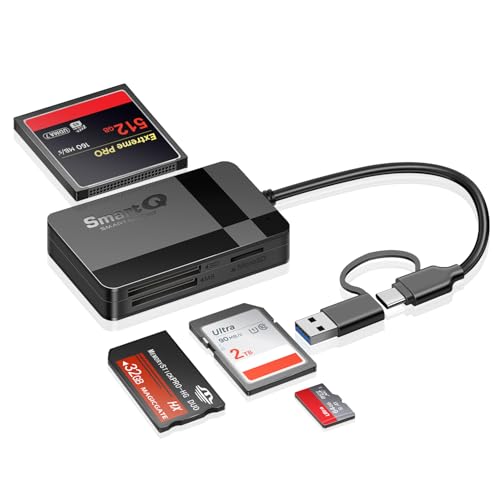
- Reads SD, microSD, CF, and MS cards
- USB 3.0 transfer rates up to 5Gbps
- Compact plug-and-play design
Best For: Photographers juggling multiple card formats
Format-Maximizing Choice
Yeemie Pro 7-in-1 USB-C Reader

- Supports SD, TF, CF, MS, and XD cards
- Reads up to five cards simultaneously
- USB-C transfers up to 5Gbps
Best For: Mixed-format photography and creator workflows
Mobile Transfer Pick
SUNTRSI Dual-Connector SD Reader

- Works with iPhone, iPad, and USB-C devices
- Supports SD and microSD cards
- Handles JPEG and RAW files without an app
Best For: Mobile photographers transferring images on the go
Best All-Around 4-in-1 – BENFEI USB-C/USB 3.0 Card Reader
For photographers who need flexible memory card readers for photographers, the BENFEI 4-in-1 reader supports SD, microSD, Memory Stick, and CompactFlash cards. Its integrated USB-C and USB-A design works with newer USB-C devices as well as conventional USB ports.
Best For: Photographers managing several card formats across USB-C and USB-A computers or mobile devices.
Pros:
- Supports SD, microSD, MS, and CF cards.
- Can read and write four cards simultaneously.
- Offers USB-C and USB 3.0 connectivity with up to 160MB/s UHS-I transfer rates.
- Includes an 18-month warranty.
Cons:
- Does not support standard Memory Stick, Memory Stick Micro (M2), or CF Type I cards.
- Actual transfer speed depends on the card and USB port.
The BENFEI is a versatile choice for photographers who want broad format support without carrying separate adapters. Its dual-connector design is especially useful when moving between older USB-A systems and newer USB-C hardware.
Best Simple Dual-Card Option – Anker USB 3.0 SD Card Reader
The Anker 2-in-1 reader is a straightforward pick among memory card readers for photographers who primarily use SD and microSD media. USB 3.0 provides transfer rates up to 5Gbps, while plug-and-play operation keeps setup simple.
Best For: Photographers who regularly transfer files between SD and microSD cards using USB-A computers, tablets, or smartphones.
Pros:
- Reads and writes two cards simultaneously.
- Supports SD, SDHC, SDXC, microSD, microSDHC, microSDXC, and related formats.
- USB 3.0 supports transfer rates up to 5Gbps.
- Requires no additional power supply or drivers for supported systems.
Cons:
- Uses USB Type-A rather than USB-C.
- Has two card slots, so it is less versatile for photographers using CF or Memory Stick media.
The Anker favors convenience over maximum format coverage. It is a practical everyday reader when SD and microSD are the main cards in your camera workflow and your devices still provide USB-A ports.
Best Multi-Card USB 3.0 Hub – UGREEN 4-Slot Card Reader
UGREEN gives photographers broad format coverage in a compact USB 3.0 reader. It accepts SD, microSD, CompactFlash, and Memory Stick cards, and its four slots can work simultaneously to simplify large photo transfers.
Best For: Photographers who need a compact reader for multiple card types and frequent multi-card transfers.
Pros:
- Supports SD, microSD, CF, and Memory Stick formats.
- Reads and writes four cards simultaneously.
- USB 3.0 offers transfer rates up to 5Gbps.
- Works with Windows, macOS, Linux, and ChromeOS.
Cons:
- Uses a USB connection rather than an integrated USB-C connector.
- Actual performance depends on the card and connected USB hardware.
The UGREEN is a strong value-oriented option for photographers who want four-card capability and wide operating-system compatibility. Its 1.7-foot cable and compact body also make it suitable for desk or travel setups.
Best for CFexpress Workflows – ORICO 40Gbps 4-in-1 Reader
For professionals working with newer high-speed media, the ORICO is a specialized choice among memory card readers for photographers. It supports CFexpress Type A and Type B, SD, and microSD cards, with Thunderbolt connectivity designed for compatible 40Gbps USB-C ports.
Best For: Professional photographers and videographers using CFexpress cards, UHS-II media, and compatible Thunderbolt systems.
Pros:
- Supports CFexpress Type A, CFexpress Type B, SD, and microSD cards.
- Supports simultaneous four-card reading.
- UHS-II cards can reach up to 312MB/s, while CFexpress Type B is listed up to 1500MB/s.
- Aluminum housing and cooling film help sustain performance during extended transfers.
Cons:
- Compatible only with Thunderbolt interfaces, according to the supplied notes.
- Its high-speed features require compatible cards and host hardware.
- It is more specialized than standard USB 3.0 readers.
The ORICO is the most performance-focused option in this group, but its Thunderbolt-only requirement is important to verify before buying. For compatible systems and professional CFexpress workflows, it offers substantially greater speed potential than conventional UHS-I readers.
Most Versatile – 7-in-1 Multi-Format Card Reader
For photographers who work with several camera formats, this multi-format reader is a flexible choice among memory card readers for photographers. It includes CF, SD, microSD, XD, and Memory Stick support, plus both USB-C and USB-A connectivity for computers, tablets, and phones.
Best For: Photographers who use multiple card formats or need to transfer files between USB-C and USB-A devices.
Pros:
- Supports seven card slots and a broad range of formats, including CF, SD, microSD, XD, and MS.
- Can read and write up to five cards simultaneously.
- Offers USB 3.0 transfer speeds up to 5Gbps and plug-and-play operation.
- Works with Windows, macOS, Linux, Chrome OS, and Android.
Cons:
- The larger multi-slot design may be less convenient than a compact two-slot reader.
- Its broad compatibility may be unnecessary if you only use SD and microSD cards.
This Rocketek reader stands out when versatility matters most. Its multiple formats, simultaneous card access, and dual USB connectors make it a practical workstation accessory for photographers with varied gear.
Best for Travel – UGREEN Dual-Interface SD Reader
This slim UGREEN model is a strong travel-friendly option among memory card readers for photographers. It supports SD and microSD cards, connects through either USB-C or USB-A, and is designed for quick, driver-free transfers from cameras, GoPros, and other devices.
Best For: Mobile photographers and creators who primarily use SD or microSD cards and want a lightweight reader for a camera bag.
Pros:
- Compact, lightweight design with a listed weight of 37 grams.
- USB-C and USB-A interfaces support a wide range of computers, tablets, and phones.
- Reads SD and microSD cards simultaneously.
- USB 3.0 supports transfer speeds up to 5Gbps with plug-and-play setup.
Cons:
- Does not support CF, XD, or Memory Stick formats.
- Its two-slot design is less suitable for photographers working with many card types.
With dual-interface connectivity and simultaneous SD/microSD access, this UGREEN reader keeps the workflow simple on the road. It is particularly appealing when portability and everyday card compatibility matter more than extensive format support.
Best for USB-C Devices – 3-in-1 CF/SD/microSD Adapter
Photographers who transfer images directly to a USB-C iPhone, iPad, Mac, or laptop may appreciate this focused option among memory card readers for photographers. Its built-in USB-C cable supports CF, SD, and microSD cards without requiring drivers or an external power source.
Best For: USB-C iPhone, iPad, and Mac users who need access to CF, SD, and microSD camera cards.
Pros:
- Supports CompactFlash, SD, and microSD cards in one adapter.
- Built-in USB-C cable helps avoid occupying another port.
- Designed for plug-and-play use without additional power.
- Compatible with a range of USB-C iPhone, iPad, Mac, Windows, and Android devices.
Cons:
- USB-C only; it is not compatible with Lightning-port devices.
- The listed data transfer rate is 30Mbps, notably below USB 3.0 readers in this selection.
- It supports three card formats rather than a wider range of legacy media.
This ChiaoPio adapter is tailored to direct transfers on modern USB-C devices. Its CF support is useful for photographers with older or professional camera equipment, though the listed transfer rate makes it better suited to convenience-focused transfers than speed-first workflows.
Versatile Field Pick – SmartQ C368 Pro 4-in-1 Card Reader
For photographers who work with several camera formats, the SmartQ C368 Pro is one of the more versatile memory card readers for photographers. Its USB-C and USB-A connectivity supports SD, microSD, CompactFlash, and Memory Stick cards, with USB 3.0 transfer speeds for moving photos and larger files.
Best For: Photographers who use multiple card formats and want simultaneous card access across computers, tablets, and USB-C mobile devices.
Pros:
- Reads SD, microSD, CF, and MS cards simultaneously.
- USB 3.0 supports data transfer rates up to 5Gbps.
- Plug-and-play compatibility with Windows, macOS, Linux, and USB-C devices.
- Compact 1.45-ounce design is convenient for travel.
Cons:
- Its broad card support may be unnecessary for photographers who use only SD cards.
- The supplied specifications list USB-C hardware, while the connectivity listing also identifies USB Type-A, so users should confirm the connector arrangement for their setup.
The C368 Pro is a practical choice when flexibility matters more than a minimalist design. It is especially useful for photographers managing cards from different cameras or transferring files directly to compatible USB-C devices.
Format-Maximizing Choice – Yeemie Pro 7-in-1 USB-C Reader
The Yeemie Pro 7-in-1 reader is aimed at photographers and creators who need broad media compatibility. It includes dedicated slots for SD, TF, CF, MS, and XD cards, supports reading up to five cards at once, and connects through USB-C at up to 5Gbps.
Best For: Photographers, drone users, and creators who regularly switch among SD, microSD, CompactFlash, Memory Stick, and XD media.
Pros:
- Seven slots cover SD, TF, CF, MS, and XD formats.
- Can read up to five cards simultaneously.
- USB-C transfer speeds are rated up to 5Gbps.
- Aluminum-alloy construction, reinforced cabling, and slot status LEDs support mobile workflows.
Cons:
- USB-C connectivity may require an adapter for devices with only traditional USB ports.
- The larger number of slots can add bulk compared with a simple SD-only reader.
- Its broad format support may exceed the needs of photographers using one card type.
With XD and Memory Stick support alongside the more common SD, microSD, and CF formats, this reader is built for mixed-media workflows. Its simultaneous-reading capability can reduce repeated card swaps during busy shoots or file organization.
Mobile Transfer Pick – SUNTRSI Dual-Connector SD Reader
The SUNTRSI dual-connector reader is a straightforward option for photographers who want to move images from SD or microSD cards directly to a phone or tablet. It combines an iPhone connector with USB-C, supports JPEG and RAW photos, and works without a separate app.
Best For: iPhone, iPad, and USB-C device users who mainly shoot with SD or microSD cards and want quick mobile transfers.
Pros:
- Dual connectors support older iPhone and iPad devices as well as USB-C equipment.
- Dedicated SD and microSD slots make card selection simple.
- Supports JPEG, RAW, H.264, and MPEG-4 files.
- Plug-and-play operation requires no additional app.
Cons:
- Supports only SD and microSD cards, not CF, MS, or XD formats.
- Listed transfer speeds of 20–30MB/s are lower than the 5Gbps ratings of the USB 3.0 multi-format readers.
- Users are advised to wait about five seconds after connecting before use.
This is a convenient pick for mobile-first workflows rather than a full desktop card-management setup. Photographers who primarily use SD cards and want to share or back up JPEG and RAW files on the go should find its dual-connector design useful.
How We Picked the Best Memory Card Readers for Photographers
We focused on the features that matter after a shoot: broad format compatibility, dependable USB connectivity, practical portability, and support for modern computers, tablets, and phones. The list includes simple single-format readers, multi-card hubs, dual-connector designs, and a CFexpress Type B model for photographers using newer high-performance cameras.
Because advertised transfer rates depend on the card, host device, cable, and file size, rated speed is a useful comparison point rather than a guarantee. We also considered whether a reader supports simultaneous card access, which can be valuable when organizing files from multiple cameras.
Quick Comparison
- Best for broad format coverage: Choose a multi-slot reader supporting SD, microSD, CF, MS, or XD when your camera collection uses several card types.
- Best for everyday travel: A compact USB-C or dual-connector reader is convenient for laptops, tablets, and phones.
- Best for high-speed professional media: A dedicated CFexpress Type B reader is the appropriate choice for compatible cameras and cards.
- Best for simple SD workflows: A focused SD or microSD reader is smaller and often easier to carry than a large hub.
Key Buying Factors for Memory Card Readers for Photographers
Card Compatibility
Check the exact card standard used by your camera before buying. SD, SDHC, SDXC, microSD, CompactFlash, Memory Stick, XD, and CFexpress are not interchangeable. A reader may list several formats while still lacking support for the one you need.
Connection and Device Support
USB-C is increasingly common on current laptops, iPads, Android devices, and iPhone models, while USB-A remains useful with older computers. Dual-connector readers offer flexibility, but verify that your phone or tablet supports external storage and that its case does not block the plug.
Speed and Workflow
USB 3.0 or faster interfaces can reduce import times, but the memory card’s own read speed is often the limiting factor. If you regularly transfer large RAW files or 4K video, prioritize a fast card reader and a compatible high-speed card rather than relying on interface specifications alone.
Simultaneous Reading and Build
Multi-slot readers can save time when you need to copy or compare cards from several cameras. Look for clear slot labeling, a stable connector, adequate spacing, and a compact design that will survive regular travel. Avoid assuming that every multi-slot model can transfer between cards at the same time; check its stated behavior.
Who Should Buy Which Memory Card Readers for Photographers?
Casual photographers and students should choose a compact SD or USB-C reader that matches their primary camera. Travel and mobile photographers will benefit from a dual-connector model that works with both a computer and a phone or tablet. Multi-camera households and working photographers should consider a four-in-one or seven-in-one reader for broader format support and fewer accessories. Sports, wildlife, and video shooters using CFexpress Type B should select the dedicated CFexpress reader, since standard SD or CompactFlash readers will not handle that format.
Before ordering, confirm the card types, connector, operating-system compatibility, and whether you need simultaneous card access. Matching those details to your actual workflow is more important than choosing the reader with the longest feature list.