The best MIDI interfaces for live performances help keyboards, drum machines, controllers, and computers communicate reliably onstage. The right model depends on your port requirements, hardware setup, audio needs, and tolerance for extra equipment.
We compared compact interfaces, dedicated multi-port MIDI units, and audio interfaces with built-in MIDI connectivity to help you choose a dependable solution for rehearsals, touring, and live production.
Best 10 Midi Interfaces for Live Performances Picks for 2026
Portable Performance Hub

- Two XLR/TRS inputs plus MIDI I/O
- Battery or optional AC power
- Up to 24-bit/96 kHz audio
Best For: Mobile performers needing compact audio and MIDI connectivity
Large-Scale MIDI Routing

- 16-channel MIDI interface
- USB class-compliant for Mac and PC
- Bus powered with cable included
Best For: Computer-based live rigs with extensive MIDI hardware
Hybrid Live Studio Hub
Focusrite Scarlett 4i4 4th Gen

- MIDI In/Out with 4-in/4-out audio
- Two mic preamps and two Hi-Z inputs
- Up to 24-bit/192 kHz audio
Best For: Performers combining MIDI, microphones, instruments, and line-level gear
Advanced Standalone MIDI Routing

- Six USB-C host ports for computer-free MIDI
- Six TRS MIDI in/out ports with A/B switching
- Routing, filtering, mapping, and dual power
Best For: Complex USB MIDI, TRS MIDI, synth, and pedalboard rigs
Best Routing Hub

- 8-in/8-out MIDI connectivity
- Three standalone routing modes
- Front I/O with LED activity indicators
Best For: Complex live MIDI hardware rigs
Best Compact Recording Option
- 2x2 USB interface with MIDI
- Up to 24-bit/192 kHz recording
- Portable Mac, Windows, and mobile support
Best For: Solo performers and mobile recording rigs
Best for Large Hybrid Rigs

- 18 inputs and 20 outputs over USB
- Eight mic preamps with phantom power
- ADAT I/O for expansion
Best For: Bands and large audio/MIDI performance setups
Yamaha URX22C

- 2-in/2-out USB-C audio with MIDI I/O
- DSP monitoring with reverb and amp effects
- Rugged housing with combo inputs and Hi-Z
Best For: Solo performers and compact live rigs
Focusrite Scarlett 18i16
High-Count MIDI Performance Hub

- 18 inputs and 16 outputs with MIDI I/O
- ADAT, S/PDIF, line, mic, and Hi-Z connectivity
- Auto Gain and Clip Safe for level management
Best For: Bands and expanded hybrid live rigs
Korg microAUDIO 722

- 2-in/2-out USB-C audio with MIDI I/O
- Integrated miniKORG-style analog filter
- Includes Ableton, Komplete Select, and Ozone Elements
Best For: Keyboardists and electronic musicians
Portable Performance Hub – Zoom U-24
For performers who need midi interfaces for live performances alongside portable audio recording, the Zoom U-24 combines MIDI I/O with two XLR/TRS combo inputs and RCA outputs. Its battery operation and optional iPad connectivity make it practical for mobile setups.
Best For: Performers needing a compact audio interface with MIDI I/O for mobile or small live rigs.
Pros:
- Two XLR/TRS combo inputs with high-performance mic preamps.
- MIDI I/O, RCA outputs, and USB connectivity in a portable unit.
- Supports up to 24-bit/96 kHz recording and playback.
- Can run on two AA batteries or an optional AC adapter.
Cons:
- iPad connection requires a separately sold camera connection adapter.
- Only two mic/line inputs are provided.
The U-24 is a flexible choice when live audio inputs and MIDI need to fit into a compact, battery-powered package. It is less suited to larger productions requiring many simultaneous connections.
Large-Scale MIDI Routing – midiplus MIDI 16×16
The midiplus MIDI 16×16 is designed for performers managing extensive hardware setups. As a USB class-compliant, bus-powered interface, it offers 16-channel MIDI connectivity for Mac and PC systems running MIDI software.
Best For: Live rigs with multiple MIDI instruments, controllers, and software-managed routing needs.
Pros:
- Provides 16 MIDI channels for larger setups.
- USB class-compliant with Mac and PC compatibility.
- Works with all MIDI software listed by the manufacturer.
- USB bus powered, with a USB cable included.
Cons:
- Designed for computer-based operation rather than standalone use.
- At 5.1 pounds, it is less portable than compact interfaces.
- Does not provide audio inputs or outputs.
For computer-centered performances requiring many MIDI channels, the MIDI 16×16 offers straightforward expansion. Its larger rack-style footprint makes it better suited to permanent or semi-permanent setups than quick mobile gigs.
Hybrid Live Studio Hub – Focusrite Scarlett 4i4 4th Gen
The Focusrite Scarlett 4i4 4th Gen suits performers who want midi interfaces for live performances plus capable audio I/O. It combines MIDI In/Out with two mic preamps, two Hi-Z inputs, four line inputs, and four line outputs.
Best For: Hybrid live setups combining microphones, instruments, synths, drum machines, and MIDI hardware.
Pros:
- MIDI In/Out supports integration with keyboards, synths, and controllers.
- Offers two mic preamps, two Hi-Z inputs, four line inputs, and four line outputs.
- Supports up to 24-bit/192 kHz audio with a 120 dB dynamic range.
- Auto Gain, Clip Safe, and Air mode support faster live preparation.
Cons:
- Its broader audio feature set may be unnecessary for MIDI-only rigs.
- USB-C power supply is included, so power planning remains necessary for live use.
The Scarlett 4i4 is a strong all-around option for performers who need both MIDI and multiple audio connections. It is especially practical when a live rig must also handle recording, monitoring, or several line-level instruments.
Advanced Standalone MIDI Routing – CME H12MIDI Pro
The CME H12MIDI Pro is built for complex midi interfaces for live performances, especially computer-free hardware rigs and pedalboards. It combines six USB-C host ports, six TRS MIDI inputs and outputs with selectable Type A/B, and configurable routing tools.
Best For: Complex live rigs using USB MIDI devices, TRS MIDI gear, pedals, synths, and sequencers.
Pros:
- Six USB-C host ports connect class-compliant MIDI devices without a computer.
- Six-in/six-out TRS MIDI connectivity supports selectable Type A/B operation.
- Routing, splitting, merging, filtering, and mapping can be configured with HxMIDI Tools.
- Supports 5V USB-C or 9V DC power and supplies up to 3A total USB host power.
Cons:
- TRS connections require compatible cables when integrating 5-pin DIN MIDI gear.
- Its advanced routing features may be more than a simple controller setup requires.
- Power adapters are not specified among the supplied components.
With standalone USB hosting, extensive TRS connectivity, and programmable MIDI processing, the H12MIDI Pro is aimed at demanding hardware-based performances. Its compact aluminum housing also makes it suitable for pedalboards and mobile hybrid rigs.
Best Routing Hub – Black Lion Audio MIDI Eight
For performers managing multiple keyboards, controllers, or hardware instruments, the Black Lion Audio MIDI Eight is one of the more purpose-built MIDI interfaces for live performances. Its 8-in/8-out design, front-mounted connections, and standalone routing modes make it suited to complex MIDI setups that need flexible signal management.
Best For: Live rigs with several MIDI instruments, keyboards, or controllers requiring extensive routing.
Pros:
- Provides 8 MIDI inputs and 8 MIDI outputs.
- Offers three standalone routing modes for flexible operation.
- Front-mounted I/O and LED port activity indicators support easier monitoring.
- Works with Windows and macOS through USB and 5-pin MIDI connections.
Cons:
- Its 19-inch rack-style form factor and 8.6-pound weight may be excessive for compact mobile rigs.
- It is focused on MIDI connectivity rather than audio recording.
The MIDI Eight is the strongest fit here when your performance setup centers on hardware MIDI routing rather than microphones or audio inputs. Its generous port count and standalone modes can reduce dependence on a computer during a show.
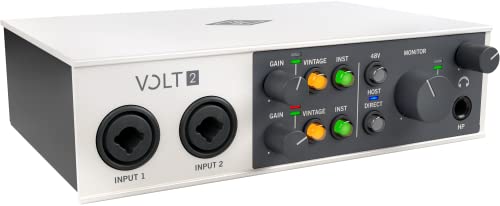
Best Compact Recording Option – Universal Audio Volt 2
The Universal Audio Volt 2 is a compact 2×2 USB audio interface with MIDI, making it a practical choice for smaller live performances and mobile recording setups. It combines 24-bit/192 kHz recording, Vintage-mode 610 preamp emulation, and support for Mac, Windows, iPad, and iPhone systems.
Best For: Solo performers, podcasters, and compact rigs that need audio recording plus MIDI in a portable interface.
Pros:
- Supports up to 24-bit/192 kHz recording quality.
- Includes Vintage mode for 610-style preamp coloration.
- Supports MacOS, Windows, iPad, and iPhone recording setups.
- Works with software including Ableton and LUNA.
Cons:
- Its two-channel design is less suitable for large live setups.
- Mobile use may require an external Volt power supply and, for some Apple devices, a Lightning to USB Camera Adapter.
Choose the Volt 2 when portability and audio capture matter more than extensive MIDI routing. It is not the highest-capacity option for a large stage rig, but its compact size and broad device support suit streamlined performance workflows.
Best for Large Hybrid Rigs – Behringer UMC1820
The Behringer UMC1820 is a high-capacity USB audio/MIDI interface for performers who need substantial audio I/O alongside MIDI. With 18 inputs, 20 outputs, ADAT I/O, eight MIDAS-designed microphone preamps, and compatibility with software such as Ableton Live, it can serve as the center of a larger live or recording setup.
Best For: Bands and hybrid live rigs requiring many microphone, instrument, audio-output, and MIDI connections.
Pros:
- Streams 18 inputs and 20 outputs over USB 2.0.
- Includes ADAT I/O for system expansion.
- Provides eight MIDAS-designed microphone preamps with +48V phantom power.
- Supports 24-bit/96 kHz audio and popular recording software including Ableton Live.
Cons:
- Its larger 24.35-inch-wide chassis is less convenient for minimal mobile setups.
- The supplied specifications contain conflicting sample-rate details, listing 24-bit/96 kHz capability but also a 48 kHz maximum in the detailed fields.
- It is more audio-I/O focused than a dedicated multi-port MIDI interface.
The UMC1820 makes the most sense when live performance involves multiple microphones, instruments, and monitor or outboard feeds. Its extensive audio connectivity and ADAT expansion are valuable for larger systems, while smaller rigs may benefit from a more compact interface.
Yamaha URX22C – Compact DSP MIDI Interface
For musicians seeking midi interfaces for live performances, the Yamaha URX22C combines MIDI I/O with two combo inputs, rugged construction, and DSP-powered monitoring. Its compact 2-in/2-out design suits streamlined rigs that still need microphone, instrument, and hardware MIDI connectivity.
Best For: Solo performers and compact live setups needing low-latency monitoring and basic MIDI control.
Pros:
- Includes MIDI I/O alongside 2-in/2-out USB-C audio connectivity.
- DSP-powered monitoring includes REV-X reverb, Channel Strip, and Guitar Amp Classics.
- Two Class-A D-PRE combo inputs offer phantom power and one Hi-Z input.
- Full-metal housing is designed for durability.
Cons:
- Two input and two output channels may limit larger live rigs.
- Its feature set is more focused on compact setups than extensive routing.
The URX22C is a practical choice when portability, sturdy construction, and latency-free monitoring matter more than a high channel count. Cross-platform support for Windows, macOS, and iOS adds flexibility for different performance systems.
Focusrite Scarlett 18i16 – High-Count MIDI Performance Hub
The Focusrite Scarlett 18i16 is built for performers and production teams who need extensive connectivity from their midi interfaces for live performances. With four mic preamps, eight line inputs, ADAT, S/PDIF, and MIDI I/O, it can accommodate a substantially larger setup than a compact two-channel interface.
Best For: Bands, electronic performers, and hybrid live rigs requiring many inputs, outputs, and expansion options.
Pros:
- Provides 18 inputs and 16 outputs, plus ADAT, S/PDIF, and MIDI I/O.
- Four 4th-generation mic preamps offer up to 69 dB of gain.
- Two Hi-Z inputs and eight line inputs support varied instruments and sources.
- Auto Gain and Clip Safe help manage recording levels.
Cons:
- The larger I/O complement may be excessive for simple solo setups.
- Supplied details identify 24-bit conversion rather than 32-bit operation.
Choose the Scarlett 18i16 when routing flexibility and expansion are central to your performance workflow. Its included MIDI cables add convenience for connecting external MIDI hardware, while Air modes provide additional tonal options for vocals and instruments.
Korg microAUDIO 722 – Analog-Filter MIDI Interface
The Korg microAUDIO 722 brings MIDI I/O and dual combo inputs to a compact 2-in/2-out USB-C interface. For midi interfaces for live performances, its integrated Korg analog filter adds hands-on tonal shaping for performers who want sound design features alongside hardware control.
Best For: Keyboardists, synth players, and electronic musicians who want MIDI connectivity with creative analog filtering.
Pros:
- Built-in MIDI connectivity supports external synths, keyboards, and other gear.
- Dual combo inputs accept microphones, instruments, and line sources.
- Integrated miniKORG-style analog filter offers creative tonal shaping.
- Includes Ableton Live Lite, Komplete Select, and Ozone Elements.
Cons:
- Two inputs and two outputs may not suit larger ensembles or complex routing.
- The supplied operating-system detail lists Windows compatibility, so other platforms should be verified.
- Warranty information requires checking with the seller or manufacturer.
The microAUDIO 722 is a focused option for electronic performance setups where MIDI control and characterful filtering are more important than extensive I/O. Its software bundle also gives new users a useful starting collection of production tools.
How We Picked the Best Midi Interfaces for Live Performances
We focused on connectivity, portability, flexibility, and practical stage use. The selection includes dedicated MIDI interfaces as well as USB audio interfaces with MIDI I/O, since many performers need to manage instruments and audio from one device. We also considered port counts, USB host support, expansion options, monitoring features, and suitability for small rigs through larger hardware setups.
For live work, dependable connections matter more than a long list of recording features. Interfaces with clear routing, sturdy construction, and broad compatibility can reduce setup time and make troubleshooting easier during a performance.
Quick Comparison
| Best For | Look For |
|---|---|
| Solo performers | Compact design, simple USB connection, and essential MIDI I/O |
| Multiple hardware instruments | Several independent MIDI inputs and outputs |
| Computer-free setups | USB host capability or standalone routing |
| Live audio and MIDI | Audio inputs, outputs, monitoring, and MIDI ports in one unit |
| Expandable rigs | High port counts, reliable routing, and digital expansion |
Key Buying Factors for Midi Interfaces for Live Performances
Port Count and Routing
Count every controller, keyboard, synth, and drum machine you expect to connect. A basic 1×1 or 2×2 interface may suit a simple setup, while larger rigs benefit from 8×8 or 16×16 routing. Extra ports provide room for future expansion and can prevent constant cable swapping.
USB Host and Computer Compatibility
Most USB MIDI interfaces connect to a computer, but USB host models can connect directly to class-compliant controllers or other USB MIDI devices. Confirm operating-system support, USB-C requirements, and whether your intended hardware needs a powered hub.
Latency, Stability, and Power
Low latency depends on the interface, computer, drivers, buffer settings, and software. For stage use, prioritize stable drivers and predictable operation. Check whether the unit is bus-powered, requires an adapter, or can be powered reliably from your live rig.
Audio Features and Physical Controls
If you also need microphones, instruments, headphones, or monitor outputs, an audio/MIDI interface may be more practical than a dedicated MIDI box. Physical knobs, clear status indicators, direct monitoring, and accessible connections are especially useful onstage.
Who Should Buy Which Midi Interfaces for Live Performances?
Choose a compact two-channel audio/MIDI interface if you perform with a laptop, one or two instruments, and a portable setup. A dedicated multi-port interface is better for several hardware synths, drum machines, or complex MIDI routing. Choose a USB host interface when you want to use USB MIDI gear without relying on a computer.
For bands, electronic acts, and production rigs that combine live audio with MIDI control, an interface with multiple analog inputs and outputs offers the most flexibility. If you already own a capable audio interface, a dedicated MIDI unit may be the cleaner and more economical upgrade.