The best MIDI interfaces for recording make it easier to connect keyboards, drum machines, controllers, and other hardware to your computer without adding unnecessary complexity to your setup.
Our 2026 roundup covers dedicated MIDI solutions and USB audio interfaces with MIDI I/O, so you can choose the right combination of connectivity, recording features, latency, and expansion for your studio.
Best 10 Midi Interfaces for Recording Picks for 2026
Best All-Around Pick

- Five-pin MIDI input and output
- Two combo inputs with phantom power
- Five-year warranty and creative software bundle
Best For: Beginners and compact home studios
Best Studio Hub
Focusrite Scarlett 4i4 4th Gen

- Four-in/four-out connectivity with MIDI I/O
- Auto Gain and Clip Safe simplify recording
- 120 dB dynamic range and 192 kHz support
Best For: Producers connecting multiple instruments and line sources
Best Standalone MIDI Routing

- Hosts USB MIDI devices without a computer
- Advanced split, merge, mapping, and filtering
- Supports USB-C, multiple operating systems, and dual power
Best For: Computer-free MIDI rigs, pedalboards, and complex routing
Best for Monitoring and Loopback

- 4x4 USB-C audio connectivity with MIDI I/O
- Hardware monitoring and LCD screen
- Loopback supports podcasting and computer-audio capture
Best For: Home producers and podcasters needing hands-on monitoring
Best Plug-and-Play MIDI Cable
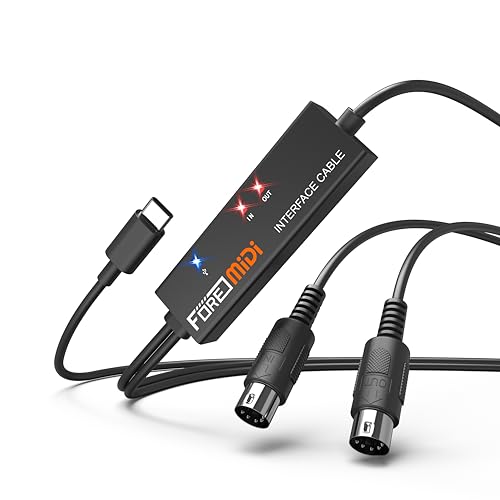
- One MIDI input and output with 16 channels
- Plug-and-play operation with LED status indicators
- Works with computers, iOS, and Android devices
Best For: Beginners and mobile producers with one five-pin MIDI device
Best for Portable Studio Recording
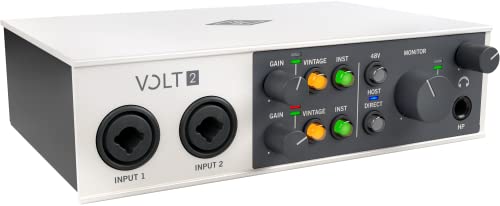
- 2x2 USB-C interface with MIDI connectivity
- Records up to 24-bit/192 kHz
- Includes 610 preamp emulation and mobile support
Best For: Musicians and creators combining MIDI with two-channel audio recording
Best High-Resolution MIDI and Audio Interface

- 2x2 audio I/O plus dedicated MIDI I/O
- 32-bit integer/192 kHz support with D-PRE preamps
- DSP monitoring effects and rugged full-metal housing
Best For: Producers needing MIDI plus two-channel, high-resolution audio recording
Best Overall
Focusrite Scarlett 2i2 4th Gen

- Two mic preamps plus two Hi-Z inputs
- 24-bit/192kHz and 120dB dynamic range
- Auto Gain, Clip Safe, and Air modes
Best For: Flexible two-input home recording
Best Budget Pick
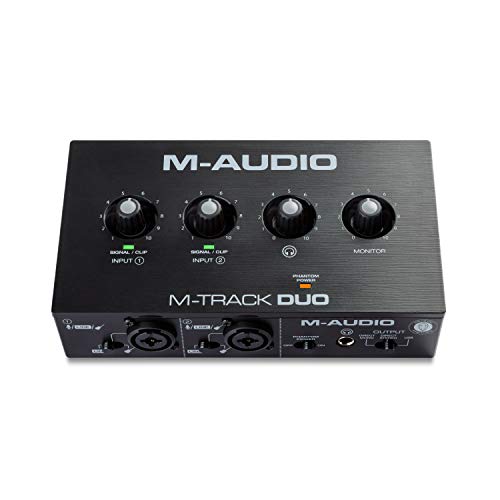
- Dual combo inputs with phantom power
- Zero-latency USB/Direct monitoring switch
- Includes MPC Beats software
Best For: Beginner recording, podcasting, and streaming
Best Compact Option
Focusrite Scarlett Solo 4th Gen

- One XLR mic preamp and one Hi-Z input
- 24-bit/192kHz and 120dB dynamic range
- Compact design with Air mode
Best For: Solo vocal-and-instrument recording
Best All-Around Pick – Arturia MiniFuse 2
The Arturia MiniFuse 2 is a practical choice for musicians seeking midi interfaces for recording alongside vocals, guitar, synths, or other instruments. Its two combo inputs, MIDI I/O, loopback, and beginner-friendly software bundle make it well suited to compact home studios.
Best For: Beginners and home-studio creators who want MIDI connectivity, flexible inputs, and an approachable recording setup.
Pros:
- Includes five-pin MIDI input and output for synths, controllers, and drum machines.
- Two combo mic/instrument/line inputs with 48V phantom power.
- Loopback supports capturing voiceovers alongside in-app or in-game audio.
- Includes Ableton Live Lite, Analog Lab Intro, effects, guitar software, and other creative tools.
Cons:
- Its two-input design may be limiting for larger recording setups.
- The USB hub is specified at 250mA, so power-hungry devices may need separate power.
With 192 kHz support, compact dimensions, and a five-year warranty, the MiniFuse 2 offers a strong balance of portability, features, and long-term value for a small studio.
Best Studio Hub – Focusrite Scarlett 4i4 4th Gen
The Focusrite Scarlett 4i4 4th Gen is a versatile option among midi interfaces for recording, especially when your setup includes microphones, guitars, synths, and drum machines. Its four-in/four-out layout and MIDI I/O provide room to connect multiple pieces of gear.
Best For: Producers who need several simultaneous line connections and tools that help simplify recording levels.
Pros:
- Provides two mic preamps, two Hi-Z inputs, four line inputs, four line outputs, and MIDI I/O.
- 120 dB dynamic range and up to 192 kHz operation support studio-oriented recording.
- Auto Gain helps set levels, while Clip Safe helps prevent clipping.
- Includes Air mode plus a substantial software bundle with recording tools and instruments.
Cons:
- At 2.2 pounds, it is less lightweight than some compact interfaces.
- The broad feature set may be more than a basic two-channel setup requires.
The Scarlett 4i4 stands out when expandability matters. Its routing capacity, MIDI connections, and level-assistance features make it a capable centerpiece for a developing production workspace.
Best Standalone MIDI Routing – CME H4MIDI WC
The CME H4MIDI WC takes a different approach to midi interfaces for recording by focusing on advanced MIDI hosting and routing rather than audio inputs. It can connect USB MIDI instruments directly to MIDI hardware without a computer, while also offering computer-based operation over USB-C.
Best For: Guitarists, electronic musicians, and mobile setups that need flexible MIDI routing without relying on a computer.
Pros:
- Standalone USB host can connect up to eight USB MIDI device ports through a standard hub.
- Offers MIDI thru, split, merge, mapper, and filter functions through HxMIDI Tools.
- Supports USB-C computer connections with four virtual MIDI inputs and outputs.
- Flexible 5V USB or 9V DC power supports studio and stage use.
Cons:
- It is a MIDI interface, not a replacement for an audio interface with microphone inputs.
- Advanced routing features may require time to configure in HxMIDI Tools.
Preset storage, broad operating-system compatibility, optional WIDI expansion, and a compact design make the H4MIDI WC particularly useful for complex or computer-free MIDI rigs.
Best for Monitoring and Loopback – MOTU M4
The MOTU M4 is a strong candidate among midi interfaces for recording when you want four-in/four-out USB-C connectivity, MIDI I/O, and low-latency monitoring in one desktop unit. Its LCD screen and loopback feature also support recording, mixing, and podcasting workflows.
Best For: Home producers, podcasters, and musicians who value clear hardware monitoring and flexible four-channel connectivity.
Pros:
- Offers 4×4 USB-C connectivity with MIDI I/O.
- Includes hardware monitoring and an LCD screen for a more hands-on workflow.
- Loopback supports podcasting and other computer-audio recording tasks.
- Supports up to 192 kHz and works with Mac, Windows, and iOS devices.
Cons:
- The included two-year warranty is shorter than the MiniFuse 2’s five-year coverage.
- The supplied notes do not specify the exact MIDI connector type or detailed input configuration.
The M4 combines useful monitoring features with four-in/four-out operation, making it a practical centerpiece for recording and streaming-oriented setups that need MIDI alongside audio.
Best Plug-and-Play MIDI Cable – T1 USB-C MIDI Interface
If you need simple midi interfaces for recording, the T1 connects a five-pin MIDI keyboard or other MIDI device to a USB-C computer, phone, or tablet. Its built-in driver, LED status indicators, and bus-powered design make it a straightforward choice for home recording and track editing.
Best For: Beginners and mobile producers connecting one MIDI device to a computer or iOS/Android device.
Pros:
- Provides one MIDI input and one MIDI output with 16 input and output channels.
- Plug-and-play setup with no separate driver installation required.
- Supports Windows, macOS, iOS, and Android, with a 6.5-foot integrated cable.
- LED indicators show power and signal-transfer status.
Cons:
- Uses five-pin DIN MIDI rather than USB MIDI directly.
- The USB A-to-C adapter is not included.
- Offers a single MIDI input and output for basic setups.
This is a focused MIDI connection solution rather than a full audio interface. Choose it when reliable, uncomplicated MIDI transfer is your priority and you already have the necessary five-pin MIDI cables or devices.
Best for Portable Studio Recording – Universal Audio Volt 2
The Universal Audio Volt 2 is a compact 2×2 USB-C audio interface for musicians, podcasters, and streamers who want high-resolution recording in a desktop or mobile setup. Although it is more than a basic MIDI interface for recording, its stated feature set combines two-channel audio capture, MIDI, and portable compatibility.
Best For: Musicians and content creators who need a portable two-channel audio interface with MIDI and onboard Vintage preamp mode.
Pros:
- Supports recording quality up to 24-bit/192 kHz.
- Includes 610 preamp emulation through Vintage mode.
- Offers 2×2 USB-C connectivity with MIDI for music and content workflows.
- Works with macOS, Windows, iPad, and iPhone with the required adapters or power supply.
Cons:
- Mobile iPad and iPhone use may require an external Volt power supply and Apple adapter.
- Its two-channel design may be limiting for larger recording sessions.
- It is an audio interface with MIDI rather than a dedicated MIDI-only converter.
Volt 2 makes sense when MIDI is part of a broader recording setup. Its two-channel format, Vintage mode, and mobile support give it more studio flexibility than a simple MIDI-to-USB cable.
Best High-Resolution MIDI and Audio Interface – Yamaha URX22C
The Yamaha URX22C is a durable 2-in/2-out USB-C interface for producers who want MIDI alongside high-resolution audio recording. With 32-bit integer/192 kHz support, two combo inputs, DSP monitoring, and included Steinberg software, it is suited to a more complete desktop or mobile production rig.
Best For: Producers and musicians who need MIDI I/O, two microphone or instrument inputs, and onboard monitoring effects.
Pros:
- Combines 2×2 analog audio I/O with MIDI I/O.
- Supports 32-bit integer/192 kHz recording and includes Class-A D-PRE preamps.
- Provides +48 V phantom power and a Hi-Z input for compatible recording setups.
- Offers latency-free DSP monitoring with reverb, channel strip, and guitar amp effects.
Cons:
- Its broader audio feature set may be unnecessary for users seeking MIDI-only connectivity.
- Two analog inputs may not accommodate larger multi-microphone sessions.
- Some included software and warranty support depend on the stated platform or authorized-retailer requirements.
For recording systems that need both MIDI and serious audio capability, the URX22C is the most feature-rich option here. Its metal housing, DSP monitoring, and 32-bit/192 kHz support make it a strong fit for a permanent or semi-portable production setup.
Best Overall – Focusrite Scarlett 2i2 4th Gen
For musicians who need flexible midi interfaces for recording setups, the Focusrite Scarlett 2i2 4th Gen offers two inputs, high-resolution recording, and useful features for getting clean takes. Its two mic preamps and Hi-Z instrument inputs suit simultaneous vocal-and-instrument recording.
Best For: Home producers, singer-songwriters, and small recording setups needing two inputs.
Pros:
- Two mic preamps and two Hi-Z instrument inputs
- 24-bit/192kHz conversion with a 120dB dynamic range
- Auto Gain and Clip Safe help manage recording levels
- Includes a broad software and plugin bundle
Cons:
- Only two audio inputs are provided
- Its features may exceed the needs of very basic one-input setups
The 2i2 is a well-rounded choice when you want dependable recording flexibility and helpful level-management tools without moving to a larger interface. Air mode and the included software add further value for vocals, guitars, and in-the-box production.
Best Budget Pick – M-AUDIO M-Track Duo
The M-AUDIO M-Track Duo is a practical entry-level option for midi interfaces for recording buyers who also want podcasting or streaming capability. It combines two combo inputs, phantom power, direct monitoring, and a compact USB design.
Best For: Beginners recording vocals, guitar, podcasts, or live streams on a Mac or PC.
Pros:
- Two combo XLR/line/instrument inputs with phantom power
- USB/Direct switch supports zero-latency monitoring
- Includes MPC Beats and a professional software suite
- Portable design with headphone and stereo outputs
Cons:
- Maximum sample rate is 48kHz
- Uses USB Type-B rather than USB-C
- One-year manufacturer warranty is shorter than some alternatives
The M-Track Duo focuses on straightforward connectivity and monitoring rather than advanced conversion specifications. It is a sensible choice for first-time recording, streaming, and podcasting where 48kHz resolution is sufficient.
Best Compact Option – Focusrite Scarlett Solo 4th Gen
For solo creators comparing midi interfaces for recording, the Focusrite Scarlett Solo 4th Gen keeps the setup compact while providing a dedicated mic preamp and Hi-Z instrument input. Its small footprint suits songwriting desks, mobile setups, and simple vocal-and-guitar sessions.
Best For: Solo musicians and songwriters recording one microphone and one instrument.
Pros:
- Dedicated XLR mic preamp and Hi-Z instrument input
- 24-bit/192kHz conversion with a 120dB dynamic range
- Air mode adds presence and harmonic drive
- Includes Pro Tools Intro+, Ableton Live Lite, Cubase LE, and Hitmaker Expansion
Cons:
- Only one microphone input is available
- Less suitable for recording two microphones at once
The Solo delivers many of the Scarlett 4th Gen benefits in a smaller, simpler format. Choose it when portability and a focused vocal-plus-instrument workflow matter more than multiple microphone inputs.
How We Picked the Best Midi Interfaces for Recording
We focused on practical studio performance rather than specifications alone. The selection includes dedicated MIDI interfaces for hardware-focused setups, as well as audio interfaces with MIDI ports for recording vocals, instruments, and keyboards through one device. We considered connection type, MIDI input and output, driver and operating-system compatibility, audio quality, monitoring, portability, software support, and value.
Because studio needs vary, this list includes compact two-channel interfaces alongside models with more I/O. A device with excellent audio performance is not automatically the best choice for a hardware sequencer, while a simple MIDI adapter may not replace a complete recording interface.
Quick Comparison
| Best For | Look For |
|---|---|
| Basic keyboard recording | Reliable USB connection, MIDI In/Out, simple monitoring |
| Home studio recording | Two mic preamps, headphone output, direct monitoring |
| Several hardware instruments | More MIDI ports, multiple audio inputs, expansion options |
| Portable setups | Bus power, compact housing, USB-C compatibility |
| Computer-free MIDI control | Standalone host or routing features |
Key Buying Factors for Midi Interfaces for Recording
MIDI Connections and Routing
Check whether you need one MIDI input and output or multiple ports for several synthesizers and drum machines. Dedicated MIDI interfaces may offer more flexible routing, while audio interfaces with MIDI are convenient for smaller setups. Also confirm whether the device supports the connectors and host connections used by your equipment.
Audio I/O and Preamps
If you will record microphones, guitars, or line-level hardware, choose an audio interface with suitable inputs. Two combo inputs are enough for many home studios; four or more inputs are better for stereo hardware, small ensembles, or simultaneous recording. Phantom power is important for condenser microphones.
Latency, Monitoring, and Drivers
Low latency depends on the interface, computer, driver quality, buffer settings, and software. Direct monitoring can reduce distracting delay while recording. Look for dependable manufacturer drivers and clear compatibility information, especially if you use Windows or a newer USB-C computer.
Power, Portability, and Software
Bus-powered models are convenient for laptops, but some hardware combinations may require more power or a separate hub. Consider enclosure size and connector placement if the interface will travel. Bundled recording software, virtual instruments, and effects can also add meaningful value for a new studio.
Who Should Buy Which Midi Interfaces for Recording?
Choose a Compact Audio Interface with MIDI
Pick a small two-channel model if you mainly record one or two sources, such as a vocal microphone, guitar, or keyboard. These interfaces are usually the simplest all-purpose choice for beginners and home producers.
Choose a Larger Interface for Expansion
A four-input model makes more sense if you regularly record multiple microphones, stereo synthesizers, or several performers. Extra outputs can also help with external effects, monitor controllers, and hardware mixing.
Choose a Dedicated MIDI Interface
Dedicated options are best when MIDI routing is the main requirement and your existing audio interface already handles recording. They can keep a hardware-heavy setup organized without forcing you to replace equipment that already works.
Choose a Portable USB-C Model
For mobile production, prioritize bus power, durable construction, and direct compatibility with your computer and accessories. The best choice is the model that provides enough I/O now while leaving a realistic upgrade path for the way you actually work.