Choosing among the best MIDI interfaces under $300 depends on more than port count. Your ideal setup may need reliable USB connectivity, multiple hardware MIDI ports, standalone routing, MIDI splitting, or audio inputs alongside MIDI.
This roundup covers compact interfaces, multi-port hubs, MIDI thru boxes, and hybrid audio/MIDI units so you can match the connection format and workflow to your studio without overspending.
Best 10 Midi Interfaces Under 300 Picks for 2026
Best All-Around Pick

- Two combo audio inputs plus 5-pin MIDI I/O
- Loopback and bundled creative software
- 5-year warranty and compact design
Best For: Home studios combining audio recording with MIDI gear
Best MIDI Thru Box

- One MIDI input feeds five outputs
- Supports clock, SysEx, MPE, and timecode
- Compact USB-C-powered hardware design
Best For: Distributing one MIDI source to multiple hardware devices
Best for Large MIDI Rigs

- Eight adaptable MIDI ports
- Standalone routing and merging
- Three-port integrated USB 3.0 hub
Best For: Complex studios with multiple MIDI and USB devices
Best Routing Features

- 3-in-3-out MIDI with standalone mode
- Router, filter, merge, split, and mapping tools
- Compatible with major desktop and mobile operating systems
Best For: Configurable MIDI routing in hardware and mobile rigs
Best All-in-One Studio Choice

- 4x4 USB audio with MIDI I/O
- Four preamps and +48V phantom power
- Works with Pro Tools, Ableton Live, and Cubase
Best For: Home studios needing multiple inputs and MIDI
Best MIDI Routing Flexibility

- Four-port USB MIDI interface
- Configurable split and merge routing
- Includes Bitwig 8-Track software
Best For: Multi-device MIDI hardware setups
Best Portable Audio and MIDI Pick

- Two XLR/TRS inputs with MIDI I/O
- Battery-powered portable design
- Up to 24-bit/96 kHz recording
Best For: Mobile recording with audio and MIDI
Best All-Around Routing
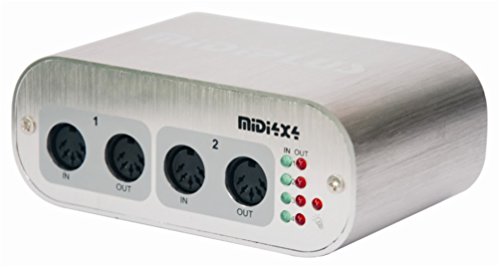
- Four MIDI inputs and four outputs
- USB-powered with low-latency operation
- Compact and driver-free on Mac and Windows
Best For: Home studios needing multiple traditional MIDI connections
Best for Hybrid Rigs

- Standalone USB host for 5-pin MIDI gear
- Expandable to eight USB MIDI device ports
- Advanced routing with cross-platform software
Best For: Hybrid setups combining USB and legacy MIDI hardware
Best MIDI Splitter
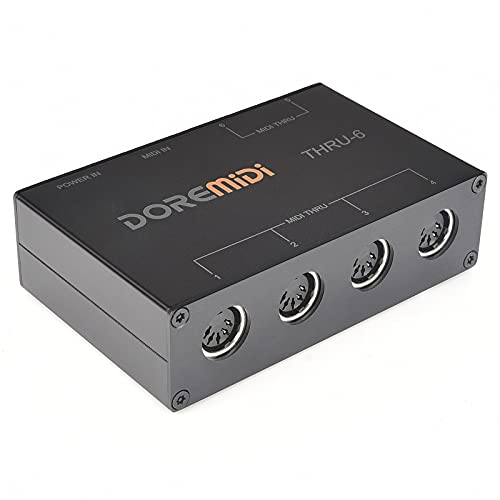
- One MIDI input feeds six outputs
- Standard 16-channel MIDI communication
- USB-powered plug-and-play operation
Best For: Sending one controller signal to multiple MIDI devices
Best All-Around Pick – Arturia MiniFuse 2
For shoppers comparing midi interfaces under 300, the Arturia MiniFuse 2 is a versatile choice when you also need USB audio recording. It combines two combo inputs, balanced outputs, headphone monitoring, and 5-pin MIDI connections in a compact interface.
Best For: Home-studio musicians recording vocals, guitars, synths, or other instruments alongside MIDI gear.
Pros:
- Includes 5-pin MIDI input and output for synths, controllers, and drum machines.
- Two combo mic/instrument/line inputs with 48V phantom power support flexible recording.
- Loopback, USB hub connectivity, and bundled creative software add practical versatility.
- Backed by an extensive 5-year warranty.
Cons:
- It is an audio-and-MIDI interface rather than a dedicated multi-port MIDI patch bay.
- The included USB hub is limited to one USB Type-A connection and 250mA.
The MiniFuse 2 stands out when your setup needs both recording and traditional MIDI I/O. Its beginner-friendly workflow, broad software bundle, and long warranty make it a strong general-purpose option.
Best MIDI Thru Box – CME MIDI Thru5 WC
CME MIDI Thru5 WC 1-in-5-out MIDI Thru | 5-pin DIN, High-speed, Optional Bluetooth
Check Price On AmazonAmong midi interfaces under 300, the CME MIDI Thru5 WC is a focused solution for duplicating one MIDI source across multiple devices. Its 1-in-5-out design uses standard 5-pin MIDI connections and USB-C for power.
Best For: Studio or live setups that need one keyboard, sequencer, or controller to feed up to five MIDI devices.
Pros:
- Provides one MIDI input and five MIDI outputs for straightforward signal distribution.
- Supports all MIDI channels and messages, including clock, SysEx, timecode, and MPE.
- High-speed optocoupler design is intended to reduce errors, dropout, and jitter.
- Compact, lightweight housing suits crowded studios, mobile rigs, and pedalboards.
Cons:
- It is a MIDI Thru device, not a USB MIDI interface for computer data.
- The USB-C port provides power only.
- It does not offer MIDI merging, filtering, or multiple MIDI inputs.
The MIDI Thru5 WC is best viewed as a dependable signal distributor rather than a computer interface. Choose it when your main requirement is sending one MIDI stream to several hardware destinations with minimal complexity.
Best for Large MIDI Rigs – ESI M4U eX
If you need extensive connectivity while comparing midi interfaces under 300, the ESI M4U eX offers eight adaptable MIDI ports. Its class-compliant USB 3.0 connection, standalone operation, and integrated USB hub make it suitable for complex studio or live configurations.
Best For: Musicians and producers managing several MIDI instruments, controllers, and USB peripherals from one central hub.
Pros:
- Eight configurable MIDI ports can operate as inputs or outputs.
- Colored LEDs provide quick visual feedback on the current port configuration.
- Standalone routing and merging allow operation without a computer.
- Built-in USB 3.0 hub provides three additional USB connections.
Cons:
- Its larger feature set may be more than needed for a small MIDI setup.
- Optional Windows drivers are needed for complex multi-device and multi-client operation.
- It is focused on MIDI and USB expansion rather than audio recording.
The M4U eX is a strong choice when port count and routing flexibility matter most. Its standalone functionality also makes it useful for hardware-based rigs that should remain operational without a computer.
Best Routing Features – CME U6MIDI Pro
The CME U6MIDI Pro is a compact contender among midi interfaces under 300 for users who need more than simple input and output. It provides 3-in-3-out MIDI, standalone routing, filtering, merging, and broad compatibility through USB-C.
Best For: Hardware-focused musicians who need configurable MIDI splits, merges, filters, or mappings across computers and mobile devices.
Pros:
- Offers 3 MIDI inputs and 3 MIDI outputs with standalone operation.
- Router, filter, merge, split, and mapping functions expand setup flexibility.
- Works with macOS, iOS, Windows, Android, Linux, and Chrome OS.
- Compact 3.49-ounce design is easy to fit into portable rigs.
Cons:
- It provides MIDI only and does not include audio inputs or outputs.
- Advanced routing and filtering require the UxMIDI Tools software.
- Its one-year manufacturer warranty is shorter than the MiniFuse 2’s stated coverage.
The U6MIDI Pro is particularly compelling when MIDI management is the priority. Its small footprint and cross-platform support suit modern mobile and hardware setups, while the routing tools provide room to grow.
Best All-in-One Studio Choice – Behringer UMC404
For shoppers comparing midi interfaces under 300, the Behringer U-PHORIA UMC404 is a versatile studio-focused option with four inputs, four outputs, and dedicated MIDI I/O. Its MIDAS-designed preamps and phantom power make it suitable for recording multiple microphones or instruments.
Best For: Home studios and musicians who need four-channel USB audio plus MIDI connectivity.
Pros:
- 4×4 USB audio interface with MIDI input and output.
- Four MIDAS-designed microphone preamps with +48V phantom power.
- Supports common software including Pro Tools, Ableton Live, and Cubase.
- Offers up to 24-bit/192 kHz operation according to the listed specifications.
Cons:
- At 2.7 pounds, it is less portable than compact MIDI-only interfaces.
- The supplied notes list 96 kHz audio resolution in one feature description, despite a 192 kHz maximum specification.
The UMC404 is the strongest fit here when MIDI is part of a broader recording setup. Its multiple preamps and 4×4 routing provide more expansion than a basic MIDI interface, though its larger format may be unnecessary for simple controller-to-computer use.
Best MIDI Routing Flexibility – Nektar MIDIFLEX4
Among midi interfaces under 300, the Nektar MIDIFLEX4 stands out as a dedicated four-port MIDI solution. Its configurable routing and standalone merge or split modes make it useful for connecting several MIDI devices without adding a full audio interface.
Best For: Keyboard players and hardware-based setups that need flexible MIDI routing.
Pros:
- Four-port MIDI interface with USB connectivity.
- Configures as 1-in/3-out, 2-in/2-out, or 4-out.
- Supports standalone MIDI-split and MIDI-merge functions.
- Includes Bitwig 8-Track with software instruments and effects.
Cons:
- It is a MIDI-focused interface rather than a microphone or instrument audio interface.
- The supplied notes do not specify included MIDI cables or other physical accessories.
The MIDIFLEX4 is the most purpose-built choice for managing multiple MIDI connections. Automatic port detection and LED indicators simplify setup, while the standalone modes add flexibility for hardware rigs that do not always need a computer.
Best Portable Audio and MIDI Pick – Zoom U-24
For portable shoppers researching midi interfaces under 300, the Zoom U-24 combines MIDI I/O with two XLR/TRS combo inputs and RCA outputs. Battery operation and optional iPad compatibility make it a practical choice for mobile recording and compact live setups.
Best For: Musicians who want a lightweight, portable audio interface with MIDI connectivity.
Pros:
- Compact 2-channel interface with two XLR/TRS combo inputs.
- Includes MIDI input and output plus RCA outputs.
- Can run on two AA batteries or an optional AC adapter.
- Supports recording and playback up to 24-bit/96 kHz.
Cons:
- It provides two audio inputs rather than the UMC404’s four.
- iPad connection requires a separately sold Apple camera adapter and power arrangements.
- The supplied notes list a one-year replacement warranty.
The U-24 is a strong middle ground for users who need real audio inputs as well as MIDI but value portability. It offers more mobile flexibility than a desktop-focused interface, although larger recording sessions may require more inputs.
Best All-Around Routing – 4×4 USB MIDI Interface
For musicians comparing MIDI interfaces under 300, this 4×4 USB MIDI interface is a practical choice for connecting several traditional MIDI devices to a Mac or Windows computer. It provides four MIDI inputs and four outputs, USB bus power, and activity indicators for straightforward setup.
Best For: Home studios and computer-based setups that need multiple MIDI inputs and outputs.
Pros:
- Four MIDI inputs and four MIDI outputs, providing 64 MIDI channels.
- High-speed USB connection with low-latency operation.
- USB-powered design requires no external power supply.
- Compact enclosure and no driver required for use with compatible Mac and Windows software.
Cons:
- Uses a USB B connection rather than USB-C.
- Designed for MIDI connectivity, not audio recording.
This is a strong value-oriented option when you need traditional multi-port MIDI connectivity without adding a separate power supply or complicated driver installation.
Best for Hybrid Rigs – CME H2MIDI Pro
Among MIDI interfaces under 300, the CME H2MIDI Pro stands out for hybrid setups that mix USB and traditional 5-pin MIDI hardware. It can operate as a standalone USB host, connect to a computer over USB-C, and provide software-configurable routing, filtering, mapping, and preset recall.
Best For: Producers and performers combining USB MIDI controllers, legacy MIDI gear, and mobile or desktop devices.
Pros:
- Connects USB class-compliant MIDI devices directly to 5-pin DIN MIDI hardware without a computer.
- Supports up to eight USB MIDI device ports when expanded with a standard USB hub.
- Works with macOS, Windows, iOS, Android, Linux, and ChromeOS.
- HxMIDI Tools enables routing, filtering, mapping, and up to four saved presets.
Cons:
- Its advanced routing features require setup through HxMIDI Tools.
- The unit provides one 5-pin MIDI input and one output, rather than multiple DIN ports.
With broad operating-system support and flexible USB-host functions, the H2MIDI Pro is the most versatile pick here for compact hybrid MIDI systems and performance-oriented routing.
Best MIDI Splitter – MIDI Thru-6 USB Interface
For shoppers looking at MIDI interfaces under 300, the MIDI Thru-6 Box is a focused solution for sending one MIDI signal to multiple devices. Its 1-in/6-out design distributes incoming messages across six 5-pin MIDI outputs and uses USB power for convenient operation.
Best For: Live performers and studio users who need to feed one controller or synthesizer signal to up to six MIDI devices.
Pros:
- One MIDI input distributes messages to six MIDI outputs.
- Supports standard 16-channel MIDI communication and standard MIDI commands.
- USB-powered and requires no batteries.
- Plug-and-play design is compatible with MIDI equipment and listed music software.
Cons:
- It is a splitter, not a multi-input USB MIDI interface.
- Limited to 16 standard MIDI channels.
- Requires a 5V DC USB power supply.
This box makes sense when the main requirement is reliable one-to-six MIDI distribution. It is less suitable for recording several independent MIDI sources or managing complex two-way routing.
How We Picked the Best Midi Interfaces Under 300
We focused on practical connectivity, compatibility, expandability, and value. The selection includes traditional USB MIDI interfaces, multi-port units for larger hardware rigs, MIDI thru boxes for distributing one signal to several devices, and audio interfaces with built-in MIDI I/O. We also considered whether each design supports plug-and-play operation, standalone use, portable setups, or computer-free routing.
Because these products serve different roles, port count alone does not determine which one is best. A compact interface may be ideal for one keyboard and a laptop, while a studio with several synthesizers may benefit more from independent inputs and outputs or dedicated MIDI splitting.
Quick Comparison
- Best for compact hybrid setups: Arturia MiniFuse 2 or Zoom U-24.
- Best for several MIDI devices: ESI M4U eX or a 4×4 USB MIDI interface.
- Best for MIDI signal distribution: CME MIDI Thru5 WC or a six-output MIDI thru box.
- Best for straightforward USB MIDI: Nektar MIDIFLEX4 or CME U6MIDI Pro.
- Best for audio recording plus MIDI: Behringer UMC404 or Zoom U-24.
- Best for USB host connections: CME H2MIDI Pro.
Key Buying Factors for MIDI Interfaces Under $300
Port Configuration
Count the MIDI inputs and outputs you need today, then allow room for expansion. A 1-in/1-out interface works for a single controller, but multiple synths, drum machines, and rack units may require 4×4 or 8-port connectivity. Remember that MIDI thru outputs duplicate an incoming signal; they do not provide the same independent routing as separate USB MIDI ports.
USB, Host, and Standalone Operation
Check whether the interface connects directly to a computer, acts as a USB host for class-compliant controllers, or can operate without a computer. Standalone functionality is especially useful for hardware-only rigs, while USB host support helps connect modern controllers to MIDI hardware without relying on a laptop.
Compatibility and Power
Confirm operating-system support and whether drivers are required. Class-compliant products are generally easier to use across current Mac and PC systems. Also check how the unit is powered: USB bus power is convenient, while dedicated power can be preferable for larger setups or reliable standalone routing.
Audio Features and Build
If you also record microphones or instruments, an audio/MIDI interface can save desk space and simplify monitoring. Look for the required input types, output connections, preamp count, and sample-rate support. For touring or mobile work, prioritize sturdy construction, clear status indicators, and a compact footprint.
Who Should Buy Which Midi Interfaces Under 300?
Choose a compact audio/MIDI model if you need recording and MIDI in one portable box. Choose a multi-port USB interface if your setup includes several independent hardware instruments. Select a MIDI thru unit when one controller or sequencer must feed multiple destinations simultaneously. If your main goal is connecting a controller to older hardware, a dedicated USB MIDI interface is usually the simplest and most cost-effective choice.
Before buying, map every device in your signal chain and identify which connections must be independent. That quick exercise will help you avoid paying for unused audio features—or discovering that a low-cost interface lacks the outputs your studio needs.