The best MIDI interface can make a major difference when you connect hardware synths, keyboards, drum machines, and computers. The right model gives your setup reliable timing, enough inputs and outputs, and a connection style that fits the way you make music.
This roundup includes dedicated MIDI interfaces, USB-to-MIDI cables, MIDI thru boxes, and audio interfaces with built-in MIDI connectivity. Use the guide below to narrow the choices by routing needs, device count, computer compatibility, and budget.
Best 10 Midi Interfaces Picks for 2026
Best Flexible MIDI Router

- 3-in-3-out MIDI routing and filtering
- USB-C support for major operating systems
- Low-latency support for advanced MIDI messages
Best For: Complex hardware and computer-based MIDI setups
Best MIDI Interface With Audio I/O
Focusrite Scarlett 4i4 4th Gen

- MIDI In/Out with four inputs and outputs
- Two mic preamps and two Hi-Z inputs
- 24-bit/192kHz recording with Auto Gain
Best For: Home studios combining MIDI and multi-channel audio
Best MIDI Thru Box

- Distributes one MIDI input to five outputs
- USB-C provides power, not MIDI data
- Compact design for studios, stages, and pedalboards
Best For: Hardware rigs needing one-to-five MIDI distribution
Best Compact Recording Interface
Focusrite Scarlett 2i2 4th Gen

- Two mic preamps and two Hi-Z inputs
- 24-bit/192kHz recording with 120dB dynamic range
- Auto Gain, Clip Safe, and Air modes
Best For: Solo recording setups with vocals and instruments
Best Plug-and-Play Cable

- Driver-free USB-to-MIDI connection
- Filtering, mapping, and routing tools
- Works across major desktop and mobile OSes
Best For: Single-instrument computer or mobile MIDI connections
Best for Audio Recording
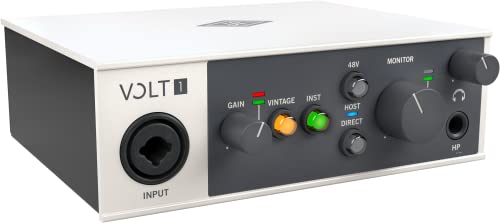
- Vintage-mode preamp for recording
- Up to 24-bit/192 kHz audio
- Compatible with computers and selected iOS devices
Best For: Recording vocals and instruments alongside MIDI gear
Best Standalone MIDI Hub

- Standalone USB host mode without a computer
- Expandable to eight USB MIDI ports
- Advanced routing, filtering, and presets
Best For: Multi-device studio, live, and pedalboard MIDI setups
Best Studio-Ready Pick
Focusrite Scarlett Solo 3rd Gen
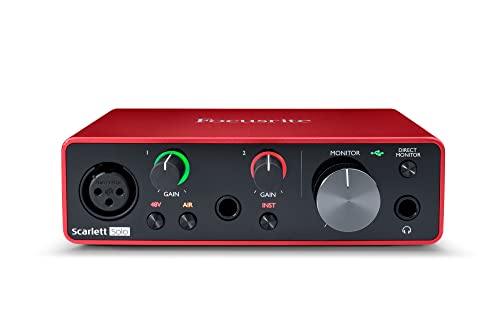
- 24-bit/192kHz recording
- Air mode and Hi-Z input
- Includes recording software
Best For: Solo recording, podcasts, and home studios
Best Simple USB-C MIDI Cable
LEKATO MIDI to USB-C Interface

- 1 MIDI input and 1 output
- Plug-and-play Windows and Mac setup
- Power and signal LED indicators
Best For: Basic keyboard and synthesizer connections
Best Broad-Compatibility MIDI Cable
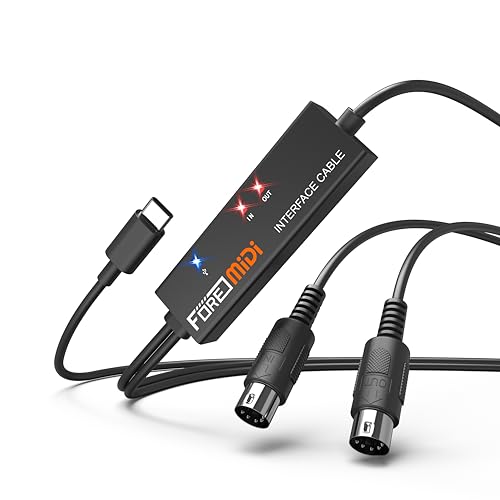
- 1 MIDI input and 1 output
- Supports iOS, Android, Mac, and Windows
- Plug-and-play with activity indicators
Best For: Mobile and computer MIDI recording
Best Flexible MIDI Router – CME U6MIDI Pro
The CME U6MIDI Pro is a versatile choice for musicians who need reliable midi interfaces for computers and standalone hardware setups. Its three MIDI inputs and outputs support routing, merging, splitting, filtering, and mapping across major operating systems.
Best For: Musicians managing multiple keyboards, synthesizers, drum machines, or DAW-based MIDI configurations.
Pros:
- Plug-and-play USB-C connectivity works with macOS, iOS, Windows, Android, Linux, and Chrome OS.
- Standalone 3-in-3-out operation includes MIDI routing, filtering, merge, split, and thru functions.
- Supports MIDI channels and messages including clock, SysEx, MIDI timecode, and MPE.
- Compact, lightweight design with stated low latency, no jitter, and error-free transmission.
Cons:
- Advanced configuration requires the UxMIDI Tools software.
- Provides MIDI connectivity only, not audio inputs or outputs.
- The supplied warranty is one year.
Choose the U6MIDI Pro when flexible routing and broad device compatibility matter more than audio recording features. It is particularly well suited to complex MIDI rigs that need dependable synchronization.
Best MIDI Interface With Audio I/O – Focusrite Scarlett 4i4 4th Gen
The Focusrite Scarlett 4i4 4th Gen combines MIDI I/O with a full USB-C audio interface, making it a practical option for producers who record microphones, guitars, synthesizers, and drum machines. It offers four inputs, four outputs, and high-resolution recording support.
Best For: Home studios that need MIDI connectivity alongside multiple audio inputs and outputs.
Pros:
- Includes MIDI In/Out, two mic preamps, two Hi-Z inputs, four line inputs, and four line outputs.
- Supports up to 24-bit/192kHz recording with a stated 120dB dynamic range.
- Auto Gain and Clip Safe help manage recording levels.
- Includes Air modes and a software bundle with Pro Tools Intro+, Ableton Live Lite, Cubase LE, and Hitmaker Expansion.
Cons:
- It is larger and heavier than a dedicated MIDI-only interface.
- Its listed operating-system compatibility is limited to macOS, Windows, and iOS.
- May offer more audio functionality than users seeking MIDI connectivity alone need.
The Scarlett 4i4 is a strong studio hub if your midi interfaces shortlist also needs serious audio recording capability. Its broader I/O makes it better suited to growing setups than simple two-channel recording rigs.
Best MIDI Thru Box – CME MIDI Thru5 WC
CME MIDI Thru5 WC 1-in-5-out MIDI Thru | 5-pin DIN, High-speed, Optional Bluetooth
Check Price On AmazonThe CME MIDI Thru5 WC is a focused solution for distributing one MIDI signal to five destinations. Unlike computer-oriented midi interfaces, it is a standalone 5-pin DIN MIDI thru box, with USB-C used for power rather than data.
Best For: Stage and studio setups that need to send one controller or sequencer signal to several MIDI devices.
Pros:
- One MIDI input feeds five MIDI outputs for straightforward hardware distribution.
- Supports MIDI channels and messages including notes, controllers, clock, SysEx, timecode, and MPE.
- High-speed optocouplers are designed to reduce data errors, signal dropout, and ground-loop issues.
- Compact, lightweight housing suits pedalboards, travel rigs, and space-limited installations.
Cons:
- It does not connect to software over USB; the USB-C port is for power only.
- It provides MIDI thru distribution rather than configurable routing, merging, or filtering.
- Requires standard 5-pin MIDI cables and a separate 5V USB power source.
For simple one-to-many hardware distribution, the MIDI Thru5 WC is more direct than a full computer MIDI interface. It is a good fit when dependable signal duplication is the priority and software control is unnecessary.
Best Compact Recording Interface – Focusrite Scarlett 2i2 4th Gen
The Focusrite Scarlett 2i2 4th Gen is a compact USB-C audio interface for recording microphones and instruments, with two inputs and two outputs. It belongs in a midi interfaces comparison when you need basic computer connectivity for a small setup, though the supplied specifications do not list dedicated MIDI In/Out.
Best For: Solo musicians and small home studios recording vocals, guitars, or other instruments.
Pros:
- Two mic preamps and two Hi-Z instrument inputs support common recording sources.
- Offers 24-bit/192kHz recording and a stated 120dB dynamic range.
- Auto Gain and Clip Safe help prevent poor levels and clipping during takes.
- Includes Air modes plus Pro Tools Intro+, Ableton Live Lite, Cubase LE, and Hitmaker Expansion.
Cons:
- The supplied notes do not list dedicated MIDI input or output.
- Two inputs and two outputs limit expansion for larger hardware setups.
- Listed operating-system compatibility covers macOS, Windows, and iOS.
The Scarlett 2i2 is best viewed as an entry-level recording interface rather than a dedicated MIDI hub. Choose it for straightforward vocal and instrument recording; users connecting several MIDI devices should consider a model with explicit MIDI I/O.
Best Plug-and-Play Cable – U2MIDI Pro
The CME U2MIDI Pro is a practical choice for musicians who need a straightforward computer-to-instrument connection. This USB MIDI cable supports major desktop and mobile operating systems without drivers, while built-in filtering, mapping, and routing add useful flexibility for MIDI interfaces setups.
Best For: Connecting a single MIDI instrument, keyboard, controller, or synthesizer to a computer or mobile device.
Pros:
- Plug-and-play support for macOS, iOS, Windows, Android, Linux, and ChromeOS.
- Supports all 16 MIDI channels and messages including clock, SysEx, MTC, and MPE.
- UxMIDI Tools adds filtering and routing, while smart LEDs and color-coded plugs simplify setup.
- Designed for low latency and jitter with a 6.5-foot cable and integrated USB connector technology.
Cons:
- Provides one MIDI input and one MIDI output rather than multiple ports.
- Uses USB-A, which may require an adapter with some newer devices.
Choose the U2MIDI Pro when simplicity, broad compatibility, and cable-style portability matter more than multi-device expansion. Its software controls make it more capable than a basic MIDI lead.
Best for Audio Recording – Volt 1
The Universal Audio Volt 1 is an audio-focused option for creators who also need MIDI device compatibility. It combines a Vintage-mode preamp with recording resolution up to 24-bit/192 kHz, making it a better fit for recording microphones and instruments than for advanced MIDI routing alone.
Best For: Home recording setups that need an audio interface with compatibility for MIDI devices, microphones, and electric guitar.
Pros:
- Vintage mode is designed to provide the character of UA’s classic 610 preamps.
- Supports up to 24-bit/192 kHz recording with crystal-clear converters.
- Works with Mac, Windows, iPad, and iPhone, with the listed Apple adapter and power requirements for some mobile setups.
- Includes access to LUNA and compatibility with supported music software and plug-ins.
Cons:
- Its supplied specifications focus on two-channel audio rather than dedicated MIDI routing features.
- Some iPad and iPhone configurations require an external Volt power supply and Apple Lightning adapter.
The Volt 1 makes the most sense when MIDI is part of a broader recording workflow. If your priority is complex MIDI merging, filtering, or standalone hardware control, another product in this roundup is more specialized.
Best Standalone MIDI Hub – H4MIDI WC
The CME H4MIDI WC is built for complex MIDI interfaces setups that need to work with or without a computer. It can connect USB MIDI devices directly to MIDI hardware, expand through a USB hub, and provide routing, merging, splitting, filtering, and mapping controls for studio or live use.
Best For: Producers, guitarists, and performers managing multiple USB MIDI devices, MIDI hardware, and pedalboard-based setups.
Pros:
- Standalone USB host mode connects class-compliant devices directly to MIDI hardware without a computer.
- Supports up to eight USB MIDI device ports through a standard USB hub.
- Offers MIDI thru, split, merge, mapping, and filtering through HxMIDI Tools.
- Flexible 5V USB or 9V DC power supports studio, mobile, and stage use.
Cons:
- Advanced configuration may be more than needed for a simple one-device connection.
- WIDI Bluetooth MIDI requires the optional WIDI Core module.
- Its one-year warranty is shorter than the lifetime software-update support described in the notes.
For users who need a central MIDI routing box, the H4MIDI WC is the most expandable choice here. Presets, standalone power, and broad device support make it particularly useful for changing live or pedalboard configurations.
Best Studio-Ready Pick – Focusrite Scarlett Solo 3rd Gen
The Focusrite Scarlett Solo 3rd Gen is a strong choice for musicians and podcasters who need a compact recording interface alongside their MIDI interfaces setup. It combines one XLR microphone preamp, one Hi-Z instrument input, Air mode, and recording up to 24-bit/192kHz in a small USB-C-compatible interface.
Best For: Solo vocalists, guitarists, podcasters, and home studios seeking high-quality audio recording.
Pros:
- High-performance preamp with switchable Air mode for added clarity.
- Dedicated instrument input with high headroom for guitar or bass.
- 24-bit/192kHz converters, low-noise outputs, and useful included software.
- Compatible with macOS, Windows, and iPadOS.
Cons:
- Only one XLR microphone input and one instrument input.
- Designed for audio recording rather than direct 5-pin MIDI connectivity.
The Scarlett Solo is best when clean vocal and instrument recording matters more than extensive I/O. It is a capable, compact foundation for a computer-based studio, but dedicated MIDI hardware will still be needed for traditional keyboard or synthesizer connections.
Best Simple USB-C MIDI Cable – LEKATO MIDI to USB-C Interface
The LEKATO MIDI Cable is a straightforward option for connecting a keyboard, synthesizer, digital piano, or drum pad to a computer or iPad. For shoppers comparing MIDI interfaces, its 1-in/1-out design, plug-and-play setup, and status LEDs make it practical for basic recording and editing workflows.
Best For: Standard MIDI setups using a 5-pin MIDI device and a USB-C-equipped host.
Pros:
- Provides one MIDI input and one MIDI output with support for 16 channels.
- Built-in driver enables plug-and-play use with Windows and macOS.
- LED indicators show power and MIDI signal activity.
- Designed for low-latency, stable MIDI transmission.
Cons:
- Compatibility with some vintage or specialized synthesizers may require additional settings or support.
- Its 1-in/1-out design is intended for basic MIDI connections rather than larger studio rigs.
This cable is a convenient choice when you need a direct connection between one traditional MIDI setup and a modern USB-C host. Check your device compatibility before buying, particularly if you use older or proprietary equipment.
Best Broad-Compatibility MIDI Cable – T1 USB-C MIDI Interface
The T1 MIDI USB Interface connects traditional 5-pin MIDI equipment to USB-C devices for recording and track editing. Among MIDI interfaces, it stands out for broad stated compatibility across iOS, Android, Windows, and macOS, plus support for keyboards, synthesizers, electronic drums, and other MIDI hardware.
Best For: Mobile and computer-based musicians connecting 5-pin MIDI gear across multiple operating systems.
Pros:
- Offers one MIDI input and one MIDI output across 16 channels.
- Plug-and-play design with built-in driver and activity indicators.
- Works with iOS, Android, Windows, and macOS systems.
- Supports common music software including GarageBand, FL Studio, Cubase, and CoreMIDI.
Cons:
- USB A-C adapter is not included.
- Requires a device with a standard 5-pin DIN MIDI port.
- Its single-in/single-out configuration may not suit larger MIDI systems.
The T1 is a flexible cable-style interface for musicians who move between mobile devices and computers. Its broad compatibility and integrated cable simplify setup, while the missing USB A-C adapter is worth accounting for if your host uses a Type-A port.
How We Picked These Midi Interfaces
We selected these models to cover the main ways musicians use MIDI today, from connecting one keyboard to a computer to routing several hardware instruments across a larger studio. We considered MIDI input and output count, USB connection type, plug-and-play convenience, compatibility with modern computers, portability, and whether each product solves a distinct setup problem.
The list includes dedicated interfaces such as the CME U6MIDI Pro, compact USB-to-MIDI cables such as the CME U2MIDI Pro and LEKATO cable, MIDI distribution hardware such as the CME MIDI Thru5 WC, and audio interfaces from Focusrite and Universal Audio that combine recording and MIDI-related studio duties. Always confirm the exact ports and included cables before ordering.
Quick Comparison
| Best For | Recommended Type | What to Look For |
|---|---|---|
| One keyboard or synth | USB-to-MIDI cable | Reliable input and output, suitable connector, low-latency operation |
| Several MIDI devices | Multi-port MIDI interface | Multiple independent ports and clear routing controls |
| Sending one source to several devices | MIDI thru box | Dedicated thru outputs and dependable signal distribution |
| Recording audio and MIDI | Audio interface with MIDI | Mic preamps, audio I/O, MIDI ports, and monitoring features |
| Modern USB-C setup | USB-C MIDI interface or cable | Native compatibility, included adapter needs, and driver support |
Key Buying Factors for Midi Interfaces
Ports and Routing
Count the MIDI devices you plan to connect now, then allow room for expansion. A single in/out cable is sufficient for one keyboard or synth, while a multi-port unit is better for several instruments that need independent sequencing. If one controller must feed multiple sound modules, a MIDI thru box can be more appropriate than a computer interface.
USB and Device Compatibility
Check whether the interface uses USB-C, USB-A, or a dedicated cable. USB-C models are convenient with newer laptops and tablets, but an adapter may still be needed for older computers. Also verify operating-system support and whether the product is class-compliant or requires software.
Audio Versus MIDI Needs
A MIDI interface does not replace an audio interface unless it includes audio inputs and outputs. Choose a Focusrite or Universal Audio model when you also need microphone recording, instrument inputs, headphone monitoring, or speakers. Choose a dedicated MIDI product when your priority is hardware routing and MIDI connectivity.
Timing, Filtering, and Portability
For larger setups, look for stable timing, filtering or mapping features, and enough physical separation between ports. Portable cable-style interfaces are convenient for travel, while powered or rack-friendly hardware may be preferable for permanent studios.
Who Should Buy Which Midi Interfaces?
Choose the CME U2MIDI Pro, LEKATO MIDI cable, or T1 Type-C interface for a simple, low-cost connection between one computer and a MIDI device. The CME U6MIDI Pro is better suited to musicians managing multiple hardware instruments and needing more flexible routing. Select the CME H4MIDI WC when advanced USB-host functionality is important, and choose the CME MIDI Thru5 WC when distributing one MIDI signal to several outputs is the main task.
For producers who need both MIDI and audio recording, the Focusrite Scarlett 4i4 offers more I/O than the 2i2 or Solo. The Scarlett 2i2 is a balanced choice for a small home studio, while the Solo fits basic one-microphone or instrument setups. The Universal Audio Volt 1 is another compact audio-interface option for musicians who want a streamlined recording setup with a premium-oriented workflow.