Upgrading to faster wired networking does not always require replacing your entire infrastructure. The best network switches with SFP ports combine multigigabit copper connections with flexible fiber or SFP+ uplinks for connecting servers, access points, storage, and other switches.
This roundup covers compact unmanaged models, easy-managed Omada options, PoE-capable switches, and industrial hardware. Use the buying guide below to match port speed, management features, power delivery, and installation requirements to your network.
Best 10 Network Switches with Sfp Ports Picks for 2026
Best Managed Option
TP-Link Omada ES210X-M2 8-Port 2.5G Switch

- Eight 2.5G RJ45 ports and dual 10G SFP+ uplinks
- Supports VLAN, IGMP Snooping, and loop prevention
- Omada cloud management in a fanless metal case
Best For: Managed home-office and small-business networks
Best for NAS Flexibility

- Five 2.5G ports plus one 10G SFP+ port
- Three modes include link aggregation and VLAN
- Supports 12K jumbo frames for large transfers
Best For: NAS setups needing link aggregation or simple VLAN isolation
Best Industrial PoE Power
4-Port Managed PoE++ Switch with Dual SFP

- 90W PoE++ per port with a 360W total budget
- Dual SFP uplinks include single-mode and multimode modules
- DIN-rail design with redundant DC inputs and web management
Best For: Industrial PoE cameras and high-power edge devices
Best Brand-Backed 2.5G Value
TRENDnet 6-Port Switch with 10G SFP+

- Five 2.5GBASE-T ports plus one 10G SFP+ slot
- 45Gbps switching capacity with fanless operation
- Wall-mountable metal design and lifetime protection
Best For: Simple home-lab and small-office 2.5Gb networks
Best PoE Pick
YuanLey 8-Port Gigabit PoE Switch
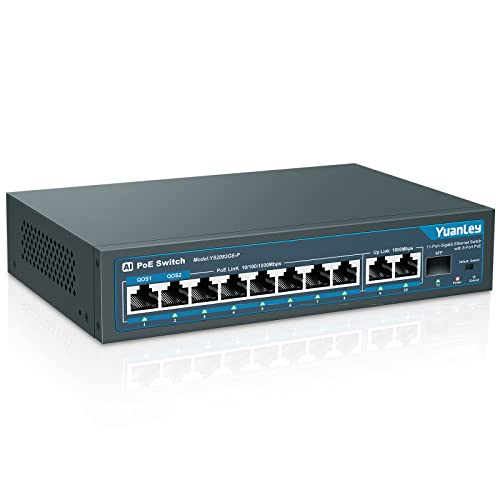
- 8 PoE+ ports with 120W total power
- Two Gigabit uplinks plus 1G SFP
- Plug-and-play VLAN isolation and watchdog
Best For: Small PoE camera and access-point networks
Best 2.5G Upgrade

- Eight multigigabit 2.5GBASE-T ports
- 10G SFP+ slot for high-speed uplinks
- Fanless, wall-mountable metal housing
Best For: SMB and home networks adding 2.5G access
Best Compact Multigigabit

- Four adaptive 2.5G Ethernet ports
- Two 10G SFP ports
- Fanless design with one-key VLAN
Best For: Compact NAS, gaming, and Wi-Fi 6 networks
Best Value 2.5G Switch – NICGIGA 6-Port 2.5G Unmanaged Switch
For buyers comparing network switches with SFP ports, the NICGIGA 6-Port model combines four adaptive 2.5G RJ45 ports with two 10G SFP+ ports. Its unmanaged design keeps setup simple, while the fanless metal enclosure suits desktop or wall-mounted installations.
Best For: 2.5G NAS setups, Wi-Fi 6 access points, gaming PCs, and users who want plug-and-play connectivity with fast SFP+ uplinks.
Pros:
- Four 2.5G RJ45 ports and two 10G SFP+ ports
- 60Gbps switching capacity for handling heavy traffic
- Fanless metal design with desktop and wall-mount options
- Supports 1G and 2.5G SFP modules, sold separately
Cons:
- Unmanaged, so it lacks VLAN and other advanced configuration features
- SFP modules are not included
This is a practical choice when fast multi-gigabit ports matter more than network management. Its two SFP+ connections add useful flexibility for compatible uplinks, servers, or NAS hardware.
Best Managed Option – TP-Link Omada ES210X-M2 8-Port 2.5G Switch
The TP-Link Omada ES210X-M2 is a strong option among network switches with SFP ports for users who need both multi-gigabit access and network controls. It provides eight 2.5G RJ45 ports, dual 10G SFP+ uplinks, and easy management through Omada.
Best For: Home offices, small businesses, Wi-Fi 6 or Wi-Fi 7 access points, NAS devices, and networks that need VLAN or traffic-management features.
Pros:
- Eight 2.5G RJ45 ports for connecting multiple devices
- Two 10G SFP+ slots for high-speed uplinks
- VLAN, IGMP Snooping, and Auto Loop Prevention support
- Fanless operation and durable metal construction
Cons:
- More features may be unnecessary for a basic plug-and-play network
- Its rated upper temperature is 40°C
With the most copper ports in this group and two SFP+ uplinks, the ES210X-M2 is well suited to expanding networks. Omada cloud management adds centralized control without sacrificing silent operation.
Best for NAS Flexibility – UGREEN 6-Port 2.5G Switch
UGREEN’s six-port switch stands out among network switches with SFP ports by adding selectable Standard, Link Aggregation, and VLAN modes. Five 2.5G RJ45 ports pair with a 10G SFP+ port, giving NAS and small-team setups a flexible way to handle fast local transfers.
Best For: NAS users who want link aggregation, high-speed file transfers, or a flexible SFP+ connection to a server or router.
Pros:
- Five 2.5G RJ45 ports plus one 10G SFP+ port
- Link Aggregation mode can provide up to 5Gbps for supported multi-port devices
- VLAN mode isolates ports 1-4 while maintaining access to ports 5-6
- Supports up to 12K jumbo frames and desktop or wall mounting
Cons:
- SFP+ module is not included
- It is an unmanaged Layer 2 switch, so configuration options are limited
The three-mode design gives this UGREEN model more flexibility than a basic unmanaged switch, particularly for compatible NAS hardware. It is a good fit when link aggregation or simple port isolation is more important than centralized management.
Best Compact Managed Switch – TP-Link Omada ES206X-M2 5-Port 2.5G Switch
The TP-Link Omada ES206X-M2 is a compact choice for buyers seeking network switches with SFP ports and straightforward management features. It offers five 2.5G RJ45 ports, one 10G SFP+ slot, and Omada control in a fanless metal enclosure.
Best For: Small desktop networks, compact home offices, and users who need one high-speed SFP+ uplink alongside several 2.5G wired connections.
Pros:
- Five 2.5G RJ45 ports and one 10G SFP+ slot
- Supports VLAN, IGMP Snooping, and Auto Loop Prevention
- Plug-and-play operation with additional configuration options
- Fanless metal case supports desktop or wall mounting
Cons:
- Only one SFP+ slot is available
- Five total ports may limit expansion in larger networks
This model balances a small footprint with useful managed features. It makes sense for a compact multi-gigabit network where one 10G SFP+ connection is enough and silent operation is desirable.
Best Compact 2.5G Upgrade – 5-Port 2.5Gb Switch with 10G SFP+
This compact unmanaged switch is a practical choice for shoppers comparing network switches with SFP ports for a faster home office, gaming, or NAS setup. It combines five 2.5Gb RJ45 ports with a 10G SFP+ port, while its fanless metal housing keeps operation quiet.
Best For: 2.5Gb home networks, gaming PCs, Wi-Fi 6 equipment, 4K video, and NAS connections.
Pros:
- Five 2.5Gb Ethernet ports plus one 10G SFP+ port
- 45Gbps switching bandwidth and backward compatibility with slower Ethernet devices
- Fanless metal design with 6KV lightning protection
- Plug-and-play setup with no software configuration
Cons:
- Unmanaged design provides no VLAN or traffic-management controls
- Full 2.5Gb performance requires compatible devices and Cat6-or-better pure copper cabling
- SFP and DAC compatibility should be confirmed before purchase
Choose this model when you want a quiet, straightforward multigigabit upgrade with a high-speed fiber or DAC uplink. It is less suitable for managed business networks that require advanced configuration.
Best Industrial PoE Power – 4-Port Managed PoE++ Switch with Dual SFP
For industrial installations, this managed unit stands out among network switches with SFP ports by combining four Gigabit PoE++ ports with dual fiber uplinks. It supports up to 90W per port, redundant DC inputs, DIN-rail mounting, and browser-based management for remote device control.
Best For: Industrial cabinets, high-power cameras, access points, and other PoE devices requiring fiber uplinks and monitoring.
Pros:
- Four IEEE 802.3bt Type 4 ports with a 360W total power budget
- Two SFP slots with both single-mode and multimode modules included
- Dual redundant 48–57V DC terminal inputs
- Web management includes VLAN, QoS, SNMP, IGMP, diagnostics, and PoE controls
Cons:
- Power supply is not included
- Industrial managed features may be excessive for basic home networking
- Fiber uplinks are limited to 1Gb-class SFP modules
This is the specialized choice for installations where uptime, high PoE output, and cabinet monitoring matter. Its DIN-rail format and redundant inputs make it better suited to industrial deployments than ordinary desktop networks.
Best Brand-Backed 2.5G Value – TRENDnet 6-Port Switch with 10G SFP+
The TRENDnet TEG-S5061 is a strong everyday option among network switches with SFP ports, offering five 2.5GBASE-T ports and a dedicated 10G SFP+ slot. Its unmanaged design, fanless metal enclosure, and wall-mounting support make it easy to add faster links without complicated setup.
Best For: Small offices, home labs, desktop networks, and users adding 2.5Gb connectivity with a 10Gb uplink.
Pros:
- Five multigigabit ports support 100Mbps, 1Gbps, and 2.5Gbps
- Dedicated SFP+ slot supports 1Gbps or 10Gbps connections
- 45Gbps switching capacity and backward compatibility
- Fanless, wall-mountable metal housing with lifetime manufacturer protection
Cons:
- Unmanaged operation lacks VLAN and other configuration features
- Maximum operating temperature is listed as 40°C
- It has only one SFP+ slot
Pick the TEG-S5061 if you want a recognizable-brand, low-maintenance switch for a mixed 2.5Gb and 10Gb network. It delivers useful uplink flexibility without adding management overhead.
Best PoE Pick – YuanLey 8-Port Gigabit PoE Switch
If you need network switches with SFP ports for powering cameras or wireless access points, this YuanLey model combines eight Gigabit PoE+ ports with two Gigabit uplinks and one 1G SFP port. Its 120W budget, VLAN isolation, and plug-and-play setup make it practical for small installations.
Best For: Small office, home, and commercial networks using PoE cameras, access points, or IP phones.
Pros:
- Eight 802.3af/at PoE+ ports with up to 120W total power.
- Includes two Gigabit uplinks and a 1G SFP port for longer-distance connections.
- Unmanaged plug-and-play operation with VLAN isolation and AI watchdog auto-restart.
- Metal enclosure and fanless, noise-free operation.
Cons:
- It is not compatible with 24V passive PoE.
- The SFP port is limited to 1Gbps.
- Only ports 1 and 2 receive the stated QoS priority treatment.
This is a capable choice when PoE power is more important than advanced management. The SFP port adds fiber connectivity, while the unmanaged design keeps installation simple.
Best 2.5G Upgrade – TRENDnet 9-Port 2.5G Switch
Among network switches with SFP ports, the TRENDnet TEG-S5091 stands out for combining eight 2.5GBASE-T ports with a dedicated 10G SFP+ slot. It is an unmanaged, fanless option for upgrading compatible SMB or home networks while keeping existing Cat5e-or-better cabling.
Best For: Home labs, small businesses, and users who need 2.5Gbps copper access with a 10Gbps uplink.
Pros:
- Eight ports support 100Mbps, 1Gbps, and 2.5Gbps connections.
- Dedicated 10G SFP+ slot supports 1Gbps or 10Gbps links.
- 60Gbps switching capacity and backward compatibility with common Ethernet speeds.
- Fanless metal design with wall-mounting flexibility.
Cons:
- It is unmanaged, so configuration features are limited.
- The SFP+ slot requires a compatible module or cable, which is not specified as included.
- Its power input is 12V DC rather than an integrated power supply.
Choose this model if you want a straightforward 2.5G switch with a faster fiber or SFP+ uplink. Its quiet, wall-mountable housing suits desktop and small-network deployments.
Best Compact Multigigabit – YuanLey 6-Port 2.5G Switch
This compact YuanLey is one of the more flexible network switches with SFP ports for a 2.5G desktop setup. It provides four adaptive 2.5G copper ports and two 10G SFP ports, along with one-key VLAN, fanless cooling, and desktop or wall-mount placement.
Best For: 2.5G NAS, gaming PCs, Wi-Fi 6 access points, and compact home labs.
Pros:
- Four RJ-45 ports support 10/100/1000Mbps and 2.5Gbps connections.
- Two 10G SFP ports support 1G and 2.5G modules.
- Up to 60Gbps switching capacity for high-volume local traffic.
- Fanless metal design with one-key VLAN and 6KV lightning protection.
Cons:
- SFP modules are not included.
- It has only four copper Ethernet ports.
- The VLAN function is controlled by a simple switch rather than full management software.
Its small footprint and dual SFP layout make it a strong fit for focused, high-speed networks. It is especially useful when a NAS, server, or Wi-Fi 6 setup needs more than Gigabit performance without requiring a managed switch.
How We Picked These Network Switches with Sfp Ports
We selected switches that offer a practical combination of copper Ethernet connectivity and SFP or SFP+ uplink capability. The lineup includes 2.5GbE desktop switches for home and small-office upgrades, managed models for networks that need VLANs and monitoring, PoE switches for powered devices, and industrial hardware for demanding installations.
We also considered port count, supported link speeds, power-delivery standards, enclosure design, cooling, installation options, and whether each switch is suited to straightforward plug-and-play use or more advanced network configuration.
Quick Comparison
| Best For | Recommended Type | What to Look For |
|---|---|---|
| Simple desktop upgrades | Unmanaged 2.5GbE switch | Fanless design, multigigabit ports, and one 10G SFP+ uplink |
| VLANs and network monitoring | Easy-managed switch | Web management, VLAN support, QoS, and link aggregation where available |
| Wi-Fi access points and cameras | PoE or PoE+ switch | 802.3af/at support, adequate power budget, and suitable uplinks |
| High-power devices | PoE++ managed switch | 802.3bt support, high total wattage, and reliable thermal management |
| Racks, fiber runs, or industrial sites | Switch with multiple SFP ports | Fiber compatibility, mounting options, temperature rating, and redundant connectivity |
Key Buying Factors for Network Switches with Sfp Ports
Port Speeds and Uplink Types
Confirm whether the copper ports support 1GbE, 2.5GbE, or faster connections. SFP is not automatically synonymous with 10GbE: standard SFP commonly supports 1GbE, while SFP+ is typically used for 10GbE. Check the switch and transceiver specifications before purchasing.
Managed Versus Unmanaged Operation
Unmanaged switches are easiest to install and work well for basic expansion. Managed and easy-managed models are better when you need VLAN segmentation, QoS prioritization, diagnostics, traffic control, or centralized administration. They require more setup but provide substantially more control.
PoE Budget and Standards
For access points, cameras, phones, and other powered devices, calculate the combined wattage rather than checking only the per-port rating. Match the switch to 802.3af, 802.3at, or 802.3bt requirements, and leave reserve capacity for startup loads and future additions.
Transceiver and Cabling Compatibility
SFP ports may use fiber modules, direct-attach copper cables, or compatible Ethernet transceivers. Verify supported speeds, connector types, fiber modes, cable distances, and vendor compatibility. A 10G uplink is useful only when the connected hardware and cabling can use it.
Installation and Cooling
Fanless metal desktop switches are quiet and convenient for offices or media cabinets. Rack, DIN-rail, and industrial models are better for structured installations but may have different ventilation, temperature, and mounting requirements.
Who Should Buy Which Network Switches with Sfp Ports?
Choose an unmanaged 2.5GbE model if you want a simple upgrade for a desktop, home lab, NAS, or small office. An easy-managed Omada switch is a stronger fit when you already use compatible networking equipment or need VLANs and centralized oversight.
Choose a PoE switch for cameras, phones, or wireless access points, paying close attention to the total power budget. Select the industrial PoE++ model for high-power devices, DIN-rail deployment, or harsher environments. Finally, favor a switch with multiple SFP or SFP+ ports when you need several fiber links, redundant uplinks, or a more expandable backbone.