A good phone document scanning stand turns a smartphone into a more reliable document digitizer. It helps keep pages flat, framing consistent, and image blur to a minimum.
Whether you’re scanning receipts, forms, photos, or archive materials, the right stand can save time and improve scan quality without needing a dedicated scanner.
Best 10 Phone Document Scanning Stand Picks for 2026
Work-Anywhere Scan Stand
Adjustable Phone & Tablet Document Scanner
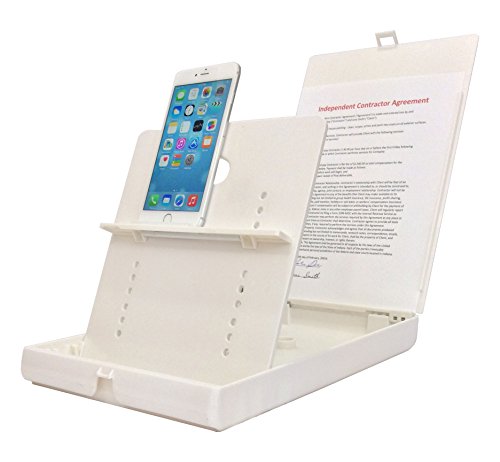
- Supports phones and tablets for document scanning
- Angled frame helps reduce shadows and glare
- Folds down for travel and quick setup
Best For: Portable OCR scanning, document capture, and assistive workflows
Mini Copy Stand
Compact Smartphone Copy Stand for Small Items

- Designed for photos, checks, jewelry, and coins
- Compact base assembles in under a minute
- Includes magnetic board and adjustable phone alignment
Best For: Casual digitizing of small objects and old photos
Flexible Clamp Holder
Flexible Photo Album Scanning Stand
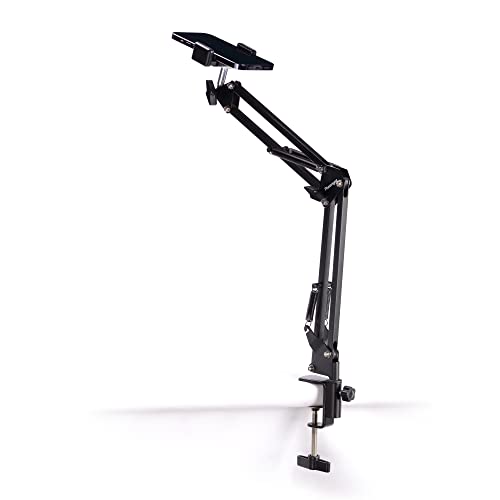
- Clamp holds most smartphones securely
- Flexible arm works on desks and tables
- Good for hands-free scanning and photos
Best For: Tabletop photo album scanning and casual hands-free use
Heavy-Duty Overhead Stand
Heavy-Duty Phone Holder for Scanning

- Weighted base improves stability
- 15-inch arm adjusts for height and angle
- Fits many smartphones, even with thicker cases
Best For: Stable overhead document scanning and desk recording
Overhead Scanning and Creative Desk Stand
Hands-Free Document and Coin Use

- Steady overhead holder for scanning documents and notes
- Adjustable angle for photos, videos, and livestreams
- Also works for coin photography and craft projects
Best For: users who need a stable overhead setup for scanning and light content creation
Heavy-Duty Recording Stand
Stable Overhead Shots With Long Arm
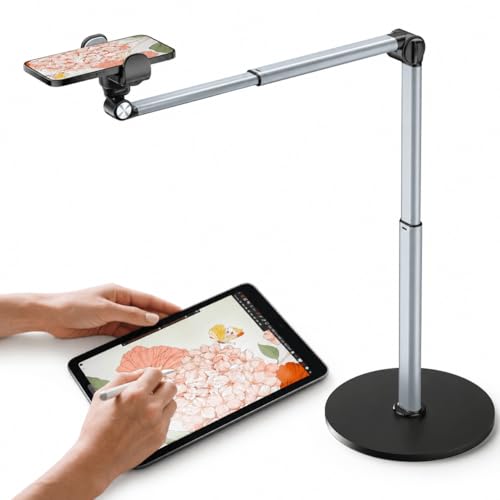
- Aluminum build and weighted base improve stability
- 12.3-inch arm offers 180° bend and 360° rotation
- Good for cooking, art, filming, and scanning
Best For: creators and workspace users who want a heavier, more adjustable overhead stand for recording and scanning
Flat-Lay Document Station
Open-Base Top-Down Phone Stand

- Lay-flat platform skips clamp pressure and button blocking
- Open U-shaped base keeps the work area clear
- Fixed-height design gives a consistent overhead view
Best For: users who want an uncluttered top-down stand for scanning multi-page documents and filming flat-lay content
Lighted overhead mount
Overhead Phone Mount with LED Light
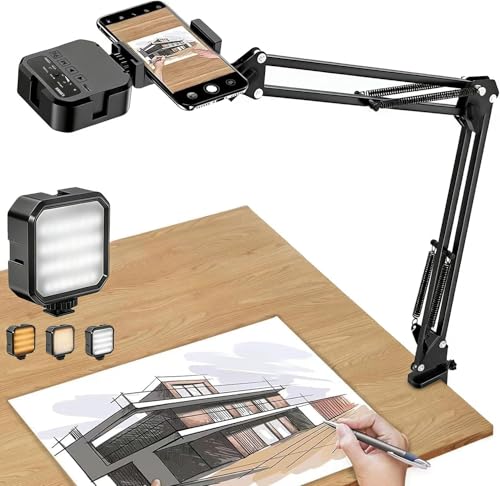
- LED light with 3 modes and 10 brightness levels
- Flexible arm for overhead positioning
- Fits phones 2.4-4 inches wide
Best For: Lighted hands-free scanning and desk recording
Simple overhead scanner stand
Adjustable Overhead Phone Holder

- Stable overhead setup for scanning documents
- Good for receipts, notes, and worksheets
- Compact tabletop design
Best For: Basic hands-free document scanning at a desk
Compact document stand

- Overhead support for scanning papers
- Universal phone compatibility
- Small tabletop footprint
Best For: Compact desk-based scanning and overhead recording
Work-Anywhere Scan Stand – Adjustable Phone & Tablet Document Scanner
If you want a phone document scanning stand that’s built for fast, aligned scans, this ScanJig model is designed to turn your phone or tablet into a portable document scanner. Its angled layout helps reduce shadows and glare, and the built-in guides make it easier to capture documents, checks, books, and photos with consistent positioning.
Best For: People who want a sturdy, travel-friendly scanning stand for document OCR, mobile scanning, and assistive use.
Pros:
- Adjustable support for phones and tablets, including larger devices
- Angled design helps avoid shadows and reduce glare without extra lighting
- Built-in guides support precise alignment and accurate OCR on the first scan
- Folds shut for backpack or suitcase storage
Cons:
- More specialized than a basic clamp-style phone holder
- Best suited to scanning workflows rather than casual overhead use
This is a practical pick if your priority is clean, repeatable scans rather than maximum adjustability. The design is clearly centered on efficient document capture, and the portability makes it useful for work from home, travel, or accessibility setups.
Mini Copy Stand – Compact Smartphone Copy Stand for Small Items
This phone document scanning stand is geared toward small-format digitizing tasks, making it a good fit when you need to capture photos, checks, jewelry, coins, or other compact objects with a smartphone. The adjustable column and smartphone alignment hole help position your camera over the board for tidy, repeatable shots.
Best For: Students, hobbyists, and casual users scanning small items or old photos with a smartphone.
Pros:
- Compact base is easy to assemble and transport
- Smartphone positioning hole helps align the camera over the board
- Includes a floating magnet board to keep originals flat
- Adjustable column and bracket offer flexible height and positioning
Cons:
- Not intended for professional or large-format work
- Better suited to small items than full-page scanning workflows
For light-duty digitizing, this stand offers a simple setup with some thoughtful alignment tools. It’s especially appealing if you want a small, portable copy stand made for occasional scanning rather than a bulkier studio solution.
Flexible Clamp Holder – Flexible Photo Album Scanning Stand
PHOTOMYNE Flexible Phone Holder with Clamp – Photo Album Scanning Stand | Steady Shots. Better Scans
Check Price On AmazonIf you’re shopping for a simple phone document scanning stand for albums or tabletop scanning, this clamp-style holder focuses on steady overhead positioning. Its flexible arm and adjustable clamp make it easy to hold most smartphones over a flat surface for hands-free shots and scanning tasks.
Best For: Users who want a lightweight, clamp-based stand for photo albums, DIY scanning, and tabletop use.
Pros:
- Adjustable clamp secures most smartphones
- Flexible arm works on desks, tables, kitchens, and other flat surfaces
- Lightweight design is easy to move and store
- Useful for hands-free scanning and photography tasks
Cons:
- Less purpose-built than dedicated copy stands for document alignment
- Flexible-arm designs may not feel as rigid as heavier overhead rigs
This is a practical everyday holder if you need an adaptable mount more than a specialized scanning station. It fits a wide range of smartphone setups and is easy to position where you need it.
Heavy-Duty Overhead Stand – Heavy-Duty Phone Holder for Scanning
For a more rigid phone document scanning stand, this overhead model is built around a weighted aluminum base and a long adjustable arm. It’s designed to keep your phone steady over a desk or counter for document scanning, filming, cooking, painting, and similar top-down tasks.
Best For: Users who want a sturdy overhead mount for document scanning, recording, and other top-down work.
Pros:
- Heavy weighted base improves stability during overhead use
- 15-inch arm with height and angle adjustment supports flexible positioning
- 360-degree rotating hinge makes it easy to switch viewing angles
- Universal phone clamp fits many smartphones, including thicker cases
Cons:
- Bulkier than simpler clamp-style holders
- Maximum load is limited to 2.2 pounds
If you want a steadier overhead setup than a lightweight clip-on stand, this model offers a strong mix of reach, adjustability, and support. The added weight and reinforced hinge design make it better suited to regular desk-based scanning and recording.
Overhead Scanning and Creative Desk Stand – Hands-Free Document and Coin Use
If you want a simple phone document scanning stand for everyday desk use, this overhead holder is built around stability and flexibility. It keeps your smartphone steady for scanning receipts, invoices, notes, books, and forms, while also working well for coin photos, tutorials, and other overhead tasks.
Best For: Home, office, school, or hobby users who need a stable overhead setup for scanning and light content creation.
Pros:
- Hands-free overhead design helps keep documents and pages clear in frame for scanning.
- Adjustable phone position supports photos, videos, livestreams, and demonstrations.
- Useful for coin photography, craft work, cooking videos, and other desktop projects.
- Compact tabletop format helps keep the workspace organized.
Cons:
- Made with a plastic enclosure rather than metal construction.
- Listed as a generic brand with no warranty description provided.
Overall, this is a practical pick if you want one stand to cover scanning and basic overhead shooting without overcomplicating the setup. Its main strength is versatility for everyday desk tasks.
Heavy-Duty Recording Stand – Stable Overhead Shots With Long Arm
This phone document scanning stand is better suited to creators who want a sturdier, more adjustable overhead setup. The aluminum build and weighted base are designed to keep the phone stable while the 12.3-inch arm gives you room to position the camera for scanning, cooking, art, or filming.
Best For: Creators and workspace users who want a heavier, more adjustable overhead stand for recording and scanning.
Pros:
- Heavy-duty aluminum construction with a weighted base for added stability.
- 12.3-inch retractable arm adjusts up and down, bends 180°, and rotates 360°.
- Useful for overhead cooking videos, painting, piano tutorials, and document scanning.
- Compatible with most smartphones and designed for easy setup.
Cons:
- Bulkier tower-style design may take up more desk space than simpler stands.
- Clip-holder style may not appeal to buyers who prefer a lay-flat platform design.
For buyers who care most about stability and reach, this model offers a strong mix of weight, adjustability, and versatility. It is a solid choice when you want a more premium overhead stand for regular recording tasks.
Flat-Lay Document Station – Open-Base Top-Down Phone Stand
For buyers focused on a clean phone document scanning stand, this flat-lay mount takes a minimalist approach. The hollow top platform and open U-shaped base are designed to keep the phone aligned above your desk while leaving the workspace clear for papers, products, and hands.
Best For: Users who want an uncluttered top-down stand for scanning multi-page documents and filming flat-lay content.
Pros:
- Lay-flat platform avoids clamp pressure and keeps setup simple.
- Open U-shaped base leaves the front and center area unobstructed.
- Fixed-height design helps maintain a level, consistent field of view.
- Works well for scanning, crafting, drawing, baking, and unboxing videos.
Cons:
- Fixed height means less flexibility than adjustable-arm stands.
- Listed as lightweight plastic rather than a heavy-duty metal build.
This is a smart choice if you prefer a straightforward top-down station over a fully adjustable arm system. Its biggest advantage is the clear, open workspace it creates for scanning and flat-lay filming.
Lighted overhead mount – Overhead Phone Mount with LED Light
If you want a phone document scanning stand that also adds light, this overhead phone mount is built for simple hands-free shooting. The adjustable arm and integrated LED make it easier to capture documents, tutorials, and overhead content when your workspace needs a little extra illumination.
Best For: Users who want an overhead phone stand with built-in supplemental lighting for scanning, recording, and desk work.
Pros:
- Built-in LED light with 3 modes and 10 brightness levels
- Flexible overhead arm helps position the phone at different angles
- Compatible with smartphones 2.4-4 inches wide
- Clamp includes a rubber pad to help protect the desktop
Cons:
- Light is meant as supplemental lighting, not a replacement for full lighting setups
- Max load is 2 lbs, so it is not for heavier cameras or devices
- Battery runtime is limited at the highest brightness setting
Overall, this is a practical choice if you need a scanning stand that doubles as a lighted overhead mount. It is best suited to smartphones and lighter desk-based tasks rather than heavy-duty gear.
Simple overhead scanner stand – Adjustable Overhead Phone Holder
This phone document scanning stand is designed for stable, hands-free overhead use at a desk. It gives you a straightforward way to capture receipts, notes, worksheets, and other papers while keeping your phone positioned for photos, videos, and everyday office tasks.
Best For: Students, teachers, and office users who want a simple overhead phone holder for document scanning and desk work.
Pros:
- Stable overhead setup for document scanning and overhead photos
- Useful for receipts, notes, worksheets, and old photos
- Adjustable positioning for photos, videos, and live demonstrations
- Compact tabletop design for home offices and workspaces
Cons:
- Warranty is only 1 month
- Plastic construction may feel basic compared with premium metal stands
- Designed for desktop use, so it is not a portable travel solution
For buyers focused on function over extras, this stand keeps the setup simple and task-oriented. It makes sense for routine scanning and general overhead content without unnecessary complexity.
Compact document stand – Compact Desk Scanner Stand
If you need a phone document scanning stand for a desk setup, this adjustable overhead holder keeps your phone in place for scanning and hands-free shooting. It is positioned as a practical desktop accessory for documents, tutorials, and creative work where a stable overhead angle matters.
Best For: People who want a compact tabletop phone stand for scanning papers, recording tutorials, and overhead desk projects.
Pros:
- Stable overhead support for document scanning and overhead photos
- Works with receipts, notes, worksheets, and old photos
- Universal phone compatibility for a wide range of devices
- Compact desk footprint for home offices and work areas
Cons:
- Plastic build may not feel as sturdy as heavier-duty options
- Warranty coverage is limited to 1 month
- Best suited to desktop use rather than portable on-the-go scanning
This is a straightforward pick if you mainly need a small overhead stand for everyday scanning and desk content. It keeps the feature set simple while covering the core use cases that matter most.
How We Picked the Best Phone Document Scanning Stand
For this roundup, we focused on stands that make overhead capture stable, repeatable, and easy to use. The best options offer solid build quality, reliable adjustability, a secure phone grip, and a base that stays planted during scanning. We also favored designs that work well for documents of different sizes, from receipts and checks to full letter pages and photo albums.
Quick Comparison
In this category, the biggest differences are usually arm style, base design, and flexibility. Fixed-height copy stands tend to be best for accuracy and repeatable framing. Articulating overhead stands are more versatile for mixed use, while models with clamps or open bases can make it easier to work directly over books, albums, or loose papers.
Key Buying Factors for a Phone Document Scanning Stand
Stability and Weight
A stable base matters more than almost anything else. Look for a heavy base, a broad footprint, or reinforced aluminum construction to reduce wobble and keep scans sharp.
Height and Reach
Make sure the arm height and horizontal reach match what you plan to scan. Taller stands help with books and larger documents, while shorter setups can feel more precise for desk work.
Phone Security and Adjustability
The phone holder should grip securely and allow easy angle changes. Smooth tilt and rotation are helpful for dialing in a perfectly centered overhead shot.
Lighting and Workflow
Some setups work best with an external lamp or ring light, especially in dim rooms. If you scan often, choose a Phone Document Scanning Stand that lets you set up quickly and repeat the same position every time.
Compatibility
Check whether the stand fits your phone size, case thickness, and any accessories you use. If you may also scan photos or film overhead videos, versatility can be a big plus.
Who Should Buy Which Phone Document Scanning Stand?
Choose a compact stand if you mainly scan receipts, IDs, or single pages and want something easy to store. Pick an overhead arm stand if you need more flexibility for books, albums, or content creation. For office or home archiving, a sturdier, more rigid model is usually worth the extra cost because it delivers more consistent results. If lighting is a challenge, consider a stand with an integrated light or plan to pair your setup with a separate desk lamp.
In short, the best choice depends on how often you scan, how large your materials are, and how much precision you need. A well-chosen Phone Document Scanning Stand can dramatically improve speed, clarity, and consistency.