The best right-angle Thunderbolt cables make high-performance connections easier to route, especially when a straight plug crowds your laptop, dock, monitor, or external drive.
This roundup compares 10 options across Thunderbolt 4, Thunderbolt 5, and USB4 specifications, with attention to bandwidth, charging, length, certification, and everyday cable management.
Best 10 Right Angle Thunderbolt Cables Picks for 2026
Top Thunderbolt 5 Pick
Cable Matters 80G Right Angle Thunderbolt 5 Cable
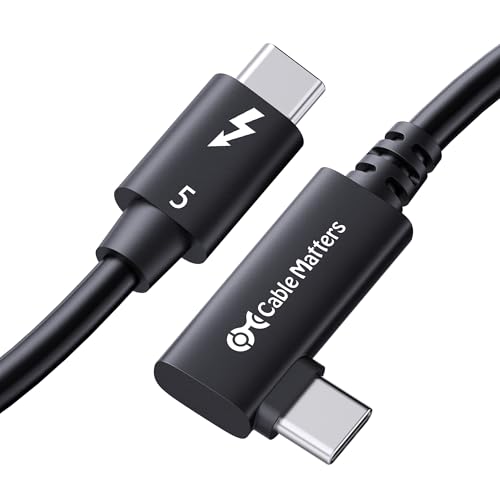
- 80Gbps bidirectional data with up to 120Gbps video bandwidth
- Supports up to 240W power delivery
- Intel Certified and backward compatible
Best For: Thunderbolt 5 workstations and multi-display creative setups
Best Supported Option
Plugable Thunderbolt 5 Right Angle Cable

- 80Gbps bandwidth with up to 120Gbps Bandwidth Boost
- Supports 240W EPR charging
- Includes lifetime North American support
Best For: High-performance docks, eGPUs, and supported multi-display systems
Best Long Thunderbolt 5 Alternative
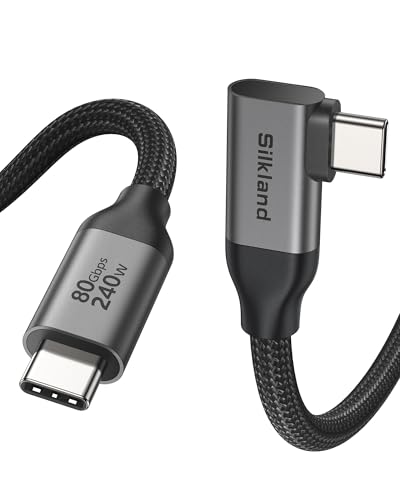
- 80Gbps data with up to 120Gbps display bandwidth
- 240W PD 3.1 charging support
- 4-foot braided cable with reinforced construction
Best For: Creators and gamers needing extra reach for docks and displays
Best Value USB4 Cable

- 40Gbps USB4 data and 8K video support
- Up to 240W USB PD 3.1 charging
- Backward compatible with older USB and Thunderbolt standards
Best For: Flexible laptop, monitor, and docking-station setups
Fastest Next-Gen Option

- Up to 80Gbps bidirectional data transfer
- 120Gbps display bandwidth for high-resolution setups
- 240W charging with a compact 90-degree connector
Best For: Thunderbolt 5 workstations, creative workflows, and gaming displays
Best Certified Choice
Right Angle Thunderbolt 4 Cable

- Thunderbolt and USB-IF certified
- 40Gbps data with dual 4K or single 8K video
- Up to 240W EPR charging in a 2.6-foot cable
Best For: Certified Mac, Windows, display, and docking-station connections
Best for Thunderbolt 5 Performance
- Up to 80Gbps data transfer
- Up to 240W charging
- High-resolution multi-display support
Best For: Thunderbolt 5 workstations, creative workloads, and demanding displays
Best Ultra-Short Cable
6-Inch 40Gbps Right Angle Cable

- Compact 0.5-foot length
- 40Gbps data transfer
- 8K at 60Hz support
Best For: Nearby monitor, dock, and portable-display connections
Best for Compact Everyday Setups
1-Foot 40Gbps Right Angle Cable

- 40Gbps Thunderbolt-compatible data
- Up to 240W PD 3.1 charging
- Short design for tidy desks
Best For: Nearby laptop, dock, monitor, and SSD connections
Top Thunderbolt 5 Pick – Cable Matters 80G Right Angle Thunderbolt 5 Cable
For shoppers seeking right angle thunderbolt cables for demanding creative or workstation setups, this Intel Certified Cable Matters model combines Thunderbolt 5 bandwidth with a space-saving 90-degree connector. Its 2.6-foot length suits desktops, docks, and nearby peripherals.
Best For: Creative professionals, high-performance laptops, and multi-monitor workstations needing Thunderbolt 5 speed and high-wattage charging.
Pros:
- Supports 80Gbps bidirectional data and up to 120Gbps video bandwidth.
- Can support dual 6K or 8K displays and triple 4K at 144Hz configurations.
- Offers up to 240W power delivery and backward compatibility with Thunderbolt 3, Thunderbolt 4, USB4, and USB-C.
- Intel Certified design is intended for stable, reliable daily use.
Cons:
- The 2.6-foot length may be limiting for larger desk layouts.
- Thunderbolt 5-level performance requires compatible host devices and peripherals.
This is a strong choice when maximum bandwidth, display capability, and charging are more important than extra cable reach. The angled connector also helps keep connections neater and reduce strain around crowded ports.
Best Supported Option – Plugable Thunderbolt 5 Right Angle Cable
This Plugable cable is one of the more capable right angle thunderbolt cables for high-performance docks, eGPUs, monitors, and external SSDs. The 2.6-foot cable pairs Thunderbolt 5 connectivity with a reinforced 90-degree connector for tighter desk arrangements.
Best For: Users building Thunderbolt 5 docking stations or video-heavy setups who value broad compatibility and ongoing technical support.
Pros:
- Provides 80Gbps bidirectional bandwidth, with Bandwidth Boost up to 120Gbps for supported display workloads.
- Supports up to 240W EPR charging.
- Backward compatible with Thunderbolt 4, Thunderbolt 3, and USB4 devices.
- Includes lifetime support from Plugable’s North American connectivity team.
Cons:
- The short 2.6-foot length is best suited to close-proximity connections.
- Maximum display and data performance depends on the connected hardware.
Plugable’s combination of Thunderbolt 5 performance, a reinforced right-angle plug, and lifetime support makes this a practical pick for users who want a future-ready cable with help available after purchase.
Best USB4 Value – Cable Matters 40Gbps Right Angle USB4 Cable
If you need right angle thunderbolt cables but your setup is centered on USB4 rather than Thunderbolt 5, this 6.6-foot Cable Matters option offers a useful balance of reach and performance. Its angled USB-C connector is designed for tight spaces, docks, and monitor connections.
Best For: USB4 users who want a longer cable for 8K video, fast data transfers, and high-power USB-C charging.
Pros:
- Supports up to 40Gbps USB4 bandwidth.
- Handles DP Alt Mode video, including 8K and high-refresh-rate 4K output.
- Supports up to 240W USB-C PD 3.1 EPR charging.
- Backward compatible with USB 3.1, USB 3.2, USB 2.0, and Thunderbolt 4 devices.
Cons:
- Its 40Gbps ceiling is lower than the Thunderbolt 5 cables in this roundup.
- The supplied notes do not claim Thunderbolt 5 compatibility.
The longer 6.6-foot reach is the main advantage here, especially where a short cable would not reach comfortably. Choose it for versatile USB4 connectivity rather than the highest available Thunderbolt bandwidth.
Best Long Thunderbolt 5 Alternative – Silkland 80Gbps USB4 Cable
For shoppers comparing right angle thunderbolt cables with more reach, Silkland’s 4-foot USB4 cable offers Thunderbolt 5-oriented performance alongside a space-saving 90-degree connector. It is designed for docks, displays, laptops, SSDs, and other USB-C equipment.
Best For: Gamers, creators, and desk users who need a 4-foot cable with high-speed data, multi-display support, and 240W charging.
Pros:
- Supports up to 80Gbps bidirectional data transfer.
- Advertises up to 120Gbps display bandwidth for dual 8K/6K, triple 4K at 144Hz, or single 4K at 540Hz configurations.
- Supports 240W PD 3.1 charging.
- Uses a braided nylon exterior, aluminum shell, triple shielding, and testing for more than 5,000 bends.
Cons:
- Actual performance depends on the connected devices.
- The supplied notes indicate that some industry standards are met, rather than identifying a specific certification.
- At 4 feet, it may still be short for widely separated equipment.
This is a compelling middle-ground option when you want Thunderbolt 5-class bandwidth and a more forgiving length than the 2.6-foot models. Its construction features and two-year customer care add practical reassurance for frequent use.
Best Value USB4 Cable – 40Gbps Right Angle Cable
For shoppers comparing right angle thunderbolt cables, the Cable Matters USB4 cable offers a practical balance of speed, charging power, and compatibility. Its 90-degree-style connector design is suited to tight spaces, while USB4 performance reaches up to 40Gbps with support for high-resolution displays.
Best For: Laptop, monitor, and docking-station setups that need 40Gbps data, 8K video support, and high-wattage charging in a 3.3-foot cable.
Pros:
- Supports up to 40Gbps data transfer and 8K video through DisplayPort Alt Mode.
- USB PD 3.1 EPR supports charging up to 240W.
- Backward compatible with USB 3.1, USB 3.2, USB 2.0, and Thunderbolt 4 devices.
- Right-angle connector helps reduce bending in space-constrained setups.
Cons:
- At 3.3 feet, it may be short for some desk layouts.
- Actual performance depends on the connected devices and standards they support.
This is a versatile choice when you want one compact cable for fast transfers, high-resolution video, and powerful charging without committing to the newer 80Gbps class.
Fastest Next-Gen Option – 80Gbps Thunderbolt 5 Cable
Among right angle thunderbolt cables, the Silkland USB4 cable stands out for its advertised 80Gbps bidirectional data rate and broad display capabilities. The 1.6-foot length and 90-degree connector are especially useful for compact desktop, docking-station, and gaming setups.
Best For: Professionals, creatives, and gamers using Thunderbolt 5 or compatible USB4 equipment who want maximum bandwidth, multi-display support, and 240W charging.
Pros:
- Supports up to 80Gbps bidirectional data transfer.
- Advertises up to 120Gbps display bandwidth, including dual 8K/6K at 60Hz or triple 4K at 144Hz.
- Provides 240W charging with PD 3.1 and QC 4.0+ compatibility.
- Braided nylon, aluminum housing, triple shielding, and testing for more than 5,000 bends support durability.
Cons:
- The 1.6-foot length may not suit setups requiring extra reach.
- Maximum speeds and display modes require compatible host devices, displays, and accessories.
- Its advanced capabilities may be unnecessary for basic USB-C charging or data needs.
This is the most performance-oriented option in the group, but its short length and high-end feature set make it best for carefully matched Thunderbolt 5 or USB4 systems.
Best Certified Choice – Right Angle Thunderbolt 4 Cable
For buyers prioritizing certified performance, the Plugable Thunderbolt 4 cable combines a right-angle connection with 40Gbps transfers, 240W EPR charging, and high-resolution video support. Its 2.6-foot length offers a useful middle ground for laptops, displays, docks, and other USB-C setups.
Best For: Users who want a Thunderbolt-certified cable for power delivery, video, and data across compatible Windows, Mac, iPad, smartphone, display, and docking-station devices.
Pros:
- Thunderbolt certified and USB-IF certified.
- Supports 40Gbps data, dual 4K at 120Hz, or single 8K at 60Hz.
- Provides up to 240W EPR charging.
- Compatible with Thunderbolt, USB4, and USB-C devices, with a 90-degree connector and included cable strap.
Cons:
- It offers 40Gbps rather than the 80Gbps bandwidth available from newer USB4/Thunderbolt 5 cables.
- Supported video and charging performance still depends on the connected hardware.
Choose this cable when certification and broad device compatibility matter more than chasing the newest bandwidth tier. The 2.6-foot length and angled design also suit everyday laptop and docking setups.
Best for Thunderbolt 5 Performance – 80Gbps Right Angle Cable
For demanding setups, this option stands out among right angle thunderbolt cables with USB4 speeds up to 80Gbps, support for high-resolution displays, and up to 240W charging. Its 90-degree connector is useful for keeping a laptop, dock, or desk setup tidy.
Best For: Professionals, creatives, and gamers using Thunderbolt 5 or compatible USB4 devices, high-resolution displays, and high-power laptops.
Pros:
- Supports bidirectional data transfer up to 80Gbps, depending on device capability.
- Supports dual 8K/6K at 60Hz, triple 4K at 144Hz, or single 4K at 540Hz with compatible hardware.
- Provides up to 240W PD 3.1 charging and broad Thunderbolt 5/4/3 and USB-C compatibility.
- Braided nylon, aluminum housing, triple shielding, and testing beyond 5,000 bends support durability.
Cons:
- Its highest data and display rates require compatible Thunderbolt 5 or USB4 devices.
- The 3.3-foot length may not suit setups needing a longer cable.
- Display capabilities vary by the connected devices and their supported modes.
This is the most performance-focused choice in the group. Choose it when you need Thunderbolt 5-class bandwidth and charging; for shorter, simpler connections, a lower-speed cable may be more practical.
Best Ultra-Short Cable – 6-Inch 40Gbps Right Angle Cable
This 6-inch model is one of the most compact right angle thunderbolt cables for connecting nearby devices without leaving excess cable on the desk. It combines 40Gbps USB4/Thunderbolt compatibility, 240W charging, and support for 8K video in a short format.
Best For: Tight monitor, dock, laptop, and portable-display setups where minimal cable length and a 90-degree connection are priorities.
Pros:
- Ultra-short 0.5-foot design helps reduce clutter in close-range connections.
- Supports up to 40Gbps data transfer and 8K at 60Hz with compatible devices.
- Offers up to 240W PD 3.1 charging with backward compatibility for lower power levels.
- Reinforced braided construction is rated for 35,000 bends in laboratory testing.
Cons:
- The short length is limiting when connected devices are more than a few inches apart.
- Maximum transfer and display performance requires compatible Thunderbolt 4 or USB4 hardware.
- The right-angle connector is noted as compatible with phone cases up to 5mm thick.
Its main advantage is its compact footprint. It makes the most sense for a fixed, close-range connection rather than flexible routing across a larger desk.
Best for Compact Everyday Setups – 1-Foot 40Gbps Right Angle Cable
For close-range connections, this 1-foot cable offers a practical balance of reach and compact cable management. It is among the more versatile right angle thunderbolt cables, supporting 40Gbps data, high-resolution video, and up to 240W charging across compatible Thunderbolt and USB-C devices.
Best For: Laptop-to-dock, charger, monitor, SSD, and other nearby connections where a short cable helps keep the workspace organized.
Pros:
- Supports up to 40Gbps data transfer and compatibility with Thunderbolt 4/3 and USB4.
- Handles single 8K at 60Hz, 5K at 60Hz, 4K at 144Hz, or dual 4K at 60Hz with compatible hardware.
- Supports up to 240W PD 3.1 charging and multiple charging standards.
- Aluminum housing, braided construction, triple-layer protection, and an E-marker chip support reliable use.
Cons:
- The 1-foot length is intended for nearby devices and may be too short for spread-out setups.
- Full 240W charging and maximum video or data performance require compatible equipment.
- The notes specify compatibility with phone cases under 1.5mm thick.
This is a well-rounded short cable for everyday desk hardware. It offers more reach than the 6-inch alternative while retaining a tidy right-angle profile.
How We Picked the Best Right Angle Thunderbolt Cables
We focused on cables that combine a right-angle USB-C connector with strong performance claims for modern Thunderbolt and USB4 devices. The selection includes Thunderbolt 4 cables rated for up to 40Gbps, newer Thunderbolt 5 options rated for up to 80Gbps, and USB4 alternatives designed to work with compatible Thunderbolt hardware.
We also considered charging support, available lengths, connector design, and practical use cases. Intel certification is an important distinction where listed because it provides additional assurance of Thunderbolt compatibility. However, your computer, dock, display, and peripheral must all support the claimed standard to achieve maximum performance.
Quick Comparison
| Type | Typical Maximum Data Rate | Best For |
|---|---|---|
| Thunderbolt 5 | Up to 80Gbps | New workstations, high-resolution displays, and demanding storage |
| Thunderbolt 4 | Up to 40Gbps | Docks, laptops, monitors, and reliable everyday connectivity |
| USB4 | Up to 40Gbps or 80Gbps, depending on the cable | Flexible USB-C setups and compatible Thunderbolt systems |
Key Buying Factors for Right-Angle Thunderbolt Cables
Bandwidth and Device Compatibility
Match the cable to the slowest device in the connection. An 80Gbps Thunderbolt 5 cable cannot make a Thunderbolt 4 dock run faster, while a 40Gbps cable may limit a newer Thunderbolt 5 setup. Check whether you need Thunderbolt certification, USB4 support, or both.
Charging Power
Several cables in this roundup advertise up to 240W USB Power Delivery or EPR charging. That rating matters for compatible laptops and devices, but the charger and host device must also support the required power profile. For ordinary accessories, a lower-power cable may be sufficient.
Length and Cable Routing
Short cables reduce clutter and are useful between a laptop and a nearby dock or portable SSD. Longer models provide more flexibility for desktop monitors and under-desk equipment, but they can be harder to route neatly. A right-angle plug is most helpful when the cable exits toward the edge of a device rather than bending sharply against it.
Connector Orientation and Construction
Confirm which side the angled connector points toward before buying, particularly if your ports face opposite directions. Look for reinforced housings and a flexible outer jacket, while avoiding tight bends immediately beside the plug.
Who Should Buy Which Right Angle Thunderbolt Cables?
Choose a Thunderbolt 5 cable if you are building a new high-bandwidth workstation, using compatible Thunderbolt 5 devices, or want more headroom for future upgrades. Thunderbolt 4 cables are a practical choice for established docks, monitors, and storage setups that top out at 40Gbps.
USB4 models can offer strong value for mixed USB-C environments, but verify support for your exact devices and desired features. Pick the shortest cable that reaches comfortably for a clean portable setup; choose a longer option when routing around a monitor stand, dock, or desktop accessories is more important than minimizing slack.