Samsung DeX can turn a compatible Galaxy phone into a surprisingly productive desktop setup, but the right dock makes all the difference.
Below, we focus on the best options for stable video output, useful ports, charging, and everyday convenience.
Best 10 Samsung DeX Docking Station Picks for 2026
Classic Samsung Desktop Dock
Samsung DeX Station for Galaxy Note8/S8/S9

- Turns supported Galaxy phones into DeX desktop mode
- Includes HDMI, Ethernet, and 2 USB-A ports
- Built-in fan and fast-charge adapter are included
Best For: Users who want the original Samsung DeX Station experience
Compact USB-C Hub Pick
Anker 5-in-1 HDMI Hub with 85W Passthrough

- Adds HDMI, USB-C data, and two USB-A ports
- Supports up to 85W pass-through charging
- Slim, lightweight design for portable setups
Best For: Portable USB-C users who need a simple monitor hub
Fan-Cooled Samsung Dock
Samsung DeX Pad with Fast Charge Bundle
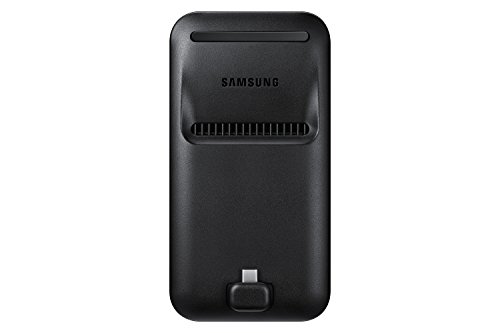
- Built-in fan helps keep the phone cool
- Includes HDMI, 2 USB-A ports, and charging
- Bundle includes charger, USB-C cable, and HDMI cable
Best For: Galaxy owners wanting a bundled DeX pad with cooling
Feature-Rich Multiport Dock
11-in-1 Rotatable USB-C Dock with 65W Adapter
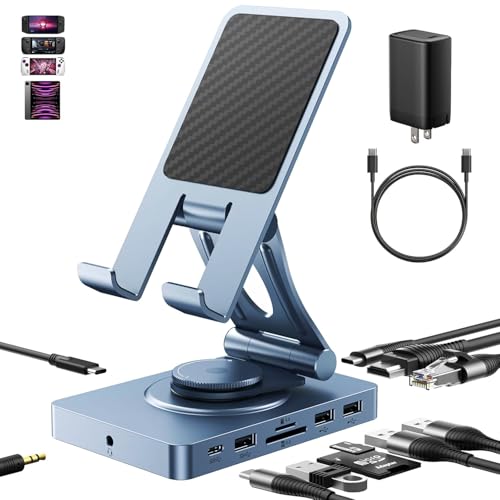
- 11-in-1 layout adds HDMI, Ethernet, audio, and card readers
- Supports 4K@60Hz and up to 100W USB-C input
- Rotatable stand can be used as a dock or tablet holder
Best For: Users who want a multi-device dock with maximum connectivity
Compact DeX Ready Hub
7-in-1 USB-C Docking Station for Phones

- 4K@30Hz HDMI output for desktop-style use
- Includes USB 3.0, USB 2.0, SD/TF, and USB-C charging
- Requires DP Alt Mode for video output
Best For: Samsung Galaxy users who need a compact DeX hub with the essentials
High-Speed Multiport Dock

- 4K@60Hz HDMI for external display use
- 10Gbps data transfer plus 100W USB-C PD
- Works only with USB-C ports that support video output
Best For: Users who want a fast USB-C hub with high-refresh HDMI and charging
Samsung DeX Workspace Dock
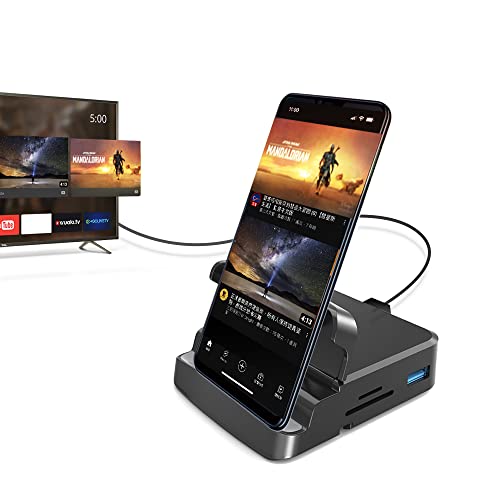
- Built for Samsung DeX and phone-to-desktop use
- Adds 4K HDMI, USB ports, SD, microSD, and charging
- Needs DP Alt Mode for external display support
Best For: Samsung Galaxy users building a compact DeX workspace
DeX Travel Hub
Samsung DeX USB-C Adapter with HDMI and Card Slots
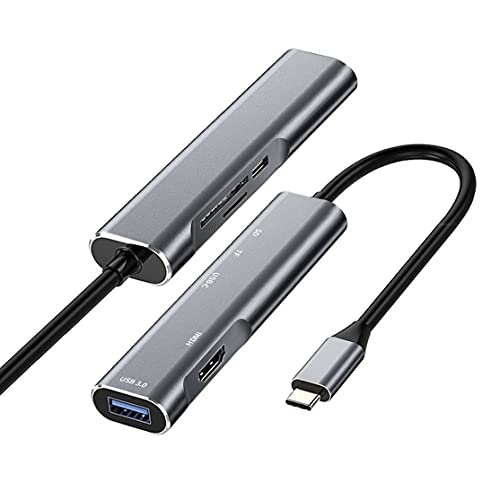
- Built for Samsung DeX plug-and-play use
- 4K HDMI plus USB 3.0 and card reader
- Compact body with 60W PD charging
Best For: Travelers who want a small, simple DeX adapter
Desk Stand Hub
JSAUX 5-in-1 Samsung DeX Docking Station

- Built-in phone stand for desk use
- 4K@30Hz HDMI with 60W PD
- USB 3.0 plus extra USB-A port
Best For: Desk users who want a stand and basic DeX ports
Classic Samsung Desktop Dock – Samsung DeX Station for Galaxy Note8/S8/S9
If you want a Samsung DeX docking station that feels closest to the original desktop-style experience, the DeX Station is a straightforward option. It turns supported Galaxy phones into a desktop interface on an external monitor and adds the basics you need for a compact workstation, including USB ports, HDMI, and Ethernet.
Best For: Galaxy owners who want the classic DeX Station setup with wired accessories and monitor output.
Pros:
- Launches Samsung DeX mode for a desktop-like experience on supported Galaxy phones
- Includes 2 USB-A 2.0 ports, HDMI output, and LAN Ethernet
- Built-in fan helps keep the phone cool while docked
- Includes Fast Charge Travel Adapter and USB-C cable
Cons:
- Compatibility is limited to specific Galaxy models noted by Samsung
- Only USB 2.0 speed on the USB-A ports
- No warranty is listed in the supplied details
Overall, this is the most purpose-built pick in the group for users who specifically want the original DeX Station form factor. It is compact, easy to pack, and focused on core desktop connectivity rather than extra features.
Compact USB-C Hub Pick – Anker 5-in-1 HDMI Hub with 85W Passthrough
This Anker USB C hub is a practical alternative if you need a simple Samsung DeX docking station style setup for a USB-C device with monitor output and extra ports. It keeps things slim while adding HDMI, USB-A, USB-C data, and pass-through charging, making it a good fit for a portable desk.
Best For: Users who want a compact hub with HDMI and charging for USB-C laptops or compatible devices.
Pros:
- 5-in-1 layout includes HDMI, USB-C data, and two USB-A data ports
- Supports up to 85W pass-through charging with a compatible charger
- HDMI output supports up to 4K at 30Hz
- Very lightweight and easy to carry
Cons:
- The USB-C data port does not support video output
- Pass-through charging requires a charger, which is not included
- Not positioned as a true DeX dock with phone cradle or Ethernet
This is best viewed as a clean, travel-friendly hub rather than a dedicated desktop dock. If your priority is compact expansion with external display support, it covers the essentials well.
Fan-Cooled Samsung Dock – Samsung DeX Pad with Fast Charge Bundle
If you want a Samsung DeX docking station with a more desktop-friendly angle, the DeX Pad is the more versatile Samsung-branded option here. It includes a fan for cooling, HDMI output, two USB-A ports, and the charger and cables needed to get started.
Best For: Galaxy users who prefer a DeX pad layout with built-in cooling and bundled cables.
Pros:
- Built-in fan helps manage heat during docked use
- Includes HDMI output plus 2 USB-A 2.0 ports for accessories
- Comes with a Fast Charge wall charger, USB-C cable, and HDMI cable
- Supports fast charging when used with the provided Samsung accessories
Cons:
- Fast charge depends on using the supplied Samsung charger and cables
- Not ideal if you need more than two USB ports
- Compatibility is centered on supported Samsung Galaxy models
The DeX Pad is a strong choice when you want a Samsung-made dock that leans into cooling and convenience. It is less about lots of expansion and more about a dependable, ready-to-use DeX setup.
Feature-Rich Multiport Dock – 11-in-1 Rotatable USB-C Dock with 65W Adapter
This USB-C docking station is the most feature-packed option in the list for users who want a broader desktop setup beyond basic Samsung DeX docking station duties. It combines 4K HDMI, Ethernet, audio, multiple USB ports, and SD/TF 4.0 support with a rotatable stand that can also work as a tablet holder.
Best For: People who want an all-in-one USB-C dock for tablets, Samsung devices, and other Type-C gear.
Pros:
- 11-in-1 design includes HDMI, Ethernet, audio, USB-A, USB-C, and SD/TF slots
- Supports 4K at 60Hz on HDMI and 100W USB-C power delivery input
- Rotatable, adjustable design can be used as a stand or folded into a dock
- Includes a 65W adapter to help maintain charging performance across ports
Cons:
- Best used with a higher-power adapter if all ports are active
- The stand is noted as less stable for some devices like Surface Pro or portable monitors
- More complex than a simple DeX dock if you only need basic monitor output
If you want maximum connectivity, this dock goes well beyond a standard Samsung DeX setup. It is better for users who need one hub to cover work, gaming, storage, and display tasks across multiple devices.
Compact DeX Ready Hub – 7-in-1 USB-C Docking Station for Phones
If you want a Samsung DeX docking station that adds the basics without taking up much desk space, this GKI 7-in-1 hub is built around phone-to-monitor use. It supports DisplayPort Alt Mode devices and can mirror or extend your screen in 4K@30Hz, while also adding USB ports, card readers, and USB-C charging for a simple mobile workstation.
Best For: Samsung Galaxy users who want a compact DeX setup with HDMI, charging, and file transfer support.
Pros:
- 4K HDMI output up to 30Hz for monitor, TV, or projector use
- 7-in-1 layout includes USB 3.0, USB 2.0, SD/TF card reader, and USB-C PD charging
- USB 3.0 supports data transfer up to 5Gbps
- Designed for desktop-style use with a phone, keyboard, and mouse
Cons:
- Requires a USB-C device with DP Alt Mode for video output
- Charging power is limited to 15W
- Not all USB-C devices will support the display features
If your priority is a straightforward DeX hub for everyday productivity, this model covers the essential ports in a lightweight format. Just confirm DP Alt Mode support before buying, since that is what enables the external display function.
High-Speed Multiport Dock – 10Gbps USB-C Hub with 4K HDMI
This ACASIS USB C hub is a practical pick if you want a Samsung DeX docking station-style setup for a laptop, tablet, or compatible phone. It combines 4K@60Hz HDMI, 10Gbps data ports, and 100W power delivery, but it still depends on a USB-C port that supports video transmission for display output.
Best For: Users who want faster data transfer and higher-refresh HDMI in a compact USB-C hub.
Pros:
- 4K@60Hz HDMI for a sharper external display experience
- 10Gbps USB-C and USB-A data transfer speeds
- 100W USB-C PD charging while using the other ports
- Compact aluminum build with 6-in-1 connectivity
Cons:
- Only one HDMI port, so it supports one external monitor
- The USB-C data port marked 10Gbps is for data only, not video or charging
- Video output requires a compatible USB-C port with support for video transmission
For users who care more about speed and 4K@60Hz output than phone-specific DeX features, this hub offers a strong balance of display, charging, and transfer performance. It is best suited to setups where you already know your device can output video over USB-C.
Samsung DeX Workspace Dock – 7-in-1 USB-C Docking Station
For a Samsung DeX docking station built around phone-to-desktop use, this GKI 7-in-1 hub is aimed squarely at productivity. It connects a Galaxy phone or other compatible USB-C device to a monitor, keyboard, and mouse, while adding HDMI, USB ports, SD and microSD slots, and USB-C charging for a more complete desk setup.
Best For: Samsung Galaxy users who want a simple DeX workspace hub with display, storage, and charging support.
Pros:
- Supports Samsung DeX and other USB-C display devices with DP Alt Mode
- 4K HDMI output for monitors, TVs, or projectors
- USB 3.0 transfers up to 5Gbps for quicker file moves
- Includes USB 2.0, SD, microSD, and USB-C charging in one compact hub
Cons:
- Video output requires DP Alt Mode support
- Devices without DP Alt Mode will not support screen expansion
- Not every USB-C phone or tablet can use the external display functions
This is a solid all-around choice if you want DeX-oriented functionality without a bulky dock. Its feature set is well matched to mobile office tasks, but the compatibility requirement is the key thing to verify first.
Rotating Stand Dock – 360° USB-C Docking Station for Tablets and Handhelds
If you want a Samsung DeX docking station that can also double as a stand, this 11-in-1 hub is built for flexible desk use. It supports USB-C devices like Samsung tablets, Steam Deck, ROG Ally, and other Type-C gear, while giving you the ports needed for a monitor-based work setup.
Best For: Users who want a rotating tablet stand and a multiport Samsung DeX docking station in one.
Pros:
- 360° adjustable angle, height, and orientation for desk comfort
- 11-in-1 layout with 4K@60Hz HDMI, Gigabit Ethernet, audio, USB-A, USB-C, and SD/TF 4.0
- 100W USB-C power delivery support with an E-Mark cable for safer charging
- Foldable design makes it easier to move between desktop and portable use
Cons:
- Surface Pro or portable monitor use is noted as less stable
- Full port usage draws about 8W, so power planning matters
- Not intended for Lightning iPad or Amazon Fire devices
This is a strong pick if you want more than a simple hub and value the built-in stand design. The combination of DeX-friendly connectivity, Ethernet, and fast card reading makes it practical for both work and travel setups.
DeX Travel Hub – Samsung DeX USB-C Adapter with HDMI and Card Slots
This Samsung DeX docking station focuses on the essentials: 4K HDMI, USB 3.0, SD/Micro SD card reading, and USB-C power delivery in a compact adapter. It is designed for plug-and-play use, making it a simple way to turn a Galaxy phone or tablet into a more desktop-like setup.
Best For: Samsung DeX users who want a compact, easy-to-carry hub with the core ports.
Pros:
- Built specifically for Samsung DeX mode with plug-and-play operation
- Includes 4K HDMI, USB 3.0, and SD/Micro SD card slots
- 60W max USB-C PD charging helps keep your device powered during use
- Very compact and lightweight for travel or desk-side use
Cons:
- USB 3.0 speed is limited to 5Gbps
- Samsung DeX mode requires charging with the original Samsung charger
- Fewer expansion options than larger multiport docks
If you mainly need HDMI output and a few practical ports, this adapter keeps things straightforward. It is a sensible choice for users who want a lightweight DeX accessory without committing to a larger docking station.
Desk Stand Hub – JSAUX 5-in-1 Samsung DeX Docking Station
This Samsung DeX docking station combines a phone stand with a compact 5-in-1 hub, so it works well on a desk when you want your phone propped up and connected. It offers 4K HDMI output, USB data ports, and 60W charging for USB-C phones like Samsung Galaxy S24, making it a practical everyday accessory.
Best For: Users who want a tabletop phone stand with basic DeX connectivity.
Pros:
- Integrated stand keeps the phone upright while connected
- 4K@30Hz HDMI output for larger-screen viewing
- USB 3.0 port supports 5Gbps data transfer for storage devices
- Includes 60W PD support for charging while in use
Cons:
- HDMI is limited to 4K@30Hz rather than 60Hz
- Samsung S21 and Note20 Ultra have connection caveats in the notes
- USB drive and PD cannot be used simultaneously on some Samsung models
This is a good fit if you want a tidy desk setup more than a full docking station. Its stand-first design makes DeX sessions easier to manage, but buyers who need more ports or stronger video specs may want to look higher up the feature ladder.
How We Picked These Samsung DeX Docking Station Options
We prioritized docks and hubs that support reliable DeX display output, practical power delivery, and the ports most buyers actually use. That means HDMI stability, enough USB connectivity for peripherals, and designs that fit both desk use and travel.
We also favored products with broad device support where relevant, while still keeping Samsung DeX compatibility front and center.
Quick Comparison
Think of the list in three broad groups: Samsung-branded DeX stations for a more official desktop-style experience, compact USB-C hubs for portable use, and multiport docks with extra connectivity such as Ethernet, card readers, or additional USB-A ports. If you want the simplest setup, choose a compact DeX hub. If you want a more workstation-like layout, look for a larger dock with power pass-through and wired networking.
Key Buying Factors for a Samsung DeX Docking Station
Display Output
Check the HDMI resolution and refresh rate. For most users, 4K output is the target, but the real-world quality depends on your phone, cable, and monitor support. A dock that advertises stable 4K output is usually a better bet than one that only mentions basic video pass-through.
Power Delivery
Samsung DeX can drain a phone quickly, especially during long work sessions. Look for enough USB-C power delivery to keep the phone charged while using accessories. If you plan to connect storage or input devices, higher-wattage PD adds flexibility.
Ports You Will Actually Use
Consider whether you need USB-A for keyboards and mice, Ethernet for a steadier connection, SD or microSD for file transfer, or audio out for speakers and headsets. A crowded dock is not automatically better if you will only use two or three ports.
Form Factor and Stability
Some users want a stand-style dock that holds the phone upright, while others prefer a flat multiport hub that disappears into a bag. Stability matters if you will dock and undock often, or if you want the phone positioned for calls, notifications, or screen mirroring.
Who Should Buy Which Samsung DeX Docking Station?
If you want the most seamless Samsung-focused setup, choose a Samsung DeX Docking Station made specifically for DeX use. If portability matters more, a compact USB-C hub is usually the smarter buy. If you are building a desk setup with monitor, keyboard, mouse, and wired internet, pick a feature-rich dock with Ethernet and multiple downstream ports. Travelers, students, and hybrid workers should lean toward lightweight, bus-friendly hubs with solid power pass-through and dependable HDMI support.
In short, the best choice depends on where you use DeX most: at a desk, on the go, or as a flexible all-in-one workstation alternative.