The best smart displays for seniors make everyday information easier to see and family communication simpler to manage. The right model can combine video calls, reminders, photos, weather, calendars, and entertainment in one accessible screen.
We compared ten options across ease of use, screen size, communication features, scheduling tools, privacy, and setup requirements to help families choose a practical fit for the home.
Best 10 Smart Displays for Seniors Picks for 2026
Compact Connection Pick
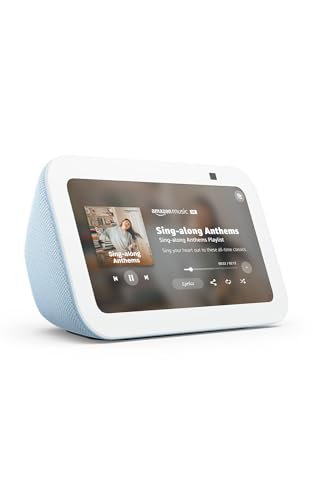
- Compact 5.5-inch screen for quick viewing
- Video calling and compatible camera check-ins
- Alexa control for compatible smart devices
Best For: Small-space communication and everyday Alexa assistance
Family Planning Pick
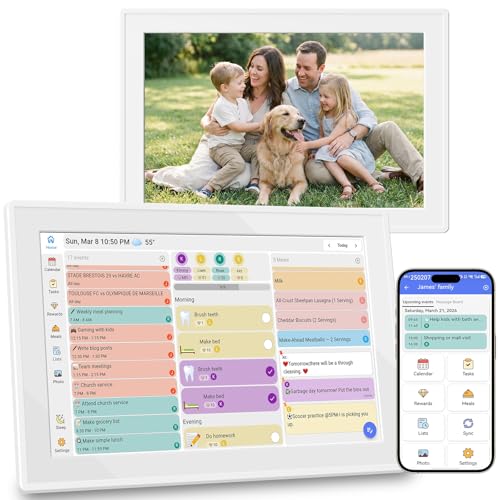
- Syncs Google, iCloud, and Outlook calendars
- Shows tasks, meals, lists, weather, and reminders
- No subscription required for listed features
Best For: Shared household schedules and visible wall organization
Large-Screen Home Hub

- 15.6-inch Full HD screen for room-wide visibility
- Widgets organize calendars, lists, weather, and controls
- Fire TV and advanced video calling included
Best For: A prominent kitchen or family command center
Best Family Command Center
Eyoyo 15.6-Inch Digital Calendar

- Large touchscreen calendar with bold reminders
- Auto-dimming and loud stereo alerts
- Subscription-free sync plus photo storage
Best For: Families coordinating schedules and senior care reminders
Best Senior Reminder Clock
WiFi Weather and Medication Display

- Large 10.1-inch clock and weather screen
- Three medicine reminders and multiple alarms
- Tabletop or wall mounting with auto brightness
Best For: Seniors needing visible time and medication prompts
Best for Family Connection
ViewClix 15.6-Inch Smart Frame

- Hands-free auto-answer video calling
- Remote photo, video, reminder, and weather management
- Private sharing with encrypted calls
Best For: Families sharing memories and calling seniors remotely
Easy-Read Timekeeper

- 10.5-inch display with large, bright digits
- Shows weather, temperature, and humidity
- Wall-mountable or tabletop with night dimming
Best For: Seniors who prioritize highly visible time and weather information
Connected Conversation Hub
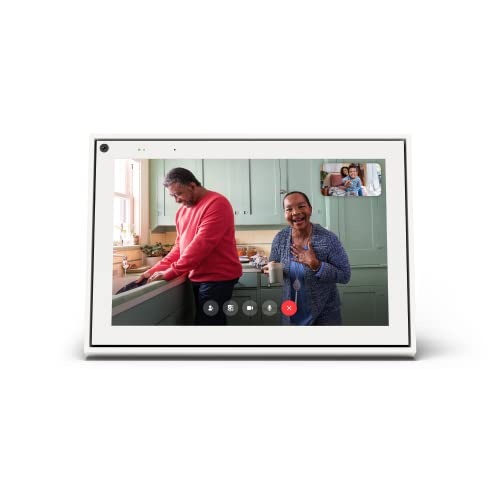
- Automatic camera framing for video calls
- Works with Messenger and WhatsApp
- Touch, voice, and physical privacy controls
Best For: Seniors who want straightforward video calls with family and friends
Family Organization Center

- Syncs Google, iCloud, and Outlook calendars
- Includes reminders, meal plans, and checklists
- Subscription-free with wall or tabletop placement
Best For: Seniors and families managing shared schedules and routines
Compact Connection Pick – Echo Show 5
For shoppers comparing smart displays for seniors, the Amazon Echo Show 5 is a compact option for video calls, reminders through Alexa, weather updates, entertainment, and basic smart-home control. Its 5.5-inch screen fits easily on a bedside table or kitchen counter.
Best For: Seniors who want a small Alexa display for calls, music, photos, and checking compatible cameras.
Pros:
- Compact 5.5-inch display shows weather, news, song titles, and more at a glance.
- Built-in 2 MP camera supports video calls and home check-ins.
- Controls compatible lights and thermostats, with camera and microphone privacy controls.
Cons:
- The smaller screen may be less comfortable for distant viewing.
- Entertainment and smart-home features depend on compatible services and devices.
The Echo Show 5 is a practical choice when space is limited and communication matters most. Consider a larger display if easy long-distance viewing is the priority.
Family Planning Pick – 10.1-Inch Digital Calendar
This 10.1-inch digital calendar is one of the more focused smart displays for seniors who benefit from a visible household schedule. It combines calendar syncing, reminders, task lists, meal planning, weather, and photo display without a subscription.
Best For: Families and older adults who want shared schedules, reminders, lists, and photos on one wall-mounted screen.
Pros:
- Syncs Google Calendar, iCloud, and Outlook in real time.
- Includes schedules, chores, to-do lists, meal planning, grocery lists, and reminders.
- Subscription-free features and a photo slideshow mode.
Cons:
- Its emphasis is organization rather than video calling or general entertainment.
- Plastic construction may feel less premium than larger smart-home displays.
With its 10.1-inch screen and wall-mountable design, this calendar can make appointments and household tasks easier to see. It is best suited to shared planning rather than hands-free assistant features.
Large-Screen Home Hub – Echo Show 15
The Echo Show 15 is a large-format choice among smart displays for seniors, with a 15.6-inch Full HD screen designed for kitchen organization, entertainment, video calls, and smart-home control. Customizable widgets keep calendars, to-do lists, weather, and other information visible.
Best For: Seniors and families who want a prominent shared display for organization, streaming, calls, and compatible smart-home devices.
Pros:
- Large 15.6-inch 1080p display supports easier viewing from across a room.
- Widgets show calendars, lists, weather, smart-home controls, and more.
- Built-in Fire TV, photo slideshow, and enhanced video calling with auto-framing and 3.3x zoom.
Cons:
- Its larger format may require more wall or counter space.
- Some streaming services or content may require subscriptions.
This is the most versatile option in the group for a central kitchen or household hub. Its large screen is helpful for visibility, while Fire TV and video calling add entertainment and connection features.
Simple Reminder Clock – 10-Inch WiFi Display
This WiFi clock display offers a straightforward alternative for shoppers seeking smart displays for seniors. Its large-font screen presents weather and indoor conditions, while reminders, photo and video playback, remote control, and power-memory features support simple daily use.
Best For: Seniors who primarily need a readable clock-style display for weather, appointments, reminders, and personal media.
Pros:
- 10-inch LCD uses large fonts and 500 cd/m² brightness for easier viewing.
- Supports reminders for birthdays, anniversaries, appointments, and countdowns.
- Remote control, USB or card media playback, and power-memory functionality add convenience.
Cons:
- The supplied notes do not indicate video calling or voice-assistant support.
- Media playback requires a card or USB drive.
- The listing details contain inconsistent screen-size information, so verify specifications before purchase.
This display is best viewed as a readable reminder and photo clock rather than a full smart assistant. Its remote and large-font presentation may appeal to users who prefer simple controls.
Best Family Command Center – Eyoyo 15.6-Inch Digital Calendar
For households comparing smart displays for seniors, the Eyoyo Digital Calendar stands out as a large, versatile planning screen. Its bold schedule and reminder display can help organize medications, appointments, chores, and family events, while auto-dimming helps make the screen more comfortable in changing light.
Best For: Families who want a shared wall planner that can also support senior reminders and display family photos.
Pros:
- 15.6-inch 1080p touchscreen with a wide 178-degree viewing angle.
- Supports medication reminders, doctor appointments, bold text, and loud stereo alerts.
- Subscription-free app synchronization and Android 14.
- Can be wall-mounted or used vertically with the included stand.
Cons:
- Its many family-planning features may be more than a senior needs from a simple display.
- Requires a nearby power outlet and Wi-Fi for connected scheduling features.
- The large wall-planner format may not suit smaller spaces.
This is a strong choice when senior support is part of a broader household organization system. Choose it over a simpler clock if you value calendars, reminders, chores, and photo display in one device.
Best Senior Reminder Clock – WiFi Weather and Medication Display
This WiFi clock is a practical option among smart displays for seniors who benefit from an uncluttered time-and-reminder station. The 10.1-inch display combines network time, weather information, alarms, and medication reminders, with an elderly-focused viewing mode and automatic brightness adjustment.
Best For: Seniors or caregivers who prioritize large time information, daily alarms, and up to three medicine reminders.
Pros:
- Includes three medicine reminders and multiple alarms.
- Displays time, weather, temperature, humidity, and wind speed.
- Offers nine display interfaces, including an elderly-focused view.
- Supports tabletop or wall mounting.
Cons:
- Its plastic construction and corded operation may limit placement flexibility.
- The weather and network features require Wi-Fi connectivity.
- It is less suited to video calling or family photo sharing than a dedicated frame.
For seniors who primarily need orientation, alarms, and medication prompts, this focused clock may be easier to use than a feature-heavy smart display. It is especially suitable for a bedside table, living room, or wall where the time needs to stay visible.
Best for Family Connection – ViewClix 15.6-Inch Smart Frame
The ViewClix Smart Frame is a connection-focused alternative among smart displays for seniors. Family members can remotely share photos and videos, schedule captions and reminders, and place video calls, while auto-answer provides a hands-free calling experience for seniors who may find conventional video-call controls difficult.
Best For: Grandparents and families who want simple remote photo sharing and hands-free video calling.
Pros:
- Auto-answers video calls for hands-free senior use.
- Family can manage photos, videos, settings, reminders, and weather updates remotely.
- Private sharing list and encrypted, non-recorded video calls.
- Large 15.6-inch 1080p display with iOS, Android, web, Wi-Fi, and Ethernet support.
Cons:
- Premier membership costs $9.95 per month after the included one-month trial.
- It is centered on communication and memories rather than a full calendar or medication display.
- Requires AC power and an internet connection for connected features.
ViewClix is compelling when staying connected matters more than managing a detailed household schedule. The recurring membership is an important budget consideration, but remote management and auto-answer can reduce the technology burden for seniors.
Easy-Read Timekeeper – Large Smart LED Wall Clock
For shoppers comparing smart displays for seniors, this large digital wall clock emphasizes visibility and at-a-glance household information rather than video calling or complex scheduling. Its 10.5-inch LED screen shows the time, weather, indoor temperature, and humidity, while network syncing helps keep the clock accurate.
Best For: Seniors who want large, bright time digits and basic weather information in a bedroom, living room, or kitchen.
Pros:
- Large 10.5-inch display with bright digits designed for viewing across a room.
- Automatically syncs network time after Wi-Fi and app pairing.
- Shows weather, indoor temperature, and humidity in one display.
- Supports six brightness levels, scheduled night dimming, wall mounting, or tabletop placement.
Cons:
- Requires Wi-Fi connection and app pairing for network time synchronization.
- Must remain plugged in and does not operate as a battery-powered clock.
- Focused on clock and environmental information rather than communication or calendar management.
This is a practical choice when readability is the priority. Its corded design and setup requirements are worth considering, but the large digits and adjustable brightness make it especially suitable for seniors who want simple, persistent information at a glance.
Connected Conversation Hub – Meta Portal 10-Inch
Meta Portal - Smart Video Calling for the Home with 10” Touch Screen Display - White
Check Price On AmazonAmong smart displays for seniors, the Meta Portal is designed primarily for staying connected with family and friends. Its 10-inch touchscreen combines voice and touch controls with a camera that automatically adjusts framing, making video calls more natural when the user moves around.
Best For: Seniors who want an easy home video-calling device for Messenger and WhatsApp conversations.
Pros:
- Smart Camera adjusts automatically to help keep the user in frame.
- Smart Sound helps the user be heard during calls.
- Supports Messenger and WhatsApp, including calls with people who do not have a Meta Portal.
- Offers touchscreen and voice controls plus a camera cover and camera/microphone disable options.
Cons:
- Its primary focus is video calling rather than calendars, weather, or household organization.
- Requires corded power and Wi-Fi connectivity.
- Camera and microphone features may be more than needed for seniors seeking a simple information display.
The Portal is a strong fit for a senior whose main goal is regular face-to-face contact. Automatic framing, voice controls, and built-in privacy controls reduce friction, while the 10-inch touchscreen keeps calls easy to see.
Family Organization Center – 10.1-Inch Smart Calendar
For seniors who benefit from visible routines, this subscription-free touchscreen calendar is one of the more organization-focused smart displays for seniors. It brings schedules, reminders, checklists, meal plans, photos, and chore information into a customizable 10.1-inch dashboard that can sit on a table or mount on a wall.
Best For: Seniors and families who want a shared visual place for appointments, reminders, meal planning, and household tasks.
Pros:
- Syncs with Google Calendar, iCloud, and Outlook for centralized scheduling.
- Includes color-coded schedules, customizable avatars, reminders, and voice reminders.
- Offers chore charts, reward settings, meal planning, shopping lists, and checklists.
- Requires no subscription for its core features and supports wall or tabletop placement.
Cons:
- The many organizational features may require more setup than a basic clock or display.
- Designed around family coordination, so some seniors may not need the chore and reward tools.
- The supplied notes do not specify battery operation, so placement may require access to power.
This calendar is best when family members want to help keep appointments and routines visible in one shared location. Its subscription-free design and customizable dashboard add flexibility, while the feature-rich interface may be excessive for someone seeking only a simple clock.
How We Picked the Best Smart Displays for Seniors
We focused on features that matter in daily use: readable screens, straightforward controls, dependable connectivity, useful reminders, and simple ways for family members to stay in touch. The selection includes voice-controlled smart displays, wall-mounted family calendars, digital photo frames, video-calling devices, and large clocks.
We also considered whether a product requires a subscription, how much setup it may involve, and whether it is better suited to a bedside table, kitchen, living room, or shared family space. Because needs vary widely, no single device is best for every household.
Quick Comparison
| Best For | Recommended Type | What to Look For |
|---|---|---|
| Video calls with family | Smart video display or photo frame | Large screen, clear camera, easy calling workflow |
| Appointments and routines | Digital wall calendar | Readable layout, shared editing, no required subscription |
| Time, weather, and alarms | Smart clock display | Large digits, auto brightness, multiple alarms |
| Entertainment and voice control | Alexa-enabled smart display | Voice commands, streaming support, speaker quality |
| Family photos | Connected digital frame | Remote photo sharing, captions, and video support |
Key Buying Factors for Smart Displays for Seniors
Screen Size and Readability
A larger display is usually easier to read from across a room, especially for calendars, weather, and clock faces. A compact screen may be more suitable for a nightstand, but check text size, brightness controls, and viewing angles before buying.
Ease of Communication
For frequent family contact, prioritize one-touch or automatic video calling, a clear camera, strong microphones, and a setup process that relatives can manage remotely. Photo frames with remote sharing can be less intimidating than general-purpose smart hubs.
Calendar and Reminder Features
Digital planners are useful for appointments, medication reminders, birthdays, chores, and household schedules. Confirm whether calendars can be edited remotely and whether the device needs an account or paid service.
Controls, Voice Support, and Privacy
Physical buttons, simple touch controls, and reliable voice commands can improve accessibility. Review microphone and camera controls, privacy settings, and whether a camera shutter or disable switch is available.
Placement and Connectivity
Measure the intended location and confirm access to a power outlet and stable Wi-Fi. Wall calendars need suitable mounting space, while tabletop devices should have a stable base and an uncluttered viewing angle.
Who Should Buy Which Smart Displays for Seniors?
Choose a large digital calendar for seniors who mainly need appointments, routines, and family scheduling in one visible place. A smart clock is a better fit for someone who wants time, weather, temperature, and alarms without a complex interface.
For grandparents who value photos and regular contact, a connected digital frame or dedicated video-calling display may be the most approachable option. Choose an Alexa-powered display when voice control, music, streaming, timers, and broader smart-home functions are priorities.
Before ordering, match the device to the senior’s comfort with touchscreens and voice assistants, then verify Wi-Fi requirements, account setup, subscription costs, and the level of family support available after installation.