A reliable universal remote can replace a coffee table full of controllers, while a connected hub adds app access, voice commands, and automation. The best setup depends on the devices you own and how much configuration you want to manage.
We compared ten smart remote controls with hub across compatibility, scene support, app features, voice-assistant integration, and everyday usability. Use the guide below to narrow the options for your home theater or smart home.
Best 10 Smart Remote Controls with Hub Picks for 2026
Flexible Matter Pick
SwitchBot Universal Remote with Hub Mini

- Controls up to 25 IR and Bluetooth devices
- Matter support through Apple Home with a compatible hub
- Rechargeable battery lasts up to 150 days
Best For: Apple Home households with supported IR and Bluetooth devices
Whole-Home Automation Pick

- Supports 8,000+ IR brands and 18 appliance types
- Adds Matter, voice control, schedules, and remote app access
- Includes a built-in 93 dB alarm for sensor alerts
Best For: Homes combining legacy appliances with Tapo automation
Simple Budget Hub
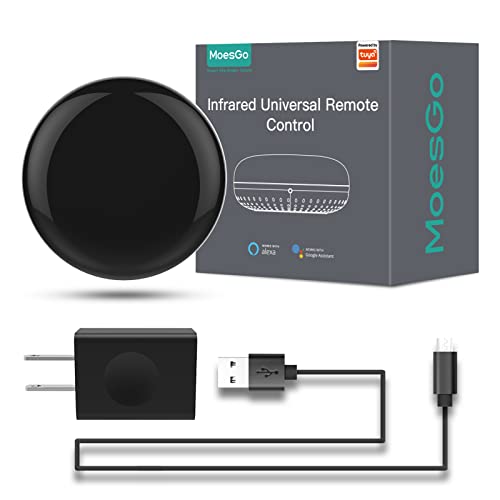
- Controls IR appliances through Smart Life or Tuya
- Supports Alexa and Google Home voice commands
- DIY learning adds commands for some unsupported remotes
Best For: Single-room IR control on a budget
Home Theater Upgrade
SofaBaton X1S Universal Remote with Hub

- Supports over 6,000 brands and 500,000 devices
- Creates one-touch activities for coordinated viewing
- Includes rechargeable backlit remote and dual IR blasters
Best For: Multi-device home theater systems
Versatile IR Hub
Frankever Smart Home Hub Remote
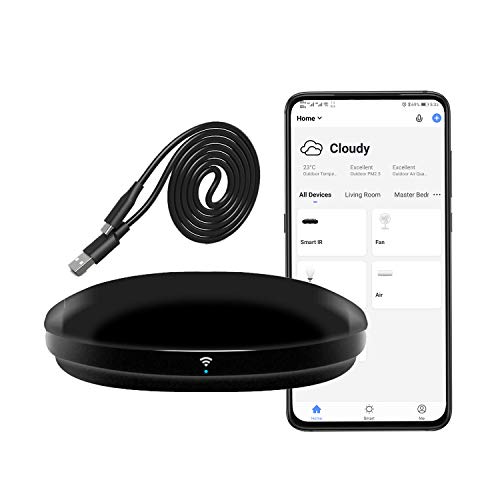
- Supports over 50,000 IR devices
- Alexa, Google, Siri, and Smart Life control
- Includes timers, scenes, and IR learning
Best For: Broad infrared control for TVs, AC units, and home theater equipment
Advanced Hub Bundle
SwitchBot Universal Remote with Hub 3

- Controls up to 25 IR and Bluetooth devices
- Hub 3 adds learning, Matter, and Apple Home support
- Rechargeable battery lasts up to 150 days
Best For: SwitchBot and Apple Home users needing multi-device control
Simple No-Hub Blaster

- No separate hub required
- Controls IR appliances through Smart Life or Tuya
- Supports Alexa, Google Assistant, and DIY learning
Best For: Single-room control of everyday infrared appliances
Best All-Around Control
SofaBaton X1S Universal Remote

- Supports over 500,000 device models
- Creates custom one-click activities
- Includes a 360-degree hub with two IR blasters
Best For: Multi-device home theater owners wanting broad compatibility and customizable scenes
Best for App and Macro Control

- Controls IR, Bluetooth, and Wi-Fi devices
- Creates macros of up to 10 commands
- Adds app, API, and phone backup control
Best For: Users who want detailed customization and multiple ways to control entertainment devices
Best for Smart Home Integration
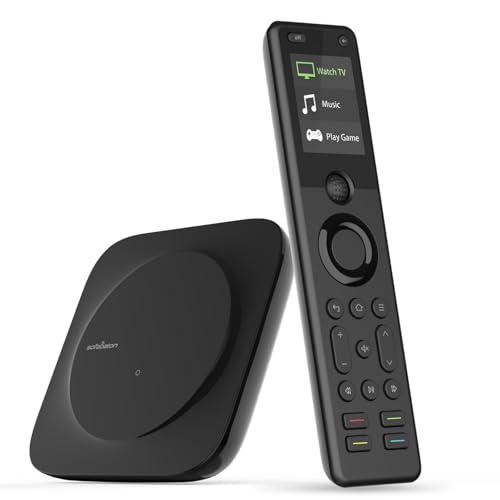
- Triggers entertainment activities by voice
- Supports IFTTT and iOS Shortcut URLs
- Combines a broad code library with hub-based control
Best For: Smart-home users who want voice scenes and shortcut-driven entertainment control
Flexible Matter Pick – SwitchBot Universal Remote with Hub Mini
The SwitchBot Universal Remote is a versatile option for shoppers seeking smart remote controls with hub support for both IR appliances and selected Bluetooth devices. It can manage up to 25 devices, though compatibility should be checked carefully before purchase.
Best For: Apple Home users who want one remote for TVs, air conditioners, SwitchBot devices, and supported Bluetooth TV boxes.
Pros:
- Supports up to 10 IR and 15 Bluetooth devices.
- Works with Apple Home through Matter when paired with Hub Mini (Matter) or Hub 2.
- Large IR code library and multiple learning methods simplify setup.
- Rechargeable 2,000mAh battery can last up to 150 days.
Cons:
- Does not support RF remotes or most third-party Bluetooth devices.
- Matter support is currently limited to Apple Home; Alexa and Google Home do not support this remote type through Matter.
- Requires 2.4GHz Wi-Fi, not 5GHz.
This is a strong choice when Bluetooth and Apple Home integration matter, but buyers should verify device compatibility and account for the hub requirement for Matter features.
Whole-Home Automation Pick – Tapo H110 Smart IR & IoT Hub
The Tapo H110 combines a universal IR controller with an IoT hub, built-in chime, and Matter certification. For shoppers comparing smart remote controls with hub functionality, it stands out for broad appliance coverage, app access, voice control, and automation features.
Best For: Households that want to control legacy IR appliances, automate routines, and connect Tapo sensors with audible alerts.
Pros:
- Supports more than 8,000 IR brands and 18 appliance types.
- Offers app, voice, Matter, scheduling, and location-based control.
- Built-in 93 dB alarm can provide alerts from connected Tapo sensors.
- Supports quick pairing by scanning or mapping remote buttons.
Cons:
- Uses 2.4GHz Wi-Fi.
- Requires a corded power connection.
- Its broadest smart-home benefits are tied to the Tapo ecosystem and compatible devices.
The H110 is especially compelling for users building a broader connected home rather than simply replacing a single remote. Its extensive IR library and Matter support give it room to grow.
Simple Budget Hub – MoesGo WiFi IR Control Hub
The MoesGo WiFi IR Control Hub is a straightforward way to bring TVs, air conditioners, fans, and other infrared appliances into the Smart Life or Tuya app. It is a practical entry point among smart remote controls with hub features, provided your devices use IR rather than RF.
Best For: Budget-conscious users who need phone and voice control for common IR appliances in one room.
Pros:
- Controls IR devices remotely through the Smart Life/Tuya app.
- Works with Amazon Echo and Google Home voice commands.
- DIY learning can add commands for devices not covered by the app.
- Includes a USB cable, US adapter, two-year warranty, and 60-day refund guarantee.
Cons:
- Supports IR only and is not compatible with RF devices.
- Infrared signals may be blocked by walls, making it best suited to a single room.
- Only supports 2.4GHz Wi-Fi.
This hub keeps the feature set focused and accessible. Choose it when app and voice control for IR appliances are the priority, and confirm that your devices appear in the Smart Life app.
Home Theater Upgrade – SofaBaton X1S Universal Remote with Hub
The SofaBaton X1S is designed for complex entertainment systems, pairing a rechargeable universal remote with a hub and customizable one-touch activities. It is a strong contender among smart remote controls with hub setups for TVs, receivers, projectors, disc players, and other home theater equipment.
Best For: Home theater owners who want macros, centralized IR control, and voice-triggered entertainment scenes.
Pros:
- Code library covers more than 6,000 brands and 500,000 devices.
- One-touch activities can power devices on and switch inputs automatically.
- Dual IR blasters provide 360-degree control with a stated 40-foot range.
- Rechargeable, backlit remote includes app customization and a find-my-remote feature.
Cons:
- Its 40-foot IR range is more limited than some whole-home control solutions.
- Primarily targets entertainment equipment rather than general household appliances.
- Customization and setup depend on the SofaBaton app.
The X1S makes the most sense when several entertainment components need coordinated control. Its activities and broad device library can reduce remote clutter while keeping advanced home theater functions accessible.
Versatile IR Hub – Frankever Smart Home Hub Remote
If you need smart remote controls with hub functionality for common infrared appliances, the Frankever Wi-Fi IR blaster offers broad device coverage through the Smart Life app. It can control TVs, air conditioners, soundbars, DVD players, fans, and other 38 kHz IR equipment from home or remotely.
Best For: Households seeking an affordable, Alexa- or Google-compatible IR hub for multiple entertainment and climate-control devices.
Pros:
- Supports more than 50,000 infrared-controlled devices.
- Works with Alexa, Google Assistant, Siri, and IFTTT-related Smart Life functions.
- Offers timers, custom scenes, remote app control, and manual IR learning.
- Compact design with a stated maximum range of 10 meters.
Cons:
- Requires a secured 2.4GHz Wi-Fi network.
- Controls IR devices only; RF remotes are not supported.
- Its listed maximum supported device count is one.
The Frankever is a practical choice when broad IR compatibility and voice control matter most. Confirm that your equipment uses infrared rather than RF before buying.
Advanced Hub Bundle – SwitchBot Universal Remote with Hub 3
For shoppers comparing smart remote controls with hub integration, the SwitchBot Universal Remote with Hub 3 combines IR control, selected Bluetooth support, and smart-home connectivity. It can manage up to 25 devices and create up to 10 custom scenes, provided your equipment meets its IR or Bluetooth compatibility requirements.
Best For: SwitchBot users and Apple Home households wanting one rechargeable remote for IR appliances, supported Bluetooth devices, and Matter-enabled setups.
Pros:
- Controls up to 25 devices, including 10 IR and 15 Bluetooth devices.
- Includes Hub 3 for IR learning, code matching, Matter, and Apple Home integration.
- Supports selected Bluetooth TV boxes, SwitchBot devices, and standard IR appliances.
- Rechargeable 2000mAh battery is rated for up to 150 days per charge.
Cons:
- Requires 2.4GHz Wi-Fi and does not support 5GHz.
- Does not support RF remotes or most third-party Bluetooth devices.
- Matter control for this remote is currently supported in Apple Home, not necessarily Alexa or Google Home.
The SwitchBot bundle is the most feature-rich option here, especially for users already invested in SwitchBot or Apple Home. Compatibility checks are important because Bluetooth support is selective.
Simple No-Hub Blaster – MOES WiFi Smart IR Remote
The MOES Wi-Fi Smart IR Controller is a straightforward option for shoppers who want smart remote controls with hub-like app access without purchasing a separate hub. Through the Smart Life or Tuya app, it can operate compatible TVs, air conditioners, fans, DVD players, set-top boxes, and other 38 kHz infrared devices.
Best For: Single-room setups that need remote app and voice control for several everyday IR appliances.
Pros:
- Does not require a separate hub.
- Supports remote control through Android and iOS Smart Life or Tuya apps.
- Works with Alexa and Google Assistant for hands-free commands.
- DIY learning can copy functions when a device brand is not listed.
Cons:
- Supports 2.4GHz Wi-Fi only.
- Infrared signals cannot pass through walls, so one unit per room is recommended.
- Does not support RF devices and is limited to 38 kHz IR equipment.
MOES keeps the setup simple and avoids the cost of an additional hub. It is a good fit for one room, but buyers should verify device compatibility and plan placement with a clear line of sight.
Best All-Around Control – SofaBaton X1S Universal Remote
For shoppers comparing smart remote controls with hub support, the SofaBaton X1S combines a broad device library with customizable activities and app control. Its hub provides 360-degree coverage and includes two IR blasters, making it suitable for entertainment setups where devices may be inside a cabinet or difficult to aim at.
Best For: Multi-device home theater owners who want one-click scenes and broad compatibility.
Pros:
- Supports more than 500,000 device models from over 6,000 brands.
- Custom activities can combine several commands, such as powering on devices and selecting inputs.
- Hub supports 360-degree control, two IR blasters, and concealed cabinet placement.
- Backlit controls, raise-to-wake functionality, voice control, and a remote-finder feature add convenience.
Cons:
- Setup and customization may take time for users who want to configure advanced activities or virtual buttons.
- Voice control requires Alexa or Google Assistant.
The X1S is a flexible choice when compatibility and custom automation matter most. Its large code library and configurable commands make it especially useful for complex entertainment systems.
Best for App and Macro Control – SofaBaton X1S Smart Remote
This SofaBaton X1S is a strong option among smart remote controls with hub functionality if you want both a physical remote and phone-based backup control. The app manages devices, activities, favorite channels, and custom buttons, while the hub supports IR, Bluetooth, and Wi-Fi equipment.
Best For: Users who want detailed app customization, macros, and multiple control methods.
Pros:
- App supports device management, activity customization, favorite channels, and remote tracking.
- Works with IR, Bluetooth, and Wi-Fi devices and lists support for over 500,000 devices.
- Macros can assign up to 10 commands to one button.
- Rechargeable battery, backlighting, raise-to-wake, scroll wheel, and voice assistant support improve daily usability.
Cons:
- The many app and macro options may be more involved than necessary for a simple setup.
- Its stated maximum range is 40 feet, which may not suit unusually large rooms.
Choose this version if you value configuration flexibility as much as basic remote control. The app, API functionality, and macro buttons make it appealing for users who enjoy tailoring their entertainment routines.
Best for Smart Home Integration – SofaBaton X1S Hub Remote
If you are shopping for smart remote controls with hub support and smart-home integrations, this SofaBaton X1S emphasizes activities, voice commands, and shortcut-based automation. It can combine commands for televisions, receivers, streaming devices, and other supported equipment, while its hub handles control without requiring direct aim.
Best For: Smart-home users who want voice-triggered entertainment scenes and shortcut integration.
Pros:
- Supports over 500,000 devices across more than 6,000 brands, with an updating code library.
- One-click activities can power devices on and select channels or HDMI inputs.
- Alexa and Google Assistant can trigger configured entertainment activities.
- Supports IFTTT and iOS Shortcut integration through activity URLs.
Cons:
- Integration features may require additional setup through compatible platforms or shortcuts.
- The supplied details list a maximum of 60 supported devices for this listing, despite its broad code-library coverage.
This model stands out for users building entertainment routines into a broader smart-home setup. Its hub placement flexibility, voice control, and shortcut support can reduce repetitive multi-device steps.
How We Picked the Best Smart Remote Controls with Hub
We focused on systems that combine a handheld or app-based remote with a hub capable of communicating with common home-entertainment devices. We considered support for infrared equipment such as TVs, DVD players, air conditioners, and set-top boxes, along with Bluetooth or Wi-Fi compatibility where offered.
We also evaluated setup flexibility, customizable activities and scenes, voice control through Alexa or Google Assistant, Matter support, app quality, and the practical difference between a simple IR blaster and a broader universal-control system. Product listings and stated specifications can vary by bundle, so confirm included accessories and supported devices before buying.
Quick Comparison
| What You Need | Best Fit | Why It Matters |
|---|---|---|
| Simple appliance control | IR hub remotes | Affordable way to operate TVs, fans, lights, and air conditioners from an app or voice assistant. |
| Handheld home-theater control | SofaBaton X1S models | Designed around physical remote use, activities, and one-touch commands. |
| Matter and newer smart-home integration | SwitchBot Hub bundles | Useful if you want broader platform compatibility and customizable scenes. |
| Tuya or Smart Life households | MOES or MoesGo hubs | Fits users already managing devices in those ecosystems. |
Key Buying Factors for Smart Remote Controls with Hub
Device Compatibility
Check whether the system supports your exact devices and control methods. IR handles many traditional appliances, but Bluetooth and Wi-Fi equipment may require dedicated integrations. Some hubs need a clear line of sight to the equipment, while others can control devices across a room through network connections.
Remote Style and Setup
A handheld remote is useful for guests and quick adjustments, whereas an app-only hub may be better for basic appliance control. Look for searchable device databases, learning functions, reliable pairing, and a setup process that does not require repeated manual troubleshooting.
Scenes, Activities, and Voice Control
One-touch activities can turn on a TV, switch inputs, adjust volume, and start a streaming device together. Voice commands are convenient, but they depend on the hub, assistant platform, account settings, and device compatibility. Confirm whether scenes are stored locally or require an internet connection.
Smart-Home Standards and Expansion
Matter support can improve interoperability, but it does not automatically make every IR or Bluetooth device Matter-compatible. Consider the hub’s app ecosystem, supported platforms, firmware policy, and whether you plan to add sensors, switches, or other connected products later.
Who Should Buy Which Smart Remote Controls with Hub?
Choose an IR-focused MOES, MoesGo, or generic smart hub if your priority is inexpensive app and voice control for conventional appliances. These are especially practical for a TV, air conditioner, fan, or several simple IR devices.
Choose a SofaBaton X1S configuration if you want a dedicated physical remote for a more involved home-theater setup and value customizable activities. Choose a SwitchBot Hub bundle if Matter compatibility, scenes, and integration with a growing smart home are high priorities. Tapo’s hub is a sensible option for buyers already invested in Tapo products or looking for a Matter-certified control point.
Before ordering, verify the exact model, included hub, regional app support, power requirements, and compatibility with every device you want to combine. The best Smart Remote Controls with Hub are the ones that match both your equipment and your preferred method of control.