A thermal camera for iPhone can turn your phone into a practical inspection tool for home repairs, HVAC checks, electrical troubleshooting, and leak detection.
Below, you’ll find the best options for different budgets, connection types, and iPhone models so you can choose with confidence.
Best 10 Thermal Camera for IPhone Picks for 2026
iOS Lightning Thermal Pick
TOPDON TC002 for iPhone & iPad

- Lightning-only iOS compatibility
- 512 x 384 super resolution output
- 25Hz imaging with photo/video support
Best For: Lightning-port iPhone and iPad users who want simple plug-and-play thermal imaging
USB-C Multi-Phone Thermal Pick
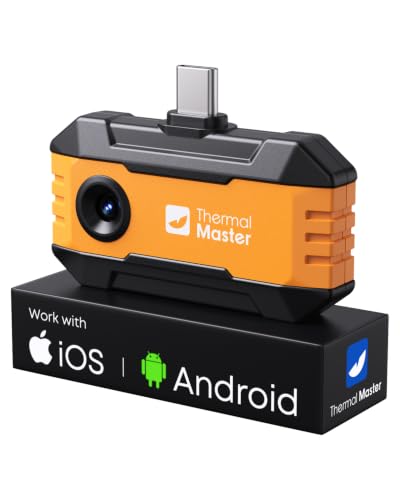
- Works with USB-C iPhone, Android, and Windows devices
- 320 x 240 super resolution from 160 x 120 native IR
- No batteries needed and includes an extension cable
Best For: USB-C iPhone owners who want a flexible inspection camera for home and trade use
FLIR iPhone 15+ Thermal Pick

- Fits iPhone 15 and newer with USB-C
- 240 x 180 super resolution with MSX imaging
- Includes app-based inspection guides
Best For: iPhone 15 and newer users who want guided thermal inspections in a rugged compact unit
Dual-Lens Thermal Upgrade
TOPDON TC001 Max for USB-C iPhone

- Dual-lens thermal plus visible-light imaging
- 512 x 384 TISR with 25Hz refresh rate
- USB-C support plus included Lightning adapter
Best For: Users who want advanced thermal detail and app analysis in a pocket-sized iPhone-compatible tool
Flagship USB-C iPhone Thermal Imager
Flir One Pro for iPhone 15 and Newer

- USB-C model for iPhone 15 and newer
- VividIR boosts 160x120 to 480x360
- MSX and inspection guides aid diagnosis
Best For: Rugged inspection work on newer iPhones
TOPDON TC002C Duo
USB-C thermal camera with 512x384 super resolution

- 512x384 super-resolution from a 256x192 IR sensor
- 25Hz refresh rate with 40mK heat sensitivity
- Works with USB-C iPhone, iPad, Android, and Windows
Best For: Users who want sharper thermal detail for inspections
GOYOJO GW192A
Pocket USB-C thermal imager for iPhone 15/16/17

- 192x192 thermal resolution with a 50° field of view
- USB-C plug-and-play operation with no batteries
- -4°F to 752°F range for leak, HVAC, and electrical checks
Best For: DIY and trade users needing simple iPhone thermal scanning
Seek Thermal Nano 200
iPhone USB-C thermal camera with 200x150 imaging

- 200x150 thermal resolution with 25Hz-plus imaging
- Captures photos and videos directly to your phone
- USB-C compatibility for iPhone 15 and newer
Best For: iPhone 15+ owners wanting a trusted all-purpose thermal imager
IOS Lightning Thermal Pick – TOPDON TC002 for iPhone & iPad
If you need a thermal camera for iPhone with Lightning support, the TOPDON TC002 is built for iOS devices and turns a compatible iPhone or iPad into a handheld infrared imager. It offers 256 x 192 IR resolution with 512 x 384 super resolution, a 25Hz refresh rate, and a wide temperature range for practical inspection work.
Best For: iPhone and iPad users with Lightning ports who want a plug-and-play thermal tool for home, HVAC, electrical, and outdoor checks.
Pros:
- Works with iPhone 7 and above and Lightning-port iPads.
- Super resolution upscales thermal images to 512 x 384 for clearer detail.
- 25Hz refresh rate helps keep imaging smooth with less flicker.
- Compact body, low power use, and support for photo/video recording.
Cons:
- Not compatible with Mac.
- For iPhone 15, iPhone 16, and later, TOPDON says to choose the TC002C version instead.
- Requires the TopInfrared app from the App Store.
The TC002 is a strong fit if your priority is a dedicated Lightning accessory with broad temperature coverage and a portable design. Its strength is straightforward iOS use rather than cross-platform flexibility.
USB-C Multi-Phone Thermal Pick – Thermal Master P1 for iPhone
The Thermal Master P1 is a thermal camera for iPhone users with USB-C models, and it also works with Android phones, tablets, and Windows devices. It combines a 160 x 120 native IR sensor with X³ super resolution to 320 x 240, plus a 25Hz frame rate for smooth real-time scanning.
Best For: USB-C iPhone owners who want a versatile thermal camera for inspections, diagnostics, and quick spot checks.
Pros:
- Compatible with USB-C iPhones, Android phones, Android tablets, and Windows devices.
- Super resolution boosts thermal detail from 160 x 120 to 320 x 240.
- Wide temperature range and ±3.6°F / 2% accuracy support practical inspection work.
- No batteries required; powered directly by the connected device.
Cons:
- Designed for USB-C generation devices, so it is not the right fit for Lightning iPhones.
- Advanced features depend on the companion app.
The P1 stands out for buyers who want one thermal tool that can move between phone platforms. Its included extension cable and case-friendly plug also make it easier to use in tight spots.
FLIR iPhone 15+ Thermal Pick – FLIR ONE for USB-C iPhone
If you’re shopping for a thermal camera for iPhone 15 or newer, the FLIR ONE is made for USB-C iPhones and plugs directly into the charging port. It uses 80 x 60 native IR with super resolution up to 240 x 180, plus FLIR MSX to blend thermal and visual detail in real time.
Best For: iPhone 15 and newer users who want a compact FLIR-branded tool for home inspection and commercial field checks.
Pros:
- Built specifically for USB-C iPhones, including iPhone 15 and newer.
- MSX technology merges thermal and visual images for clearer detail.
- Includes thermal inspection guides inside the app.
- Jjobsite-tough design with 1.5m drop resistance.
Cons:
- Native IR resolution is 80 x 60 before super resolution enhancement.
- Accuracy specs are tied to a defined temperature and scene range.
- Requires one AA battery, which is included.
The FLIR ONE is a practical choice if you value guided inspections and a compact, rugged build. It is especially appealing for users who want a name-brand thermal camera with app-based workflow support.
Dual-Lens Thermal Upgrade – TOPDON TC001 Max for USB-C iPhone
The TOPDON TC001 Max is a thermal camera for iPhone, Android, and Windows devices with USB-C support and included Lightning adapters. It pairs dual-lens thermal and visible-light imaging with 256 x 192 IR resolution enhanced to 512 x 384 TISR, giving you a clearer view for inspection and troubleshooting.
Best For: Buyers who want a compact, case-friendly thermal camera for iPhone with stronger detail and advanced app analysis.
Pros:
- Dual-lens design combines infrared and visible-light views.
- TISR boosts thermal resolution to 512 x 384 with 25Hz refresh.
- Works with USB-C devices and includes a Lightning adapter.
- Supports photo/video capture, 3D analysis, and multiple color palettes.
Cons:
- Best fit for USB-C iPhone users, despite adapter support.
- Some advanced functions are app-dependent.
- Temperature accuracy is listed at ±2°C / ±2%.
This model is the most feature-rich option in the group for users who want both clearer imaging and deeper analysis tools. The pocket-sized build and case-friendly connection also make it easy to keep on hand.
Flagship USB-C iPhone Thermal Imager – Flir One Pro for iPhone 15 and Newer
If you want a thermal camera for iPhone that leans more toward professional inspection work, the FLIR One Pro is built for iPhone 15 and newer devices with USB-C. It plugs directly into the phone, uses VividIR and MSX for clearer thermal detail, and includes guided inspection tools for common issues like air leaks and moisture.
Best For: iPhone 15 and newer owners who want a jobsite-tough thermal imager for home inspections, automotive work, and other professional checks.
Pros:
- USB-C compatibility for iPhone 15 and newer
- VividIR upsamples 160×120 native IR to 480×360
- MSX merges thermal and visual images for added detail
- Includes step-by-step thermal inspection guides in the app
Cons:
- Only works with iPhones that have USB-C
- Native IR resolution is 160×120 before enhancement
This is the strongest fit if your priority is a rugged, inspection-focused thermal camera with guided workflows and higher apparent detail. It is a clear match for buyers who need more than a casual temperature check.
Most Versatile USB-C Option – Thermal Master P1 for iPhone and Android
For buyers comparing a thermal camera for iPhone with broader phone support, the Thermal Master P1 stands out for USB-C iPhones, Android phones, tablets, and even Windows devices. It offers 320×240 super resolution, a 25Hz refresh rate, and a plug-and-play setup designed for fast inspections without extra charging.
Best For: Users who want one thermal camera that can move between an iPhone, Android device, or Windows machine for home, HVAC, and repair tasks.
Pros:
- Works with USB-C iPhones, Android phones, tablets, and Windows devices
- 320×240 super IR resolution from 160×120 native IR
- 25Hz refresh rate for smoother real-time imaging
- No batteries needed; powered by the device
Cons:
- Only supports USB-C phones, not Lightning iPhones
- Thermal cameras show surface heat differences, not through walls
This is a flexible pick if you want one compact tool that can handle several devices and inspection types. The included extension cable and case add convenience for everyday field use.
Best Lightning iPhone Pick – Flir One for iPhone 14 and Older
If you need a thermal camera for iPhone and still use a Lightning model, the FLIR One is the compatible option for iPhone 14 and older. It connects directly through the Lightning port, uses VividIR and MSX for improved clarity, and includes inspection guides for spotting air leaks, moisture buildup, and other common issues.
Best For: iPhone 14 and older owners who want a compact, app-guided thermal imager for home and general inspection use.
Pros:
- Compatible with iPhone 14 and older Lightning models
- VividIR upsamples 80×60 native IR to 240×180
- MSX merges thermal and visible images in real time
- Step-by-step inspection guides are built into the app
Cons:
- Not compatible with iPhone 15 and newer USB-C models
- Native IR resolution is 80×60 before enhancement
This is the most straightforward choice for older iPhones if you want the FLIR ecosystem and guided inspection tools. It is less future-proof than a USB-C model, but it remains a solid fit for Lightning users.
TOPDON TC002C Duo – USB-C thermal camera with 512×384 super resolution
If you want a thermal camera for iPhone that also works across newer USB-C phones and tablets, the TOPDON TC002C Duo is built for flexible everyday and professional use. Its super-resolution output, fast 25Hz refresh rate, and wide temperature span make it a practical option for spotting heat differences during inspections.
Best For: Home inspectors, HVAC techs, electricians, and iPhone users who want a compact USB-C thermal imager with stronger image detail.
Pros:
- 512×384 super-resolution output from a 256×192 IR sensor helps reveal finer thermal detail.
- 25Hz refresh rate and 40mK sensitivity support smooth real-time heat tracking.
- Wide -4°F to 1022°F temperature range suits HVAC, electrical, and automotive work.
- Compact 1.1 oz design makes it easy to carry on the job.
Cons:
- Not compatible with Mac devices.
- Temporarily not compatible with Android 16 devices.
- Requires the TopInfrared app for control and viewing.
This TOPDON model stands out if image detail matters more than basic thermal viewing, especially for iPhone users on USB-C. It combines broad compatibility with strong sensitivity, making it a solid all-around inspection tool for heat tracing and troubleshooting.
GOYOJO GW192A – Pocket USB-C thermal imager for iPhone 15/16/17
The GOYOJO GW192A is a straightforward thermal camera for iPhone users who want plug-and-play USB-C imaging without batteries or pairing. With 192×192 resolution, a wide 50° field of view, and a broad temperature range, it fits practical tasks like leak detection, electrical checks, and home inspection work.
Best For: DIYers, HVAC users, plumbers, and iPhone 15/16/17 owners who want a simple USB-C thermal tool.
Pros:
- USB-C plug-and-play design makes setup quick and simple.
- 192×192 thermal resolution helps identify heat patterns clearly.
- 50° field of view is useful for scanning walls, ceilings, and floors.
- -4°F to 752°F range covers many home and jobsite diagnostics.
Cons:
- Compatibility is specifically listed for iPhone 15/16/17 series phones.
- Lower resolution than some higher-end thermal cameras.
- App-based operation means you must use the THG Start app.
This is a practical pick if you want a no-fuss infrared tool for everyday diagnostics on a USB-C iPhone. It focuses on core thermal inspection needs rather than premium imaging extras, which can be a good fit for home and trade use.
Seek Thermal Nano 200 – iPhone USB-C thermal camera with 200×150 imaging
The Seek Thermal Nano 200 is a thermal camera for iPhone owners who want a compact USB-C accessory with solid imaging and app-based controls. Its 200×150 resolution, 25Hz frame rate, and smartphone capture features make it a useful tool for checking heat loss, air leaks, electrical issues, and general thermal activity.
Best For: iPhone 15 and newer users who want a dependable thermal imager for home maintenance and outdoor use.
Pros:
- 200×150 thermal resolution offers clearer imaging for practical inspections.
- 25Hz-plus refresh helps deliver smoother view changes while scanning.
- Wide -4°F to 626°F range covers common household and mechanical tasks.
- Can capture images and videos directly to your smartphone for sharing.
Cons:
- Works with iPhones that have USB-C connectors only.
- Field of view is 35° x 26°, which may feel narrower than some alternatives.
- Requires the Seek Nano app to use.
This model is a strong middle-ground choice if you want a known brand and a balanced feature set for iPhone thermal imaging. It favors dependable everyday use, with enough range and capture options to handle home diagnostics and outdoor spotting.
How We Picked the Best Thermal Camera for IPhone
We focused on image resolution, temperature accuracy, refresh rate, app usability, iPhone compatibility, and overall value. For a Thermal Camera for IPhone, the best choice is the one that balances clear heat signatures with easy setup and dependable performance in real jobs.
We also weighed whether the model supports newer USB-C iPhones, older Lightning iPhones, or both, since compatibility is often the first deciding factor.
Quick Comparison
In general, higher-resolution models are better for spotting small differences in temperature and reading crowded scenes, while simpler units can still be excellent for basic leak checks and electrical inspections. Faster refresh rates help when scanning moving targets or large areas. If you need a Thermal Camera for IPhone for professional-style diagnostics, prioritize image clarity and app tools before extras.
Key Buying Factors for Thermal Camera for IPhone
Compatibility
Start by matching the connector to your phone. Some cameras are built for USB-C iPhones, while others support older Lightning models. A few work across iPhone and Android, which can be useful if you share devices across a team.
Thermal Resolution and Image Quality
Higher native IR resolution generally means better detail, especially around circuit boards, insulation gaps, plumbing leaks, and HVAC vents. Super resolution can improve viewing, but native sensor quality still matters most.
Accuracy and Refresh Rate
If you care about measurements, look for stated temperature accuracy and a refresh rate that feels responsive during live scanning. A more accurate Thermal Camera for IPhone is more useful when you need repeatable comparisons, not just a colorful heat map.
App Features and Focus Tools
Useful software can make a big difference. Spot tracking, hotspot detection, multiple color palettes, and easy image capture help you work faster and interpret results more confidently.
Use Case and Durability
Think about how you’ll use it most often. Homeowners may want simple plug-and-play convenience, while contractors and techs may prefer higher detail, broader temperature range, and sturdier build quality.
Who Should Buy Which Thermal Camera for IPhone?
If you want a simple tool for occasional home checks, choose a budget-friendly model with easy setup. If you work on HVAC, plumbing, electrical systems, or building diagnostics, step up to a higher-resolution camera with stronger app features and better image detail. Buyers with newer phones should focus on USB-C compatibility first, while owners of older iPhones should confirm Lightning support before buying.
For most people, the best Thermal Camera for IPhone is the one that fits your connector, gives you enough detail for your tasks, and feels easy to use every time you need it.