The best Thunderbolt cables for laptops do more than transfer files. The right cable can support fast charging, high-speed storage, and one or more high-resolution displays without becoming a performance bottleneck.
Our roundup covers Thunderbolt 4, Thunderbolt 5, and USB4-compatible cables in several lengths and designs, so you can match your laptop, dock, monitor, and charging setup with greater confidence.
Best 10 Thunderbolt Cables for Laptops Picks for 2026
Premium Pick
Anker Prime Thunderbolt 4 Cable

- 240W charging and 40Gbps transfers
- Single 8K or dual 4K display support
- Thunderbolt 4-certified with 18-month warranty
Best For: Compact, high-performance laptop and dock setups
Next-Gen Choice
Fitee 80Gbps USB4 Thunderbolt 5 Cable

- 80Gbps transfers with Thunderbolt 5 compatibility
- Supports advanced multi-monitor configurations
- 5-foot cable with up to 240W PD3.1
Best For: High-end multi-display workstations and creators
Certified Value
Silkland USB4 Thunderbolt 4 Cable
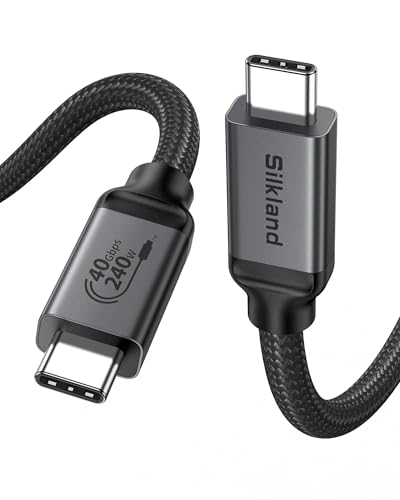
- USB-IF-certified 40Gbps performance
- 240W charging with compatible equipment
- 8K or dual 4K display support
Best For: Certified close-range laptop, dock, and monitor connections
Everyday Workhorse

- 40Gbps transfers and up to 240W charging
- 8K or dual 4K video support
- USB-IF-certified with bend-tested durability
Best For: General-purpose laptop, device, and monitor connections
Future-Ready Powerhouse
UGREEN 240W Thunderbolt 5 Cable

- 240W charging with USB4 80Gbps data
- Supports high-resolution multi-display setups
- Braided, shielded design rated for 10,000 bends
Best For: Power users and high-performance laptop workstations
Premium High-Speed Pick
Anker Prime Thunderbolt 5 Cable

- 80Gbps transfers and 240W charging
- Supports dual 8K displays at 60Hz
- Includes an 18-month warranty
Best For: Premium laptop, dock, and multi-display setups
Flexible Desk Setup Pick
Silkland Right-Angle Thunderbolt 5 Cable
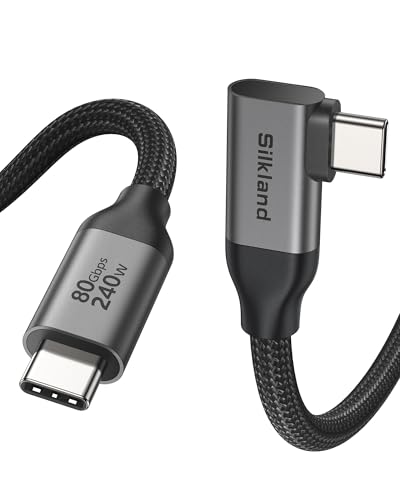
- 4-foot cable with a space-saving 90-degree plug
- 80Gbps data and 240W charging support
- Designed for docks, displays, and organized desks
Best For: Laptop docking stations and cable-conscious workspaces
Best All-Rounder

- 40Gbps USB4 data transfer
- Up to 8K@60Hz display output
- 240W charging and tested durability
Best For: Everyday laptop, monitor, and high-power charging setups
Best Space-Saving Pick

- 80Gbps transfer capability
- Compact 13cm flat design
- 240W PD and up to 16K video support
Best For: Short laptop-to-dock, hub, or SSD connections
Best Durable Cable

- USB-IF certified USB4 design
- 40Gbps data and 8K@60Hz video
- Braided, bend-resistant construction
Best For: Durable laptop, monitor, dock, and SSD connections
Premium Pick – Anker Prime Thunderbolt 4 Cable
For shoppers comparing thunderbolt cables for laptops, the Anker Prime is a certified Thunderbolt 4 option with strong charging, fast file transfers, and support for high-resolution displays. Its 3.3-foot length works well for close laptop-to-dock or laptop-to-monitor connections.
Best For: Laptop users who want a compact, high-performance Thunderbolt 4 cable for charging, storage, and displays.
Pros:
- Supports up to 240W charging with compatible devices and chargers.
- Offers up to 40Gbps data transfer and single 8K or dual 4K display support.
- Thunderbolt 4-certified and USB4-compliant, with an 18-month warranty.
Cons:
- The 3.3-foot length may be limiting for setups where devices are farther apart.
- Dual-display daisy-chaining requires compatible DisplayPort Alt Mode or Thunderbolt hardware.
This is a well-rounded choice when certification, fast charging, and dependable display connectivity matter more than extra length.
Next-Gen Choice – Fitee 80Gbps USB4 Thunderbolt 5 Cable
The Fitee cable stands out among thunderbolt cables for laptops when you need extra bandwidth and a longer reach. Its 5-foot design supports Thunderbolt 5 compatibility, advanced multi-monitor configurations, and up to 240W power delivery.
Best For: Professionals, creators, and high-end workstation users building multi-display or high-refresh-rate setups.
Pros:
- Supports up to 80Gbps bidirectional data transfer.
- Designed for 16K, dual 8K/6K, or triple 4K displays, depending on device support.
- Provides up to 240W PD3.1 charging and a useful 5-foot length.
Cons:
- The highest video and transfer rates require compatible Thunderbolt 5 or USB4 Version 2.0 hardware.
- Its advanced capabilities may be unnecessary for basic charging or single-monitor use.
Choose this cable if your laptop, dock, displays, and peripherals can take advantage of its newer standards; otherwise, a 40Gbps cable may be more practical.
Certified Value – Silkland USB4 Thunderbolt 4 Cable
Silkland offers a practical balance for buyers seeking thunderbolt cables for laptops with certified USB4 performance. This 3.3-foot cable combines 40Gbps transfers, 240W charging, and support for 8K or dual 4K displays in a compact design.
Best For: Users who want certified USB4 and Thunderbolt compatibility for close-range laptop, monitor, dock, or SSD connections.
Pros:
- USB-IF-certified and supports up to 40Gbps data transfer.
- Handles up to 240W charging with compatible PD3.1 equipment.
- Supports single 8K or dual 4K display output and broad backward compatibility.
Cons:
- The 3.3-foot length is best for side-by-side connections.
- The manufacturer recommends cables under 5 feet for stable docking performance.
It is a strong everyday option for compact desk layouts, especially when USB-IF certification and broad device compatibility are priorities.
Everyday Workhorse – Amazon Basics USB-C 4 Cable
The Amazon Basics USB-C 4 cable is a straightforward pick among thunderbolt cables for laptops, covering charging, data transfer, and video output in one 3.3-foot cable. It is USB-IF-certified and compatible with Thunderbolt 4, Thunderbolt 3, USB4, and older USB standards.
Best For: Everyday laptop, tablet, phone, storage, and monitor connections where broad compatibility and simple charging are important.
Pros:
- Supports up to 240W charging and 40Gbps data transfer with compatible hardware.
- Handles single 8K or dual 4K display output when devices support DisplayPort Alt Mode.
- Tested to bend 95 degrees 5,000 times and backed by a one-year limited warranty.
Cons:
- The 3.3-foot length may not suit larger desk arrangements.
- Reaching 240W requires a compatible EPR-capable device, charger, and cable setup.
This is a sensible general-purpose choice for users who want certified USB-C 4 performance without needing the specialized Thunderbolt 5 bandwidth of newer cables.
Future-Ready Powerhouse – UGREEN 240W Thunderbolt 5 Cable
For shoppers comparing thunderbolt cables for laptops, this UGREEN USB-C cable stands out with 240W charging, 80Gbps data transfer, and broad support for Thunderbolt 3/4, Thunderbolt 5, and USB4 devices. Its 3.3-foot length suits compact desk setups and high-performance laptop accessories.
Best For: Power users, photographers, developers, and multi-display workstations that need high charging and transfer capacity.
Pros:
- Supports up to 240W PD 3.1 charging and backward compatibility with 140W, 100W, and 65W devices.
- Offers up to 80Gbps data transfer and DisplayPort 2.1 support for high-resolution displays.
- Braided construction, aluminum housing, triple shielding, and testing for up to 10,000 bends.
Cons:
- Its 3.3-foot length may be limiting for larger desk layouts.
- Maximum performance depends on compatible laptops, displays, chargers, and peripherals.
This is a strong all-in-one option when you want one cable for charging, fast storage transfers, and demanding display setups. It makes the most sense for a laptop ecosystem designed to take advantage of its higher specifications.
Premium High-Speed Pick – Anker Prime Thunderbolt 5 Cable
Among thunderbolt cables for laptops, the Anker Prime Thunderbolt 5 cable is built for fast file transfers, powerful charging, and advanced display setups. Its 3.3-foot USB-C-to-USB-C design supports up to 80Gbps transfers, 240W charging, and dual 8K displays at 60Hz.
Best For: Laptop users who want a premium cable for large file transfers, high-resolution displays, and fast charging.
Pros:
- Provides up to 80Gbps data transfer and supports up to 120Gbps display bandwidth.
- Delivers up to 240W USB-C charging for compatible high-performance laptops.
- Includes an 18-month warranty and USB-IF specification compliance.
Cons:
- The 3.3-foot length may not reach across larger desks or docking setups.
- Its advertised speeds and display capabilities require compatible devices and accessories.
Anker’s cable is a straightforward choice for users prioritizing a recognized brand, high bandwidth, and fast charging in a compact setup. It is especially appealing for laptop-and-dock configurations that can use Thunderbolt 5 features.
Flexible Desk Setup Pick – Silkland Right-Angle Thunderbolt 5 Cable
For thunderbolt cables for laptops that need extra reach and cleaner cable routing, the 4-foot Silkland USB4 cable uses a 90-degree connector and supports up to 80Gbps data transfer, 240W charging, and advanced display configurations. The right-angle design is useful around docks, monitors, and crowded laptop ports.
Best For: Desk setups, docking stations, gamers, and creators who prefer a longer cable with a space-saving right-angle connector.
Pros:
- Offers up to 80Gbps bidirectional data transfer and up to 120Gbps display bandwidth.
- Supports 240W PD 3.1 charging and compatibility with Thunderbolt 3, 4, 5, USB-C, and DisplayPort 2.1 devices.
- 4-foot length, 90-degree connector, braided nylon, aluminum shell, and triple shielding suit organized desk setups.
Cons:
- The right-angle connector may not suit every laptop port orientation or accessory layout.
- Actual speeds depend on the connected devices and setup.
- The notes cite testing over 5,000 bends, which is lower than some competing durability ratings.
Silkland’s main advantage is practical flexibility: the extra length and L-shaped connector can reduce strain and clutter without sacrificing headline bandwidth. Consider it when port clearance and cable placement matter as much as charging and transfer speed.
Best All-Rounder – Anker 240W USB-C Cable
For shoppers comparing thunderbolt cables for laptops, the Anker 240W USB-C cable is a practical all-purpose option. It combines 40Gbps USB4 data transfer, high-resolution display support, and up to 240W charging in a 3.3-foot cable.
Best For: Laptop users who want one cable for fast file transfers, external displays, and high-power USB-C charging.
Pros:
- Supports USB4 and Thunderbolt 4/3 connections with data rates up to 40Gbps.
- Handles displays up to 8K at 60Hz or 4K at 144Hz.
- Supports up to 240W charging with a compatible charger.
- Tested to withstand up to 5,000 bends and includes an 18-month warranty.
Cons:
- The 3.3-foot length may be limiting for some desk setups.
- A compatible charger and devices are required to reach the maximum charging output.
This is a strong choice when you want dependable, high-bandwidth performance without an unusually specialized design. Its standard-length construction suits everyday laptop, monitor, and tablet connections.
Best Space-Saving Pick – 80Gbps Flat USB-C Cable
If you need thunderbolt cables for laptops in a cramped setup, this compact flat USB-C cable is designed to reduce clutter. Its 13cm length supports up to 80Gbps transfer, 240W PD charging, and high-resolution monitor connections.
Best For: Laptop docks, hubs, portable SSDs, and other close-range connections where a short, flexible cable is useful.
Pros:
- Offers up to 80Gbps bandwidth with compatible Thunderbolt 5, Thunderbolt 4, or USB4 devices.
- Supports single 16K@60Hz, dual 8K@60Hz, or 4K@240Hz video output.
- Supports up to 240W PD 3.1 charging at 48V/5A.
- The 13cm flat FPC design is lightweight, flexible, and space-saving.
Cons:
- Its very short length is not suitable for separated laptop-and-monitor setups.
- Actual transfer, charging, and display performance depends on the connected devices.
This cable stands out for compact desk layouts and dock connections. Choose it when minimizing cable slack matters more than reach, and verify that your hardware supports the advertised top speeds and resolutions.
Best Durable Cable – Acer USB4 40Gbps Cable
The Acer USB4 cable is a durable option for shoppers seeking thunderbolt cables for laptops with broad connectivity. It supports 40Gbps transfers, 8K display output, and up to 240W charging in a 3.3-foot braided design.
Best For: Laptop users who regularly connect monitors, SSDs, docks, eGPUs, and other USB-C or Thunderbolt devices.
Pros:
- USB-IF certified and compatible with Thunderbolt 4/3 and USB4 devices.
- Supports up to 40Gbps data transfer and 8K@60Hz video output.
- Provides up to 240W charging with compatible equipment and supports common QC and PD outputs.
- Braided, bend-resistant construction and an aluminum alloy casing add protection.
Cons:
- The 3.3-foot length may not reach across larger workspaces.
- Maximum charging and display capabilities require compatible devices, chargers, and monitors.
With its certified USB4 specification and reinforced construction, this Acer cable is suited to demanding everyday connectivity. It is a sensible pick for users who value durability while still needing fast data, display, and charging support.
How We Picked the Best Thunderbolt Cables for Laptops
We focused on cables with clearly stated data-transfer, charging, and video capabilities. The selection includes Thunderbolt 4 and Thunderbolt 5 models, USB4 cables, USB-IF-certified options, and products advertised as compatible with earlier Thunderbolt standards. We also considered length, connector design, right-angle and compact formats, construction, and whether the specifications make sense for laptop docks, external SSDs, monitors, and high-wattage USB-C chargers.
Compatibility claims still require attention: the cable, laptop port, dock, display, and charger must all support the feature you want. A high-rated cable cannot add Thunderbolt capability to a non-Thunderbolt USB-C port.
Quick Comparison
- Thunderbolt 4 and USB4 40Gbps: A strong fit for most current laptops, docks, external drives, and 4K or 8K display setups.
- Thunderbolt 5 and USB4 80Gbps: Best for newer systems that support the standard and need more bandwidth for demanding storage or multi-display configurations.
- 240W charging: Useful for compatible USB-C Power Delivery equipment, but the laptop and charger determine the actual charging rate.
- Short and right-angle cables: Helpful for compact desk setups, portable drives, and reducing connector strain.
Key Buying Factors for Thunderbolt Cables for Laptops
Speed and Standard
Check whether your devices use Thunderbolt 3, Thunderbolt 4, Thunderbolt 5, or USB4. A 40Gbps cable is sufficient for many laptops, while an 80Gbps cable makes more sense for Thunderbolt 5 hardware. Backward compatibility is common, but maximum performance is limited by the slowest component.
Charging Capacity
Look for the advertised wattage, especially if you intend to charge a performance laptop through a dock. A 240W rating provides headroom, but actual power delivery depends on the charger, laptop, and USB-C PD profile. Charging wattage and data speed are separate specifications.
Display Support and Length
For monitors, verify the supported resolution and refresh rate across the entire setup. Short cables generally make it easier to maintain signal integrity and manage a desk, while longer cables offer flexibility but may be less convenient in compact layouts.
Build and Connector Design
Reinforced strain relief, a durable outer jacket, and secure connectors matter for frequently moved cables. Right-angle plugs can improve cable routing, but confirm which direction suits your laptop or dock before buying.
Who Should Buy Which Thunderbolt Cables for Laptops?
Most laptop users: Choose a reputable Thunderbolt 4 or 40Gbps USB4 cable for dependable everyday charging, docking, storage, and display use.
Thunderbolt 5 owners: Select an 80Gbps Thunderbolt 5 or USB4 cable if your laptop and peripherals support the newer standard.
Power users: Prioritize a 240W-rated cable when connecting a high-wattage charger or dock, while checking the laptop’s actual charging limit.
Travelers and compact-desk users: A 3.3-foot cable is easier to pack and manage; a right-angle or very short model can reduce clutter around a portable SSD or dock.