The best trackballs for gaming can reduce desk movement, ease wrist strain, and provide steady cursor control when space or comfort matters. This roundup compares ten models with different ball sizes, control layouts, connection options, and ergonomic designs.
Because trackballs feel very different from conventional gaming mice, the right choice depends on your preferred finger control, hand size, game genres, and need for programmable inputs. Use the guide below to narrow the field before buying.
Best 10 Trackballs for Gaming Picks for 2026
Best Wired RGB Thumb Trackball

- Wired USB-A connection with a 1.8m cable
- Five DPI settings up to 1200
- Right-handed design with RGB lighting
Best For: Compact desks and users wanting stable wired thumb control
Best Wireless Gaming-Style Trackball

- Bluetooth, 2.4GHz, and wired connectivity
- Large 55mm ball with dual sensors
- Rechargeable battery rated for four months
Best For: Ambidextrous users who want flexible connections and customization
Best Large-Hand Trackball

- Designed for larger hands
- 44mm finger-operated trackball
- Five DPI levels and wired USB setup
Best For: Design, office work, and general computing—not gaming
Best Quiet Wireless Trackball

- Bluetooth and Logi Bolt wireless options
- Up to 18 months from one AA battery
- Quiet clicks and ergonomic thumb control
Best For: Quiet office setups and compact desks
Classic Precision Pick
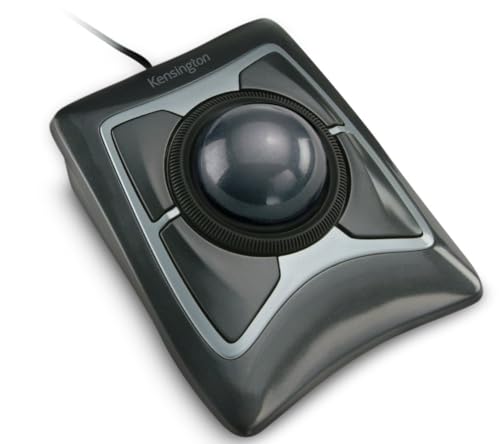
- Large 55mm ball with optical tracking
- Ambidextrous design and detachable wrist rest
- Wired USB-A connection with customizable controls
Best For: Precision-focused wired desktop use
Feature-Rich Gaming Choice

- 12,000 DPI sensor with 1000Hz report rate
- Ten programmable buttons and tilt wheel
- Bluetooth, 2.4GHz wireless, and wired connectivity
Best For: Right-handed gaming and multi-device control
Adjustable Comfort Pick
ProtoArc EM02 Wireless Trackball

- Flat or 15° adjustable tilt
- Quiet buttons with five DPI settings
- Bluetooth, 2.4GHz wireless, and USB-C charging
Best For: Quiet, ergonomic everyday computing
Premium Customizable Pick
ELECOM Huge Plus Wireless Trackball

- Large 52mm ball with swappable steel bearings
- Tri-mode connectivity for up to three devices
- 10 programmable buttons and up to five months of battery life
Best For: Right-handed users seeking extensive customization and multi-device flexibility
Quiet Ergonomic Pick
Nulea Wireless Tilt-Stand Trackball

- 21.7° tilt stand supports a natural wrist position
- Completely silent trackball, buttons, and scroll wheel
- Four DPI levels and three-device wireless switching
Best For: Quiet workspaces and users prioritizing ergonomic comfort
Proven Precision Pick
ELECOM Huge Wireless Trackball

- 52mm ball with index-finger control and soft palm rest
- Optical sensor with three selectable DPI settings
- Eight buttons plus scroll-wheel tilt controls
Best For: Users wanting large-ball precision and adjustable cursor speed
Best Wired RGB Thumb Trackball – Ergonomic 34mm Control
This wired model is a practical choice among trackballs for gaming when you want stable USB connectivity, thumb-operated control, and customizable cursor speeds. Its 34mm ball, ergonomic right-handed shape, and RGB lighting suit compact desks and general PC use.
Best For: Right-handed users who want a wired trackball with adjustable DPI and colorful desktop lighting.
Pros:
- Five DPI settings from 100 to 1200 support slower or faster cursor movement.
- Thumb control and a sculpted shape help limit hand and wrist movement.
- Works on desks and other surfaces, including a sofa, bed, or carpet.
- Includes Back/Forward buttons, a scroll wheel, and RGB lighting.
Cons:
- Buttons are non-programmable.
- Back/Forward buttons are not compatible with macOS.
- Its 1200 DPI maximum is more modest than some gaming mice.
The TM551 emphasizes comfort, reliable wired performance, and flexible tracking rather than extensive gaming customization. It is a sensible fit for users who value a small-footprint pointing device and straightforward plug-and-play setup.
Best Wireless Gaming-Style Trackball – Kensington SlimBlade Pro
The Kensington SlimBlade Pro is a flexible option among trackballs for gaming, offering Bluetooth, 2.4GHz wireless, and wired modes. Its low-profile ambidextrous design and large 55mm ball prioritize comfortable, precise control in space-constrained setups.
Best For: Users who want a premium-feeling, ambidextrous trackball with multiple connection options and configurable controls.
Pros:
- Supports Bluetooth, 2.4GHz wireless, and USB wired connections.
- Large 55mm ball and dual sensors provide accurate cursor tracking and scrolling.
- Rechargeable battery is rated for up to four months per charge.
- KensingtonKonnect software supports personalized functions across eight button sets.
Cons:
- Windows ARM-based computers are currently unsupported by the software.
- The low-profile design may require an adjustment period for users new to trackballs.
- Supplied details list four physical buttons, while customization depends on KensingtonKonnect.
This is the most connection-flexible choice in the group, with a large ball and software customization that can suit productivity and gaming-style shortcuts. Choose it if you value versatility and ambidextrous use more than a conventional mouse shape.
Best Large-Hand Trackball – 44mm Finger Control
This large-hand wired model is included for its spacious ergonomic shape and 44mm finger-operated ball, but it is not recommended by the supplied notes for gaming. It is better viewed as a comfortable precision pointer for office work, design, and general computing.
Best For: Users with larger hands who need a comfortable wired trackball for design and office tasks.
Pros:
- Hand-conforming design is intended to reduce muscle strain and wrist pressure.
- Five DPI levels allow tailored cursor control.
- 44mm finger-operated ball works on varied surfaces and tight workspaces.
- USB-A plug-and-play connection requires no drivers.
Cons:
- The manufacturer notes that it is not recommended for gaming.
- It is a right-handed wired design with a 1.8m cable.
- Forward/Backward buttons are not supported on Mac systems.
Despite its gaming-themed styling, the TM552 is a poor match for buyers specifically seeking trackballs for gaming. Its strengths are large-hand comfort, precise positioning, and convenient use away from a conventional mouse surface.
Best Quiet Wireless Trackball – Logitech ERGO M575S
The Logitech ERGO M575S is a compact wireless option for buyers considering trackballs for gaming alongside everyday computing. Its thumb-controlled design, quiet clicks, Bluetooth or Logi Bolt connectivity, and long battery life make it especially practical for small desks and mixed-use setups.
Best For: Right-handed users who want a comfortable, quiet wireless trackball for office work and casual computer use.
Pros:
- Bluetooth and included Logi Bolt receiver provide two wireless connection methods.
- AA battery life is rated for up to 18 months.
- Ergonomic thumb control supports use on small desks and virtually any surface.
- Logi Options+ enables cursor-speed adjustments, shortcuts, and Smart Actions.
Cons:
- The right-handed shape is not ambidextrous.
- It has fewer physical controls than the Kensington model.
- The supplied notes position it primarily for ergonomic office use rather than dedicated gaming.
The ERGO M575S is a strong everyday comfort pick, not a specialized high-performance gaming controller. Its quiet operation, simple wireless setup, and 18-month battery rating make it attractive when convenience and reduced hand movement matter most.
Classic Precision Pick – Kensington Expert Trackball
Kensington Expert Trackball Mouse (K64325), Black Silver, 5"W x 5-3/4"D x 2-1/2"H
Check Price On AmazonIf you want a dependable option among trackballs for gaming and everyday desktop use, the Kensington Expert Trackball focuses on precise optical tracking and a large 55mm ball. Its wired USB-A connection avoids wireless battery management, while the ambidextrous layout suits either hand.
Best For: Users who prioritize a large ball, reliable wired connectivity, and ambidextrous ergonomics.
Pros:
- Large 55mm ball with Diamond Eye optical tracking for precise cursor control.
- Detachable wrist rest and ambidextrous design support extended use.
- Customizable buttons, scroll speed, and cursor speed through KensingtonKonnect on supported systems.
- Scroll ring makes vertical page navigation quick and convenient.
Cons:
- Wired USB-A design offers no wireless flexibility.
- KensingtonKonnect customization is unavailable on ChromeOS and currently unsupported on Windows ARM-based computers.
The Expert Trackball is a straightforward choice for a stable workstation setup. It is less feature-rich than newer wireless models, but its large ball, scroll ring, and wrist support make it a practical precision-focused option.
Feature-Rich Gaming Choice – ELECOM IST PRO Trackball
For shoppers comparing trackballs for gaming, the ELECOM IST PRO stands out with a PixArt sensor rated up to 12,000 DPI, a 1000Hz report rate, and 10 programmable buttons. It also supports Bluetooth 5.3, 2.4GHz wireless, and USB-C wired operation, making it adaptable across gaming and productivity setups.
Best For: Right-handed users who want high sensitivity, extensive button customization, and multi-device connectivity.
Pros:
- 12,000 DPI PixArt sensor and 1000Hz report rate support responsive tracking.
- Ten programmable buttons and a tilt wheel offer extensive control options.
- Connects to up to six devices through Bluetooth, 2.4GHz wireless, or USB-C wired mode.
- Swappable steel or ruby bearings let users adjust the ball feel.
Cons:
- Right-handed design is not ambidextrous.
- Its broad feature set may be more than needed for simple office use.
The IST PRO is the most gaming-oriented model in this group. Its high-DPI sensor, fast report rate, programmable controls, and three connection modes give it the flexibility to serve as both a gaming peripheral and a multi-device work mouse.
Adjustable Comfort Pick – ProtoArc EM02 Wireless Trackball
The ProtoArc EM02 is a practical choice among trackballs for gaming when comfort, quiet operation, and flexible placement matter. Its body adjusts between a flat 0° and tilted 15° angle, while Bluetooth and 2.4GHz wireless connections make it suitable for compact or shared workspaces.
Best For: Right-handed users seeking an adjustable, quiet, rechargeable trackball for everyday computing.
Pros:
- Adjustable 0° or 15° angle helps personalize hand posture.
- Bluetooth and 2.4GHz wireless support switching between devices.
- Quiet-touch buttons and five DPI settings from 200 to 1600 suit low-noise work.
- USB-C charging provides up to 90 days of standby time.
Cons:
- Maximum sensitivity is 1600 DPI, lower than the ELECOM IST PRO.
- Forward and backward buttons are not compatible with Mac OS.
- Right-handed design does not suit left-handed users.
The EM02 emphasizes ergonomic flexibility rather than high-end gaming specifications. Its adjustable tilt, quiet clicks, wireless connectivity, and rechargeable battery make it a strong fit for comfortable everyday navigation in limited desk space.
Premium Customizable Pick – ELECOM Huge Plus Wireless Trackball
For shoppers comparing trackballs for gaming and everyday productivity, the ELECOM Huge Plus stands out with a large 52mm ball, three connection modes, and extensive button customization. Its right-handed ergonomic design supports precise control, while rechargeable power and silent clicks suit long sessions.
Best For: Right-handed users who want a highly customizable trackball for multitasking, gaming-console compatibility, and extended desktop use.
Pros:
- Large 52mm ball and smooth, swappable steel bearings support controlled movement.
- Bluetooth, 2.4GHz wireless, and wired USB-C connectivity support up to three devices.
- Ten programmable buttons enable customized shortcuts.
- Rechargeable battery lasts up to five months per charge and supports use while charging.
Cons:
- At 291 g, it is relatively substantial for a mouse.
- Its right-hand design is not intended for left-handed users.
The Huge Plus is a strong choice when customization, connection flexibility, and a large control surface matter more than portability. It is especially practical for users moving between several devices.
Quiet Ergonomic Pick – Nulea Wireless Tilt-Stand Trackball
The Nulea wireless trackball is a practical option among trackballs for gaming when quiet operation and a comfortable wrist position are priorities. Its 21.7-degree tilt stand, thumb control, four DPI settings, and dual wireless connection options make it suitable for focused desk work and casual control.
Best For: Right-handed users who want a quiet, rechargeable trackball with an elevated ergonomic angle and straightforward sensitivity adjustments.
Pros:
- 21.7-degree tilt stand encourages a more natural wrist position.
- Silent trackball, buttons, and scroll wheel minimize distractions.
- Bluetooth and USB receiver connections support switching among up to three devices.
- Four DPI levels from 400 to 1600 allow slower precision or quicker cursor movement.
Cons:
- The six buttons are not programmable.
- Maximum sensitivity is 1600 DPI, which may feel limited for some fast cursor setups.
- It is specified for Windows and macOS rather than a broader range of operating systems.
Nulea keeps the feature set focused on comfort, silence, and convenient device switching. It is a better fit for quiet workspaces and general control than for users who need extensive button mapping.
Proven Precision Pick – ELECOM Huge Wireless Trackball
The ELECOM Huge combines a 52mm ball with index-finger control, an optical gaming sensor, and adjustable DPI, making it a capable contender among trackballs for gaming. Its eight physical buttons, scroll-wheel tilt controls, and 2.4GHz wireless connection add useful flexibility for desktop use.
Best For: Right-handed users who prefer index-finger trackball control, adjustable cursor speed, and a large palm-supporting design.
Pros:
- Large 52mm ball and soft palm rest support controlled, comfortable operation.
- Gaming-oriented optical sensor offers selectable 500, 1000, and 1500 DPI settings.
- Eight buttons include scroll-wheel tilt for horizontal scrolling.
- 2.4GHz wireless connection reaches up to 10 meters on non-magnetic surfaces.
Cons:
- Uses a replaceable battery rather than a rechargeable design.
- Connectivity is limited to 2.4GHz wireless via USB receiver.
- The right-handed, full-size design may not suit every desk setup.
This model is appealing if you want a large, finger-operated trackball with dedicated DPI switching and additional controls. Its simpler wireless setup may be preferable to multi-mode models, provided you are comfortable managing replaceable batteries.
How We Picked the Best Trackballs for Gaming
We evaluated these models by focusing on the factors that most affect everyday gaming and desktop use: ball placement, tracking hardware, connection reliability, comfort, customization, portability, and value. The selection includes thumb-controlled and index-finger-controlled designs, wired and wireless models, and trackballs ranging from compact 34mm options to large 52mm balls.
Not every trackball is designed specifically for competitive gaming. Instead, this list prioritizes models that can deliver controlled cursor movement, dependable connectivity, and comfortable long-session use while still being practical for games that work well with trackball input.
Quick Comparison
| Best For | Look For |
|---|---|
| Small desks | Compact body and wireless connectivity |
| Large hands | Oversized shell or large 44mm–52mm ball |
| Precision control | Index-finger ball placement and adjustable sensitivity |
| Flexible setups | Bluetooth, 2.4GHz, and wired connection options |
| Customization | Programmable buttons and companion software |
| Long sessions | Angled support, stable palm rest, and low-effort tracking |
Key Buying Factors for Trackballs for Gaming
Ball Size and Placement
Larger balls can provide smoother, broader movements, while smaller balls may feel quicker and require less finger travel. Thumb trackballs resemble the control style of many mice, whereas index-finger models often offer more direct precision and less thumb fatigue.
Connection and Latency
Wired models avoid battery concerns and are a straightforward choice for stationary gaming setups. Wireless models are more flexible, but check whether the device supports a low-interference 2.4GHz receiver, Bluetooth, or both. Multi-device connectivity is useful if you switch between a gaming PC, laptop, and tablet.
Ergonomics and Hand Fit
Look for a shape that supports your palm without forcing your wrist into an awkward angle. Tilted designs may reduce strain, but the best position is personal. Large-hand users should pay close attention to body dimensions, button spacing, and palm-rest depth.
Buttons and Software
Extra or programmable buttons can help with shortcuts, browser controls, and noncompetitive games. Confirm software compatibility and whether profiles can be stored on the device. Also check whether the ball and sensor area are easy to clean.
Who Should Buy Which Trackballs for Gaming?
Choose a thumb-controlled model if you want the most familiar transition from a standard mouse. Index-finger designs are better suited to users who prioritize fine control or prefer moving the ball independently from the primary buttons. Large-ball options are worth considering for broad, deliberate movements and larger hands, while compact models suit limited desks and travel.
For a permanent workstation, a wired trackball keeps setup simple. If you alternate between devices, choose a model with Bluetooth and 2.4GHz support. Competitive players should verify game compatibility and test sensitivity before committing, since some games favor conventional mouse input. For strategy, simulation, RPG, productivity, and casual gaming, comfort and reliable control may matter more than maximum polling-rate specifications.