If you need to copy flash drives in batches without tying up a computer, standalone duplicators can save serious time. The best models also handle erasing, verifying, and multi-target duplication with minimal setup.
We narrowed this roundup to practical usb duplicators under 1000 that balance speed, target count, and ease of use for small businesses, labs, IT teams, and resellers.
Best 10 USB Duplicators Under 1000 Picks for 2026
Portable 1-to-2 Standalone Cloner
BestDuplicator UB300 1:2 USB 2.0 Duplicator

- Copies one source to two targets at once
- Standalone use with no computer required
- Includes erase and media test functions
Best For: Small IT or school deployments that need portable 1-to-2 USB cloning
High-Capacity Standalone Duplicator
Nexcopy USB115SA 1-to-15 Standalone Duplicator

- 1 master to 15 target duplication
- No PC or software required
- LCD shows real-time status and feedback
Best For: Users who need a standalone USB duplicator for larger 1-to-15 batches
Computer-Connected Mini Duplicator
DupliM 1-to-10 Mini USB Duplicator

- Copies up to 10 USB drives at once
- Works with Windows and Mac software
- Can copy from files, folders, or images
Best For: Computer-connected users who want flexible 1-to-10 USB duplication
Large-Scale Standalone Duplicator
Nexcopy USB131SA 1-to-31 Standalone Duplicator
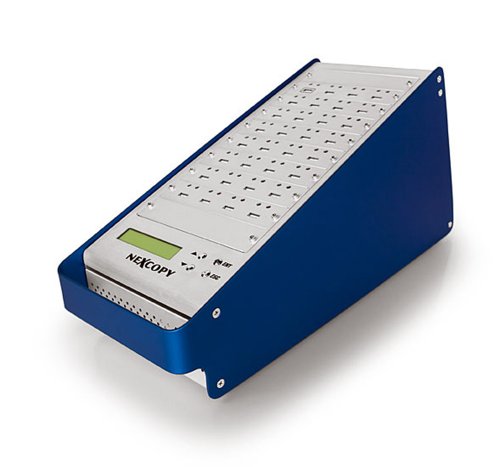
- Copies one master to 31 targets
- Standalone with no software needed
- Fast per-port duplication with LCD feedback
Best For: High-volume teams needing a standalone 1-to-31 USB duplicator
Touchscreen 1-to-10 Cloner
EZ Dupe SOHO Touch USB Duplicator

- Touchscreen menu with copy, compare, format, and erase
- Up to 35MB per second flash-drive duplication
- Built for daily use with standalone operation
Best For: Simple, daily USB flash-drive cloning and erasing
Standalone 7-Target Duplicator
Vinpower Digital USBShark 7-Target

- Standalone operation with no PC required
- Copies to up to 7 target drives
- Includes smart copy, secure erase, and prescan
Best For: Technicians running larger standalone flash-drive duplication jobs
Compact 1:2 USB Copier
StarTech Standalone USB Duplicator

- Standalone 1-to-2 duplicator and eraser
- System/file copy plus sector-by-sector modes
- LCD menu with Copy & Compare and erase options
Best For: Small, controlled USB cloning and wiping tasks
Enterprise Standalone Duplicator

- Copies up to 15 USB drives at once
- Standalone operation needs no PC
- Smart Copy, Raw Mode, and secure erase
Best For: High-volume offices and IT teams needing a 15-target standalone cloner
Portable 4-Target Copy Unit

- Copies up to 4 USB drives at once
- Standalone and portable with no PC needed
- Updated for faster speed and better compatibility
Best For: Small-batch USB copying when portability matters
Compact 3-Port Cloner

- Standalone 3-port USB cloner
- Smart Copy, Raw Copy, and DoD erase
- Read Error Skip helps with damaged drives
Best For: Small offices needing a compact duplicator with secure wipe support
Portable 1-to-2 Standalone Cloner – BestDuplicator UB300 1:2 USB 2.0 Duplicator
If you want usb duplicators under 1000 for simple field use, the BestDuplicator UB300 is a compact standalone option that copies one flash drive to two targets without needing a computer. It supports quick copy for data-only jobs and whole media copy for bit-for-bit cloning, making it practical for routine distribution and backup tasks.
Best For: IT teams, schools, and technicians who need a small standalone USB cloner for 1-to-2 jobs.
Pros:
- Duplicates one source to two USB drives at the same time
- Standalone operation, so no Windows or Mac software is required
- Offers Quick Copy and Whole Media Copy modes
- Includes erase, capacity check, device info, and speed test functions
Cons:
- Limited to 1-to-2 duplication, so it is not suited for larger batches
- Best performance is tied to using source and target media of similar capacity
- Designed for USB 1.1 and USB 2.0 media, not modern high-speed flash drives
The UB300 is a straightforward choice if you value portability and built-in verification tools over high-volume output. For small deployments, it delivers the core cloning and erase features most buyers need.
High-Capacity Standalone Duplicator – Nexcopy USB115SA 1-to-15 Standalone Duplicator
Among usb duplicators under 1000, the Nexcopy USB115SA stands out for users who need a much larger standalone duplication setup. It runs without a PC or software and supports a 1 master to 15 target configuration, which is useful when you need to push the same content to many USB sticks at once.
Best For: Teams that need standalone 1-to-15 duplication with LCD status feedback.
Pros:
- Standalone design with no PC or software required
- 1 master to 15 target configuration for larger batch jobs
- LCD provides real-time performance feedback and status
- Asynchronous duplication supports masters up to 256MB
Cons:
- Master size support is limited to 256MB for asynchronous duplication
- Bulky 15-target workflow may be more than small users need
- Less portable than smaller desktop duplicators
If your priority is scaling beyond basic two-way copying, this model is a more capable standalone option. It is best suited to structured duplication tasks where many identical USB sticks are needed quickly.
Computer-Connected Mini Duplicator – DupliM 1-to-10 Mini USB Duplicator
If you prefer usb duplicators under 1000 that work through a computer, the DupliM Mini USB Duplicator offers a compact 1-to-10 setup for USB 3.0 and 2.0 drives. It can duplicate from image files, flash drives, or selected files and folders, which gives it more workflow flexibility than basic standalone cloners.
Best For: Windows and Mac users who want a compact, software-driven USB duplication workflow.
Pros:
- Duplicates up to 10 USB drives simultaneously
- Works with Windows and Mac through the included software suite
- Can duplicate from image files, flash drives, or selected files and folders
- Includes USB 3.0 cable, power adapter, and U.S.-based tech support
Cons:
- Requires a connected computer to operate
- Needs compatible system requirements for Windows or Mac
- Not a standalone field duplicator
This is a strong pick when you want more control over what gets copied and you already have a PC or Mac in the workflow. Its software-driven approach makes it more flexible for content-based duplication jobs.
Large-Scale Standalone Duplicator – Nexcopy USB131SA 1-to-31 Standalone Duplicator
For buyers comparing usb duplicators under 1000, the Nexcopy USB131SA is the biggest batch-focused model in this group. It is a standalone 1 master to 31 target duplicator with no PC or software required, and it advertises very fast per-port copy speed for high-output duplication work.
Best For: Large duplication runs that need up to 31 targets from one master.
Pros:
- 1 master to 31 target configuration
- Standalone operation with no PC or software required
- Advertised copy speed of over 1800MBs per minute to each port
- LCD provides real-time performance feedback and status
Cons:
- Very large target count may be more than smaller teams need
- Asynchronous duplication is limited to masters up to 256MB
- Heavier 18-pound form factor is less portable
This model is aimed at users who need maximum throughput in a standalone setup. If your main concern is pushing the same content to a very large number of USB sticks, it is the most scalable option here.
Touchscreen 1-to-10 Cloner – EZ Dupe SOHO Touch USB Duplicator
If you want usb duplicators under 1000 that feel straightforward in daily use, the EZ Dupe SOHO Touch is built for quick flash-drive cloning with a touchscreen menu and no PC required. It supports copy, compare, format, and erase tasks, making it a practical pick for routine thumb-drive jobs across USB 2.0, 3.0, and 3.1 media.
Best For: Teams that need a simple standalone duplicator for frequent USB copying and erasing.
Pros:
- Touchscreen interface keeps copy, compare, format, and erase functions easy to access.
- Copies USB flash media at up to 35MB per second.
- Supports all file formats, file sizes, and drive capacities on USB flash media.
- Lightweight but heavy-duty construction is intended for daily operation.
Cons:
- Designed for USB flash media, so it is not a broad-purpose storage duplicator.
- Best suited to thumb drives rather than mixed device workflows.
This is a solid choice if you value a simple interface and dependable standalone operation over advanced enterprise features. For offices or labs that clone flash drives often, it offers a balanced mix of ease, speed, and day-to-day durability.
Standalone 7-Target Duplicator – Vinpower Digital USBShark 7-Target
Vinpower Digital USBShark Standalone USB Flash Drive Duplicator - 7 Targets (High Speed)
Check Price On AmazonAmong usb duplicators under 1000, the Vinpower Digital USBShark stands out if you want a standalone unit that can handle larger multi-drive jobs without a computer. Its smart copy, secure erase, and prescan features make it a practical tool for copying accessible content and checking source-drive health before duplication.
Best For: Technicians who need a no-PC 7-target duplicator for flash-drive workflows.
Pros:
- Standalone operation means no computer is required.
- Supports up to 7 target drives for multi-copy jobs.
- Smart copy and bit-by-bit duplication support all data formats.
- Secure erase and prescan features add useful maintenance and verification steps.
Cons:
- At 10 pounds, it is heavier than simpler tabletop units.
- Designed around USB flash drive workflows rather than general storage media.
If your priority is batch cloning with built-in utility functions, this model offers a lot of capability in one standalone box. It is best when speed, multi-target output, and drive checking matter more than portability.
Compact 1:2 USB Copier – StarTech Standalone USB Duplicator
If you are comparing usb duplicators under 1000 for small-team or technician use, the StarTech 1:2 standalone duplicator is a compact option focused on simple two-drive jobs. It can duplicate, erase, and verify USB flash drives without a computer, and it also includes a push-button LCD menu for status checks and drive diagnostics.
Best For: Small duplication tasks, quick wipes, and IT pros managing a couple of USB drives at a time.
Pros:
- Standalone 1-to-2 design keeps the workflow simple and self-contained.
- Supports system/file copy and sector-by-sector copy for all file formats.
- Includes Quick Erase plus 1-pass and 3-pass overwrite options.
- LCD menu, Copy & Compare, and bad-sector scanning help with verification.
Cons:
- Limited to two drives at a time, so it is not ideal for larger batch runs.
- Asynchronous mode depends on source content being under 64 MB.
This model makes sense when you need a dependable standalone tool for small, repeatable flash-drive tasks. It is less about high-volume throughput and more about controlled duplication, erasing, and drive checking in a compact package.
Enterprise Standalone Duplicator – Vinpower 15-Target USB Cloner
If you need usb duplicators under 1000 for a larger job, this Vinpower standalone model is built for copying to multiple flash drives without a PC. Its asynchronous duplication is useful when you want drives finished independently, while Smart Copy and Raw Mode give you options for faster file-based copies or bit-for-bit cloning.
Best For: IT teams, labs, and offices that need a standalone 15-target USB cloning and erase station.
Pros:
- Copies to up to 15 USB drives at once with standalone operation.
- Asynchronous duplication lets each drive copy independently.
- Smart Copy and Raw Mode cover both quick data copies and exact clones.
- Also supports secure erase for USB drives, plus optional flash media modules.
Cons:
- Bulkier and heavier than mini duplicators.
- Interface adaptor modules are needed for SD, microSD, CF, and other media.
This is the most scalable option in the group, especially if your priority is high target count and standalone workflow. It suits repeat duplication work better than occasional single-set copying.
Portable 4-Target Copy Unit – EZ Dupe Mini USB Plus MK II
For buyers comparing usb duplicators under 1000, this EZ Dupe unit is a compact standalone choice for small batch flash drive copying. It supports up to four USB flash media drives at a time, adds asynchronous copying, and is updated for better compatibility and faster copy speeds than the original version.
Best For: Users who want a lightweight, portable 1-to-4 USB duplicator for quick batches.
Pros:
- Copies up to 4 USB flash drives simultaneously.
- Standalone plug-and-use operation requires no computer.
- Updated version claims 25% faster copy speed than the original.
- Supports USB 1.0, 2.0, 3.0 flash drives and some external USB storage with its own power source.
Cons:
- Lower target count than larger duplicators.
- External USB devices must have their own power source.
If you only need modest output, this model keeps the process simple and portable without adding unnecessary bulk. It’s a practical fit for on-the-go duplication and smaller production runs.
Compact 3-Port Cloner – Vinpower USB Mini Dup
If you’re shopping for usb duplicators under 1000 and want a compact standalone option, this Vinpower 1-to-3 unit focuses on reliable everyday cloning and erasing. It offers Smart Copy and Raw Copy modes, plus Read Error Skip to help recover as much readable data as possible from aging or damaged drives.
Best For: Small offices and IT users who want a compact 3-port duplicator with erase features.
Pros:
- Standalone operation requires no computer.
- Smart Copy and Raw Copy support both quick and exact duplication.
- Secure erase uses DoD 5220.22-M standards.
- Read Error Skip can help when working with failing drives.
Cons:
- Only supports 3 ports, so output is lower than larger systems.
- Not as scalable as 4-target or 15-target models.
This is the most balanced pick if you want a small footprint and practical duplication tools in one unit. It works well for routine copying, secure wipe jobs, and smaller deployment tasks.
How We Picked the Best USB Duplicators Under 1000
For USB Duplicators Under 1000, the most important factors are target count, transfer speed, standalone operation, and reliability. We favored models that can run without constant PC control, support common USB flash drives, and offer features like erase modes and copy verification. We also looked for useful formats ranging from compact 1-to-2 units to higher-capacity systems for larger production runs.
Quick Comparison: What Matters Most
Start by matching the duplicator to your workload. A 1-to-2 or 1-to-3 unit is usually best for light office use, service desks, and occasional media prep. A 1-to-10 or 1-to-15 model is better when you need repeatable output for training kits, event materials, or customer deliveries. Larger target counts can improve throughput, but they also make sense only if you regularly duplicate enough drives to keep all ports busy.
Key Buying Factors for USB Duplicators Under 1000
Standalone Vs. Computer-Connected
Standalone machines are the simplest choice for most buyers because they reduce setup time and avoid software dependency. Computer-connected options can still be useful when you want more control, but they are less convenient for fast, repeatable jobs.
Speed and Verification
Raw copy speed matters, but verification is just as important. A fast copier that does not check data can create avoidable errors, especially when distributing identical content to multiple users.
Target Count and Drive Mix
Choose a target count based on how many drives you need per run. Also confirm the unit supports the USB standards and drive sizes you use most often. Some duplicators handle older USB 2.0 media well, while others are better suited to mixed USB 3.x environments.
Workflow Features
Useful extras include erase functions, copy status screens, and easy menu navigation. These features matter most if multiple staff members will operate the unit or if you plan to use it often.
Who Should Buy Which USB Duplicators Under 1000?
If you only duplicate a few drives at a time, a compact 1-to-2 or 1-to-4 unit is usually the most cost-effective choice. For small teams and recurring production work, 1-to-10 models offer a strong balance of price and output. If you need to process larger batches quickly, higher-target systems can be worth it, provided your budget and workload justify the extra ports.
In short, the best USB Duplicators Under 1000 are the ones that match your volume, keep the workflow simple, and deliver consistent copies without babysitting.