The right video switcher can make a multi-camera stream easier to produce, monitor, and deliver without relying on a complicated software setup. These 10 picks cover beginner-friendly HDMI switchers, integrated streaming systems, audio-focused production tools, and portable options.
We compare features that matter in real use, including input capacity, resolution support, recording, encoding, audio control, monitoring, and portability, so you can choose a switcher that fits your workflow and budget.
Best 10 Video Switcher for Streamers Picks for 2026
Best Compact HDMI Switcher

- Four HDMI inputs with multiview
- Built-in streaming and recording
- Integrated audio mixer and transitions
Best For: Compact multicamera HDMI streaming
Best Integrated Production Hub

- Six HDMI and USB video inputs
- Studio-grade dual combo audio inputs
- Scenes, overlays, streaming, and ISO recording
Best For: Streamers combining advanced video and audio production
Best for Large HDMI Setups
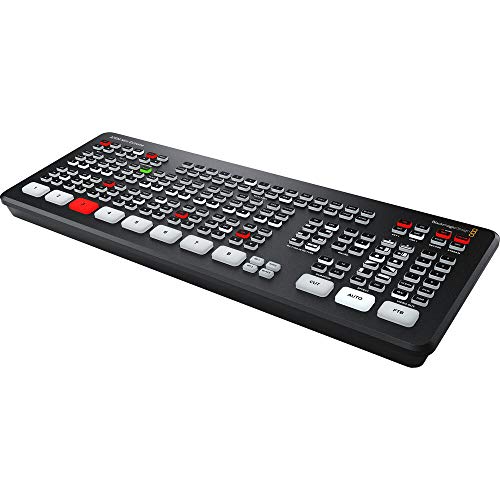
- Eight HDMI video inputs
- Resynchronizes every HDMI input
- Frame-rate and format conversion on all inputs
Best For: Multicamera streamers with many HDMI sources
Best Standalone Streaming System

- Switches HDMI, USB, IP, and mobile sources
- Built-in seven-inch AMOLED touchscreen
- Streaming, recording, overlays, and battery support
Best For: Mobile or PC-free live production
Compact 4K Touchscreen Pick

- Four HDMI inputs and dual 1080p outputs
- 2.1-inch touchscreen with T-bar control
- UVC mode, recording, and creative effects
Best For: Portable multi-camera streaming and entry-level content creation
ISO Recording Workhorse

- Four HDMI inputs for multi-camera production
- Records up to five H.264 streams simultaneously
- Advanced transitions, keys, audio mixing, and multiview
Best For: Multi-camera broadcasts, presentations, education, and esports
Professional PTZ Production Pick

- 4K60 inputs with 1080p60 output and loop-through
- PTZ control for four cameras with nine presets
- UVC, RTMP, RTMPS, recording, and advanced audio
Best For: Professional multi-camera, PTZ, church, studio, and event productions
Best Direct-Streaming Control

- Four HDMI inputs plus USB camera support
- Streams to three platforms via Ethernet
- SD recording and eight macro buttons
Best For: Churches, classrooms, and event production teams
Best Portable Multiview

- Integrated 4-inch multiview display
- Four HDMI inputs with zero-latency switching
- PTZ, keying, PIP, and logo-overlay tools
Best For: Portable multi-camera streams and online classes
Best Feature-Rich 4K Workflow

- Handles 4K and 1080p HDMI sources
- Records simultaneously to USB and SD
- PTZ, audio, keying, and remote control tools
Best For: Advanced event production and multi-camera streaming
Best Compact HDMI Switcher – Blackmagic ATEM Mini Pro
The Blackmagic Design ATEM Mini Pro is a practical video switcher for streamers who need four HDMI camera inputs, built-in streaming, recording, multiview, and audio mixing in a compact unit. It suits creators producing multicamera streams, presentations, training sessions, or esports content.
Best For: Streamers who want a compact four-camera HDMI setup with integrated streaming and audio controls.
Pros:
- Four HDMI inputs with 10-bit 4:2:2 video support
- Built-in streaming, recording, and four-camera multiview
- Includes transitions, keying tools, and a six-input, two-channel audio mixer
Cons:
- Limited to four HDMI video inputs
- Designed around HDMI sources rather than IP video inputs
With its straightforward HDMI workflow and built-in production features, the ATEM Mini Pro is a strong fit for streamers who want capable live switching without a large control surface.
Best Integrated Production Hub – RØDECaster Video
The RØDE RØDECaster Video combines video switching and audio production in one device, making it a versatile video switcher for streamers working with HDMI cameras, USB sources, microphones, and instruments. It supports live streaming, recording, scenes, overlays, and automatic switching.
Best For: Streamers who want studio-style video and audio control from a single front-panel unit.
Pros:
- Switches up to six sources, including four HDMI and two USB inputs
- Two Neutrik combo inputs with high-gain Revolution Preamps
- Supports custom scenes, overlays, chroma keying, direct streaming, and ISO recording
Cons:
- Requires corded power
- Its broad feature set may be more than a simple single-camera setup needs
The RØDECaster Video stands out for creators who need audio and video handled together, particularly when production involves multiple sources, custom scenes, and flexible recording options.
Best for Large HDMI Setups – Blackmagic ATEM Mini Extreme
The Blackmagic Design ATEM Mini Extreme is a video switcher for streamers who need more HDMI capacity than a four-input model provides. Its eight HDMI inputs, input resynchronization, and frame-rate and format converters support larger multicamera live-production setups.
Best For: Streamers and producers connecting up to eight HDMI sources in a single switcher.
Pros:
- Eight HDMI Type A video inputs
- Input resynchronization on all eight HDMI inputs
- Frame-rate and format converters on all HDMI inputs
Cons:
- Heavier and larger than the ATEM Mini Pro
- Its HDMI-focused design is less suited to IP-based workflows
If your production regularly uses several cameras, computers, or other HDMI devices, the ATEM Mini Extreme offers the input headroom needed to avoid constantly swapping sources.
Best Standalone Streaming System – Magewell Director One
The Magewell Director One is an all-in-one video switcher for streamers who want switching, encoding, recording, monitoring, and streaming without a separate computer. Its touchscreen, HDMI and USB inputs, IP-source support, and battery options make it suitable for both fixed and mobile production.
Best For: Streamers and field producers who need standalone production with HDMI, USB, IP, and mobile connectivity.
Pros:
- Supports two HDMI, two USB-A, and up to three simultaneous IP sources
- Seven-inch AMOLED touchscreen for scene control and monitoring
- Handles H.264/H.265 encoding, recording, overlays, chroma keying, and multi-destination streaming
- Supports Ethernet, Wi-Fi, 4G, and dual hot-swappable batteries
Cons:
- 4G service is not included
- Its extensive production features may be unnecessary for basic streaming
The Director One is the most self-contained option in this group, offering a broad set of production and connectivity tools for creators who value portability and reduced dependence on external hardware.
Compact 4K Touchscreen Pick – RGBlink Mini V3
The RGBlink Mini V3 is a compact video switcher for streamers who want four HDMI inputs, hands-on T-bar control, and a built-in 2.1-inch touchscreen. It can output program and preview feeds over HDMI or work as a UVC webcam, while recording and selected advanced effects require TAO Cloud activation.
Best For: Entry-level creators and multi-camera streamers who value portability, touchscreen control, and flexible licensing.
Pros:
- Four HDMI inputs with dual 1080p HDMI outputs
- UVC webcam mode for compatible streaming setups
- Supports PIP, chroma key, logo overlays, and 15 transition effects
- Records to USB drives up to 2TB when the recording feature is activated
Cons:
- Recording and some advanced features require optional TAO Cloud licensing
- Requires firmware updating, internet connection, and account binding for activation
- A 35W or higher USB-C power adapter is recommended
Choose the Mini V3 if a small footprint and straightforward physical controls matter more than having every feature enabled out of the box. Verify camera compatibility and plan for the activation process before buying.
ISO Recording Workhorse – Blackmagic ATEM Mini Pro ISO
The Blackmagic ATEM Mini Pro ISO is a feature-rich video switcher for streamers handling multi-camera broadcasts, presentations, education, or esports. Its four HDMI inputs pair with extensive transitions, audio mixing, multiview, and real-time recording of up to five H.264 streams.
Best For: Streamers and production teams that need ISO recording, integrated audio mixing, and advanced live-switching tools.
Pros:
- Four 10-bit HDMI camera inputs and Ethernet connectivity
- Records up to five separate H.264 video streams in real time
- Includes multiple transitions, upstream keys, and a downstream keyer
- Built-in six-input, two-channel audio mixer and four-camera multiview
Cons:
- Only one HDMI output is listed
- More advanced production features may require a steeper learning curve
- The bundle’s included cables and ties add convenience but not switching capability
This is a strong choice when isolated recordings and broadcast-style controls are more important than minimal setup. It is especially well suited to repeatable productions where post-event editing or camera-angle flexibility matters.
Professional PTZ Production Pick – FoMaKo KC602 4K Video Mixer
The FoMaKo KC602 is a professional video switcher for streamers who need 4K60 input, PTZ camera control, dedicated audio tools, and multiple streaming paths. It combines a 5.5-inch display with physical buttons, knobs, and a T-bar for hands-on live production.
Best For: Churches, studios, event producers, and advanced streamers using PTZ cameras and professional audio.
Pros:
- Accepts four 4K60 HDMI inputs with 1080p60 output and 4K loop-through
- Controls up to four PTZ cameras and stores nine presets
- Supports UVC, RTMP, and RTMPS streaming, including up to three platforms simultaneously
- Offers XLR/TRS audio inputs, 48V phantom power, EQ, monitoring, and audio delay
Cons:
- Its extensive controls and audio features may be more than casual streamers need
- The main program output is specified as 1080p60 rather than 4K
- Professional PTZ and audio capabilities can require more setup time
The KC602 stands out when a video switcher for streamers must also serve as a PTZ controller, audio mixer, recorder, and streaming hub. Its larger control surface is better suited to permanent or semi-permanent production setups than simple desk streaming.
Best Direct-Streaming Control – GoStream Deck Pro 4-Ch
The Osee GoStream Deck Pro 4-Ch is a video switcher for streamers who want flexible source mixing, recording, and direct network streaming in one compact unit. It accepts four HDMI sources plus a USB camera, while its hardware encoder can stream to up to three platforms without an external computer.
Best For: Churches, educators, and live-event teams that need direct Ethernet streaming and local recording.
Pros:
- Records MP4 video to an SD card while streaming over USB.
- Supports up to four HDMI inputs plus one USB camera.
- Streams to up to three platforms through its built-in encoder.
- Eight physical macro buttons provide quick access to switching and overlays.
Cons:
- Its feature set may be more than needed for simple single-camera streams.
- Direct streaming requires an Ethernet network connection.
This is a strong all-in-one option when dependable source flexibility, tactile controls, and computer-free network streaming matter more than having the smallest possible setup.
Best Portable Multiview – Mixer Plus Compact 4-HDMI
The CINETREAK Mixer Plus is a video switcher for streamers who want four-camera switching and built-in monitoring in a portable package. Its integrated 4-inch display shows multiview previews, while customizable transitions, scene presets, and production tools support more polished streams.
Best For: Mobile multi-camera productions, online classes, events, YouTube streams, OBS, and Zoom.
Pros:
- Built-in 4-inch screen provides real-time multiview monitoring.
- Supports four HDMI inputs with zero-latency switching.
- Includes 30 transition effects and four user-defined scene presets.
- Offers PTZ control, chroma key, luma key, PIP, DSK, and logo overlay.
Cons:
- The compact 4-inch display may be limiting for detailed monitoring.
- Its advanced controls may require setup time for first-time users.
The built-in screen makes this a practical choice for creators who need to monitor multiple sources without carrying a separate display, especially when portability is part of the workflow.
Best Feature-Rich 4K Workflow – FoMaKo M1 4K Video Mixer
The FoMaKo M1 is a video switcher for streamers building a more advanced production workflow around mixed-resolution sources, audio control, recording, and PTZ cameras. It combines 4K HDMI inputs, USB connectivity, streaming, recording, transitions, and remote browser control in one system.
Best For: Event producers and experienced streamers who need PTZ control, flexible recording, and multiple streaming options.
Pros:
- Accepts two 4K HDMI inputs, two 1080p HDMI inputs, and two USB sources.
- Supports simultaneous USB and SD-card recording.
- Provides audio mixing, delay adjustment, ALC, and two mic inputs.
- Includes PTZ control, keying, PIP, DSK, up to 30 transitions, and remote browser operation.
Cons:
- NDI HX functionality requires an upgrade.
- The broad feature set may be unnecessarily complex for basic streaming setups.
- Its advanced audio, PTZ, and routing options require more configuration.
With its combination of 4K inputs, recording redundancy, audio processing, PTZ control, and remote management, the M1 is suited to creators who want a central production hub rather than a basic HDMI switcher.
How We Picked the Best Video Switcher for Streamers
We focused on hardware suited to live streaming, online teaching, events, interviews, gaming, and multi-camera content. The lineup includes dedicated HDMI switchers as well as all-in-one production systems with encoding, recording, audio mixing, or touchscreen control.
Our evaluation criteria include the number and type of video inputs, supported frame rates and output resolutions, switching workflow, built-in monitoring, streaming connectivity, recording options, audio features, software support, and portability. We also considered whether each model is better suited to beginners, solo creators, or more demanding productions.
Quick Comparison
| Best For | What to Prioritize |
|---|---|
| Solo streamers | Simple switching, built-in streaming, and reliable monitoring |
| Multi-camera creators | Four or more inputs, clean transitions, and flexible layouts |
| Travel and mobile production | Compact design, touchscreen control, and minimal accessories |
| Professional broadcasts | ISO recording, advanced audio, encoding, and control options |
| Budget setups | Essential HDMI switching without unnecessary production features |
Key Buying Factors for a Video Switcher for Streamers
Inputs and Compatibility
Check how many cameras, consoles, computers, or other HDMI sources you need to connect now and later. Also verify whether inputs accept your preferred resolution and frame rate. A switcher with spare inputs can prevent an expensive upgrade as your setup grows.
Output, Streaming, and Recording
Some switchers only route a program feed to a computer or display, while others include hardware encoding for direct streaming. If you want a simpler workflow, look for built-in streaming and recording. ISO recording is particularly useful when you want separate camera files for editing after a broadcast.
Monitoring and Audio
Built-in screens can help you preview sources and the program feed without adding a separate monitor. Audio features vary widely: basic models may only embed HDMI audio, while advanced units provide input mixing, microphones, headphone monitoring, and delay or routing controls.
Resolution and Production Features
4K input support does not always mean 4K streaming or output. Confirm the complete signal path, including output resolution, frame-rate limits, scaling, chroma support, transitions, picture-in-picture, and keying. These details matter for cameras, game consoles, and presentation sources.
Who Should Buy Which Video Switcher for Streamers?
Choose a compact basic HDMI switcher if you stream with two or three sources and value a quick setup. A model with more inputs is a better fit for multi-camera creators, gaming streams, classrooms, and events. Pick an all-in-one switcher with a touchscreen when portability and hands-on control matter, especially for solo operators.
Creators who also need serious audio control should consider a system that combines video switching with an audio interface or mixer. For professional workflows, prioritize ISO recording, hardware encoding, PTZ support, and expanded routing over the lowest purchase price. Before buying, confirm camera compatibility, streaming platform requirements, USB or network connections, and the cables or accessories included in the package.