A well-designed vertical mouse can make long work sessions more comfortable by keeping your hand and wrist in a more natural position. The best wireless vertical mice also add useful flexibility with Bluetooth, USB receivers, rechargeable batteries, and adjustable DPI settings.
We’ve compared 10 popular models across comfort, connectivity, controls, battery design, and value to help you choose the right fit for your desk, laptop, or multi-device setup.
Best 10 Wireless Vertical Mice Picks for 2026
Best Multi-Device Value
TECKNET 3-Device Vertical Mouse

- Three-device Bluetooth and 2.4GHz connectivity
- Six DPI levels up to 4800
- Quiet primary clicks and 36-month warranty
Best For: Right-handed users switching between multiple devices
Best Rechargeable Fit for Smaller Hands
ProtoArc EM11 NL Vertical Mouse

- Designed for hands under 7.5 inches
- Rechargeable 500mAh battery
- Connects with three devices
Best For: Small to medium right hands needing rechargeable multi-device use
Best Premium Ergonomics

- 57-degree upright ergonomic design
- Bluetooth and Logi Bolt connectivity
- Quiet clicks and up to two years of battery life
Best For: Small to medium right hands and long office sessions
Best Simple Rechargeable Option
Lekvey Comfort Grip Vertical Mouse

- Over 150 hours per charge
- Plug-and-play 2.4GHz USB receiver
- Designed for medium or large hands
Best For: Right-handed desktop users wanting simple rechargeable operation
Best Premium Pick

- 57-degree angle supports a natural handshake position
- 4000 DPI sensor with cursor-speed control
- Up to four months of battery life
Best For: Right-handed users seeking a polished ergonomic mouse for extended computer use
Best for Everyday Use
Uineer Vertical Ergonomic Mouse

- Connects with up to three devices
- Bluetooth and 2.4GHz wireless modes
- Four DPI settings up to 2400
Best For: Small- to medium-handed users who switch among multiple devices
Best Quiet High-DPI Option
TECKNET Vertical Wireless Mouse

- Five DPI settings up to 4800
- Over 90% quieter clicks
- Six-month battery life with two AAA batteries
Best For: Shared workspaces and users who prefer quiet, adjustable cursor control
Best Small-Hand Fit
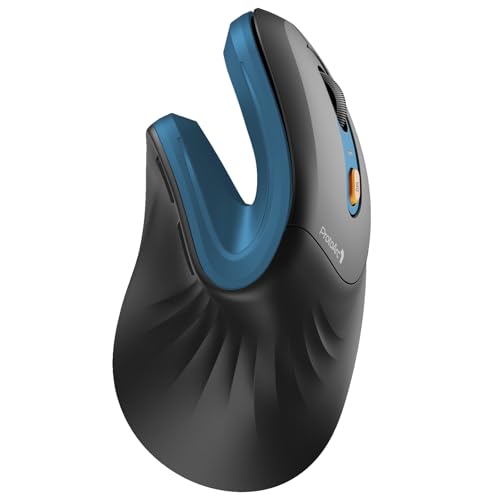
- 58° ergonomic angle for a natural grip
- Connects to up to three devices
- Rechargeable battery with up to 100 hours of use
Best For: Small to medium right hands and multi-device office setups
Best Simple USB Option

- Neutral handshake-style ergonomic design
- Three DPI settings up to 1600
- Power-saving mode after eight minutes
Best For: Right-handed users who prefer a straightforward USB receiver
Best Budget Dual-Mode Pick
JYKEYMOUT Rechargeable Vertical Mouse

- Bluetooth and 2.4G USB dual-mode connection
- Switches between two connected devices
- Six silent buttons and Type-C charging
Best For: Quiet workspaces and users switching between two devices
Best Multi-Device Value – TECKNET 3-Device Vertical Mouse
The TECKNET is a practical choice among wireless vertical mice if you regularly move between computers. It supports two Bluetooth connections plus a 2.4GHz USB-A connection, with six DPI settings and quiet left- and right-click buttons.
Best For: Right-handed users who want flexible three-device connectivity and adjustable sensitivity without recharging.
Pros:
- Connects with Bluetooth 5.0/3.0 or a 2.4GHz USB-A receiver.
- Offers six DPI levels from 800 to 4800 for different tasks and surfaces.
- Uses deep sleep to conserve its two AAA batteries and includes a 36-month warranty when registered.
Cons:
- Requires two AAA batteries, which are not included.
- Designed for right-handed use only.
- Side buttons are not compatible with macOS, and the other buttons are not silent.
Choose this model if device switching and high DPI flexibility matter more than a rechargeable design. Its vertical shape and quiet primary clicks also make it suitable for shared or quiet workspaces.
Best Rechargeable Fit for Smaller Hands – ProtoArc EM11 NL Vertical Mouse
The ProtoArc EM11 NL is one of the more adaptable wireless vertical mice for small to medium right hands. It combines three-device connectivity with a built-in rechargeable battery, while its vertical grip is intended to keep the wrist and forearm in a more natural position.
Best For: Users with hand lengths under 7.5 inches who want a rechargeable mouse for Windows, Mac, Android, or compatible tablets.
Pros:
- Connects to up to three devices using dual Bluetooth and 2.4G USB-A.
- Built-in 500mAh battery recharges through the included Type-C cable.
- Includes back and forward buttons and quiet left- and right-click operation.
Cons:
- Requires a one- to two-week adjustment period for some users.
- Back and forward buttons are not compatible with Mac OS.
- The Type-C cable is for charging only, and no USB-C receiver is included.
Hand size is the key consideration here. If the fit is appropriate, the rechargeable battery and three-device support make the EM11 NL a convenient option for a multi-device desk.
Best Premium Ergonomics – Logitech Lift Vertical Mouse
The Logitech Lift is a polished option among wireless vertical mice, with a 57-degree upright shape, a textured grip, and a supportive thumb rest. It is designed for small to medium right hands and adds quiet clicks, customizable buttons, and smooth SmartWheel scrolling.
Best For: Small to medium right-handed users seeking a comfortable, well-supported mouse for long work sessions.
Pros:
- Vertical design encourages a more natural forearm posture.
- Supports Bluetooth Low Energy and the included Logi Bolt USB receiver.
- Offers whisper-quiet clicks, customizable buttons, and up to two years of battery life.
Cons:
- Right-handed design is not suitable for left-handed users.
- Uses a replaceable AA battery rather than a rechargeable battery.
- Its compatibility list is focused on supported modern operating systems.
The Lift is a strong fit when comfort details and refined controls are priorities. Its smaller-hand orientation and two connection options make it especially practical for office and laptop setups.
Best Simple Rechargeable Option – Lekvey Comfort Grip Vertical Mouse
The Lekvey is a straightforward choice among wireless vertical mice for shoppers who prefer plug-and-play setup. Its vertical handshake grip, rechargeable battery, page navigation buttons, and included USB receiver focus on everyday comfort and convenience.
Best For: Medium or large right-handed users who want a rechargeable mouse with simple 2.4GHz USB connectivity.
Pros:
- Rechargeable battery provides over 150 hours of continuous use per charge.
- Plug-and-play 2.4GHz receiver requires no Bluetooth pairing or drivers.
- Includes back and forward buttons, three DPI levels, and a 36-month warranty.
Cons:
- Recommended for medium or large hands and designed for right-handed use.
- Maximum sensitivity is 1600 DPI with only three settings.
- Forward and back buttons are not compatible with Mac OS, and buttons are not programmable.
This model makes sense for a home or office computer where simple USB setup matters. It offers useful ergonomic features and rechargeable convenience, though users seeking Bluetooth or more DPI control should consider another option.
Best Premium Pick – Logitech MX Vertical
The Logitech MX Vertical is one of the most established wireless vertical mice for right-handed users seeking a more natural wrist position. Its 57-degree angle, textured grip, and high-precision sensor make it a strong option for extended office and computer use.
Best For: Right-handed users who prioritize ergonomic design, reduced hand movement, and precise tracking.
Pros:
- 57-degree vertical angle and handshake grip help support a more natural wrist posture.
- 4000 DPI sensor and cursor-speed switch provide precise control with less hand movement.
- Works with Windows, macOS, iPadOS, Linux, Chrome OS, and Android.
- Rechargeable battery offers an average battery life of up to four months.
Cons:
- Designed for right-handed use only.
- Includes four buttons, fewer than some multi-device alternatives.
- Its larger ergonomic shape may require an adjustment period.
The MX Vertical stands out for its polished ergonomic design and precise 4000 DPI tracking. It is best suited to shoppers willing to pay for a recognized, feature-focused vertical mouse rather than a basic wireless model.
Best for Everyday Use – Uineer Vertical Ergonomic Mouse
The Uineer is a flexible choice among wireless vertical mice, combining Bluetooth and 2.4GHz connectivity with support for up to three devices. Its compact design, adjustable DPI, and ambient lighting suit everyday office and general computer use, especially for small to medium hands.
Best For: Small- to medium-handed users who need one mouse for multiple computers or mobile devices.
Pros:
- Connects with up to three devices through dual Bluetooth and 2.4GHz wireless modes.
- Four DPI settings from 800 to 2400 support different everyday tasks.
- Natural vertical grip is designed to keep the wrist straighter and forearm relaxed.
- Includes automatic sleep, one-click wake, and a low-battery LED reminder.
Cons:
- Recommended for small to medium hands, so sizing should be checked before purchase.
- Side buttons do not function on macOS systems.
- Uses a replaceable C battery rather than a rechargeable battery.
The Uineer offers useful connectivity flexibility at an everyday-friendly feature level. Its three-device switching is the main advantage, while the hand-size guidance and macOS side-button limitation are important considerations.
Best Quiet High-DPI Option – TECKNET Vertical Wireless Mouse
The TECKNET vertical wireless mouse is a practical 2.4GHz option with a high 4800 DPI ceiling, quiet clicks, and a colorful fingerprint-resistant finish. It is a good fit for shoppers who want straightforward USB-A setup and comfortable positioning for everyday desktop work.
Best For: Users who want quiet clicking, long battery life, and adjustable sensitivity through a USB-A receiver.
Pros:
- Five DPI settings range from 800 to 4800 for adjustable cursor sensitivity.
- Quiet clicks are rated over 90% quieter for shared workspaces.
- Two AAA batteries provide an advertised six-month lifespan, with smart auto-sleep.
- Includes forward and backward side buttons for browsing on supported systems.
Cons:
- Uses a 2.4GHz USB-A receiver and may require an adapter on USB-C-only Macs.
- Side buttons do not support Mac systems.
- The colorful purple-to-green finish may not suit every workspace.
The TECKNET emphasizes quiet operation, high sensitivity, and simple plug-and-play use. It is particularly appealing for shared offices, though Mac users should verify port and side-button compatibility first.
Best Small-Hand Fit – ProtoArc EM11 NL
The ProtoArc EM11 NL is a strong option among wireless vertical mice for users with small to medium hands. Its 58° angle supports a more natural wrist position, while Bluetooth and 2.4G connectivity make it practical for multi-device office setups.
Best For: Small to medium right hands, quiet shared workspaces, and users who switch between up to three devices.
Pros:
- 58° vertical design encourages a relaxed forearm and wrist position.
- Connects with up to three devices through dual Bluetooth and 2.4G USB-A.
- USB-C rechargeable battery provides up to 100 hours of use.
- Adjustable 1000, 1600, and 2400 DPI settings plus quiet left and right clicks.
Cons:
- Designed for hand lengths under 7.5 inches, so larger hands may not fit comfortably.
- The scroll wheel and back/forward buttons are not silent.
- The included USB-C cable is for charging only.
Measure your hand before ordering, especially if you are between sizes. If the fit is right, the EM11 NL combines useful device switching, rechargeable power, and quiet primary clicks in a comfortable vertical format.
Best Simple USB Option – Anker 2.4G Vertical Mouse
The Anker 2.4G Wireless Ergonomic Mouse keeps things straightforward for shoppers comparing wireless vertical mice. It uses a 2.4 GHz USB receiver rather than Bluetooth and pairs its handshake-style shape with adjustable optical tracking for everyday work and browsing.
Best For: Right-handed laptop and desktop users who want a simple USB receiver connection and familiar AAA battery power.
Pros:
- Vertical ergonomic structure supports a neutral handshake wrist and arm position.
- 800, 1200, and 1600 DPI settings provide adjustable tracking sensitivity.
- Next and previous buttons make webpage navigation easier.
- Enters power-saving mode after eight minutes of inactivity.
Cons:
- Uses 2.4 GHz USB only; it does not offer Bluetooth connectivity.
- Two AAA batteries are required and are not included.
- Key clicks are not silent.
This is a practical pick if you prefer plug-and-play USB connectivity over rechargeable features. Its limited 1600 DPI maximum and five-button layout are best suited to routine office work rather than highly configurable setups.
Best Budget Dual-Mode Pick – JYKEYMOUT Rechargeable Vertical Mouse
The JYKEYMOUT rechargeable mouse offers flexible wireless connectivity at a practical feature level. As one of the more versatile wireless vertical mice, it supports Bluetooth and 2.4G USB modes, can connect to two devices simultaneously, and includes six silent buttons for quieter workspaces.
Best For: Users who need Bluetooth and USB flexibility, device switching, and quiet clicking for home, office, or library use.
Pros:
- Bluetooth 5.2/3.0 and 2.4 GHz USB modes cover laptops, tablets, and desktops.
- Can connect to two devices at the same time and switch between them.
- Six silent buttons support quieter operation and faster browsing.
- Rechargeable Type-C battery can last about one to three months depending on use.
Cons:
- Back and forward buttons are not compatible with Mac OS.
- It enters power-saving mode after 10 minutes, temporarily disabling cursor movement.
- Charging guidance advises against fast chargers and extended charging after full.
The JYKEYMOUT stands out for connectivity flexibility and quiet controls rather than advanced sensitivity. Its 1000/1200/1600 DPI range is adequate for everyday navigation, while the two-device setup can reduce cable and receiver swapping.
How We Picked the Best Wireless Vertical Mice
We evaluated these Wireless Vertical Mice based on the features that matter most in daily use: hand support, grip angle, tracking sensitivity, connection options, battery convenience, button layout, compatibility, and overall value. Models with Bluetooth or multi-device support may suit laptop users, while USB receiver models can offer simple plug-and-play setup for desktops.
Because comfort is highly personal, we also considered hand size and whether each design is intended primarily for right-handed use. A vertical shape can reduce wrist rotation, but it may take several days to feel natural.
Quick Comparison
| Feature | What to Look For |
|---|---|
| Connection | Bluetooth for compatible laptops and tablets; 2.4GHz receivers for broad compatibility and easy setup. |
| Devices | Multi-device switching is useful if you regularly move between a computer, laptop, and tablet. |
| Power | Rechargeable models reduce disposable batteries; replaceable-battery designs can be convenient for quick swaps. |
| Sensitivity | Adjustable DPI helps you balance precise control with faster cursor movement. |
| Hand orientation | Most vertical mice are right-handed, so check the shape before buying. |
Key Buying Factors for Wireless Vertical Mice
Ergonomic Shape and Size
Choose a mouse that supports your palm without forcing your fingers to stretch. A pronounced thumb rest and textured grip can improve control, while a smaller body may be better for compact hands. Vertical mice are not universally comfortable, so consider the return policy if you are switching from a traditional design.
Connectivity and Compatibility
Bluetooth models avoid occupying a USB port, but your computer must support the required Bluetooth profile. A 2.4GHz USB receiver is often the simplest option for desktop PCs. Some mice include both connection types or support multiple devices, making them more versatile for hybrid work.
Battery Life and Controls
Look for a rechargeable battery if you prefer USB charging, and check whether the charging port can be used while the mouse is operating. Silent buttons may be useful in shared spaces, while extra side buttons can speed up browser navigation and productivity shortcuts.
Who Should Buy Which Wireless Vertical Mice?
- For multi-device setups: Choose a model with Bluetooth and device switching.
- For straightforward desktop use: A 2.4GHz receiver model is usually the easiest choice.
- For frequent travel: Prioritize a compact shape, Bluetooth connectivity, and rechargeable power.
- For precision work: Select adjustable DPI and dependable tracking.
- For maximum ergonomic support: Favor a fuller vertical grip with a stable thumb rest and palm support.
Before buying, confirm operating-system compatibility, handedness, dimensions, and included accessories. The best choice is the model that fits your hand naturally and connects reliably to the devices you use most.