Reliable video links can make a major difference when a church streams worship services, sermons, presentations, or events from cameras positioned away from the production desk. The right receiver helps deliver a stable feed without forcing the crew to run long HDMI cables through busy spaces.
This roundup compares 10 wireless video systems across range, resolution, latency, connectivity, and multi-receiver support. Use the buying guide below to match your church’s room layout, camera equipment, and streaming workflow.
Best 10 Wireless Video Receivers for Church Streaming Picks for 2026
Best Pro Streaming Pick

- 1080p60 with under 0.06-second latency
- UVC output for OBS and computer streaming
- Supports up to four receivers or mobile devices
Best For: Church camera teams needing low-latency monitoring and direct computer streaming
Best Plug-and-Play Value

- No drivers or app required
- Supports 1080p at 60Hz
- Receiver can pair with up to eight transmitters
Best For: Simple church displays, presentations, and short-range HDMI distribution
Best Long-Range Production System

- Up to 3 km wireless transmission distance
- 1080p60 video with 35ms latency
- SDI, HDMI, and USB-C monitoring
Best For: Large church venues and professional multi-station production teams
Best for Church Projection
Vrriis WL081 Wireless HDMI Extender

- 1080p60 video with stated 0.05-second latency
- Transmitter loop-out for local monitoring
- IR control supports remote source operation
Best For: Church projectors and remote HDMI displays with local preview needs
Best for Multi-Receiver Church Production

- Up to 1,300ft range and 60ms latency
- Supports up to four receivers
- HDMI loopout and UVC computer streaming
Best For: Church production teams needing shared camera monitoring
Best Plug-and-Play Budget Option
Dual-Band Wireless HDMI Extender

- Simple setup without apps or Wi-Fi
- 4K decode with 1080p60 output
- Supports up to eight transmitters per receiver
Best For: Small venues and straightforward HDMI extension
Best for On-Site Monitoring
Wireless HDMI System with 7-Inch Monitor
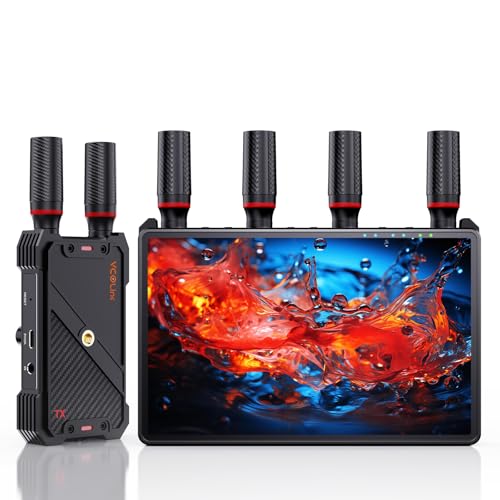
- Built-in 7-inch receiver display
- Up to five receivers from one transmitter
- HDMI loopout and flexible battery power
Best For: Mobile crews needing an all-in-one monitoring receiver
Premium 4K Pick

- 4Kp30 10-bit HDR over HDMI
- 750-foot range with very low claimed latency
- 6GHz transmission and flexible power options
Best For: High-quality, long-range church video production
Streaming-Friendly Choice
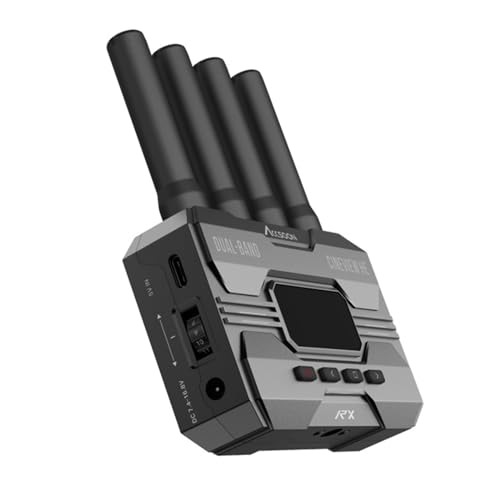
- UVC output for direct computer streaming
- Dual-band 2.4GHz and 5GHz transmission
- Up to 1,200-foot stated range at 1080p
Best For: OBS-based church streaming with a compatible transmitter
Budget Multi-Channel Option

- 1080p/60Hz UVC output for PC streaming
- 20 channels with LCD status display
- Supports up to five receivers and HDMI loop-out
Best For: Small churches using Osmo Pocket 3 or multi-screen monitoring
Best Pro Streaming Pick – Accsoon CineView HE
For churches that need dependable wireless video receivers for church streaming, the Accsoon CineView HE stands out with dual-band transmission, low latency, and a receiver-side UVC output. It can send video to a computer for platforms such as OBS without requiring a separate capture device.
Best For: Churches streaming from HDMI cameras to a computer while also supporting multiple monitors or mobile devices.
Pros:
- Supports 1080p60 transmission with latency under 0.06 seconds.
- Dual-band 2.4GHz and 5GHz transmission is designed for stability and interference resistance.
- Receiver UVC output works with a computer and third-party streaming platforms.
- One transmitter can connect with up to four receivers or mobile devices.
Cons:
- Battery and charging cables are not included.
- It is designed around HDMI sources rather than an all-purpose wireless presentation setup.
The CineView HE is a strong fit for a church production team that values responsive monitoring and a straightforward computer-streaming workflow. Its multi-device support is especially useful when camera operators, directors, and stream operators need to see the feed.
Best Plug-and-Play Value – Wireless HDMI 4K Kit
This wireless HDMI kit is a practical entry point for churches looking for wireless video receivers for church streaming, projection, or presentations. It pairs a transmitter and receiver without requiring drivers or an app, and includes adapters for several HDMI and USB-C devices.
Best For: Church presentations, overflow-room displays, and simple camera-to-projector or TV connections.
Pros:
- Plug-and-play setup requires no software or app.
- Supports video up to 1080p at 60Hz.
- Includes mini and USB-C adapter options for broader device compatibility.
- A receiver can pair with up to eight transmitters for switching source devices.
Cons:
- The advertised 165-foot range can be reduced significantly by concrete walls or separate floors.
- The package does not include a 5V/2A charger.
- The notes specify Full HD performance even though the product title references 4K.
Choose this kit when ease of installation matters more than advanced broadcast features. It can simplify temporary displays and basic HDMI distribution, but church buildings with thick walls should plan for shorter real-world coverage.
Best Long-Range Production System – DJI SDR Transmission
For larger campuses and demanding production environments, DJI SDR Transmission offers a professional approach to wireless video receivers for church streaming. Its SDR design uses automatic frequency hopping across multiple bands, while SDI, HDMI, and USB-C monitoring provide flexible connection options.
Best For: Large church productions, long-distance camera links, and teams that need multiple monitoring stations.
Pros:
- Provides a stated transmission distance of up to 3 km or 10,000 feet.
- Supports 1080p60 video at up to 20 Mbps with 35ms latency.
- Broadcast mode supports an unlimited number of receivers according to the supplied notes.
- Offers SDI, HDMI, and USB-C monitoring options.
Cons:
- Its advanced feature set may be more than a small church livestream requires.
- The system is positioned as a professional production solution rather than a basic plug-and-play HDMI extender.
DJI’s system is the most capable choice here for churches managing complex venues or multiple monitoring locations. The combination of long-range transmission, interference management, and broad output options makes it better suited to established production teams.
Best for Church Projection – Vrriis WL081 Wireless HDMI Extender
The Vrriis WL081 is a straightforward option for churches comparing wireless video receivers for church streaming and projection. It supports Full HD video, includes transmitter-side loop-out for a local monitor, and adds IR control for managing the source from the receiver location.
Best For: Church projection systems, remote displays, and HDMI sources that need local monitoring and remote control.
Pros:
- Supports 1080p at 60Hz with stated 0.05-second latency.
- Transmitter loop-out allows a local monitor to remain connected.
- Includes IR remote-control support for the HDMI source.
- Designed for TVs, projectors, laptops, set-top boxes, and other HDMI devices.
Cons:
- Walls, metal, brick, and glass can substantially reduce the stated 1,300-foot range.
- Adding receivers can reduce transmission distance.
- The supplied details list support for up to five receivers in one section but also identify a maximum of two supported devices, so multi-receiver capacity should be verified before purchase.
This kit makes sense when the primary goal is sending an HDMI feed to a church projector or remote screen while retaining a local preview. Its loop-out and IR features add practical flexibility, though building conditions should be tested before relying on the maximum range.
Best for Multi-Receiver Church Production – Pyro H Wireless HDMI System
For churches seeking wireless video receivers for church streaming, the Hollyland Pyro H is a strong fit for camera feeds, confidence monitoring, and production-team collaboration. It supports up to 4 receivers, 4K30 transmission, HDMI loopout, and UVC streaming to a computer.
Best For: Church production teams that need multi-location monitoring and direct computer streaming from an HDMI camera.
Pros:
- Transmits up to 1,300 feet with stated 60ms latency in suitable conditions.
- Supports 2.4GHz and 5GHz operation with Smart Channel Scan.
- Can send one feed to up to four receivers for directors, operators, or monitors.
- Includes HDMI input, output, loopout, and UVC support for computer streaming.
Cons:
- The kit includes only one transmitter and one receiver.
- Its 4K input capability may exceed the needs of churches producing in 1080p.
- Wireless performance depends on the venue and surrounding interference.
The Pyro H is the most production-oriented option here, especially when several team members need the same live camera feed. Its receiver expansion and UVC capability make it versatile for larger or more structured streaming setups.
Best Plug-and-Play Budget Option – Dual-Band Wireless HDMI Extender
This wireless HDMI kit is a straightforward choice for churches that want wireless video receivers for church streaming without apps, Wi-Fi setup, or additional software. It decodes 4K input while outputting 1080p at 60Hz and supports mirror or extended-screen modes.
Best For: Smaller churches, classrooms, and event spaces needing simple point-to-point HDMI distribution for services or presentations.
Pros:
- Plug-and-play setup with automatic connection and no required app or software.
- Uses dual-band 2.4GHz and 5.8GHz transmission for added flexibility.
- Advertised range reaches 360 feet outdoors or 165 feet indoors in stated conditions.
- One receiver can connect with up to eight transmitters, with up to three sets supported in one environment.
Cons:
- Output is limited to 1080p at 60Hz despite 4K decoding input.
- Walls and other obstacles can reduce range and transmission speed.
- The supplied notes do not indicate HDMI loopout or multi-receiver output.
This model emphasizes convenience and flexible device compatibility rather than advanced broadcast control. It is a practical fit when the church primarily needs to move one HDMI source to a remote display or streaming position.
Best for On-Site Monitoring – Wireless HDMI System with 7-Inch Monitor
Church streaming teams that need a built-in confidence screen may appreciate this wireless HDMI system. Its receiver includes a 7-inch monitor, while HDMI output, loopout, and support for up to five receivers provide options for production and live-event workflows.
Best For: Mobile church production crews that want self-contained camera monitoring without carrying a separate receiver display.
Pros:
- Built-in 7-inch receiver screen enables immediate monitoring without an extra display.
- Supports 1080p at 60Hz with advertised sub-0.05-second latency and a 1,312-foot line-of-sight range.
- One transmitter can broadcast to up to five receivers.
- Offers HDMI loopout, headphone monitoring, IR remote control, and flexible power options.
Cons:
- External HDMI cables are not included for connecting a larger display.
- The supplied notes specify 1080p transmission rather than 4K output.
- A Type-C-to-HDMI cable is required for smartphone or tablet compatibility.
The built-in monitor makes this a convenient choice for camera operators, directors, and volunteers who need a ready-to-use screen in the sanctuary or production area. Its receiver expansion also supports shared viewing during larger services and events.
Premium 4K Pick – Teradek Ace 750
For church teams comparing wireless video receivers for church streaming, the Teradek Ace 750 is a premium transmitter-receiver set built for high-quality HDMI workflows. It supports up to 4Kp30 10-bit HDR, offers a stated 750-foot range, and uses 6GHz transmission with very low claimed latency.
Best For: Churches needing high-resolution, long-range wireless monitoring or video feeds for cameras and AV systems.
Pros:
- Supports up to 4Kp30 10-bit HDR over HDMI.
- 750-foot range and less than 0.01 seconds of claimed latency.
- 6GHz transmission offers 12 frequency options with automatic channel selection.
- Paired out of the box and includes AC and D-Tap power options.
Cons:
- It is a premium option compared with basic 1080p wireless systems.
- The listed set includes one AC adapter; a second adapter for studio use is sold separately.
- Its HDMI-based design may require additional equipment for computer streaming workflows.
The Ace 750 stands out when image quality, range, and minimal delay matter most. Its 4K support and flexible power connections suit demanding church production setups, although buyers should confirm how its HDMI output will integrate with their streaming computer or switcher.
Streaming-Friendly Choice – Accsoon CineView HE Receiver
The Accsoon CineView HE is a receiver-focused option for churches that want to send wireless camera video directly to a computer. Its dual-band 2.4GHz and 5GHz transmission, 1080p/60fps support, and built-in UVC output can simplify streaming with platforms such as OBS, provided the compatible transmitter is also available.
Best For: Church streaming teams that want a receiver with direct USB-C UVC output for computer-based live production.
Pros:
- Dual-band 2.4GHz and 5GHz technology is designed for stable transmission.
- Offers a stated range of up to 1,200 feet and latency under 0.06 seconds.
- UVC output can send received video to a computer without a separate capture device.
- One transmitter can support up to four receivers or mobile devices in a mix-and-match setup.
Cons:
- This listing is for the receiver only, so a compatible transmitter is required.
- It is designed around 1080p video rather than the 4K capability of higher-end systems.
- A USB-C cable for the UVC connection is user-provided.
For a church already using the CineView ecosystem, the HE receiver offers a practical route from a wireless camera feed to streaming software. Its UVC output is the main advantage, but confirm that the transmitter and required USB-C cable are included in your overall setup.
Budget Multi-Channel Option – Vrriis Wireless Video System
For churches seeking wireless video receivers for church streaming on a 1080p budget, this Vrriis transmitter-receiver system emphasizes broad compatibility and straightforward monitoring. It includes UVC output for computer streaming, 20 adjustable channels, and support for up to five receivers, with particular optimization for the DJI Osmo Pocket 3.
Best For: Small church productions using an Osmo Pocket 3, HDMI devices, or multiple wireless viewing points.
Pros:
- UVC output supports up to 1080p at 60Hz through PC streaming software such as OBS.
- Provides 20 adjustable channels and an LCD status display.
- Supports one transmitter to up to five receivers and includes HDMI loop-out for local monitoring.
- Offers a stated 1,640-foot line-of-sight range and 0.05-second latency in open conditions.
Cons:
- Walls, glass, bricks, and metal obstacles can reduce coverage or cause signal loss.
- It is a 1080p system, not a 4K wireless solution.
- NP-F batteries are not included and must be purchased separately.
This system is appealing for flexible, multi-screen church setups, especially when the Osmo Pocket 3 is part of the camera kit. Its range figures depend on open line-of-sight conditions, so test placement in the actual worship space before relying on it for critical broadcasts.
How We Picked These Wireless Video Receivers for Church Streaming
We focused on the features that matter most in a live church production: dependable signal transmission, practical operating range, low latency, useful video outputs, and compatibility with cameras, switchers, computers, and streaming encoders. We also considered whether each system supports 1080p or 4K workflows, dual-band or less congested wireless operation, loop-through output, USB video output, and multiple receivers.
Specifications such as advertised range and resolution are tested under ideal conditions. Walls, crowded Wi-Fi environments, metal structures, and other wireless equipment can reduce real-world performance, so installation conditions should influence your final choice.
Quick Comparison
| Priority | Look For | Best Fit |
|---|---|---|
| Simple livestream camera feed | UVC output and low latency | Churches sending video directly to a computer or encoder |
| Long sanctuary or campus runs | Extended range and interference management | Large rooms, outdoor events, and distant camera positions |
| Multiple displays or operators | Multi-receiver support and loop out | Churches feeding a switcher, confidence monitor, and overflow display |
| Highest image quality | 4K support, suitable bandwidth, and stable power | Production teams recording or monitoring in 4K |
Key Buying Factors for Wireless Video Receivers for Church Streaming
Range and Signal Stability
Measure the actual distance between each camera and receiver, including walls and elevation changes. A system with a shorter claimed range may perform better than a longer-range model in a congested building if it offers stronger interference handling and suitable frequency options.
Latency and Synchronization
Low latency is especially important when camera operators, musicians, or speakers need to see the live image while performing. For switching several cameras, keep latency consistent across links to reduce timing differences between sources.
Outputs and Workflow Compatibility
Check whether the receiver provides HDMI, USB UVC, or both. HDMI works well with switchers and displays, while UVC can connect directly to many computers and streaming applications. Loop-out is useful when one received signal must feed multiple pieces of equipment.
Resolution, Power, and Reliability
1080p60 is often the practical choice for live church streaming because it balances image quality, bandwidth, and system load. Choose 4K only when the cameras, switcher, displays, and streaming workflow support it. Also confirm power requirements, mounting options, included cables, and whether the units can remain powered for the full service.
Who Should Buy Which Wireless Video Receivers for Church Streaming?
Choose a compact UVC-capable system if your priority is sending one camera directly to a laptop or streaming encoder. Choose a long-range HDMI kit for a large sanctuary or camera position far from the production booth. A multi-receiver model is better when the same source must reach several monitors, a switcher, or an overflow room. For professional crews that need 4K monitoring, HDR support, or advanced wireless management, a higher-end system may justify its added cost. Before purchasing, verify connector types, supported frame rates, frequency regulations, and compatibility with your exact camera and streaming hardware.