If you need one desk setup to control two computers across two monitors, the Hearvo USB 3.0 HDMI KVM Switch is built for exactly that job.
This Hearvo USB 3.0 HDMI KVM Switch 2 Monitors 2 Computers review focuses on whether the feature set matches a real dual-workstation workflow.
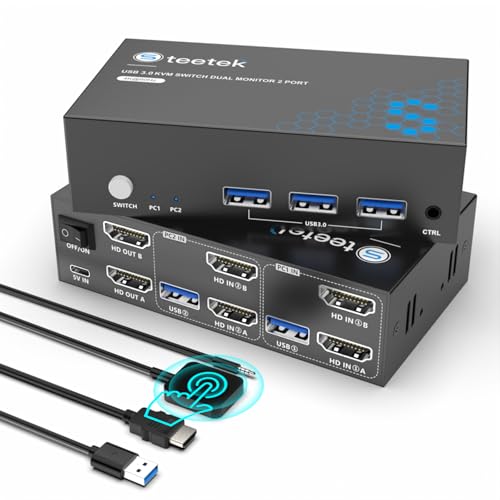
Hearvo USB 3.0 HDMI KVM Switch Review Summary
The Hearvo dual monitor KVM makes sense for buyers who want a single keyboard, mouse, and shared USB hub to move between two systems without constant cable swapping.
Its strongest case is a clean, office-friendly setup for people who work across a primary machine and a secondary laptop or desktop, especially when dual displays and peripheral sharing matter more than desktop simplicity.
Best fit: remote workers, IT admins, programmers, designers, and home office users who want stable two-computer control with a practical remote switch.
Less ideal if you want a minimalist single-monitor setup or if you are not prepared to cable it carefully with the right HDMI leads.
Review Scorecard
| Category | Score | Buyer assessment |
|---|---|---|
| Dual-monitor switching | 9/10 | Built specifically for 2 computers and 2 monitors, which is the core reason to buy it. |
| Peripheral sharing | 8/10 | Four USB 3.0 ports, including USB-A and USB-C, give useful device sharing headroom. |
| Video capability | 8/10 | 4K@60Hz support is strong for a productivity KVM and fits modern displays well. |
| Switching convenience | 9/10 | Button plus wired remote is practical when the unit sits under a desk or behind monitors. |
| Setup flexibility | 7/10 | Plug-and-play is good, but the full setup depends on having the right HDMI cabling. |
| Stability features | 8/10 | Adaptive EDID is a meaningful inclusion for reducing display recognition issues. |
| Value for the use case | 8/10 | The feature mix is focused and sensible for multi-system desk users. |
Key Features and Specifications of Hearvo USB 3.0 HDMI KVM Switch
This is a 2-computer, 2-monitor HDMI KVM designed for shared control across dual displays.
The listing positions it as a productivity tool rather than a niche enthusiast device, and that is the right frame for judging it.
If your daily workflow involves moving between two machines while keeping the same desk peripherals, the feature list is aligned with that need.
The headline capabilities are straightforward:
- Shares one keyboard and one mouse across two computers
- Supports two monitors in the same switching setup
- Includes 4 USB 3.0 ports total, with 3 USB-A ports and 1 USB-C port
- Supports transfer speeds up to 5Gbps for attached USB devices
- Supports up to 4K@60Hz, plus 4K@30Hz, 2K, 1080P, and 3D
- Includes HDCP 2.2 compatibility
- Supports switching by built-in button or wired remote controller
- Uses adaptive EDID to help with display detection and resolution consistency
- Ships with 2 USB 3.0 cables and 1 wired remote controller
- Requires you to provide 6 HDMI 2.0 cables for full setup
- No driver or software installation is required
The practical takeaway is that this is built for a desk with multiple systems and a lot of attached gear.
The four USB ports matter because KVM buyers often underestimate how quickly shared devices add up.
A keyboard, mouse, webcam, printer, external drive, or scanner can all become part of the same switchable workspace, which is useful if you do actual daily work rather than occasional laptop toggling.
Pros and Cons of Hearvo USB 3.0 HDMI KVM Switch
Pros
- Purpose-built for a dual-monitor, dual-computer workflow
- 4K@60Hz support is a strong productivity baseline
- USB 3.0 hub sharing is useful for more than just keyboard and mouse
- Wired remote control is convenient when the box is hidden away
- Adaptive EDID should help reduce display handshake frustration
- Plug-and-play design keeps setup simple on the software side
Cons
- Needs a fairly deliberate cable setup, since 6 HDMI 2.0 cables are required
- Best value only appears if you truly use two computers and two monitors
- Not the cleanest fit for people who want a very light or minimal desk
- As with any KVM, compatibility depends on the rest of your display and USB chain
The biggest strength is not one flashy spec, but the way the specs work together.
Dual monitor support, USB 3.0 sharing, EDID, and remote switching all point to a unit intended for a serious workstation.
The biggest drawback is the cabling burden, which is typical for this category but still worth calling out before purchase.
Who Should Buy Hearvo USB 3.0 HDMI KVM Switch?
Buy this if you manage two computers at one desk and want both screens, input devices, and shared USB accessories to follow you with minimal friction.
It is especially relevant for people who alternate between a work machine and a personal machine, or between a desktop and a laptop docked into a permanent station.
It also makes sense for IT professionals, programmers, designers, and office users who care about fast switching and a cleaner desk.
The wired remote is a real advantage in those settings because the switch can live out of sight without becoming awkward to reach.
Skip it if you only need a single-monitor KVM, if you rarely switch between systems, or if your desk setup is not ready for a more involved cable layout.
In those cases, the extra ports and dual-display design are just complexity you do not need.
Dual-Computer Dual-Monitor Workflow of Hearvo USB 3.0 HDMI KVM Switch
Switching Two Systems Cleanly
The core promise here is simple: move between two computers without changing your keyboard, mouse, or monitors.
That is the right mental model for this product.
If you spend your day jumping between systems, the time saved by a reliable switch matters more than any one isolated feature.
USB Hub Sharing in Daily Use
The four USB 3.0 ports make the unit more useful than a barebones KVM.
Sharing printers, webcams, flash drives, scanners, or external drives through the same switch can reduce clutter and remove the need for extra USB hubs.
The USB-C inclusion is a nice practical touch for modern peripherals.
Display Stability and EDID
Adaptive EDID is one of the more important features on the sheet because it helps the connected computers recognize the display layout more consistently.
For a dual-monitor KVM, that can mean fewer annoying resolution resets, less flicker, and less time spent reconfiguring windows after a switch.
Desk Placement and Remote Control
The wired remote controller is not a luxury feature here; it is part of what makes the product usable in a real office.
Many KVMs become annoying when the physical button is hidden under the desk, but a remote keeps switching accessible without cluttering the desk surface.
Alternatives to Hearvo USB 3.0 HDMI KVM Switch
If you want a different path, the most credible Amazon alternatives are usually from established KVM brands or adjacent product lines.
Look at a UGREEN dual monitor KVM switch, a TESmart dual monitor KVM switch, or a AV Access dual monitor KVM switch.
Each of those is worth checking if you want to compare port layout, switching style, and compatibility expectations.
If your setup is less demanding, a single-monitor KVM from brands like IOGEAR KVM switch may be enough and could be simpler to cable.
The main decision point is whether you genuinely need two monitors to switch together; if not, a smaller KVM may be the cleaner choice.
Is Hearvo USB 3.0 HDMI KVM Switch Worth It?
Yes, if your desk really needs dual-monitor, dual-computer control. The Hearvo USB 3.0 HDMI KVM Switch is worth considering when your workflow depends on shared peripherals, modern 4K display support, and a switch you can reach without digging under the desk.
The value proposition is strongest for buyers who will use the full setup every day.
If that is you, this looks like a sensible, feature-complete KVM rather than an overcomplicated gadget.
If not, the cabling and hardware overhead will probably feel like too much.
For the right workstation, though, it solves a real problem well.