A good MagSafe desk stand does more than hold your iPhone upright—it helps keep your workspace organized, improves viewing angles, and makes charging feel effortless.
In this roundup, we focus on stands that balance stability, adjustability, magnetic strength, and desk-friendly design so you can choose the right setup for work, video calls, or bedside use.
Best 10 MagSafe Desk Stand Picks for 2026
Best for Adjustable Viewing
OMOTON MS05 360° Rotating MagSafe Phone Stand

- 360° rotating base for quick angle changes
- Height adjusts up to 3.94 inches
- Foldable, portable design with metal rings included
Best For: People who want a flexible magnetic stand for desk work, calls, and streaming.
Best with Ambient Light
Adjustable Blue 3-in-1 MagSafe Charger Stand

- 3-in-1 dock for iPhone, Apple Watch, and AirPods
- Adjustable blue ambient light with touch on/off control
- 15W fast charging with strong magnetic alignment
Best For: Apple users who want a tidy all-in-one charging stand with a subtle night light.
Best for Heavy-Duty Stability
Nulaxy Magnetic Aluminum MagSafe Phone Stand

- Heavy aluminum base for solid desk stability
- 720° rotation for portrait or landscape viewing
- Includes metal ring for wider phone compatibility
Best For: Desk users who want a sturdy magnetic stand with flexible viewing angles.
Best for Rotation
OMOTON MS04 360° Magnetic Desk Stand

- 360° rotating head for portrait or landscape viewing
- Foldable aluminum body with a stable non-slip base
- Strong magnetic hold, but no MagSafe charging
Best For: Users who want a sturdy rotating magnetic desk stand for flexible viewing angles.
Best for Creators on the Go
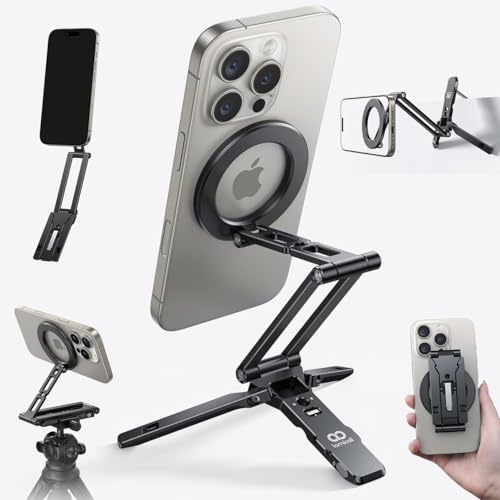
- 20x magnetic hold for quick one-handed mounting
- 5-in-1 design works as stand, tripod, selfie stick, and hook mount
- Ultra-light 90g aluminum body with Arca-Swiss and 1/4" support
Best For: iPhone users and mobile creators who want one compact magnetic stand for desk use, travel, and shooting angles.
Best for Stability
APPS2Car Magnetic MagSafe Phone Stand

- Weighted metal base reduces wobble and tipping
- Adjustable 0–6 inch height with 360° rotation
- Includes metal ring for Android and non-MagSafe phones
Best For: People who want a stable MagSafe desk stand for calls, streaming, and everyday desk use.
Best for Versatile Viewing
Magnetic 360° Foldable MagSafe Desk Stand

- 360° rotation for portrait or landscape viewing
- Foldable aluminum design for travel and storage
- Works with iPhone, Android, and metal-ring cases
Best For: Users who want a stable, adjustable magnetic stand for desk work, calls, and travel.
Best for Adjustable Viewing – OMOTON MS05 360° Rotating MagSafe Phone Stand
If you want a MagSafe desk stand that makes it easy to fine-tune your viewing angle, the OMOTON MS05 is a practical pick. It combines a strong magnetic hold with height adjustment, 180° swiveling, and a 360° rotating base, so it works well for calls, streaming, and everyday desk use.
Best For: People who want a foldable magnetic stand for desk work, video calls, and flexible viewing angles.
Pros:
- Strong built-in magnets keep compatible iPhones stable on the stand.
- Height adjusts up to 3.94 inches, with 180° tilt and 360° rotation.
- Folds flat and weighs just 217g, making it easy to pack and move.
- Includes metal rings for broader phone and case compatibility.
Cons:
- Does not support MagSafe charging.
- Best fit is limited to compatible phones and MagSafe-style cases.
As a MagSafe desk stand, the MS05 stands out more for flexibility than for charging, so it makes the most sense if you want a stable, adjustable mount that saves space and adapts quickly throughout the day.
Best with Ambient Light – Adjustable Blue 3-in-1 MagSafe Charger Stand
If you want a MagSafe desk stand that does more than just power your phone, this 3-in-1 charging station is built for everyday convenience. It combines iPhone, Apple Watch, and AirPods charging in one vertical dock, while the blue ambient light adds a clean bedside or desk-ready look.
Best For: Apple users who want a tidy all-in-one charging stand with an adjustable night light for a desk, nightstand, or home office.
Pros:
- 3-in-1 design charges iPhone, Apple Watch, and AirPods at the same time
- Adjustable blue ambient light can be turned on or off with touch control
- Strong magnetic alignment supports portrait and landscape viewing angles
- Up to 15W fast charging with built-in safety protections
Cons:
- Works best with MagSafe-compatible iPhones or magnetic cases
- Blue lighting may not suit buyers who want a completely unlit charger
Overall, this MagSafe desk stand makes the most sense for Apple households that want one neat dock instead of multiple cables. The standout feature is the adjustable blue light, which gives it a more premium bedside feel without sacrificing practical charging performance.
Best for Heavy-Duty Stability – Nulaxy Magnetic Aluminum MagSafe Phone Stand
If you want a MagSafe desk stand that feels more solid than the usual plastic options, this Nulaxy model is built around a heavy aluminum base and strong magnetic hold. It’s a practical pick for everyday desk use, especially if you switch between portrait and landscape viewing or keep your phone mounted for long calls and work sessions.
Best For: People who want a sturdy, adjustable desk stand with strong magnetic retention and broad phone compatibility.
Pros:
- Strong magnetic hold supports phones up to 3.5 lbs, even with thick cases.
- 720° rotation makes it easy to dial in portrait or landscape viewing.
- Full aluminum construction adds weight, stability, and a premium feel.
- Includes a metal ring to make non-MagSafe phones compatible.
Cons:
- Metal ring setup requires a wait before full magnetic strength kicks in.
- Thicker cases may reduce magnetic performance.
- Heavier base is less travel-friendly than lightweight stands.
Overall, this is a strong choice if stability matters most in a MagSafe desk stand. It’s especially appealing for desk workers who want a dependable mount that minimizes wobble while still giving plenty of viewing flexibility.
Best for Original MagSafe Chargers – CreaDream Aluminum MagSafe Stand
If you already use Apple’s original puck-style charger, this MagSafe desk stand turns it into a cleaner, more stable desktop setup. The aluminum build feels sturdy, the 55-degree viewing angle is practical for calls and streaming, and the silicone contact points help protect both your charger and phone.
Best For: iPhone users who want a simple, no-fuss desktop stand for the original Apple MagSafe Charger.
Pros:
- Solid 3.0 mm aluminum alloy construction with minimal wobble
- 55-degree angle works well for video calls, notifications, and media
- Silicone pads help reduce scratches and slipping
- Compact, clean-looking design suits desks and nightstands
Cons:
- MagSafe charger and cable are not included
- Only fits the original Apple MagSafe charger size
- Works best with MagSafe-compatible cases or no case
For shoppers who already own the right charger, this is an easy MagSafe desk stand upgrade that improves stability and desk organization without adding much bulk. Just note the fit limitations before buying.
Best for Rotation – OMOTON MS04 360° Magnetic Desk Stand
If you want a MagSafe desk stand that makes it easy to switch between portrait and landscape viewing, this OMOTON model is built around adjustability. The 360° rotating head, foldable aluminum body, and non-slip base make it a practical pick for work, gaming, video calls, and everyday desk use.
Best For: People who want a sturdy, rotating magnetic phone stand for flexible desk viewing without wireless charging.
Pros:
- 360° rotation makes it simple to find a comfortable viewing angle
- Strong magnetic attachment with included rings for broader phone compatibility
- Foldable aluminum design is sturdy, compact, and travel-friendly
- Non-slip base helps keep the stand steady on a desk
Cons:
- Does not support MagSafe charging
- Metal ring setup adds an extra step for non-MagSafe phones
Overall, this is a solid MagSafe desk stand if you care more about stability and angle control than charging features. It’s especially appealing for shared workspaces, multitasking setups, and anyone who wants a compact stand that still feels substantial.
Best for Apple MagSafe Setups – Lamicall Dual-Hinge MagSafe Charging Stand
If you want a MagSafe desk stand that keeps your Apple charger mounted neatly while giving you flexible viewing angles, this Lamicall option is a practical pick. The dual-hinge design makes it easier to position for charging, video calls, or standby mode on a desk or nightstand.
Best For: Apple users who want a compact, adjustable stand for a MagSafe charger on a desk, bedside table, or work setup.
Pros:
- Dual-hinge design offers more angle adjustment than basic fixed stands
- Collapsible build is easy to pack away or clear off a nightstand
- Works with Apple 15W MagSafe charger setup for a cleaner charging dock
- Good fit for desks, bedside tables, and small spaces
Cons:
- Stand only; MagSafe charger is not included
- Best suited to Apple MagSafe accessories rather than universal charging needs
Overall, this is a solid MagSafe desk stand if you care more about adjustability and a tidy footprint than extra features. It’s especially appealing for Apple owners who already have the charger and want a simple, flexible dock.
Best for Creators on the Go – Lamicall MagSafe Tripod Stand
If you want a MagSafe desk stand that does more than just hold your phone upright, this Lamicall model is built for flexibility. It works as a desktop stand, selfie stick, handheld grip, and hook-mounted tripod, while the magnetic attachment keeps setup fast and frustration-free.
Best For: iPhone users and mobile creators who want one compact magnetic stand for desk use, travel, and quick shooting angles.
Pros:
- Strong 20x magnetic hold makes one-handed mounting quick and secure.
- Five-in-one design covers desk viewing, tripod use, handheld shooting, and hook mounting.
- Aluminum build is lightweight at 90g, so it’s easy to carry every day.
- Arca-Swiss support and 1/4" screw options add flexibility for creator gear.
Cons:
- Not a true full-size desk stand, so it’s more versatile than minimalist.
- Magnetic use may require the included ring on non-MagSafe phones or cases.
- Multiple joints and accessories can feel more complex than a basic stand.
This is a smart pick if you want a MagSafe desk stand that can double as a travel tripod and content-creation tool. It’s especially appealing for users who value compact size, fast magnetic attachment, and broader mounting options.
Best for Stability – APPS2Car Magnetic MagSafe Phone Stand
If you want a MagSafe desk stand that feels planted on the table, this APPS2Car model is built around a weighted metal base and strong magnets for daily use. It’s a practical pick for iPhone users who want adjustable height, easy rotation, and a cleaner setup for calls, videos, and browsing.
Best For: Users who want a very stable desk stand for iPhone video calls, media viewing, and everyday hands-free use.
Pros:
- Weighted metal base with anti-slip pads for excellent stability
- 0–6 inch height adjustment plus 360° rotation for flexible viewing
- Strong magnetic attachment for MagSafe-compatible iPhones and cases
- Includes a metal ring for non-magnetic phones and Android devices
Cons:
- It’s a magnetic stand, not a wireless charger
- Bulkier than lightweight travel stands
- Best fit is on flat surfaces, so it’s not ideal for uneven setups
For shoppers who care more about steadiness than portability, this MagSafe desk stand hits a useful sweet spot. The adjustable arm and strong base make it especially appealing if you spend a lot of time on video calls or want a stand that won’t slide around.
Best for Adjustability – 360° Rotating MagSafe Phone & Tablet Stand
If you want a MagSafe desk stand that can adapt to different tasks, this 360° rotating option is built for flexible viewing. The height adjusts from 6 to 17.7 inches, and the 5-axis design makes it easy to fine-tune for video calls, recording, reading, or hands-free viewing at your desk.
Best For: People who want one magnetic stand for both phone and tablet use, with lots of angle and height adjustment.
Pros:
- 38 N52 magnets provide a strong magnetic hold for compatible MagSafe devices.
- 360° rotation plus 5-axis adjustment makes positioning very easy.
- Aluminum alloy body and non-slip base add desk stability.
- Works as a versatile stand for calls, streaming, cooking, and recording.
Cons:
- Not ideal if you need a fully universal mount for non-MagSafe phones without a compatible case.
- Bulkier than simple low-profile desktop phone stands.
This is a strong pick if adjustability matters more than minimalism. As a MagSafe desk stand, it stands out for its wide height range and magnetic convenience, making it a practical choice for work and everyday use.
Best for Versatile Viewing – Magnetic 360° Foldable MagSafe Desk Stand
If you want a MagSafe desk stand that can adapt to different setups, this magnetic aluminum model is a practical pick. It offers strong magnetic hold, 360° rotation, and a foldable design, so it works well for calls, streaming, and quick desk-to-bag portability. Just note that it does not support MagSafe charging.
Best For: People who want a stable, adjustable magnetic phone stand for everyday desk use, travel, and multi-angle viewing.
Pros:
- 360° rotating head makes it easy to switch between portrait and landscape viewing
- Foldable aluminum build is sturdy, compact, and easy to carry
- Includes metal rings for broader compatibility with iPhone, Android, and cases
- Non-slip base helps keep the stand steady on a desk
Cons:
- Does not support MagSafe charging
- Metal-ring setup may not appeal to users who want a true snap-on MagSafe-only experience
Overall, this MagSafe desk stand is a strong all-rounder if you value adjustability and portability over charging features. It’s a good fit for anyone who wants a secure magnetic hold and a compact stand that can move easily between home, office, and travel.
How We Picked These MagSafe Desk Stands
We prioritized stands that solve the most common desk-use problems: wobble, weak magnets, awkward angles, and cluttered charging areas. We also looked at build quality, adjustability, portability, and whether each option makes sense for everyday use at a desk, nightstand, or home office.
Quick Comparison
Some options are best for simple magnetic phone support, while others add charging, extra height, or multi-device convenience. If you want the cleanest minimalist setup, a basic aluminum stand is often enough. If you want fewer cables and more functionality, a charging station or multi-angle design may be the better fit.
Key Buying Factors for a MagSafe Desk Stand
Stability and Base Weight
A heavier base and non-slip feet matter if you tap the screen often, use your phone in portrait and landscape, or place it near the edge of a desk. Lightweight stands are fine for travel, but they are usually less planted during frequent use.
Adjustability and Viewing Angles
Look for tilt, height adjustment, and 360-degree rotation if you use your phone for video calls, reference material, or multitasking. A flexible MagSafe Desk Stand can reduce neck strain and make notifications easier to scan at a glance.
Magnetic Strength and Compatibility
The magnet should hold securely without making removal difficult. If you use a case, confirm MagSafe compatibility or check whether a metal ring is included. Strong alignment is especially important for larger iPhone models and for stands that support repeated one-handed use.
Charging Vs. Non-Charging Designs
Charging stands are convenient, but they are not always the best choice if you want a cleaner, more portable setup. Non-charging stands are often simpler, more affordable, and better if you already have a separate cable or charging pad.
Who Should Buy Which MagSafe Desk Stand?
If you want a straightforward everyday holder, choose a stable adjustable stand with a weighted base. If you need a full workstation solution, consider a 3-in-1 charging station. If you travel often or want a compact option for meetings and content viewing, a foldable or ultra-compact design will usually be the best fit.
For most buyers, the ideal MagSafe Desk Stand is the one that matches how you actually use your phone: charging, streaming, video calls, or quick glances at work. Prioritize stability first, then choose the level of adjustability and convenience that fits your routine.