The best memory card readers for Mac make it simple to move photos, videos, and other files from camera cards to a MacBook, iMac, iPad, or iPhone. The right choice depends on your card formats, ports, transfer habits, and need for portability.
This roundup compares 10 options ranging from compact USB-C readers to versatile multi-card adapters, helping you choose a reliable match for your Apple setup without paying for features you will not use.
Best 10 Memory Card Readers for Mac Picks for 2026
Most Versatile
BENFEI 4-in-1 USB-C/USB 3.0 Card Reader

- Reads SD, microSD, MS, and CF cards
- Supports USB-C and USB 3.0 connections
- Can handle four cards simultaneously
Best For: Mac users with multiple card formats
Best for UHS-II SD Cards

- Transfers using UHS-II speeds
- Works with USB-C Mac, iPad, and iPhone devices
- Designed to preserve access to nearby ports
Best For: Apple users with UHS-II SD cards
Best Compact Dual-Slot Pick
Anker USB-C SD and microSD Reader

- Includes standard SD and microSD slots
- Compact USB-C design for travel
- Supports transfer rates up to 5Gbps
Best For: Portable SD and microSD transfers
Best USB-A Multi-Format Option
SmartQ C368 USB 3.0 Card Reader

- Supports SD, microSD, MS, and CF cards
- Works with Mac OS without drivers
- USB 3.0 transfer rates up to 5Gbps
Best For: USB-A Macs and legacy card formats
Best USB-C Pick

- Built-in USB-C cable
- Plug-and-play SD/microSD transfers
- Compatible with macOS and USB-C devices
Best For: Everyday Mac users transferring photos and videos from SD or microSD cards
Best Multi-Format Choice

- Seven card slots for broad format support
- Reads up to five cards simultaneously
- USB-C and USB-A with up to 5Gbps
Best For: Mac users managing multiple camera and legacy card formats
Best Dual-Slot Option

- Up to 5Gbps USB 3.0 transfers
- Reads SD and microSD simultaneously
- USB-C and USB-A connectivity
Best For: Mac photographers needing fast, flexible SD and microSD transfers
Best with Extra Features
4-in-1 USB-C CF/SD/TF/MS Reader

- Reads CF, SD, microSD, and Memory Stick cards
- Includes detachable USB-C-to-USB adapter
- Plug-and-play across macOS and other platforms
Best For: Multi-format card users with newer or older Macs
Best Multi-Connector Pick
3-in-1 SD Reader for Mac and iPhone
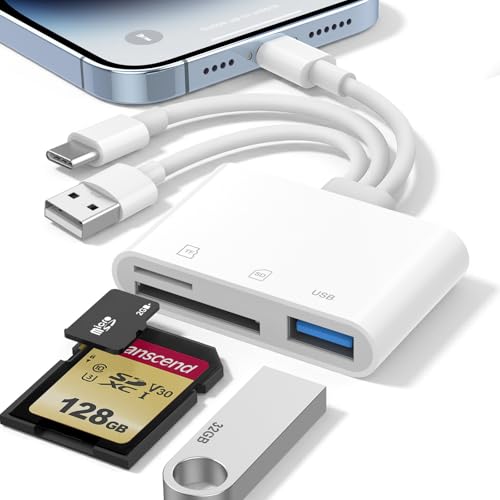
- Built-in USB-C, Lightning, and USB-A connectors
- Supports SD and microSD cards up to 1TB
- No app, Wi-Fi, or driver required
Best For: Apple users moving files between Macs, iPhones, and iPads
Best Compact USB-C Option

- USB-C reader with SD, microSD, and USB-A ports
- Works with macOS without extra drivers
- Built-in cable and compact port design
Best For: USB-C Mac users needing SD or microSD transfers
Most Versatile – BENFEI 4-in-1 USB-C/USB 3.0 Card Reader
For shoppers comparing memory card readers for Mac, the BENFEI 4-in-1 stands out for broad card support and flexible connectivity. Its integrated USB-C and USB 3.0 design supports SD, microSD, MS, and CF cards, with simultaneous reading and writing for all four card types.
Best For: Mac users who work with several card formats and need both USB-C and USB-A connectivity.
Pros:
- Supports SD, microSD, MS, and CF cards.
- USB-C and USB 3.0 connectors support newer and older computers.
- Can read four cards simultaneously.
- Offers UHS-I transfer rates of up to 160MB/sec with compatible hardware and cards.
Cons:
- Not compatible with standard Memory Stick, Memory Stick Micro, or CF Type I cards.
- Actual transfer speeds depend on the card and USB port.
- Older Mac systems may need exFAT compatibility for SDXC cards.
The BENFEI is a strong all-purpose option when format flexibility matters more than having the smallest possible reader. Its 18-month warranty adds useful purchase reassurance.
Best for UHS-II SD Cards – Apple USB-C to SD Card Reader
If you want a straightforward choice among memory card readers for Mac, Apple’s USB-C to SD Card Reader focuses on fast SD-card transfers. It supports high-resolution photo and video transfers at UHS-II speeds and is designed to leave nearby ports accessible.
Best For: Mac, iPad, and iPhone users transferring photos and videos from UHS-II SD cards.
Pros:
- Supports UHS-II transfer speeds for high-resolution photos and videos.
- Works with USB-C enabled Mac, iPad, and iPhone devices.
- Backward compatible with other SD cards and adapters.
- Designed not to block other device ports.
Cons:
- Supports SD cards rather than a broad range of formats such as CF or microSD directly.
- Its usefulness depends on having a USB-C enabled device.
This is a focused, convenient pick for Apple-device owners who primarily use SD cards and want UHS-II support without a multi-format adapter.
Best Compact Dual-Slot Pick – Anker USB-C SD and microSD Reader
For portable memory card readers for Mac, the Anker PowerExpand offers a compact two-slot design. Its USB-C connection works with compatible Mac computers and other USB-C devices, while the standard SD and microSD slots make swapping common card types simple.
Best For: Mac and mobile users who need a small reader for standard SD and microSD cards.
Pros:
- Provides dedicated SD and microSD slots.
- Compact design is suited to travel and use beside other peripherals.
- USB-C connectivity works with a wide range of compatible devices.
- Supports USB 3.0 transfer rates up to 5Gbps.
Cons:
- Does not provide slots for CF or Memory Stick cards.
- A device case may need to be removed for connection.
- It has two card slots rather than a four-format design.
The Anker is a practical everyday reader when your workflow centers on SD and microSD cards. Its small footprint and 18-month warranty make it especially convenient for travel and mobile use.
Best USB-A Multi-Format Option – SmartQ C368 USB 3.0 Card Reader
The SmartQ C368 is a useful option for memory card readers for Mac when you need USB-A compatibility and support for several legacy formats. Its four-in-one layout handles SD, microSD, MS, and CF cards, and plug-and-play operation works with Mac OS without requiring a driver.
Best For: Mac users with USB-A ports who need a simple reader for camera and legacy memory cards.
Pros:
- Supports SD, microSD, MS, and CF card families.
- USB 3.0 connection offers transfer rates up to 5Gbps.
- Compatible with Mac OS, Windows, and Linux without a driver.
- Blue LED indicates when the reader is powered on.
Cons:
- Uses USB-A rather than USB-C.
- Cards must be purchased separately.
- It reads cards independently rather than offering simultaneous four-card access.
The SmartQ C368 is a sensible budget-minded fit for Macs and peripherals that still use USB-A. Its broad format support is particularly helpful for camera owners and older card collections.
Best USB-C Pick – Compact SD and MicroSD Reader
If you need memory card readers for Mac with a built-in USB-C cable, this Oyuiasle model offers a simple way to move files between SD or microSD cards and compatible Mac computers, iPads, iPhones, and other USB-C devices. It supports plug-and-play use without drivers, apps, or external power.
Best For: Mac users who primarily work with SD and microSD cards and want a compact USB-C reader for everyday photo and video transfers.
Pros:
- Built-in USB-C cord helps keep the setup tidy and avoids blocking nearby ports.
- Supports SD and microSD cards with two-way file transfers.
- Works with macOS and a broad range of USB-C Mac, iPad, iPhone, Android, and Windows devices.
- Can also connect compatible USB peripherals such as flash drives, keyboards, mice, and hard disks.
Cons:
- SD and microSD cards cannot be read simultaneously.
- Its listed transfer rate is 30 megabits per second, slower than the faster readers in this roundup.
- It uses USB-C, so older devices may require a separate adapter.
This is a practical, travel-friendly choice when your Mac workflow centers on standard SD and microSD media. Its integrated cable and straightforward operation are appealing, though users handling large files or demanding workloads may prefer a faster model.
Best Multi-Format Choice – 7-in-1 Card Reader Hub
For Mac owners who use more than one type of memory card, this Rocketek model is one of the most versatile memory card readers for Mac. Its seven-slot design covers CF, SD, microSD, XD, MS, and related formats, while dual USB-C and USB-A connectors support newer and older computers.
Best For: Photographers, editors, and Mac users who regularly switch among legacy, camera, and removable-card formats.
Pros:
- Seven card slots support CF, SD, microSD, XD, MS, and related card types.
- Can read and write up to five different cards simultaneously.
- USB-C and USB-A connectors improve compatibility with modern and older Macs.
- Offers up to 5Gbps transfer speeds and works without extra drivers on macOS.
Cons:
- Its larger range of slots may be unnecessary for users who only need SD or microSD support.
- Simultaneous multi-card use can make the hub less convenient for a minimal travel setup.
- The product notes do not specify a compact size or attached cable.
This is the strongest fit for a mixed-card workflow. The combination of broad format support, simultaneous reading, fast USB 3.0 performance, and dual connectors makes it especially useful for photo and video work involving several devices.
Best Dual-Slot Option – Acer USB-C and USB-A Reader
This Acer reader is a flexible option for memory card readers for Mac, combining USB-C and USB-A connectivity with dedicated SD and microSD slots. Its USB 3.0 interface supports up to 5Gbps transfers, and both card slots can be used at the same time for efficient file management.
Best For: MacBook users, photographers, and editors who need fast transfers and simultaneous SD/microSD access across USB-C and USB-A devices.
Pros:
- Supports up to 5Gbps transfer speeds and is backward-compatible with USB 2.0.
- Allows simultaneous reading and writing of SD and microSD cards.
- Dual USB-C and USB-A headers work with newer and older computers.
- Compact aluminum construction includes protective port covers and an attached cord.
Cons:
- Supports SD and microSD formats but not CF Express, XQD, MS, or Memory Stick cards.
- Thick device cases may prevent full connector insertion.
- It is not compatible with Lightning-port devices.
The Acer is a well-rounded choice for Mac users who value speed and dual-card workflows without needing a multi-format hub. Its two connector options add flexibility, while the compact design suits camera bags and laptop sleeves.
Best with Extra Features – 4-in-1 USB-C CF/SD/TF/MS Reader
For shoppers comparing memory card readers for Mac, this 4-in-1 model stands out for its broad card support and dual-connector design. It reads CF, SD, microSD, and Memory Stick formats, while the detachable USB-C-to-USB adapter helps connect it to newer and older computers.
Best For: Mac users who work with several memory card formats and want USB-C plus USB compatibility.
Pros:
- Supports CF, SD, TF/microSD, and Memory Stick cards.
- Includes USB-C and a detachable USB adapter.
- Plug-and-play operation across macOS, Windows, iOS, and Android.
- Supports JPEG, RAW, H.264, and MPEG-4 media transfers.
Cons:
- Rated transfer speed is 480 Mbps, below many USB 3-class readers.
- Does not support Wi-Fi SD cards.
This is a practical choice when card-format flexibility matters more than maximum throughput. Its four slots and two connector options make it especially useful for photographers moving files between different devices.
Best Multi-Connector Pick – 3-in-1 SD Reader for Mac and iPhone
This 3-in-1 reader is a flexible option among memory card readers for Mac, with built-in USB-C, Lightning, and USB-A connectors. It supports SD and microSD cards, requires no app or driver, and can also provide USB-A OTG access for compatible devices.
Best For: Users who transfer camera files among Macs, iPhones, iPads, and USB-A computers.
Pros:
- Built-in Lightning, USB-C, and USB-A connectors eliminate extra adapters.
- Supports SD, SDHC, SDXC, microSD, microSDHC, and microSDXC cards up to 1TB.
- Works without an app, Wi-Fi, or driver.
- Supports exFAT and FAT32 formats.
Cons:
- Listed transfer rate is 68 Mbps.
- USB-A OTG accessories require device-specific settings, and printers are not supported.
Its built-in connector variety makes this a convenient travel reader for mixed Apple and USB-A setups. Choose it when cross-device compatibility is more important than having CF or Memory Stick support.
Best Compact USB-C Option – SD and microSD Reader
For a straightforward USB-C option, this compact reader provides SD and microSD slots plus a USB-A port. It is designed for Macs, MacBooks, iPhone 15/16 models, iPads, Android devices, and other USB-C equipment, with plug-and-play support on macOS.
Best For: USB-C Mac and MacBook users who need SD or microSD access with an extra USB-A port.
Pros:
- Compatible with macOS, Windows, Linux, and Chrome OS.
- Supports SD, SDHC, SDXC, microSD, microSDHC, and microSDXC cards.
- USB-A OTG port supports flash drives, hard drives, keyboards, mice, and MIDI keyboards.
- Built-in USB-C cable helps save space and supports side-by-side port use.
Cons:
- Does not support Lightning iPhones.
- Cannot read SD and microSD cards simultaneously.
- Listed transfer rate is 54 MB/s.
This reader is a good fit for a modern USB-C Mac setup that needs basic card access and occasional USB peripheral connectivity. It is less suitable for Lightning devices or workflows requiring simultaneous card reading.
How We Picked the Best Memory Card Readers for Mac
We focused on compatibility, card-format support, connection type, convenience, and overall versatility. The selection includes simple SD and microSD readers, dual-slot models, four-in-one readers, and multi-card adapters that support formats such as CompactFlash, Memory Stick, and xD.
We also considered whether each reader can work across newer USB-C Macs and older USB-A equipment, along with compatibility claims for iPhone and iPad. A good reader should be plug-and-play, clearly identify supported cards, and avoid unnecessary software or complicated setup.
Quick Comparison
| Best For | Look For | Typical Advantage |
|---|---|---|
| Everyday SD transfers | USB-C SD reader | Small, simple, and easy to carry |
| Photography workflows | SD and microSD dual slots | Convenient support for common camera cards |
| Legacy equipment | SD, microSD, CF, MS, or xD support | Works with a wider range of devices |
| Mixed Apple devices | USB-C, USB-A, or Lightning connectors | More flexibility across Mac, iPad, and iPhone |
| Travel and backup use | Compact plug-and-play design | Less space and fewer accessories to pack |
Key Buying Factors for Memory Card Readers for Mac
Connector and Mac Compatibility
Check your Mac’s available ports before buying. Most current MacBook models use USB-C or Thunderbolt ports, while some older Macs and accessories rely on USB-A. A reader with a built-in USB-C plug is convenient, but a model with an adapter or multiple connectors can be more useful if you switch between devices.
Supported Card Formats
SD and microSD are the most common formats for cameras, drones, action cameras, and phones. If you use older cameras or professional equipment, confirm support for CF, MS, or xD cards. Do not assume that a reader supports every format simply because it has several slots.
Simultaneous Use and Transfer Speed
Some multi-slot readers allow cards to be read or written at the same time, while others support only one card at a time. This distinction matters when backing up files or moving content between cards. USB 3.0 can offer faster transfers than USB 2.0, but actual performance also depends on the card, computer, and file sizes.
Build, Size, and Cable Design
A compact reader is ideal for a camera bag, but a short attached cable may be easier to use with a desktop Mac or a crowded port layout. Look for a sturdy connector, clear slot labels, and enough spacing to access adjacent cards without blocking other ports.
Who Should Buy Which Memory Card Readers for Mac?
Choose a basic USB-C SD reader if you mainly import photos from a standard SD camera card and want the smallest setup. A dual-slot SD and microSD model is a better fit for photographers, drone users, and action-camera owners who regularly use both formats.
Buy a multi-format reader if you work with older cameras, professional media, or several card standards. If you use a Mac alongside an iPhone or iPad, prioritize a reader with the connectors your mobile devices require, while checking device and operating-system compatibility before purchase.
Finally, consider a reader with USB-A support or an included adapter if your accessories span multiple generations. For most buyers, the best Memory Card Readers for Mac are not necessarily the ones with the most slots—they are the ones that match your cards, ports, and everyday transfer routine.