The right Zigbee hub can make your smart home more reliable, responsive, and easier to manage. It can also reduce the need for separate bridges by connecting compatible lights, sensors, switches, locks, and other devices through one control system.
We selected 10 smart home hubs with Zigbee for different priorities, from simple app-based setups to advanced local automation and Home Assistant projects. The key is matching each hub’s wireless standards, ecosystem support, and setup requirements to the way you plan to use your home.
Best 10 Smart Home Hubs with Zigbee Picks for 2026
Best Overall

- Supports Zigbee, Matter, Z-Wave Plus, and Wi-Fi
- SmartThings app with local automation support
- Ethernet or Wi-Fi connectivity
Best For: Multi-protocol SmartThings homes
Best for Aqara

- Supports Aqara Zigbee and Thread devices
- Local automations with Matter bridging
- PoE, dual-band Wi-Fi, and IR control
Best For: Aqara-centered smart homes
Best DIY Adapter
SONOFF Zigbee USB Dongle Plus MG24

- Works with Home Assistant and Zigbee2MQTT
- EFR32MG24 chip and enhanced antenna gain
- Flashable for coordinator, router, or Thread RCP modes
Best For: DIY and open-source smart home builds
Best for Local Automation

- Local processing keeps automations running offline
- Supports Zigbee, Z-Wave, Matter, and Bluetooth
- No recurring subscription required
Best For: Privacy-focused DIY automation
Best Linux-Based Hub
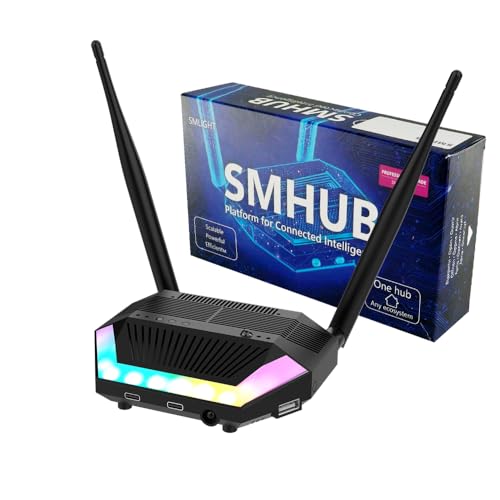
- Runs Zigbee2MQTT and other services locally
- Built-in Zigbee, Thread, Wi-Fi, and Bluetooth
- Supports advanced integrations and expansion modules
Best For: Advanced users seeking a flexible local automation platform
Best Wired Tuya Gateway

- Built for Tuya ZigBee 3.0 devices
- Uses a wired Ethernet connection
- Lists coverage up to 200 square meters
Best For: Tuya households wanting a dedicated wired Zigbee gateway
Best for Home Assistant

- Combines Zigbee 3.0 and Thread
- Designed for Home Assistant ZHA and Thread
- Plug-and-play local network setup
Best For: Home Assistant users building Zigbee and Thread networks
Versatile Tuya Bridge
Multi-Mode Zigbee & Bluetooth Hub

- Combines Zigbee 3.0 and Bluetooth Mesh
- App, automation, and voice control
- Supports up to 128 Tuya devices
Best For: Tuya or Smart Life homes using Zigbee and Bluetooth devices
Future-Ready Controller

- Supports Zigbee, Bluetooth, Thread, and Matter
- Offers local automation and broad platform support
- Includes Ethernet and dual-band Wi-Fi
Best For: Advanced multi-protocol Tuya and Matter installations
Simple Tuya Gateway
Zigbee & Bluetooth Dual-Mode Hub

- Supports Zigbee, Bluetooth Mesh, and Wi-Fi
- Wireless setup through the Tuya or Smart Life app
- Works with Alexa and Google Assistant
Best For: Beginners with compatible Tuya devices
Best Overall – Aeotec Smart Home Hub
The Aeotec Smart Home Hub is a versatile choice for shoppers comparing smart home hubs with Zigbee. It combines Zigbee, Z-Wave Plus, Matter, and Wi-Fi support with SmartThings app control, making it useful for connecting devices from multiple ecosystems.
Best For: Homes that want broad protocol support, SmartThings automation, and Alexa or Google Assistant compatibility.
Pros:
- Supports Zigbee, Matter, Z-Wave Plus, and Wi-Fi devices.
- Works with Alexa, Google Home, and the SmartThings app.
- Offers wired Ethernet or Wi-Fi setup.
- Many automations can run locally for improved responsiveness.
Cons:
- Z-Wave Plus support is specified for the V3 model.
- Designed for use in North America.
Choose this hub if you want a mainstream, multi-protocol controller with flexible networking and a familiar app-based setup. It is especially practical for households building around SmartThings while adding Zigbee and Matter devices.
Best for Aqara – Aqara Smart Home Hub M3
The Aqara Smart Home Hub M3 is a strong option among smart home hubs with Zigbee for Aqara-focused setups. It supports Aqara Zigbee and Thread devices, acts as a Matter controller and bridge, and emphasizes local automation and encrypted storage.
Best For: Aqara users who want local automations, Matter integration, IR appliance control, and optional wired networking.
Pros:
- Supports up to 127 Aqara Zigbee devices and 127 Thread devices.
- Provides local automation processing through its Edge Hub design.
- Includes Matter bridging, a 360-degree IR blaster, and PoE connectivity.
- Uses encrypted local storage and omits microphones and cameras.
Cons:
- The Zigbee capacity applies to Aqara Zigbee devices, not third-party Zigbee devices.
- A USB-C power adapter is not included.
- Some cloud-based notifications still require internet access.
The M3 makes the most sense when Aqara is your primary smart home platform. Its local processing, Matter features, and IR control add flexibility, but shoppers with a mixed third-party Zigbee collection should verify compatibility first.
Best DIY Adapter – SONOFF Zigbee USB Dongle Plus MG24
The SONOFF Zigbee 3.0 USB Dongle Plus MG24 is a compact alternative for DIY smart home hubs with Zigbee. Rather than operating as a standalone consumer hub, it connects to a computer or home server running platforms such as Home Assistant, Zigbee2MQTT, or openHAB.
Best For: Technical users building a customizable Home Assistant, Zigbee2MQTT, or openHAB installation.
Pros:
- Uses the EFR32MG24 chip for fast processing and stable sub-device control.
- Supports Zigbee 3.0 devices from brands including Philips Hue, Aqara, IKEA Tradfri, and SONOFF.
- Can be flashed for coordinator, router, or Thread RCP operation.
- Includes a USB extension cable to help reduce interference and improve placement.
Cons:
- Requires a compatible host device and smart home software.
- Setup is more hands-on than with a plug-and-play consumer hub.
This dongle is a good fit when you want control over your software stack and device integrations. It offers useful hardware flexibility, but it is better viewed as a Zigbee and Thread radio adapter than a complete out-of-the-box hub.
Best for Local Automation – Hubitat Elevation C-8 Pro
The Hubitat Elevation C-8 Pro stands out among smart home hubs with Zigbee for local-first operation. It supports Zigbee 3.0, Z-Wave 800 Series, Matter, and Bluetooth while running automations directly on the hub instead of relying on remote servers.
Best For: Privacy-conscious DIY users who want fast local automations, broad compatibility, and no required subscription.
Pros:
- Runs automations locally, including when the internet is unavailable.
- Supports Zigbee 3.0, Z-Wave 800 Series, Matter, and Bluetooth.
- Works with Alexa, Google Home, and Apple HomeKit.
- Includes separate external antennas for Zigbee and Z-Wave to extend wireless reach.
Cons:
- Advanced setup may appeal more to DIY users than beginners.
- Its broad rule engine and community ecosystem can involve a learning curve.
Consider the C-8 Pro if reliable local control matters more than a purely simplified setup. Its protocol coverage, external antennas, and subscription-free platform make it a capable foundation for larger or more customized smart homes.
Best Linux-Based Hub – SMLIGHT SMHUB Essential
For shoppers comparing smart home hubs with Zigbee, the SMLIGHT SMHUB Essential stands out as a locally managed Linux system rather than a basic bridge. It can host Zigbee2MQTT, MQTT, Matterbridge, Node-RED, and other applications directly, while supporting Zigbee, Thread, Wi-Fi, and Bluetooth.
Best For: Advanced users who want local control, broad protocol support, and the flexibility to run smart-home services on one hub.
Pros:
- Runs Zigbee2MQTT, MQTT, Matterbridge, and other Linux applications locally.
- Built-in Zigbee, Thread, Wi-Fi, and Bluetooth radios.
- Can connect Zigbee devices with Google Home or Apple Home through Zigbee2MQTT and Matterbridge.
- Includes useful hardware features such as IR, audio output, ambient light sensing, and expandable storage.
Cons:
- Its Linux-based setup may be more involved than a simple plug-and-play gateway.
- Z-Wave, 4G/LTE, and PoE functions require optional expansion modules.
The SMHUB Essential is the most flexible choice here for users comfortable managing local software and integrations. It offers substantial headroom, though beginners may prefer a simpler dedicated gateway.
Best Wired Tuya Gateway – MOES Tuya ZigBee 3.0 Hub
The MOES Tuya ZigBee 3.0 Hub is a straightforward wired option for shoppers seeking smart home hubs with Zigbee. It connects through Ethernet and is designed to work with Tuya ZigBee smart devices, with a listed range of up to 200 square meters.
Best For: Tuya users who want a wired Zigbee gateway for compatible sensors, switches, and other smart devices.
Pros:
- Designed for Tuya ZigBee 3.0 smart devices.
- Uses Ethernet connectivity with a listed 1000 Mbps LAN port.
- Offers a stated coverage range of up to 200 square meters.
- Uses TLS security according to the supplied specifications.
Cons:
- Its compatibility is centered on Tuya ZigBee devices.
- Wired operation requires a suitable Ethernet connection and placement.
This MOES hub makes the most sense when your existing smart-home ecosystem is built around Tuya. It is less suited to shoppers looking for a multi-protocol hub or a locally hosted automation server.
Best for Home Assistant – Zigbee Thread Matter Gateway
This Zigbee Thread gateway is aimed at Home Assistant users comparing smart home hubs with Zigbee and newer Matter-ready devices. Its dual-protocol design supports Zigbee 3.0 and Thread, while automatic detection is intended to simplify setup with Home Assistant.
Best For: Home Assistant users who want one device for Zigbee and Thread networks with local communication.
Pros:
- Supports both Zigbee 3.0 and Thread connectivity.
- Designed to work with Home Assistant ZHA and Thread systems.
- Plug-and-play setup with automatic detection and configuration.
- High-gain antenna design is intended to improve range and wall penetration.
Cons:
- Its feature set is primarily tailored to Home Assistant.
- It is a USB-based gateway rather than a standalone Linux hub.
Choose this gateway if Home Assistant is the center of your setup and you want Zigbee and Thread support in one device. Its local communication and simplified setup are practical advantages for compatible installations.
Versatile Tuya Bridge – Multi-Mode Zigbee & Bluetooth Hub
For shoppers comparing smart home hubs with Zigbee, this compact Tuya gateway stands out for combining Zigbee 3.0 and Bluetooth Mesh support in one bridge. It connects compatible devices to a 2.4GHz network and supports app, voice, and automation control.
Best For: Tuya or Smart Life households using both Zigbee and Bluetooth devices.
Pros:
- Supports Zigbee 3.0 and Bluetooth Mesh devices through one gateway.
- Enables remote control, grouping, and device management in the Smart Life or Tuya app.
- Works with Alexa and Google Home voice control.
- Supports up to 128 Tuya smart home devices.
Cons:
- Supports Tuya and Smart Life devices only.
- Requires a 2.4GHz network.
This is a practical choice for a Tuya-centered setup that needs both Zigbee and Bluetooth support. Its main limitation is ecosystem compatibility, so confirm every device works with Tuya or Smart Life before buying.
Future-Ready Controller – Matter Zigbee & Thread Hub
This Tuya gateway is one of the more expansive smart home hubs with Zigbee, adding Bluetooth, Thread, Matter, Ethernet, and dual-band Wi-Fi support. It can bridge compatible devices into platforms such as Apple Home, Home Assistant, and SmartThings while supporting local scenarios and automation.
Best For: Advanced Tuya users building a multi-protocol Matter, Thread, and Zigbee system.
Pros:
- Combines Zigbee, Bluetooth, Thread, Matter, Ethernet, and Wi-Fi connectivity.
- Acts as a Matter bridge, controller, and Thread border router.
- Supports local scenarios and automation when the network is unavailable.
- Supports up to 128 Tuya Zigbee devices, 128 Thread devices with repeaters, and 200 Bluetooth devices.
Cons:
- Tuya Zigbee support is not intended for third-party Zigbee devices unless they meet the stated Zigbee 3.0 requirements.
- Thread device support may require repeaters.
- The broad feature set may be more than a basic Tuya setup needs.
Choose this model when interoperability and expansion matter more than simplicity. Its Matter and Thread capabilities provide a stronger long-term platform, but device compatibility should be checked carefully before adding third-party products.
Simple Tuya Gateway – Zigbee & Bluetooth Dual-Mode Hub
If you want smart home hubs with Zigbee that are straightforward to set up, this dual-mode gateway supports Tuya Zigbee, Bluetooth Mesh, and Wi-Fi control through the Smart Life or Tuya app. It connects wirelessly without requiring an Ethernet cable and supports Alexa and Google Assistant.
Best For: Beginners with compatible Tuya devices who want a simple wireless gateway.
Pros:
- Supports Zigbee and Bluetooth Mesh devices alongside Wi-Fi control.
- Sets up through the Smart Life or Tuya app without a network cable.
- Provides remote, group, and device-management controls in the app.
- Works with Alexa and Google Assistant.
Cons:
- Compatible with Tuya protocol products only.
- Requires a 2.4GHz Wi-Fi connection.
- Not compatible with non-Tuya bulbs, door locks, or blinds.
This gateway is best suited to a focused Tuya ecosystem where easy wireless installation is a priority. It offers useful dual-protocol coverage, but shoppers with mixed-brand devices should verify compatibility first.
How We Picked These Smart Home Hubs with Zigbee
We focused on hubs and gateways that provide Zigbee connectivity while offering a clear use case for modern smart homes. Selection factors included support for Matter, Thread, Z-Wave, Bluetooth, or Wi-Fi; compatibility with major platforms; local versus cloud-based control; automation flexibility; and the likely setup experience.
The list includes complete consumer hubs, ecosystem-specific gateways, and USB coordinators designed for platforms such as Home Assistant. Because features can vary by firmware, region, and connected device, check current compatibility details before buying.
Quick Comparison
| Best For | Look For | Typical Trade-Off |
|---|---|---|
| Easy mainstream setup | SmartThings, Alexa, Google Home, or Tuya support | Some features may depend on cloud services |
| Advanced local automation | Hubitat or a Home Assistant-compatible coordinator | More setup and configuration work |
| Future-ready connectivity | Matter and Thread support | Not every device exposes all standards equally |
| Low-cost ecosystem expansion | Tuya or Aqara compatibility | Best results may require staying within one brand ecosystem |
Key Buying Factors for Smart Home Hubs with Zigbee
Device and Platform Compatibility
Confirm that the hub supports the devices you already own, not just the wireless protocol on the box. Zigbee compatibility can differ by device profile, manufacturer, and software integration. Also check whether the hub works with Alexa, Google Home, Apple Home, SmartThings, Home Assistant, or another platform you use.
Local Control and Reliability
Local processing can keep automations working when the internet is unavailable and may reduce delays. Cloud-connected hubs can be easier to set up, but review what requires an account, internet access, or a subscription. For a large installation, look for stable coordinator performance and a clear way to back up or restore settings.
Wireless Standards and Expansion
Zigbee is useful for low-power sensors and switches, while Thread and Matter may improve interoperability as newer devices arrive. Z-Wave can broaden compatibility with locks, sensors, and other products. Choose the standards that match your planned purchases rather than paying for features you will not use.
Setup, Range, and Network Design
Most Zigbee networks improve when powered devices act as repeaters, so hub placement and device distribution matter. Keep the hub away from heavy wireless interference where possible. USB coordinators may require a compatible host, software configuration, and a USB extension cable for better radio placement.
Who Should Buy Which Smart Home Hubs with Zigbee?
Choose a mainstream SmartThings, Aqara, or Tuya-style hub if you want guided setup and app-based control. Hubitat is a stronger fit for users who want detailed automations and more local processing without building a complete server-based system. A Zigbee USB coordinator or SMLIGHT-style controller suits technically confident users running Home Assistant, Zigbee2MQTT, Matterbridge, or MQTT.
If you are starting from scratch, prioritize broad compatibility and simple recovery. If you already have a defined ecosystem, staying with its hub may deliver the smoothest pairing and automation experience. Before ordering, verify device support, required software, power requirements, and whether the selected hub supports the protocols you expect to add later.