Vertical mice for gaming can reduce wrist rotation while adding useful controls for MMOs, productivity-heavy setups, and long PC sessions. The right model balances hand comfort with sensor performance, button placement, connection type, and software support.
This roundup compares 10 options ranging from compact ergonomic designs to feature-rich mice with joysticks, rocker controls, high DPI settings, and programmable side buttons.
Best 10 Vertical Mice for Gaming Picks for 2026
Rocker-Control Gaming Pick
TRELC 5D Rocker Vertical Gaming Mouse

- Five-direction rocker adds thumb controls
- 11 programmable buttons with onboard memory
- Wired 10,000 DPI setup with RGB effects
Best For: Right-handed gamers who need extensive customizable inputs
Premium Wireless Choice
Razer Pro Click V2 Vertical Mouse

- Six-button ergonomic design with base support
- 2.4GHz, Bluetooth, and wired connectivity
- 30K sensor and up to six-month battery life
Best For: Users seeking a versatile gaming and productivity mouse
Most Versatile
Attoe F-18 12-Button Vertical Gaming Mouse

- 12 programmable buttons and a 5-direction rocker
- Bluetooth, 2.4GHz wireless, and USB-C wired modes
- 24,000 DPI maximum with RGB lighting
Best For: Right-handed gamers needing extensive controls and flexible connectivity
Best Budget Wired Pick
Nulea M504 Ergonomic Vertical Mouse

- 57-degree natural-grip ergonomic design
- Plug-and-play wired USB connection
- Four DPI levels up to 3,200 with RGB lighting
Best For: Office use and casual gaming on a simple wired setup
Best Rocker Controls
TRELC F-18 5D Vertical Gaming Mouse

- 5-direction thumb rocker for directional inputs
- 11 programmable buttons with saved settings
- Tri-mode connectivity and 24,000 DPI maximum
Best For: Right-handed FPS, MOBA, and MMO players wanting joystick-style control
Best Budget Pick

- Handshake-style ergonomic design
- 1000/1600 DPI optical tracking
- Lightweight wired five-button layout
Best For: Affordable ergonomic gaming and everyday computer use
Best Joystick Controls
Zelotes C-18 Vertical Gaming Mouse
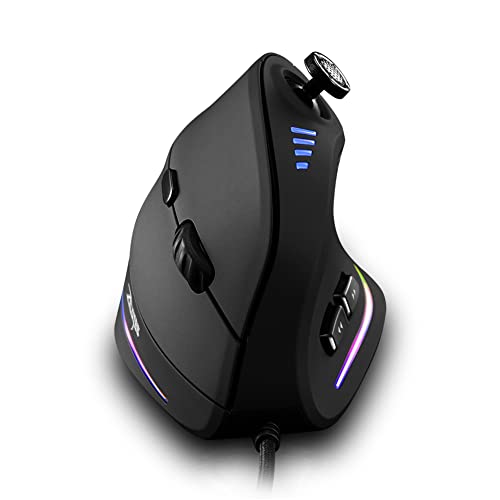
- Five-direction thumb joystick
- 11 programmable buttons
- Up to 10000 DPI with five settings
Best For: Right-handed gamers wanting joystick input and extensive controls
Rocker-Control Gaming Pick – TRELC 5D Rocker Vertical Gaming Mouse
Among vertical mice for gaming, the TRELC stands out for its integrated five-direction rocker and 11 programmable buttons. Its handshake-style shape is aimed at right-handed players who want extensive thumb control for FPS, MOBA, and MMO games.
Best For: Right-handed PC gamers who want many programmable inputs and onboard profile storage.
Pros:
- Five-direction rocker provides five additional control inputs through the thumb.
- All 11 buttons can be customized with the included software.
- Onboard memory retains programmable settings when moving to another computer.
- Offers five DPI levels from 1,500 to 10,000 and customizable lighting effects.
Cons:
- USB wired connection limits wireless flexibility.
- The supplied configuration software may require consulting the manual.
- Designed for right-handed use only.
The TRELC is a feature-heavy choice for players who prioritize button density and thumb-based controls over a cable-free setup. Its vertical grip and stored profiles also make it practical for switching between gaming computers.
Premium Wireless Choice – Razer Pro Click V2 Vertical Mouse
For shoppers comparing vertical mice for gaming with productivity features, the Razer Pro Click V2 combines a handshake grip with wireless versatility. It supports up to five connected devices, includes a wrist-supporting base, and uses a high-resolution sensor suited to gaming and creative work.
Best For: Right-handed users who want one ergonomic mouse for gaming, work, and multiple devices.
Pros:
- Six-button vertical design and base support promote a natural hand position.
- Connects through 2.4GHz wireless, Bluetooth, or wired USB-C mode.
- Battery is rated for up to six months under standard test conditions.
- Focus Pro 30K sensor and mechanical switches support precise tracking and durability.
Cons:
- Requires Windows 11 for the listed operating-system support.
- Offers fewer buttons than MMO-focused vertical gaming mice.
- Its 0.41 kg listed weight may feel substantial to users who prefer lightweight mice.
The Pro Click V2 is a strong all-around option when wireless connectivity and long battery life matter as much as gaming performance. Its six-button layout is less specialized for MMO macros, but more adaptable for everyday use.
MMO Button Specialist – SOLAKAKA E9 Vertical MMO Mouse
The SOLAKAKA E9 is built for gamers who need abundant thumb controls from their vertical mice for gaming. Its 45-degree handshake design combines 10 programmable side buttons with tri-mode connectivity, onboard memory, and a sensor rated for up to 24,800 DPI through software.
Best For: MMO players and multi-device users who want a dense programmable side-button layout.
Pros:
- Ten programmable side buttons create a substantial MMO command hub.
- Tri-mode connection supports 2.4GHz, Bluetooth 5.0, and USB-C wired use.
- Onboard memory stores settings after configuration on a Windows PC.
- PAW3311 sensor provides 1,000Hz polling, 300 IPS tracking, and six physical DPI presets.
Cons:
- Browser-based configuration is Windows-only.
- The many side buttons may require an adjustment period.
- Designed for right-handed users.
With its large side-button array and flexible connection options, the E9 is particularly compelling for MMO rotations and complex shortcuts. Buyers using Mac, Linux, or ChromeOS can use saved settings, but initial programming requires Windows.
Large-Hand Wired Pick – DELUX M618PLUS RGB Vertical Mouse
The DELUX M618PLUS is a practical option among vertical mice for gaming for users with larger hands who prefer a dependable wired connection. It adds a removable wrist rest, adjustable DPI, programmable buttons, and RGB lighting while remaining suitable for everyday work.
Best For: Right-handed users with 6.7- to 7.5-inch hand lengths who prefer wired comfort and a supported wrist.
Pros:
- Large-hand fit is specified for 6.7- to 7.5-inch hand lengths and 3.1- to 3.9-inch widths.
- Removable palm rest helps elevate the wrist and reduce table friction.
- Six DPI levels range from 400 to 4,000, with driver support up to 12,800 DPI.
- Six programmable buttons, RGB lighting, and silent primary clicks add flexibility.
Cons:
- At 210g, it may feel heavy compared with lighter gaming mice.
- USB wiring limits portability and cable-free movement.
- Side buttons and driver are not available on Mac or iOS systems.
The M618PLUS makes the most sense for larger-handed users who value palm support and quiet clicking over a lightweight competitive design. Its plug-and-play wired setup is straightforward, while gaming customization is stronger on Windows.
Most Versatile – Attoe F-18 12-Button Vertical Gaming Mouse
If you want vertical mice for gaming with extensive customization, the Attoe F-18 combines a natural handshake grip with tri-mode connectivity, 12 programmable buttons, and a thumb-operated 5-direction rocker. Its 24,000 DPI maximum and onboard profile storage make it especially flexible for gaming and multi-device use.
Best For: Right-handed gamers who want many controls, wireless flexibility, and macro customization.
Pros:
- 12 programmable buttons support macros and retain programmed data in the mouse.
- 5-direction rocker provides forward, backward, left, right, and click inputs.
- Supports Bluetooth, 2.4GHz wireless, and USB-C wired connections.
- Offers five DPI presets up to 24,000 and customizable RGB effects.
Cons:
- Configuration software is required for button customization.
- Designed for right-handed users only.
- The extensive controls may take time to learn.
The Attoe F-18 is a feature-heavy choice among vertical mice for gaming, particularly for MMO, MOBA, and FPS players who can make use of its rocker and programmable controls. Its tri-mode design also suits users who switch between a PC, laptop, or tablet.
Best Budget Wired Pick – Nulea M504 Ergonomic Vertical Mouse
The Nulea M504 is a straightforward wired option for shoppers exploring vertical mice for gaming but prioritizing comfort and simple setup. Its 57-degree grip, four DPI levels, RGB underglow, and plug-and-play USB connection make it better suited to everyday computing and lighter gaming than competitive play.
Best For: Right-handed users who want an affordable wired vertical mouse for office work and casual gaming.
Pros:
- 57-degree ergonomic grip is designed to keep the forearm in a more natural position.
- Plug-and-play USB connection requires no drivers.
- Four adjustable DPI settings range from 800 to 3,200.
- Lightweight design includes RGB lighting and forward/back buttons.
Cons:
- Buttons are non-programmable.
- Forward and backward buttons are not compatible with Mac OS.
- Wired operation limits desk flexibility.
The Nulea M504 makes sense when ergonomic positioning and reliable wired operation matter more than advanced gaming features. Its limited DPI range and fixed controls mean serious players may want a more specialized model.
Best Rocker Controls – TRELC F-18 5D Vertical Gaming Mouse
The TRELC F-18 is one of the more game-focused vertical mice for gaming, pairing a 5-direction thumb rocker with 11 programmable buttons and a 24,000 DPI sensor. Tri-mode connectivity lets it work over Bluetooth, 2.4GHz wireless, or USB, while the vertical grip is designed to reduce wrist strain.
Best For: Right-handed FPS, MOBA, and MMO players who want joystick-style thumb inputs and customizable controls.
Pros:
- 5D rocker replaces five directional inputs with thumb control.
- All 11 buttons can be customized through the included software.
- PMW3311 sensor supports up to 24,000 DPI, 300 IPS, and 35G acceleration.
- Bluetooth, 2.4GHz, and wired USB modes support multiple devices.
Cons:
- Software is needed to customize the buttons.
- It can connect to multiple devices but cannot control two simultaneously.
- Designed for right-handed use.
Choose the TRELC F-18 if the rocker is the main attraction. It offers a strong combination of directional thumb control, high sensitivity, and connection options, though its specialized layout may require an adjustment period.
Best Budget Pick – Anker Wired Vertical Mouse
The Anker USB Wired Vertical Mouse is a straightforward option among vertical mice for gaming, especially if you want an affordable, corded design for everyday play and extended computer use. Its handshake-style shape, adjustable 1000/1600 DPI tracking, and five-button layout offer basic control without wireless charging or software complexity.
Best For: Budget-conscious gamers and general computer users who prefer a lightweight wired vertical mouse.
Pros:
- Vertical ergonomic shape supports a natural handshake wrist and arm position.
- Two DPI settings provide a choice between 1000 and 1600 DPI sensitivity.
- Next/previous buttons support easier webpage navigation.
- Lightweight design and a 4.9-foot USB cable suit extended desk use.
Cons:
- Maximum sensitivity is 1600 DPI, below the other gaming-focused options here.
- Wired USB connectivity limits placement flexibility.
- No programmable gaming controls or RGB lighting are listed.
The Anker is best viewed as an entry-level ergonomic mouse rather than a dedicated MMO or competitive gaming peripheral. Choose it when comfort, simplicity, and value matter more than extensive customization.
Best MMO Feature Set – SOLAKAKA E9 Vertical MMO Mouse
The SOLAKAKA E9 is one of the most feature-rich vertical mice for gaming, combining a 45-degree ergonomic angle with 10 programmable side buttons. Its PAW3311 sensor, tri-mode connectivity, onboard memory, and RGB lighting make it a strong fit for MMO players who want extensive control and flexible device support.
Best For: MMO gamers who need many remappable commands, wireless flexibility, and a wrist-friendly shape.
Pros:
- Ten fully remappable side buttons provide a large thumb-accessible command hub.
- PAW3311 sensor offers six physical DPI presets from 800 to 6400 DPI and software expansion up to 24800 DPI.
- Tri-mode connection supports 2.4GHz, Bluetooth 5.0, and USB-C wired use.
- 1000mAh battery is rated for up to 270 hours, with wired use while charging.
Cons:
- The browser-based configuration tool requires Windows for setup or resetting.
- Its many buttons may be excessive for users who prefer a simpler layout.
- Vertical MMO designs can require an adjustment period compared with conventional mice.
The E9 offers the broadest combination of MMO controls, connectivity, and customization in this selection. It is particularly appealing if you can configure it on Windows and want to carry those settings over to other operating systems.
Best Joystick Controls – Zelotes C-18 Vertical Gaming Mouse
The Zelotes C-18 stands out among vertical mice for gaming with an integrated five-direction thumb joystick and 11 programmable buttons. Its 1500-to-10000 DPI adjustment and PMW3325 optical sensor give gamers configurable movement and command options, while the vertical shell is designed to reduce forearm twisting during prolonged use.
Best For: Right-handed gamers who want joystick input, many programmable buttons, and high adjustable DPI in a wired mouse.
Pros:
- Five-direction thumb joystick is mapped to movement keys by default and can be customized.
- Eleven programmable buttons allow personalized game controls through software.
- Five DPI levels range from 1500 to 10000 DPI.
- Compatible with Windows, Mac OS, and other listed operating systems.
Cons:
- Programming software is not fully available for Mac.
- At 165 g, it is heavier than the Anker model.
- USB corded operation does not provide wireless flexibility.
The C-18 is a specialized choice for players who can make use of its joystick and dense button layout. It offers more direct gaming controls than a basic vertical mouse, but right-handed users should be comfortable with its larger, heavier design.
How We Picked These Vertical Mice for Gaming
We focused on the features that matter most in an upright gaming mouse: hand position, button accessibility, sensor resolution, connection reliability, programmable controls, and suitability for different grip styles. The selection includes wired and wireless models, mice with six to 12 controls, and designs intended for small, medium, or large hands.
Because vertical mice are less standardized than conventional gaming mice, advertised DPI should not be treated as a complete measure of performance. Tracking consistency, comfortable reach, and practical button placement are often more important than maximum sensitivity.
Quick Comparison
| Best For | Features to Prioritize | Models to Consider |
|---|---|---|
| MMO and strategy games | Many programmable side buttons, onboard profiles | SOLAKAKA E9, TRELC 11-button models |
| Fast-paced gaming | Reliable sensor, low-latency connection, secure grip | Wireless 24,000 DPI models, wired gaming options |
| Office and gaming crossover | Comfort, simple controls, dependable connectivity | Razer Pro Click V2, Anker vertical mouse |
| Large hands | Tall shell, broad palm support | DELUX M618PLUS RGB |
Key Buying Factors for Vertical Mice for Gaming
Shape and Hand Fit
A vertical mouse should let your hand rest in a relaxed handshake position without forcing your thumb or pinky to stretch. Check the listed dimensions and intended hand size, especially if you have large hands or use a palm grip. A steep angle can improve wrist comfort but may require an adjustment period.
Buttons and Game Compatibility
Extra buttons are valuable for MMO abilities, push-to-talk, macros, and productivity shortcuts. However, more controls are not automatically better. Make sure the side buttons are easy to distinguish and that the included software supports remapping, profiles, and any onboard memory you need.
Sensor, DPI, and Connection
High DPI settings provide flexibility, but consistent tracking matters more. Wired models avoid charging and pairing concerns, while wireless versions provide a cleaner desk and greater freedom of movement. Confirm whether wireless operation uses Bluetooth, a 2.4GHz receiver, or both.
Comfort Features and Durability
Look for a stable base, a textured grip, smooth primary clicks, and a cable or receiver arrangement that will not interfere with movement. RGB lighting is cosmetic, so prioritize shape and control quality unless lighting is important to your setup.
Who Should Buy Which Vertical Mice for Gaming?
Choose an MMO-focused model with 10 or more side controls if you play games that require frequent ability access. A wired, high-button mouse is a practical choice for desk-based players who want consistent power and minimal setup. Wireless 24,000 DPI models suit users who want a clean workspace and flexible sensitivity settings, provided battery life and receiver placement meet their needs.
For mixed work and gaming, the Razer Pro Click V2 or Anker model may be easier to live with than a heavily buttoned MMO design. Users with larger hands should start with the DELUX M618PLUS RGB, while shoppers seeking a budget-friendly ergonomic transition should compare the simpler six-button options first.