Powered KVM over IP switches let you view and control computers remotely, often even when an operating system is unavailable. They are useful for IT administration, server rooms, home labs, and remote troubleshooting.
This roundup compares 10 options across compact single-port designs, multi-computer systems, PoE models, rackmount hardware, and professional-grade platforms. Look closely at video resolution, network requirements, remote access features, and the number of systems you need to manage.
Best 10 Powered Kvm Over Ip Switches Picks for 2026
Best Wireless Flexibility

- Dual-band Wi-Fi 6 plus wired connectivity
- 4K@30 passthrough with two-way audio
- Tailscale and optional self-hosted cloud access
Best For: Home labs, offices, and wireless remote recovery
Best Open-Source Option

- 1080p@60 streaming with 30–60 ms latency
- Local, cloud, and Wake on LAN access
- Linux-based open-source and expandable design
Best For: Developers and home-lab remote management
Best PoE-Powered Choice

- PoE and USB-C dual-power support
- 4K streaming at 30 FPS
- Remote BIOS reinstall and Tailscale support
Best For: Server rooms and PoE-based network installations
Best Long-Distance KVM Extension

- 4K extension up to 390 feet over Cat5e
- KVM control through an existing IP network
- Supports up to 16 paired extender sets
Best For: Control rooms, server rooms, and distributed workstations
Best Compact Remote KVM

- BIOS-level remote control without host software
- 4K 30Hz video with remote audio
- Compact single-port design with file transfer
Best For: Single-PC remote management and IT support
Best Premium 4K KVM-over-IP
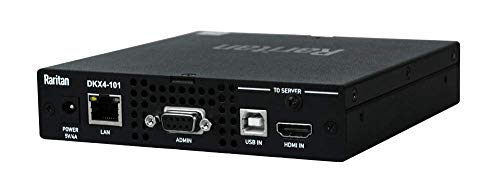
- Single-port remote KVM over Ethernet
- 4K-oriented professional design
- Rack-mountable enclosure for IT installations
Best For: Professional single-server remote management
Best Multi-Port PoE KVM
GL.iNet Comet X Quad-Port Remote KVM

- Controls four HDMI hosts over IP
- PoE power with 5V Type-C backup
- 4K 30Hz loop-out, touchscreen, and 64GB eMMC
Best For: Multi-system home labs and rack-based IT environments
Flexible Remote Control

- Remote access for two computers
- 4K60 video with synchronized audio
- ZeroTier and remote power support
Best For: Two-computer remote work and IT management
Rack-Ready Administration

- Eight-port server management
- Simultaneous local and remote users
- 1U rackmount Cat5 design
Best For: Server rooms and multi-user administration
Redundant 4K DisplayPort Access
ATEN CN9950 Single-Port 4K IP KVM

- 4K DisplayPort at 30Hz
- Dual LAN and dual power backup
- Local and remote console support
Best For: Single-server DisplayPort deployments
Best Wireless Flexibility – GL-RM10 Comet Pro
The GL.iNet GL-RM10 Comet Pro is a flexible choice among powered KVM over IP switches for users who want remote BIOS access, recovery, and system control without relying solely on wired networking. Dual-band Wi-Fi 6, Ethernet connectivity, 4K passthrough, and browser- or app-based access make it suitable for home labs and offices.
Best For: Home labs, offices, and remote system recovery where wireless access and broad device compatibility matter.
Pros:
- Supports 2.4 GHz and 5 GHz Wi-Fi 6 alongside wired connectivity.
- Provides 4K at 30 FPS video passthrough and two-way audio.
- Includes Tailscale, browser-based access, app support, and a self-hosted cloud option.
- Can support remote power control or hard resets with optional ATX Board or Fingerbot accessories.
Cons:
- ATX Board and Fingerbot power-control accessories are sold separately.
- Its 4K passthrough is limited to 30 FPS.
- Some remote-access features require cloud or server configuration.
Choose the Comet Pro if wireless flexibility, privacy-conscious connectivity, and recovery features are more important than a basic wired-only setup. Its touchscreen and multiple access methods also make initial management approachable.
Best Open-Source Option – JetKVM IP KVM
The JetKVM IP KVM is a compact powered KVM over IP switch designed for browser-based control of a remote computer. It combines Ethernet access, optional cloud connectivity, Wake on LAN, low-latency 1080p streaming, and flexible USB-C power options in a small Linux-based device.
Best For: Developers, home-lab users, and IT teams who want open-source software and expandable hardware options.
Pros:
- Installs through HDMI and USB-C, then provides browser access over Ethernet.
- Streams up to 1080p at 60 FPS with stated 30–60 ms latency.
- Offers local access, optional cloud access, and Wake on LAN.
- Supports expansion options such as ATX power control, DC power control, and RS-232 serial console functions.
Cons:
- Video output is specified at 1080p, rather than 4K.
- Remote cloud access is optional and requires use of the cloud service.
- Power and expansion accessories may add setup complexity.
The JetKVM stands out for its open-source foundation and customization potential. It is a strong fit when remote rescue, Wake on LAN, and hardware expansion are priorities, while users seeking 4K streaming should consider another model.
Best PoE-Powered Choice – GL-RM1PE Comet PoE
The GL.iNet Comet PoE GL-RM1PE is a streamlined powered KVM over IP switch for computers and servers that can benefit from network-based installation. Its PoE and USB-C dual-power design, 4K streaming, Tailscale support, and remote BIOS reinstall capability make it well suited to organized server or equipment deployments.
Best For: Server rooms and network installations where PoE power and remote recovery are useful.
Pros:
- Supports Power over Ethernet and USB-C dual power supply options.
- Provides 4K video streaming at 30 FPS.
- Includes Tailscale support and remote BIOS reinstall capability.
- Offers USB interfaces for optional ATX and Fingerbot accessories.
Cons:
- Supports one computer or server at a time.
- 4K streaming is limited to 30 FPS.
- Some power-control functions rely on optional accessories.
The GL-RM1PE is a practical choice when PoE can simplify cabling and centralized deployment. Its compact form and remote BIOS features make it particularly useful for maintaining systems that are difficult to access physically.
Best Long-Distance KVM Extension – AV Access 4K HDMI USB KVM
The AV Access 4K HDMI USB KVM Extender is a practical alternative to powered KVM over IP switches when the goal is to extend video, audio, keyboard, mouse, and USB peripherals across an existing Ethernet network. It supports 4K at 30 Hz, long cable runs, and multi-system deployments without requiring drivers.
Best For: Control rooms, server rooms, classrooms, and distributed workstations needing long-distance local KVM extension.
Pros:
- Extends 4K video, audio, and USB up to 390 feet over Cat5e or up to 492 feet over Cat6/6A/7.
- Works across an existing IP network and supports keyboard, mouse, and other USB peripherals.
- Receiver includes three USB 2.0 ports for devices such as flash drives, gamepads, and printers.
- Supports up to 16 extender sets using the DIP-switch pairing design.
Cons:
- This is an extender system rather than a browser-based cloud KVM management device.
- It requires separate transmitter and receiver units plus network cabling.
- 4K operation is limited to 30 Hz.
Choose this AV Access system when distance, peripheral access, and reliable signal extension matter more than software-based remote administration. Its multi-set support and driver-free setup suit professional AV and workstation installations.
Best Compact Remote KVM – GL.iNet Comet GL-RM1
The GL.iNet Comet GL-RM1 is a compact powered KVM over IP switch for remotely managing one computer, laptop, router, or server. It provides BIOS-level access, 4K 30Hz video, remote audio, file transfer, and host-side operation without installing software.
Best For: Remote IT support, home labs, smart-home users, and offline server maintenance.
Pros:
- Supports remote rebooting, operating-system installation through BIOS, and power-on control.
- Delivers 3840×2160 at 30Hz with low-latency remote access and audio output.
- Uses H.264 hardware encoding and supports file transfers between computers.
Cons:
- Provides one KVM port, so it is intended for a single host system.
- PD adapters cannot be used.
- The enclosure is plastic rather than rack-oriented hardware.
Choose the GL-RM1 when you need straightforward, software-free remote access to one machine in a small package. Its BIOS control and file-transfer features make it more capable than a basic remote desktop solution.
Best Premium 4K KVM-over-IP – Raritan Dominion KX IV-101
Raritan Dominion KX IV-101 Ultra High Performance 1-Port 4K KVM-Over-IP Switch
Check Price On AmazonThe Raritan Dominion KX IV-101 is a rack-mount powered KVM over IP switch designed for remote control of one Ethernet-connected device. Its 4K positioning, USB connectivity, Ethernet protocol, and remote operation make it suited to professional infrastructure management.
Best For: Rack-mounted IT environments that need remote access to a single compatible device.
Pros:
- Supports remote control over an Ethernet connection.
- Designed as a 4K KVM-over-IP unit for high-resolution access.
- Rack-mount form factor suits organized server-room installations.
Cons:
- Limited to one KVM port.
- The supplied notes provide few details about included cables or advanced management features.
- Its 1.4-pound, rack-oriented design may be excessive for casual home use.
The KX IV-101 is a focused choice for buyers who want a professional, rack-mountable single-port KVM-over-IP switch. It makes the most sense when remote Ethernet control and installation-ready hardware matter more than multi-host capacity.
Best Multi-Port PoE KVM – GL.iNet Comet X Quad-Port Remote KVM
The GL.iNet Comet X is a four-port powered KVM over IP switch for home labs and professional server rooms. It connects four HDMI hosts, supports PoE through one Ethernet cable, and combines browser-based remote access with local touchscreen and HDMI loop-out control.
Best For: Home labs, server rooms, and IT teams managing multiple systems from one rack-ready unit.
Pros:
- Controls up to four host systems through four HDMI inputs and dedicated USB-C device ports.
- Supports PoE, with 5V Type-C backup power for flexible installation.
- Includes 4K 30Hz HDMI loop-out, a touchscreen, HTTPS browser access, and 64GB eMMC storage.
- Includes brackets for 10-inch and 19-inch rack installation.
Cons:
- Remote video is specified at 4K 30Hz, rather than a higher refresh rate.
- PoE installation requires suitable network equipment; Type-C backup power is limited to 5V input.
- The larger feature set may be unnecessary for users managing only one computer.
Comet X is the strongest fit here for multi-system environments. Its four inputs, PoE operation, local controls, rack brackets, and onboard storage give it the flexibility needed for a growing lab or compact server rack.
Flexible Remote Control – ONE-KVM 4K 2-Port IP KVM
For buyers comparing powered kvm over ip switches for remote work or small-scale IT management, the ONE-KVM provides remote access to two computers through a web interface or app. Its LCD status display, ZeroTier support, and optional remote power control make setup and off-site access more convenient.
Best For: Remote access to two desktop computers, home labs, and small IT deployments.
Pros:
- Controls two computers remotely through a browser or the ONE KVM app.
- Supports 4K at 60Hz, synchronized audio, and hardware-based H.264 encoding.
- LCD shows the acquired IP address, while built-in ZeroTier can simplify cross-network access.
- Supports remote power on/off for compatible desktop PCs with the included Dupont connection.
Cons:
- Requires a 12V power adapter and is not PoE-powered.
- Web access is listed for LAN use; WAN access through the app requires the app setup.
- Remote power control applies to desktop PCs only and requires motherboard-header wiring.
This is a feature-rich choice when you need two-computer remote KVM control, 4K video, and network access without installing software on the target computers. The extra wiring and power requirements are worth considering before installation.
Rack-Ready Administration – Tripp Lite 8-Port Cat5 IP KVM
Among powered kvm over ip switches for server rooms, the Tripp Lite NetCommander emphasizes rack organization and shared administration. Its eight-port Cat5 design supports one local and one remote user simultaneously, with IPv4 and IPv6 connectivity for flexible network deployment.
Best For: Rack-mounted server management where multiple administrators need local and remote access.
Pros:
- Controls up to eight servers from a single KVM switch.
- Allows simultaneous use by one local and one remote user.
- 1U rackmount design and Cat5 connectivity help reduce rack cable clutter.
- Supports cascading to control up to 128 servers and offers RADIUS and LDAP/S authentication.
Cons:
- Remote control uses a Java-based web application.
- Additional cascading is required to reach the stated 128-server capacity.
- Its rack-focused 6.3-pound chassis may be excessive for a small desktop setup.
The NetCommander is oriented toward structured server-room management rather than casual home use. Choose it when eight ports, rack mounting, simultaneous local and remote sessions, and enterprise-oriented authentication matter more than a compact footprint.
Redundant 4K DisplayPort Access – ATEN CN9950 Single-Port 4K IP KVM
ATEN 1-Local/Remote Share Access Single Port 4K DisplayPort KVM Over IP Switch
Check Price On AmazonFor buyers seeking powered kvm over ip switches with high-resolution DisplayPort support, the ATEN CN9950 combines local and remote access for a single computer or server. Its FPGA graphics processor, dual power supply, and dual LAN connections are suited to installations where image quality and connection resilience are priorities.
Best For: Single-server remote administration requiring 4K DisplayPort video and network redundancy.
Pros:
- Supports DisplayPort 4K DCI resolution up to 4096 × 2160 at 30Hz.
- Provides the same 4K capability at local and remote consoles.
- FPGA graphics processing is designed for improved image quality and frame-rate throughput.
- Dual power supplies and dual LAN connections add backup options, while the relay/DI terminal supports monitoring and reboot control.
Cons:
- Designed for a single port rather than multi-server switching.
- 4K operation is specified at 30Hz, lower than 60Hz video modes.
- Its advanced redundancy and monitoring features may be more than a basic setup requires.
The CN9950 is a specialized option for DisplayPort environments that need dependable local/remote sharing and infrastructure redundancy. It is best suited to professional server or control installations rather than users seeking many KVM ports.
How We Picked the Best Powered Kvm Over Ip Switches
We focused on products that provide remote keyboard, video, and mouse control over a network rather than simple local KVM switching. The selection includes Wi-Fi, wired Ethernet, PoE, TCP/IP extension, rackmount, and multi-port designs to cover different installation types.
We also considered practical features such as 4K support, BIOS-level access, remote and local user sharing, Tailscale or other secure-access options, IPv4 and IPv6 compatibility, port count, cable distance, and suitability for home labs or professional infrastructure. Always verify exact refresh-rate, connector, licensing, and compatibility details before purchase.
Quick Comparison
| Best For | Look For |
|---|---|
| Single computer | Compact IP KVM with HDMI or DisplayPort support |
| Home labs | Easy remote access, 4K streaming, and secure networking |
| PoE installations | Power and network connectivity through a compatible Ethernet switch |
| Multiple computers | Two or more KVM ports and clear switching controls |
| Server rooms | Rackmount construction, user permissions, and enterprise management |
| Long cable runs | TCP/IP extension over Cat5e, Cat6, or better cabling |
Key Buying Factors for Powered Kvm Over Ip Switches
Video Resolution and Refresh Rate
Check both the maximum resolution and refresh rate. Some models advertise 4K but operate at 30Hz, while others target smoother desktop use or higher-performance professional workflows. Confirm the input and output connector type, including HDMI or DisplayPort.
Remote Access and BIOS Control
For server administration, BIOS and pre-boot control matter more than operating-system software support. Look for true hardware-level access, virtual media if needed, and a management interface that works during crashes, restarts, and installations.
Network, Security, and Power
Determine whether the device uses Ethernet, Wi-Fi, or PoE, and confirm that your network can provide the required bandwidth. Secure remote access may involve encryption, VPN support, Tailscale integration, user accounts, or role-based permissions. Avoid exposing an IP KVM directly to the public internet without appropriate protections.
Port Count and Installation
A single-port unit is efficient for one workstation or server, while a multi-port switch can reduce hardware and cabling in a lab or rack. Check dimensions, rack compatibility, included adapters, USB support, and whether local access remains available while a remote user is connected.
Who Should Buy Which Powered Kvm Over Ip Switches?
Choose a compact single-port model if you need occasional remote control of one desktop, NAS, mini PC, or server. A Wi-Fi model can simplify temporary setups, while wired or PoE hardware is generally preferable for permanent installations and higher reliability.
Home-lab users should prioritize secure remote access, 4K support, straightforward setup, and BIOS control. Buyers managing two or more computers should consider a multi-port unit, while IT teams and server-room operators will benefit from rackmount construction, concurrent local and remote access, strong authentication, and centralized administration.
Finally, choose a professional enterprise model when uptime, permissions, auditability, and vendor support outweigh the lowest purchase price. Match the switch to your actual display standard, network design, and number of systems rather than paying for unused ports or resolution.