Accurate color starts with dependable references. The best compact color calibration tools help photographers, videographers, and editors reduce color shifts from capture through final display without adding bulky equipment to the workflow.
This roundup includes monitor colorimeters, gray and white-balance targets, color charts, and kits that combine capture and display calibration. Use the guide below to match the right tool to your camera, monitor, software, and shooting environment.
Best 10 Compact Color Calibration Tools Picks for 2026
RAW Workflow Reference

- Sets white balance, exposure, contrast, and black point
- Uses white, chrome, and black reference surfaces
- Integrates with Photoshop, Lightroom, and Premiere Pro
Best For: RAW photo processing and repeatable lighting corrections
Simple Dual-Screen Choice

- Guided Easy 1 2 3 calibration workflow
- Calibrates up to two displays
- Includes before-and-after comparison checking
Best For: Beginners and creators with a two-monitor workspace
Fast Entry-Level Pick

- Three-step calibration takes about 90 seconds
- Supports Liquid Retina XDR and everyday monitors
- Optional upgrades add advanced workflow features
Best For: New creators seeking quick calibration with room to expand
Travel-Ready Reference
Calibrite ColorChecker Classic Mini

- 24-patch target for photo and video workflows
- Pocket-sized for travel and location shoots
- Supports white balance, grading, and custom profiles
Best For: Creators who prioritize portability and consistent color references
Dual-Chart Control
DKC-Pro White Balance Chart Set
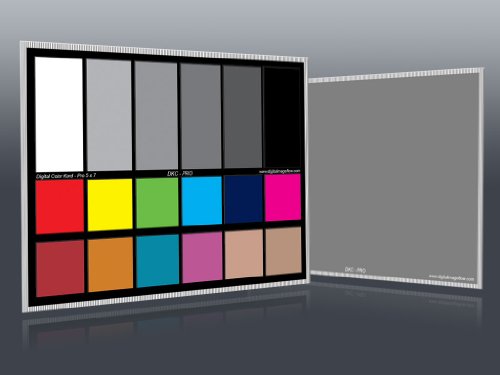
- Two 5 x 7-inch calibration cards included
- 12% and 18% gray references for exposure and white balance
- Includes stand and 18 color patches per card
Best For: Studio and tabletop workflows needing two larger reference cards
Versatile Shoot Reference

- 24 calibrated patches with skin tones and grayscale
- Supports white balance and RAW/JPEG correction
- Acrylic 5.7 x 4.1-inch portable design
Best For: Photo and video creators wanting one multipurpose reference card
Video Production Reference
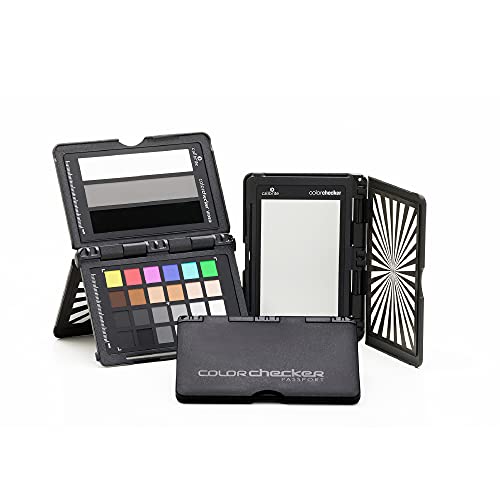
- Video-optimized color, skin-tone, gray, and exposure chips
- Supports custom in-camera white balance
- Includes hard case and lanyard
Best For: Portable video color and exposure referencing
Capture-to-Edit Workflow

- Pairs monitor calibration with camera profiling
- Supports mini LED, OLED, and Apple XDR displays
- Includes PROFILER software and Passport Photo 2
Best For: RAW photographers calibrating capture and editing displays
Budget Portable Reference

- Two 5-by-7-inch cards for photo and video
- Matte coating helps reduce glare
- Includes Adobe correction software access
Best For: Affordable in-bag white-balance and color reference
High-Luminance Pro – Display Pro HL
For creators working with bright LCD, mini-LED, OLED, or HDR-capable displays, this compact color calibration tool offers advanced measurement and control. Its high-luminance sensor measures up to 3000 nits, while PROFILER software supports detailed display adjustments and validation.
Best For: Photographers, designers, and studios needing precise profiling across modern high-brightness displays.
Pros:
- Measures displays up to 3000 nits, including LCD, mini-LED, and OLED panels.
- PROFILER software includes Basic and Advanced modes with custom presets.
- Supports validation, uniformity checks, flare correction, and multiple-monitor workflows.
- Includes USB-C connectivity, USB-A adapter, travel pouch, and a built-in 1/4-inch mount thread.
Cons:
- Advanced features may be more than casual users need.
- Requires compatible Mac or Windows software for operation.
The Display Pro HL is the most capable option here for demanding color workflows. Its brighter-display support and verification tools make it a strong choice when consistency and profiling control matter more than simplicity.
RAW Workflow Reference – SpyderCube
This compact color calibration tool is designed for setting white balance and exposure during RAW processing rather than calibrating a monitor. The SpyderCube uses a three-dimensional reference target with white surfaces, a chrome ball, black face, and black trap to help establish consistent image adjustments.
Best For: Photographers who want a repeatable RAW reference for white balance, contrast, exposure, and black-point adjustments.
Pros:
- Helps set white balance, exposure, contrast, and black point for photo series.
- Three-dimensional design reveals primary and secondary light sources.
- Black trap provides an absolute black reference for evaluating detail.
- Works with workflows involving Photoshop, Lightroom, and Premiere Pro.
Cons:
- It is an image-capture reference tool, not a monitor colorimeter.
- Its benefits depend on photographing and processing the reference image correctly.
The SpyderCube is a practical choice for photographers who need consistent RAW corrections across images shot under the same lighting. Choose it for camera and editing workflow control, not for profiling a screen.
Simple Dual-Screen Choice – Display 123
The Display 123 is one of the most approachable compact color calibration tools for photographers and creators. Its guided Easy 1 2 3 workflow simplifies setup, and it can calibrate up to two displays so a multi-screen workspace is easier to match.
Best For: Beginners and photo editors who want straightforward calibration for one or two monitors.
Pros:
- Guided workflow makes calibration fast and approachable.
- Supports up to two displays for more consistent multi-screen viewing.
- Before-and-after checking makes the calibration effect easy to evaluate.
- Compact body includes an adjustable counterweight for screen placement.
Cons:
- Offers fewer advanced customization features than the Display Pro HL.
- Supports two displays rather than larger multi-monitor workstations.
Display 123 is a sensible pick when ease of use is the priority. It covers the core calibration task without requiring users to navigate extensive settings, while still accommodating a two-monitor editing setup.
Fast Entry-Level Pick – SpyderExpress
SpyderExpress is a compact color calibration tool aimed at creators who want a quick, uncomplicated route to more dependable screen color. The supplied workflow uses three simple steps and is designed to deliver edit-ready color in about 90 seconds, with support for up to three connected displays per workstation.
Best For: Entry-level creators who want fast calibration and the option to add software features later.
Pros:
- Three-step process is designed to produce edit-ready color in about 90 seconds.
- Supports current Liquid Retina XDR displays, including the MacBook M4 mini-LED screen.
- Can calibrate up to three connected displays per workstation.
- Software upgrades can add ambient-light adjustment, multi-display profiling, and DevicePreview.
Cons:
- OLED and advanced mini-LED support requires a software upgrade.
- Some advanced capabilities are optional upgrades rather than included features.
SpyderExpress stands out for speed and upgrade flexibility. It is a good starting point for creators who want basic calibration now and may expand into multi-display or device-preview tools later.
Travel-Ready Reference – Calibrite ColorChecker Classic Mini
The Calibrite ColorChecker Classic Mini is a practical choice among compact color calibration tools for photographers and videographers who need a consistent reference without adding bulk to a camera bag. Its 24 patches support white balance, exposure evaluation, color grading, and profile creation workflows.
Best For: Travel photographers, location crews, and creators working across changing lighting conditions.
Pros:
- Pocket-sized design measures 3.5 x 5 inches and weighs 1.41 ounces.
- Provides 24 color patches for white balance, exposure, and grading reference.
- Supports custom DNG and ICC profiles when paired with Calibrite PROFILER software.
- Helps maintain color continuity across cameras and scenes.
Cons:
- The compact target offers less physical viewing area than larger charts.
- Profile creation requires separate Calibrite PROFILER software.
Choose this model when portability and a recognized 24-patch reference matter most. It is especially useful for fast-paced production days where a repeatable color reference can reduce corrective edits.
Dual-Chart Control – DKC-Pro White Balance Chart Set
This two-card DKC-Pro set gives photographers a larger reference format than many compact color calibration tools while remaining easy to position with its included stand. Each 5 x 7-inch card combines 12% and 18% gray references with 18 color patches for white balance, exposure, and correction work.
Best For: Studio and tabletop photographers who want two reference cards and an easel-style stand.
Pros:
- Includes two 5 x 7-inch cards for flexible placement or backup.
- Provides both 12% and 18% gray references for white balance and exposure.
- Features 18 n-Chrome-coated color patches designed for color correction.
- Includes a frame stand and user guide for tabletop use.
Cons:
- Its 5 x 7-inch format is less pocket-friendly than mini reference targets.
- The set weighs 2.4 ounces and includes a stand, adding more gear to transport.
This is a practical pick when you need a pair of larger cards and dedicated gray references rather than the smallest possible travel target. The included stand also suits controlled tabletop or studio setups.
Versatile Shoot Reference – 24-Color Correction Card
This 24-color correction card is one of the more versatile compact color calibration tools for photo, video, and print-related workflows. It combines calibrated color, skin-tone and natural-tone references, grayscale patches, and a durable acrylic body in a 5.7 x 4.1-inch format.
Best For: Photographers and filmmakers who want one portable card for white balance, RAW or JPEG correction, and on-set reference.
Pros:
- Includes 24 scientifically calibrated patches covering color, natural tones, skin tones, and grayscale.
- Supports custom white balance under tungsten, fluorescent, and daylight sources.
- Can be used for camera correction, filming reference, and print proofing.
- Durable acrylic construction is sized for camera-bag transport.
Cons:
- The supplied notes do not identify included software or a dedicated stand.
- At 5.7 x 4.1 inches and 4.7 ounces, it is less lightweight than the smallest mini charts.
Consider this card if you want a single, broadly useful reference for both capture and post-production. Its patch variety and grayscale area make it suitable for establishing a benchmark in the first frame of a shoot.
Video Production Reference – Video Color Target
For filmmakers seeking compact color calibration tools, this target provides practical references for white balance, exposure, and color alignment during capture or post-production. Its video-oriented layout is designed for use with a vectorscope, waveform, or RGB parade.
Best For: Video creators who need portable camera white-balance, skin-tone, gray-balance, and exposure references.
Pros:
- Includes chromatic color, skin-tone, gray-balance, highlight, and shadow chips.
- Supports custom in-camera white balance for a consistent neutral point.
- Provides white highlight, 40 IRE midtone gray, and high-gloss black exposure references.
- Includes a hard-shell case and lanyard for transport and quick access.
Cons:
- Its layout is specifically optimized for video production rather than a general photo workflow.
- It requires a camera or editing setup with compatible video scopes to use its full reference system.
This is a focused, portable choice for video shooters who want dedicated color and exposure targets in a compact format. The included case and lanyard also make it convenient for location work.
Capture-to-Edit Workflow – Photo Calibration Kit
This kit combines two compact color calibration tools for photographers: a monitor colorimeter and a camera reference target. It is designed to connect RAW capture, custom camera profiling, white balance, and display calibration in one workflow.
Best For: Photographers who want a coordinated camera-and-monitor calibration setup for RAW editing.
Pros:
- Combines Display Pro HL monitor calibration with ColorChecker Passport Photo 2.
- Supports modern mini LED, OLED, and Apple XDR displays.
- Enables custom camera profiles for RAW workflows and consistent white-balance references.
- Includes Calibrite PROFILER software with presets and adjustable white-point and gamma targets.
Cons:
- It is a more involved kit than a standalone gray or color card.
- The supplied product details do not specify the exact calibration time or supported operating systems.
For photographers managing both capture and editing, this kit offers the broadest workflow coverage of the three options. It is especially useful when display consistency matters as much as camera color accuracy.
Budget Portable Reference – Camera Color Correction Cards
These two 5-by-7-inch cards are straightforward compact color calibration tools for setting white balance, checking exposure, and correcting color in photo or video workflows. Their portable size and two-card package make them easy to keep in an equipment bag.
Best For: Budget-conscious photographers and video creators who need simple, portable color and gray references.
Pros:
- Two-card set provides a practical backup or second shooting position.
- SmartFlex synthetic paper and a matte coating help avoid glare.
- Includes spectrally formulated pigment patches and free Adobe correction software.
- Offers instructions and a download link for the Adobe DNG Profile Editor.
Cons:
- It does not include a hard case, lanyard, or monitor calibration device in the supplied details.
- Its paper-based construction may be less protective than a rigid target with a dedicated case.
This set is a sensible low-cost starting point for basic color and exposure consistency. Choose it when portability and price matter more than an integrated camera-and-display calibration workflow.
How We Picked These Compact Color Calibration Tools
We selected tools that address the main sources of color inconsistency: inaccurate displays, changing lighting, incorrect white balance, and unreliable color references. The list includes both hardware colorimeters for monitor calibration and portable targets for setting exposure, white balance, and color during photography or video production.
We also considered portability, workflow simplicity, target format, software compatibility, display technology support, and whether each tool suits casual creators or demanding professional work. A compact tool is most useful when it is easy to carry, quick to use, and appropriate for the stage of the workflow where color problems occur.
Quick Comparison
| Tool type | Best for | Main advantage |
|---|---|---|
| Monitor colorimeter | Photo and video editing | Creates a more reliable display profile |
| Gray or white-balance card | Camera setup and RAW workflows | Fast exposure and white-balance reference |
| Color reference chart | Photo and video color matching | Provides multiple known color patches |
| Calibration kit | End-to-end workflows | Combines capture and monitor tools |
Key Buying Factors for Compact Color Calibration Tools
Monitor Compatibility
If your main concern is editing accuracy, choose a colorimeter that supports your display type and brightness level. LCD, mini-LED, OLED, and high-brightness screens can require different measurement capabilities. Confirm compatibility with your operating system and the included profiling software before buying.
Reference Target Size and Purpose
Gray cards are useful for exposure and neutral white balance, while multi-patch charts support more detailed color correction and camera profiling. Smaller charts travel easily, but larger targets may be easier to frame consistently in studio or video setups.
Workflow and Software
Look for straightforward software if you calibrate occasionally, or more advanced controls if you need repeatable profiles for professional color work. For camera targets, check whether your editing software supports the target’s profiling or correction workflow.
Build Quality and Portability
A calibration target should remain flat, neutral, and protected from dirt, fading, and harsh light. A folding case, frame, stand, or protective cover can be worthwhile for location work. Keep cards stored safely and replace them if their surfaces become damaged or visibly discolored.
Who Should Buy Which Compact Color Calibration Tools?
For Monitor-Based Editing
Choose a display colorimeter such as the Calibrite Display Pro HL, Calibrite Display 123, or Datacolor SpyderExpress. These are the right category for photographers, designers, and editors who need a consistent screen.
For RAW Photography and Everyday Shooting
A compact gray card or white-balance tool, such as the SpyderCube or a portable gray-card set, provides a quick reference for neutral tones, exposure, and post-processing adjustments.
For Color-Critical Photo and Video Production
Use a multi-color reference target such as a ColorChecker or 24-patch card when matching cameras, correcting skin tones, or maintaining consistent color between scenes. Video-focused charts are particularly useful when working with scopes and camera profiles.
For a Complete Capture-To-Edit Setup
A bundled kit combining a monitor colorimeter with a camera color target is the most practical choice for creators who want consistency from shooting through final delivery. It costs more than a single card, but it can eliminate gaps between camera reference and display calibration.