Shared offices make color consistency harder: different monitors, changing lighting, and multiple users can all affect how images and video appear. The right calibration tool helps teams create a dependable visual baseline without relying on guesswork.
This roundup covers monitor colorimeters, camera reference cards, gray targets, and color charts suited to different workflows and budgets. Use the buying guide below to match the tool type, software, and portability to your office.
Best 10 Color Calibration Tools for Shared Offices Picks for 2026
Portable Camera Reference
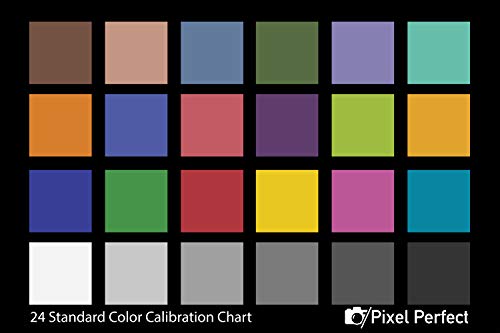
- Set of two compact 4-by-6-inch color and gray reference cards.
- Matte coating helps reduce glare during photo and video capture.
- Includes Adobe correction software access and DNG profile instructions.
Best For: Small media teams needing a portable capture reference
Compact Team Standard
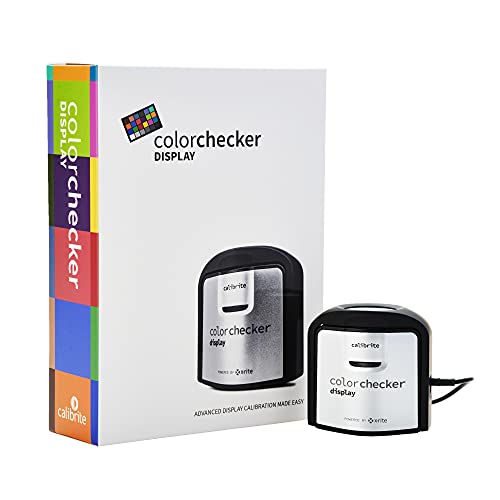
- Calibrates monitors and projectors with portable ccStudio software.
- Rotatable diffuser supports ambient-light measurement and tabletop projector profiling.
- Integrated tripod mount helps with projector calibration in larger venues.
Best For: Offices calibrating both screens and projectors
Multi-Display Workflow

- Supports displays up to 12,000 nits, including OLED, QD-OLED, Mini LED, and XDR.
- StudioMatch, SpyderTune, and CheckCal support multi-screen consistency.
- Adds projector calibration, display analysis, uniformity checks, and 3D LUT export.
Best For: Professional creative offices managing multiple advanced displays
Professional Reference Cards
DKC-Pro 5" x 7" Calibration Charts
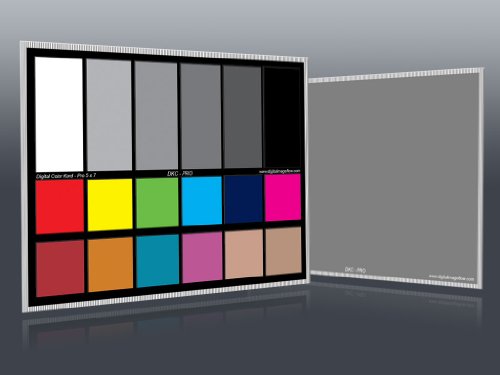
- 12% and 18% gray references with 18 color patches
- n-Chrome-coated targets for color correction
- Includes two cards, stand, and user guide
Best For: Shared photo and video workstations needing professional physical references
Dual-Monitor Workflow
Calibrite Display 123 Colorimeter

- Guided Easy 1 2 3 calibration workflow
- Supports up to two displays
- USB-C connection with before-and-after check
Best For: Shared dual-monitor editing and creative workstations
Portable Production Reference
DKK 5" x 7" Calibration Charts

- Two compact charts with 12% and 18% gray
- Colorbar and grayscale combination
- Includes stand and user guide
Best For: Shared video teams needing a portable physical reference
Compact Reference
Monitor and Camera Accuracy Card

- Designed for monitor and camera accuracy
- Compact package for shared storage
- Lightweight at 0.864 ounces
Best For: Portable visual color reference use in shared workspaces
Professional 24-Color Tool
Portable Color Correction Card

- 24 calibrated patches with skin tones and grayscale
- Supports white balance and RAW/JPEG correction
- Portable acrylic card for studio or field use
Best For: Shared photo and video workspaces needing repeatable color references
Video Workflow Pair

- Two charts for shared video setups
- 16:9 format for video calibration
- Lightweight, portable 14 x 7.88-inch design
Best For: Collaborative video-production offices and editing workflows
High-Luminance Precision – Display Pro HL
For shared offices supporting photography, design, or HDR workflows, the Calibrite Display Pro HL is a versatile choice among color calibration tools for shared offices. Its high-luminance sensor supports LCD, mini-LED, OLED, Apple XDR displays, and compatible projectors, while the included software helps teams create repeatable profiles.
Best For: Creative teams matching multiple bright or HDR-capable displays across workstations.
Pros:
- Measures displays up to 3000 nits, including modern LCD, mini-LED, and OLED panels.
- PROFILER software offers Basic and Advanced modes with adjustable white point, luminance, contrast ratio, and gamma.
- Supports multi-monitor profiling, preset sharing, validation, uniformity checks, and flare correction.
- Includes USB-C connectivity, a USB-A adapter, storage pouch, and a built-in 1/4-inch mount thread.
Cons:
- Its advanced controls may be more than a basic office display setup requires.
- Calibration depends on compatible Mac or Windows software and displays.
Choose this model when a shared office needs detailed control over different display technologies and wants verification tools rather than a one-time basic adjustment.
Portable Camera Reference – Pixel Perfect Color Card
The Pixel Perfect Camera Colour Correction Card is a simple, low-cost reference option among color calibration tools for shared offices. Rather than calibrating monitors directly, it helps photo and video teams establish consistent white balance, exposure, and color references during capture.
Best For: Small media teams that need a portable camera color and gray reference for shoots.
Pros:
- Set of two cards provides a spare or allows reference cards at separate workstations.
- Compact 4-by-6-inch format fits easily in an equipment bag.
- Matte SmartFlex synthetic paper is designed to reduce glare.
- Includes access to Adobe correction software and instructions for creating a DNG profile.
Cons:
- It is a camera reference card, not a direct monitor colorimeter.
- Printed targets may be less comprehensive than a dedicated display calibration device for office-wide screen matching.
This is best treated as an affordable capture-stage companion for teams that need repeatable camera color, not as a replacement for calibrating shared office monitors.
Compact Team Standard – ColorChecker Display
The Calibrite ColorChecker Display is a compact monitor and projector colorimeter suited to shared offices with mixed presentation and creative needs. Its portable design, USB connection, and intuitive ccStudio software make it practical for teams that periodically match several displays or profile a projector.
Best For: Offices needing straightforward monitor and projector calibration in a portable package.
Pros:
- Supports monitor calibration and projector calibration.
- Optical design is intended to provide repeatable results across display types.
- Rotatable diffuser arm supports tabletop projector profiling, ambient-light measurement, and optic protection.
- Integrated tripod mount is useful for projector profiling in larger venues.
Cons:
- The supplied notes do not specify the software’s advanced adjustment controls or display brightness range.
- USB connectivity may require an adapter for computers without a compatible port.
For a shared office that values portability and projector support without needing the more specialized high-luminance features of newer models, this is a practical team calibration tool.
Multi-Display Workflow – SpyderPro
The SpyderPro is designed for demanding shared-office environments where multiple displays, varied backlights, and ongoing verification matter. It supports modern OLED, QD-OLED, Mini LED, and Apple Liquid Retina XDR screens, with StudioMatch and SpyderTune helping teams keep multi-monitor setups consistent.
Best For: Professional creative offices managing many displays, advanced video standards, and recurring calibration checks.
Pros:
- Supports unlimited displays per computer capability and brightness levels up to 12,000 nits.
- Offers Standard Calibration in 90 seconds plus a deeper grayscale calibration mode.
- Includes projector calibration, display analysis, uniformity checks, and CheckCal verification.
- Supports 3D LUT exports for compatible video monitors and includes USB-C with a USB-A adapter.
Cons:
- The extensive professional feature set may be excessive for basic office monitors.
- Some advanced functions, such as 3D LUT export, depend on compatible video monitors and workflows.
- Ambient-light adaptation may require the separately referenced Datacolor LightColor Meter.
This is the strongest fit for a creative shared office that needs broad display compatibility, multi-screen matching, video-oriented controls, and tools to confirm calibration remains accurate over time.
Professional Reference Cards – DKC-Pro 5" x 7" Calibration Charts
For shared offices that need repeatable camera and lighting results, these DKC-Pro charts provide physical color and gray references for setting white balance, exposure, and post-production corrections. Their compact tabletop format makes them practical to keep near a shared shooting or editing station.
Best For: Teams needing professional physical references for photography, video, and Adobe Photoshop or Lightroom workflows.
Pros:
- Includes precision 12% and 18% gray references plus 18 color patches.
- n-Chrome-coated targets are designed for increased saturation, luminance, and accuracy.
- Two cards, a metal frame stand, and a user guide are included.
Cons:
- Physical charts require a camera-based workflow rather than direct monitor calibration.
- The 5 x 7-inch format may provide less target area than larger studio charts.
This is the most feature-rich physical reference option in the group, particularly for shared offices where multiple users need a consistent in-camera starting point and post-production reference.
Dual-Monitor Workflow – Calibrite Display 123 Colorimeter
Among color calibration tools for shared offices, the Calibrite Display 123 is the direct choice for matching the screens people use to edit and review work. Its guided software workflow and support for two displays suit shared desks with dual-monitor setups.
Best For: Shared creative workstations where users need more consistent color and brightness across up to two monitors.
Pros:
- Easy 1 2 3 software workflow helps simplify monitor calibration.
- Supports calibration of up to two displays for a matched multi-screen workspace.
- Includes USB-C connectivity, brightness targets, and a before-and-after comparison.
Cons:
- It calibrates displays rather than providing a physical camera white-balance chart.
- The supplied notes do not specify compatibility beyond the listed workflow and USB-C connection.
This is the strongest fit when the office problem is inconsistent monitor appearance, especially for photo editing, video work, or other tasks performed across two screens.
Portable Production Reference – DKK 5" x 7" Calibration Charts
These DKK charts are a straightforward option for shared offices that move between desk-based video work and occasional shoots. The pair combines color bars and grayscale references in a portable 5 x 7-inch format for white-balance, exposure, and color consistency checks.
Best For: Video teams wanting a compact, reusable physical reference that can travel between cameras, shoots, and editing stations.
Pros:
- Provides two 5 x 7-inch charts with 12% and 18% gray references.
- Combines colorbar and grayscale targets for color balance and exposure checks.
- Includes a frame stand and user guide for convenient setup.
Cons:
- Physical charts do not directly calibrate office monitors.
- The supplied notes do not list advanced coating details or specialized color patches.
Choose this set when portability and simple camera or video calibration matter more than advanced target construction or direct display measurement.
Compact Reference – Monitor and Camera Accuracy Card
This compact reference card is a straightforward option for shared offices that need color calibration tools for shared offices without adding bulky equipment. Its listed purpose covers monitor and camera accuracy, while the lightweight design makes it easy to keep near a workstation or carry between rooms.
Best For: Shared workspaces that need a portable visual color reference for monitors and cameras.
Pros:
- Designed for monitor and camera color accuracy.
- Compact package measuring 12.6 x 2.76 x 1.18 inches.
- Lightweight at 0.864 ounces for easy storage or transport.
Cons:
- The supplied notes provide limited information about its calibration pattern or workflow.
- Battery requirements are listed as unknown.
Choose this card when portability and a simple reference aid matter more than documented advanced features. Because the supplied specifications are brief, teams may want to confirm the chart layout and intended calibration process before purchasing several for an office.
Professional 24-Color Tool – Portable Color Correction Card
For teams comparing camera output across shared rooms, this 24-color card is one of the more feature-rich color calibration tools for shared offices. It combines scientifically calibrated color patches, natural and skin tones, grayscale patches, and a portable acrylic format for photo and video workflows.
Best For: Shared photography or video workspaces that need white-balance checks, RAW/JPEG correction, and a repeatable first-frame reference.
Pros:
- Includes 24 scientifically calibrated color patches covering natural tones, skin colors, and grayscale.
- Gray patches support custom white-balance setup under tungsten, fluorescent, or daylight lighting.
- Supports camera, RAW/JPEG, and print-proofing workflows.
- Portable 5.7 x 4.1-inch acrylic construction suits studio and on-location use.
Cons:
- At 4.7 ounces, it is heavier than a minimal reference card.
- The supplied notes do not specify a protective case or mounting system.
This is a strong fit when multiple users need a shared, objective color benchmark rather than a basic visual chart. Its patch variety and neutral references can help standardize capture and correction, especially when the office works under changing lighting conditions.
Video Workflow Pair – Digital Kolor Pro 16:9 Chart
DGK Color Tools Digital Kolor Pro 16:9 Large Color Calibration and Video Chip Chart, 2-Pack
Check Price On AmazonVideo teams sharing cameras, editing stations, or shooting spaces may value this two-pack of large 16:9 charts among color calibration tools for shared offices. The charts are built for consistent video color work, with a portable 14 x 7.88-inch format and compatibility with various cameras and editing software.
Best For: Shared video-production offices that want two durable, portable charts for camera and editing workflows.
Pros:
- Two-pack supports use across multiple rooms, users, or setups.
- 16:9 chart format is suited to video production and image-quality adjustments.
- Listed as compatible with various cameras and editing software.
- Lightweight 2.08-ounce design is practical for on-location transport.
Cons:
- The supplied notes do not list the number or types of color chips.
- Battery requirements are listed as nonstandard batteries required.
- The larger chart footprint may need more storage space than a small card.
This pair makes the most sense when a shared office needs duplicate references for collaborative video work or separate shooting areas. Its durability and 16:9 layout are useful on paper, though buyers seeking detailed patch specifications should verify them before ordering.
How We Picked the Best Color Calibration Tools for Shared Offices
We grouped these tools by their primary job: calibrating displays, setting camera white balance and exposure, or checking color during photo and video production. For shared offices, we prioritized repeatable results, straightforward setup, compatibility with common display types, portability, and ease of handing the tool between users.
Monitor colorimeters are the strongest choice when several people need consistent screens. Reference cards and charts are better for camera teams that need dependable white balance, exposure, and color correction on location or in a studio.
Quick Comparison
| Tool type | Best for | Main advantage | Watch for |
|---|---|---|---|
| Monitor colorimeter | Design, editing, and review stations | Creates a repeatable display profile | Requires software and supported connections |
| Gray card | Exposure and white balance | Fast, simple camera reference | Does not calibrate a monitor |
| Color chart | Photo and video color correction | Supports matching across cameras and scenes | Needs a consistent capture workflow |
| Large video chart | Video crews and wider shots | Easy to frame and read on set | Less convenient for small desks |
Key Buying Factors for Color Calibration Tools for Shared Offices
Choose the Correct Calibration Type
Buy a display colorimeter if the problem is inconsistent monitors. Choose a gray card or color chart if the problem is inconsistent camera capture. A chart cannot profile a screen, and a monitor calibrator cannot replace an on-set white-balance reference.
Check Display and Software Compatibility
Before purchasing, confirm operating-system support, USB requirements, and whether the software supports LCD, Mini LED, OLED, HDR, or high-brightness displays. USB-C connectivity can simplify use on newer laptops, while older workstations may need an adapter.
Consider Shared-Use Durability
Office equipment should be easy to store, transport, and identify. Protective cases, a stand, a rigid frame, and clear instructions are useful when multiple people borrow the same tool. Keep charts away from direct sunlight and replace visibly faded or damaged targets.
Plan a Repeatable Schedule
Calibration is most useful when everyone follows the same process. Set a schedule, use consistent viewing conditions, label calibrated workstations, and save profiles by user or monitor. Recheck after major display changes or when color-critical work begins.
Who Should Buy Which Color Calibration Tools for Shared Offices?
Choose a monitor colorimeter for shared design, retouching, editing, or proofing stations where screen consistency matters most. A higher-end model is worthwhile for HDR or very bright modern displays.
Choose a compact gray card for photographers and videographers who need quick exposure and white-balance references. Choose a multi-patch color chart when the team needs more precise camera matching and post-production correction.
Choose a large chart or two-pack for production teams, frequent shoots, or offices where more than one camera position needs a reference. If your team does both display and camera work, pair a monitor colorimeter with a durable chart rather than expecting one product to handle both tasks.