The best USB document cameras make it easier to share books, worksheets, lab work, handwriting, and physical demonstrations on a computer screen. The right model can improve classroom instruction, remote tutoring, presentations, and video meetings without requiring a complicated setup.
This roundup compares 10 options ranging from compact handheld cameras to higher-resolution models with built-in lighting, microphones, autofocus, and larger A3 capture areas. Use the guide below to match features and connectivity with the way you plan to teach, present, or record.
Best 10 USB Document Cameras Picks for 2026
Best Overall
IPEVO V4K 8MP USB Document Camera

- 8MP Ultra HD capture
- Fast autofocus and up to 30 fps at Full HD
- Mac, Windows, and Chromebook compatible
Best For: Teachers and presenters seeking a versatile high-resolution USB camera
Best for Large Documents
INSWAN INS-2 4K Document Camera

- 13MP 4K capture at 30 fps
- Supports documents up to A3 size
- Includes lighting, autofocus, mic, and Documate software
Best For: Educators and artists presenting large-format materials
Best Dual-Mode Pick
IPEVO VZ-R HDMI/USB Document Camera
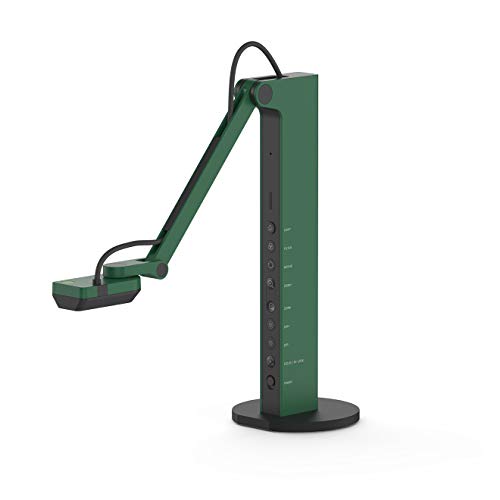
- Connects by HDMI or USB
- 8MP camera with fast focus and LED light
- Can also function as a webcam
Best For: Presenters needing direct projector output and computer connectivity
Best for Hands-On Demonstrations

- Handheld design for flexible angles
- 2560 x 1920 capture at up to 30 fps
- Includes LED light, autofocus, mic, and software tools
Best For: Teachers demonstrating objects, artwork, and models
Best for Easy Setup
OKIOCAM S2-4K USB Document Camera

- 8MP capture with 30fps streaming
- Strong low-light performance without extra LEDs
- AI tracking and broad device compatibility
Best For: Teachers and presenters needing detailed, flexible classroom visuals
Best Feature Set
INSWAN INS-1 USB Document Camera

- 8MP imaging with 30fps video
- LED, anti-glare sheet, and brightness controls
- Autofocus, macro capture, and annotation software
Best For: Classrooms and desktops needing flexible lighting and close-up capture
Best Foldable Design

- A3 capture area for larger materials
- Foldable body for convenient storage
- One-push autofocus and built-in microphone
Best For: Presenters needing a portable camera for large documents
Flexible 4K Classroom Pick
THUSTAR 8MP Foldable Document Camera

- 8MP/2448P video at 30fps
- A3 coverage with adjustable LED lighting
- Foldable design and dual microphones
Best For: Teachers and presenters needing broad coverage and flexible positioning
Portable Teaching Value
PAKOTOO 8MP USB Document Camera

- 2448P resolution with autofocus
- A3 coverage and foldable multi-joint body
- USB-C cable with adjustable exposure
Best For: Teachers seeking a compact camera with manual image controls
Easy Plug-and-Play Choice

- 8MP/2448P capture at 30fps
- Plug-and-play USB-C connectivity
- A3 coverage with lights and dual microphones
Best For: Remote educators wanting quick setup and integrated audio
Best Overall – IPEVO V4K 8MP USB Document Camera
For shoppers comparing usb document cameras, the IPEVO V4K is a strong all-around choice for live lessons, demonstrations, and video calls. Its 8MP Sony CMOS sensor captures up to 3264 x 2448 resolution, while autofocus and up to 30 fps at Full HD help keep presentations clear and responsive.
Best For: Teachers, remote instructors, and presenters who want high-resolution USB connectivity across Mac, Windows, and Chromebook.
Pros:
- 8MP sensor supports Ultra HD image capture.
- Fast autofocus helps reduce interruptions when changing materials.
- Works with Mac, Windows, Chromebook, and a range of software.
- Multi-jointed stand can be tightened for frequent daily use.
Cons:
- Requires a compatible computer for USB operation.
- Does not include a zoom function.
- Its listed shooting area is smaller than some large-format models.
The V4K balances image quality, speed, and broad compatibility in a straightforward USB design. It is especially appealing when you need reliable detail and quick focusing rather than HDMI output or oversized document coverage.
Best for Large Documents – INSWAN INS-2 4K Document Camera
Among usb document cameras, the INSWAN INS-2 stands out for large-format teaching and presentation work. Its 13MP Sony sensor records 4K video at 30 fps, and the adjustable arm supports documents and artwork up to A3 size.
Best For: Professional educators, art instructors, and presenters displaying large documents, artwork, two-page spreads, or classroom materials.
Pros:
- 13MP sensor provides 4K Ultra HD capture at 30 fps.
- A3 capture area accommodates large documents and artwork.
- Includes LED lighting, anti-glare sheet, dual autofocus, and macro capability.
- Documate software adds annotation, OCR, recording, scanning, and whiteboard tools.
Cons:
- Its larger design weighs more than compact handheld options.
- Mac, iPad, and Chromebook compatibility depends on the listed operating-system versions.
- USB-A connectivity may require an adapter for some newer devices.
The INS-2 is a specialized pick when coverage and presentation tools matter more than minimal size. Built-in lighting, a microphone, and software features make it well suited to polished classroom or exhibition presentations.
Best Dual-Mode Pick – IPEVO VZ-R HDMI/USB Document Camera
The IPEVO VZ-R is one of the more flexible usb document cameras because it can also connect directly to a TV, monitor, or projector through HDMI. USB mode supports up to 3264 x 2448 capture, while the camera can double as a webcam for conferencing and live demonstrations.
Best For: Classrooms and presenters who need both computer-based USB operation and computer-free HDMI projection.
Pros:
- Dual HDMI and USB connectivity supports flexible setups.
- 8MP Sony CMOS camera provides detailed images and fast focus.
- Built-in LED light helps with dimly lit materials.
- Swiveling head, multi-jointed stand, and tactile controls support varied angles and quick adjustments.
Cons:
- HDMI cable and wall power adapter are not included.
- HDMI mode is limited to 1920 x 1080 resolution.
- It is heavier than the IPEVO V4K.
If you want a document camera that can work with or without a computer, the VZ-R offers a useful advantage over USB-only models. Account for the missing HDMI cable and wall adapter when planning your setup.
Best for Hands-On Demonstrations – INSWAN INS-3 Handheld Camera
The handheld INSWAN INS-3 offers a practical alternative to fixed usb document cameras for demonstrations involving objects, artwork, and models. It captures 2560 x 1920 live video at up to 30 fps, with a flexible design that lets you move around the subject.
Best For: Teachers and presenters who need to show small 2D or 3D objects, hands-on activities, artwork, or architectural models from changing angles.
Pros:
- Handheld design supports flexible, multi-angle demonstrations.
- Captures areas larger than B4 size and records at up to 30 fps.
- LED light, anti-glare sheet, dual autofocus, and brightness controls improve presentation quality.
- Documate software includes annotation, OCR, recording, snapshots, and whiteboard tools.
Cons:
- It offers 2K rather than 4K capture.
- Handheld operation may require more active positioning than a stand-mounted model.
- Compatibility depends on the specified operating-system versions and USB-C availability for iPad.
The INS-3 is a good fit when mobility matters more than a permanently positioned camera. Its built-in lighting, microphone, and software package make it especially useful for interactive instruction and object-focused demonstrations.
Best for Easy Setup – OKIOCAM S2-4K USB Document Camera
The OKIOCAM S2-4K is a strong all-around choice among USB document cameras, combining 8MP Ultra HD capture, 30fps streaming, and a large near-Ledger viewing area. Its low-light performance, AI pointer tracking, and broad compatibility make it particularly practical for hybrid teaching and presentations.
Best For: Teachers, hybrid classrooms, and presenters who need detailed images, flexible software tools, and iPad or interactive-display compatibility.
Pros:
- Captures up to 3264 x 2448 pixels with smooth 30fps streaming.
- Back-illuminated sensor provides clear images in low light without supplemental LEDs.
- Includes AI pointer tracking, annotation, recording, digital zoom, and picture-in-picture tools.
- Works with Windows, Mac, Chromebook, iPadOS, and compatible interactive displays.
Cons:
- Some iPad use requires iPadOS 17 or later and the appropriate USB-C connection.
- Its feature-rich setup may be more than casual users need.
Choose this model if image detail, low-light clarity, and presentation software matter more than having the simplest possible document camera. The reinforced multi-joint arm and weighted base also suit regular classroom use.
Best Feature Set – INSWAN INS-1 USB Document Camera
The INSWAN INS-1 offers a practical mix of high-resolution imaging and presentation controls in a compact design. This USB document camera includes an LED, anti-glare sheet, adjustable brightness, autofocus, and bundled software for teaching, demonstrations, and video calls.
Best For: Educators and home-office users who want useful lighting controls, close-up capability, and plug-and-play conferencing on a desktop.
Pros:
- 8MP Sony camera captures up to 3264 x 2448 pixels at 30fps.
- Built-in LED, anti-glare sheet, and seven brightness settings help with difficult lighting.
- Autofocus and macro capability support objects as close as 3.9 inches.
- INSWAN Documate software provides annotation, recording, snapshots, rotation, and digital zoom.
Cons:
- Uses a USB-A cable, so some USB-C-only devices may require an adapter.
- Listed iPad compatibility requires iPadOS 17 or higher and a USB-C port.
The INS-1 is a versatile option when you want more than basic image capture but do not need the S2-4K’s higher-end AI tracking. Its compact multi-joint design and broad computer compatibility make it easy to add to an existing workstation.
Best Foldable Design – ELMO OX-1 USB Document Camera
The ELMO OX-1 is a straightforward visual presenter for users who value a foldable form factor and a generous A3 capture area. It records Full HD through USB, includes one-push autofocus and an integrated microphone, and folds down for easier storage between lessons or presentations.
Best For: Classrooms, offices, and presenters who need a portable document camera with a large capture area and simple autofocus operation.
Pros:
- Captures 1080p Full HD at up to 15fps and 720p at up to 30fps.
- Supports an A3 capture area for larger documents and visual materials.
- Foldable design reduces its height substantially for storage and transport.
- Includes one-push autofocus, 8x software digital zoom, and a built-in microphone.
Cons:
- 1080p recording is limited to 15fps rather than 30fps.
- Its listed compatibility is focused on personal computers.
- Digital zoom is software-based rather than optical.
The OX-1 makes sense for buyers who prioritize storage convenience and broad document coverage over maximum frame rate. Its foldable body and A3 capture area are especially useful for shared classrooms or mobile presentation setups.
Flexible 4K Classroom Pick – THUSTAR 8MP Foldable Document Camera
The THUSTAR is a versatile option among USB document cameras, combining 8MP imaging, 30fps video, adjustable lighting, and a foldable design. Its A3-size coverage and dual microphones make it suitable for showing documents, objects, and live demonstrations during online lessons or meetings.
Best For: Teachers and presenters who want a foldable camera with broad A3 coverage, built-in lighting, and microphone support.
Pros:
- 8MP/2448P output with 30fps live transmission.
- Manual image reversal, brightness adjustment, and one-press autofocus.
- Foldable, multi-joint design supports 2D and 3D object demonstrations.
- Compatible with Windows, macOS, Chrome OS, Zoom, Teams, Meet, and OBS.
Cons:
- Uses a USB 2.0 interface.
- Does not include a dedicated HDMI connection.
With its generous A3 capture area, three-level LED lighting, and dual noise-reducing microphones, this model is a practical all-in-one choice for remote teaching and live demonstrations. The foldable build also helps with storage and portability.
Portable Teaching Value – PAKOTOO 8MP USB Document Camera
The PAKOTOO is a compact choice for shoppers comparing USB document cameras for classroom and distance-learning use. It offers 2448P resolution, autofocus, A3 coverage, adjustable exposure, and a foldable multi-joint body for showing both flat documents and three-dimensional objects.
Best For: Teachers who want a portable A3-size camera with manual image controls and USB-C connectivity.
Pros:
- 2448P high-definition capture with one-press autofocus.
- Three brightness levels and 10 exposure adjustments help refine image clarity.
- Foldable design supports multi-angle positioning and easier storage.
- Includes a USB-C cable and works with Windows, Macs, and Chromebooks.
Cons:
- Not plug and play; the computer’s USB Camera option must be selected.
- Does not support zoom or HDMI, and is not compatible with iPad.
- Its stated warranty is one year.
This model stands out for its straightforward physical controls and compact foldable format. Buyers should plan for a brief setup step and confirm that their computer and software recognize the camera before teaching or presenting.
Easy Plug-and-Play Choice – Kitchbai 4K USB Visualiser
The Kitchbai combines an 8MP sensor, 2448P video, and plug-and-play USB-C connectivity in a foldable visualiser. As one of the USB document cameras designed for live teaching and web conferencing, it covers A3 material and adds adjustable lighting, image inversion, autofocus, and dual microphones.
Best For: Remote educators and presenters who prioritize quick setup, A3 coverage, and integrated audio.
Pros:
- Plug-and-play USB-C connection for supported Windows, Mac, and Chromebook systems.
- 8MP/2448P output with 30fps live transmission.
- Three-level LED lighting, brightness controls, and manual image reversal.
- Foldable multi-joint construction captures documents and 3D objects.
Cons:
- The supplied resolution details describe 2448P rather than a specific 4K output mode.
- Uses USB connectivity rather than HDMI.
The Kitchbai is a well-rounded option when convenience matters: its USB-C connection, built-in microphones, and physical image controls reduce the need for extra accessories or software setup. Its foldable structure also makes it easier to carry between teaching spaces.
How We Picked These USB Document Cameras
We focused on models designed for practical classroom, presentation, and video-conferencing use. The comparison considers resolution, capture size, focus performance, lighting, microphone features, portability, connection options, and compatibility with common computers and conferencing software. We also included a mix of established visual-presenter brands and feature-rich value options so different buyers can find a suitable fit.
Resolution claims are only one part of image quality. A stable arm, even lighting, responsive autofocus, and software compatibility can matter more than moving from one nominal resolution to another. Product specifications and included features can vary by seller or revision, so confirm current details before purchasing.
Quick Comparison
| Best for | Features to prioritize |
|---|---|
| Everyday classroom teaching | Fast autofocus, built-in light, USB plug-and-play setup |
| Detailed worksheets and objects | 8MP or 4K capture, A3 coverage, adjustable positioning |
| Remote lessons and meetings | Built-in microphone, reliable webcam compatibility, image controls |
| Large displays and hybrid classrooms | HDMI output, USB support, flexible dual-mode connectivity |
| Travel and shared workspaces | Foldable design, low weight, durable adjustable arm |
Key Buying Factors for USB Document Cameras
Resolution and Real-World Detail
Choose at least 8MP if you regularly show small print, diagrams, or detailed student work. A 4K-capable model can preserve additional detail, but results also depend on lighting, camera distance, software support, and your display.
Capture Area and Positioning
Check whether the camera covers A4, letter, ledger, or A3-size material. A larger capture area is useful for textbooks, posters, maps, and demonstrations. Adjustable arms and multi-angle heads make it easier to show three-dimensional objects or write from different positions.
Focus, Lighting, and Audio
Autofocus saves time when switching between pages and objects, while manual focus can help during fixed demonstrations. Built-in LED lighting is useful in dim rooms, but adjustable brightness is preferable for glossy pages. A built-in microphone can simplify remote teaching, although a dedicated headset or room microphone may sound better.
Connections and Compatibility
USB connectivity should work with the computer, operating system, and meeting software you use. HDMI is valuable when connecting directly to a projector or display. Look for stated compatibility with Windows, macOS, Chromebooks, and common applications such as Zoom, Teams, Google Meet, or classroom capture software.
Who Should Buy Which USB Document Cameras?
Teachers who want the simplest setup should choose a plug-and-play USB model with autofocus, a built-in light, and a stable folding arm. Buyers showing large pages or classroom materials should prioritize A3 coverage and flexible positioning. For hybrid classrooms or presentations using a projector, a dual HDMI/USB model offers more connection flexibility. Remote tutors and presenters may prefer a model with an integrated microphone, while frequent travelers should favor a compact handheld design. If image detail is the priority, select a high-resolution camera from a reputable brand and verify that your computer and software can use its full output.