Finding affordable Christmas gift ideas for gamers is easier when you focus on the setup they use every day. These picks cover comfort, controls, audio, connectivity, and desk organization.
16 Gifts for a Gamer’s Setup
1. COMHOMA Big and Tall Gaming Chair
A Roomier Seat for Long Sessions
COMHOMA Big and Tall Gaming Chair

- Wide seat and backrest with thick padding for a more spacious setup.
- Height-adjustable armrests and a reclining back let the sitter adjust their position.
- Integrated footrest and built-in lumbar pocket springs add support features.
Best For: Someone who spends long sessions gaming at a computer.
2. Z-Edge 27-Inch Curved QHD Gaming Monitor
A Bigger, Smoother PC Display
Z-Edge 27-Inch Curved QHD Gaming Monitor

- 27-inch curved screen with 2560 × 1440 QHD resolution.
- Supports up to 165Hz through DisplayPort and up to 144Hz over HDMI.
- Two HDMI inputs and one DisplayPort connect compatible devices.
Best For: A PC gamer looking to upgrade to a larger, high-refresh display.
3. Acer Wireless Gaming Headset
Wireless Audio for Multiplayer Nights

- Supports 2.4GHz wireless and Bluetooth, with compatibility listed for PS5, PS4, PC, Switch, and Steam Deck.
- Flip the boom microphone up to mute it during voice chat.
- The listing states up to 70 hours of battery life at 50% volume.
Best For: A multiplayer gamer who wants wireless audio and a quick-mute mic.
4. FIFINE AmpliGame A6T USB Microphone Kit
A Ready-to-Set-Up Streaming Mic
FIFINE AmpliGame A6T USB Microphone Kit

- USB plug-and-play microphone set includes a boom arm, shock mount, and pop filter.
- Top-mounted touch mute and a volume knob offer quick audio adjustments.
- RGB lighting and a foldable boom arm suit a streaming desk.
Best For: A streamer or online gamer improving their desk microphone setup.
5. Redragon K668 Hot-Swap Gaming Keyboard
Customizable Keys for a PC Setup
Redragon K668 Hot-Swap Gaming Keyboard

- Full-size wired keyboard has 108 keys and four extra shortcut keys.
- Hot-swap sockets accept compatible 3-pin or 5-pin switches without soldering.
- Includes RGB lighting modes and two sets of mixed-color keycaps.
Best For: A PC gamer who likes adjusting keyboard switches and appearance.
6. Redragon K585 One-Handed Gaming Keypad
Compact Controls for the Off Hand
Redragon K585 One-Handed Gaming Keypad

- 42-key one-handed layout includes seven onboard macro keys and four profiles.
- Hot-swap socket accepts compatible 3-pin or 5-pin switches.
- Detachable wrist rest and USB pass-through help tailor a compact desk setup.
Best For: A PC gamer who wants a dedicated keypad for custom controls.
7. Redragon M810 PRO Wireless Gaming Mouse
Cable-Free Mouse with Programmable Buttons
Redragon M810 PRO Wireless Gaming Mouse

- 2.4GHz wireless connection uses an included nano receiver.
- Eight programmable buttons and five onboard DPI levels support control customization.
- Rechargeable battery is listed for up to 45 hours in eco mode.
Best For: A right-handed PC player who wants a wireless mouse with remappable buttons.
8. WALI Adjustable Single Monitor Arm
More Room on the Gaming Desk
WALI Adjustable Single Monitor Arm

- Fits compatible monitors with 75 × 75mm or 100 × 100mm VESA mounting patterns.
- Arm extends, tilts, swivels, and rotates for adjustable screen positioning.
- C-clamp and grommet mounting options fit desks within the listed thickness range.
Best For: A gamer with a compatible monitor who wants to free desk space.
9. KANTUTOE RGB Monitor Light Bars
Colorful Lighting Around the Screen
KANTUTOE RGB Monitor Light Bars

- Two USB-powered light bars offer RGB colors and adjustable brightness.
- Change colors and modes with the included remote or phone app.
- Music mode adjusts the light to sound, according to the listing.
Best For: A gamer who enjoys customizable lighting near a monitor or TV.
10. BENFEI 10-in-1 USB-C Hub
Extra Ports for a Laptop Gaming Setup
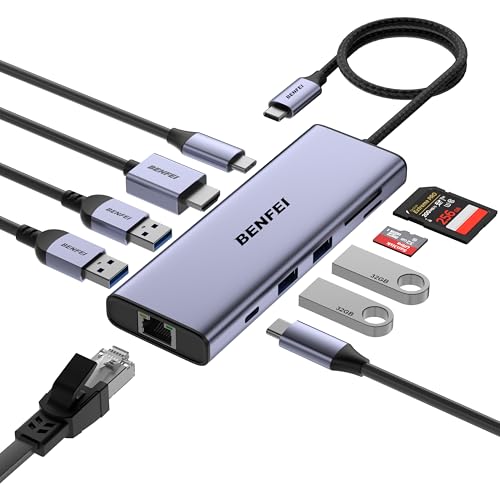
- Includes HDMI, Gigabit Ethernet, four USB-A ports, USB-C data, and SD/TF card readers.
- HDMI supports up to 4K at 60Hz when the host USB-C port supports DisplayPort Alt Mode.
- USB-C pass-through charging is listed at up to 100W input, with up to 85W for the laptop.
Best For: A laptop gamer whose USB-C device needs more connections.
11. Acer Nitro 15.6-Inch Portable Gaming Monitor
12. Samsung T7 Portable SSD 1TB
Extra Space for Games and Files

- Portable 1TB SSD connects over USB and is listed as compatible with PCs, Macs, and gaming consoles.
- Read speeds are listed up to 1,050MB/s.
- Compact aluminum body has shock resistance and fall protection up to six feet, per the listing.
Best For: A console or PC gamer who could use portable extra storage.
13. TP-Link Deco XE75 Wi-Fi 6E Mesh System
Wider Wi-Fi Coverage at Home
TP-Link Deco XE75 Wi-Fi 6E Mesh System

- Two-unit mesh system supports Wi-Fi 6E tri-band networking, including a 6GHz band.
- The listing states coverage up to 5,500 square feet and support for up to 200 devices.
- Setup and network management use the Deco app; a modem is required for most internet providers.
Best For: A gamer whose home has Wi-Fi dead zones or many connected devices.
14. Nuetsa Surge Protector Power Strip
A Practical Power Hub for the Desk
Nuetsa Surge Protector Power Strip

- Eight AC outlets and four USB ports provide connections for multiple devices.
- Six-foot cord and flat plug suit a crowded desk or entertainment area.
- The listing specifies 2,700 joules of surge protection.
Best For: A gamer with several devices and accessories to plug in.
15. Eneloop AA Rechargeable Batteries and Charger
Rechargeable Power for Controllers
Eneloop AA Rechargeable Batteries and Charger

- Pack includes four rechargeable AA batteries and an individual-cell charger.
- Four LED indicators show the charging status of each battery slot.
- Batteries are listed as rechargeable up to 2,100 times.
Best For: A gamer whose controller uses replaceable AA batteries.
16. ICE COOREL Laptop Cooling Pad
A More Adjustable Laptop Desk

- Cooling pad has eight fans and is designed for 15- to 17.3-inch laptops.
- Six height settings let the user adjust the laptop’s angle.
- Two USB ports, a phone stand, fan speed controls, and RGB lighting are included.
Best For: A laptop gamer who wants a raised, adjustable desk setup.
How to Choose a Gift for a Gamer
Start with the recipient’s actual setup and habits. A person who plays at a desktop may appreciate a keyboard, mouse, microphone, monitor, or chair. Someone gaming on a laptop might get more use from a cooling stand, USB-C hub, or portable monitor. Console players may value a headset, storage, rechargeable controller batteries, or an accessory that tidies the entertainment area.
Consider whether the gift solves a recurring nuisance. Do they run out of storage, need more desk space, move a laptop between rooms, or struggle to hear teammates? A useful upgrade does not need to be flashy. Everyday accessories can feel thoughtful when they address something the recipient regularly mentions.
Match the Gift to Your Budget
For an affordable gift, look at accessories that complement existing equipment: rechargeable AA batteries, a power strip, monitor lighting, or a compact keypad. These can improve a gaming space without replacing its central devices. A mouse, keyboard, headset, or microphone can also be a substantial gift, particularly if you know what the player wants to upgrade.
Larger items such as a gaming chair, monitor, mesh Wi-Fi system, or external SSD may suit a shared family gift or a higher budget. Compare the role each product fills rather than assuming the most expensive item will be the most appreciated. A charger may see more use than a major display if the recipient’s current screen already fits their needs.
Check Compatibility Before Buying
Gaming gear depends on the devices around it. Check which console, computer, or operating system the recipient uses before choosing a headset, microphone, keyboard, or mouse. For a monitor, consider the available HDMI or DisplayPort connection and whether the computer can drive the desired resolution and refresh rate. A hub’s video output also depends on the host’s USB-C port supporting DisplayPort Alt Mode.
For desk accessories, measure first. A monitor arm needs a compatible VESA mounting pattern, and the desk must accommodate its clamp or grommet mount. Confirm that a laptop fits a cooling pad’s supported size range. For storage, check the console or computer’s connection and any setup requirements for using an external drive.
Personalization can make a practical gift feel especially considered. Pick a keyboard or lighting setup that suits the recipient’s preferred colors, or choose an accessory that fits how they arrange their desk. If you are unsure about a large or compatibility-sensitive item, ask a family member who knows the setup or give the recipient a say in the final choice.
Think About Timing and Last-Minute Decisions
For a Christmas gift, order early enough to leave time to check the exact model, connection, and physical fit. Shipping estimates and stock can change, so rely on the seller’s current information rather than assuming a delivery date. If time is short, a smaller accessory that clearly matches the recipient’s setup can be simpler to choose than a monitor or chair that needs careful measurements.
A last-minute decision can still be personal: connect the gift to a specific habit, such as playing with friends, gaming while traveling, or keeping a desk organized. Include a short note explaining why you chose it. If compatibility is uncertain, make the choice together after Christmas; the thought behind a useful upgrade matters more than guessing at a technical detail.
A Useful Gift Is One They’ll Reach For
The strongest affordable Christmas gift ideas for gamers fit the person’s equipment, space, and play style. Use the product details to narrow the options, check compatibility where needed, and choose something that makes their regular gaming time more comfortable, organized, or convenient.