The right equalizer can make spoken audio easier to understand by reducing muddiness, controlling harsh frequencies, and helping voices sit cleanly in a mix. For podcasters, the best choice depends on whether you need simple tone shaping, hands-on band control, or an all-in-one recording console.
This roundup compares 10 options across compact podcast production systems, USB-friendly interfaces, and traditional stereo graphic equalizers. Use the guide below to match the hardware to your microphones, workflow, room, and editing experience.
Best 10 Audio Equalizers for Podcasting Picks for 2026
Best All-in-One Mixer
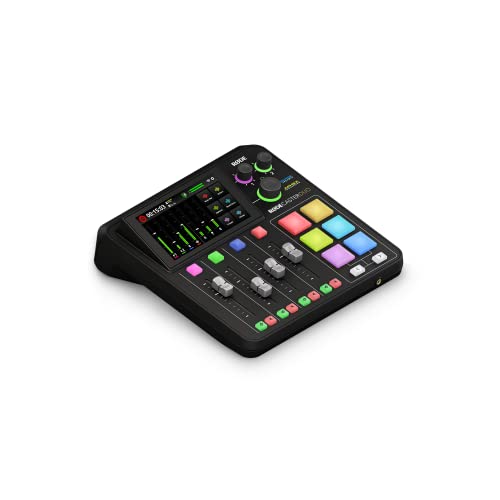
- Two combo inputs with 76dB of gain
- APHEX voice effects and touchscreen control
- Four faders, SMART pads, and USB connectivity
Best For: Creators wanting an integrated podcast and streaming studio
Best for Simple Two-Person Shows

- Two mic inputs and headphone outputs
- Auto Gain and four Enhance presets
- Bluetooth and phone connectivity
Best For: Host-and-guest podcasts with quick setup
Best for Advanced Podcast Production

- Four XLR inputs and APHEX voice processing
- Eight customizable SMART pads
- Standalone and multitrack recording options
Best For: Multi-mic podcasts and live production
Best Dedicated Manual EQ

- Seven frequency bands from 60Hz to 15kHz
- ±12dB adjustment per band
- 3.5mm dual-channel design with headphone support
Best For: Hands-on tone shaping in compact setups
Solo Podcast Starter

- Over 70dB of microphone gain
- Auto Gain and four Enhance presets
- Phone, camera, and stereo loopback connectivity
Best For: Solo podcasters who prioritize simple level setting and flexible recording connections
Analog EQ Control

- Seven adjustable frequency bands
- XLR and RCA input/output options
- Compact design with high stated SNR
Best For: Analog podcast and home-studio setups needing straightforward hardware tone shaping
Advanced Graphic Tuning

- 31-band independent frequency control
- Real-time spectrum analyzer and 12 modes
- Optical, coaxial, and USB connectivity
Best For: Users building detailed, multi-device podcast or studio audio systems
Precision Rack Control
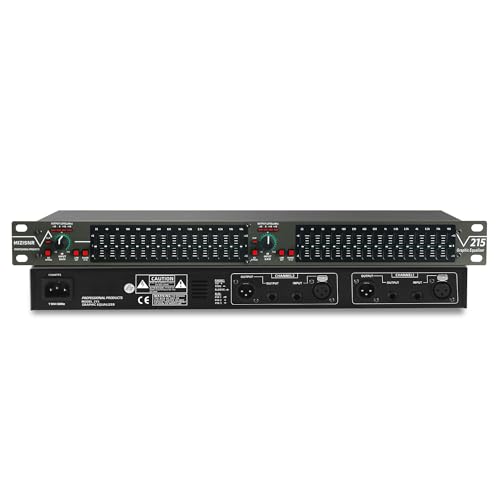
- 15 bands per channel with ±12 dB adjustment
- Low-cut switch for rumble and hum reduction
- XLR and 1/4-inch TRS connectivity
Best For: Rack-based podcasting setups needing hands-on stereo EQ
Visual Digital Tuning
31-Band Equalizer with Spectrum Display

- 31-band control with real-time LED spectrum display
- 10 presets, bypass, and high/mid/bass adjustment
- Bluetooth 5.2, USB playback, and adjustable bass output
Best For: Studios and podcast setups that value visual monitoring and presets
Low-End Flexibility
15-Band EQ with Subwoofer Output

- 15 bands per channel with ±12 dB adjustment
- Adjustable low-cut frequency for targeted cleanup
- Dedicated bass output and XLR/TRS connections
Best For: Podcast and audio systems needing detailed low-frequency routing
Best All-in-One Mixer – RØDECaster Duo
The RØDECaster Duo is a versatile choice for creators seeking audio equalizers for podcasting alongside recording, streaming, and content-production tools. It combines two combo inputs, physical faders, SMART pads, a touchscreen, and APHEX processing in one compact studio.
Best For: Podcasters and streamers who want an integrated production setup with voice processing and hands-on controls.
Pros:
- Two Neutrik combo inputs with up to 76dB of gain.
- Includes APHEX effects such as Aural Exciter and Big Bottom.
- Four faders, six SMART pads, and a touchscreen support live control.
- Offers USB and 3.5mm TRRS connectivity.
Cons:
- Only two microphone or instrument combo inputs are listed.
- Its corded design is less portable than a simple interface.
The RØDECaster Duo suits users who want equalization and broadcast-style processing integrated with a broader podcast production workflow rather than a standalone equalizer.
Best for Simple Two-Person Shows – Focusrite Vocaster Two
The Focusrite Vocaster Two is a straightforward podcasting interface for users comparing audio equalizers for podcasting with quick voice-enhancement features. It provides two microphone inputs, two headphone outputs, Auto Gain, Enhance presets, mute control, and phone connectivity.
Best For: Two-person podcasts that prioritize fast setup, automatic level setting, and simple voice enhancement.
Pros:
- Two mic inputs and separate headphone outputs support host-and-guest recording.
- Auto Gain sets levels with a button press.
- Four Enhance presets are designed for podcast voices.
- Bluetooth and TRRS phone connectivity can capture calls or play device audio.
Cons:
- It has two channels and fewer hands-on controls than larger production studios.
- The supplied notes describe voice presets rather than adjustable EQ bands.
The Vocaster Two is a practical option when ease of use matters more than detailed manual equalization. Its Auto Gain and Enhance controls can shorten setup time for conversational shows.
Best for Advanced Podcast Production – RØDECaster Pro II
The RØDECaster Pro II is built for creators who need audio equalizers for podcasting within a larger standalone production system. It combines four XLR inputs, APHEX voice processing, headphone outputs, SMART pads, multitrack recording, and computer-free operation.
Best For: Multi-microphone podcasts, live streams, and producers who want extensive routing and recording flexibility.
Pros:
- Four studio preamps accommodate multiple microphones.
- APHEX presets provide one-tap voice processing.
- Eight customizable SMART pads can trigger effects and mix-minus calls.
- Records to a computer, microSD card, or USB drive.
Cons:
- Its larger feature set may be more than a basic podcast requires.
- The supplied notes do not specify adjustable EQ-band details.
With four inputs and standalone multitrack recording, the Pro II is the strongest fit here for complex shows. It offers broad production control while keeping voice processing accessible through presets.
Best Dedicated Manual EQ – 7 Band Sound Equalizer
This compact 7 Band Sound Equalizer is the most direct match for shoppers seeking audio equalizers for podcasting. It provides seven adjustable frequency bands, dual-channel operation, a 3.5mm input, microphone-headset support, and a headphone amplifier in an aluminum-alloy enclosure.
Best For: Users who want hands-on tone shaping for a simple recording, streaming, or podcasting setup.
Pros:
- Seven bands cover 60Hz through 15kHz.
- Each band offers a ±12dB adjustment range.
- Supports 3.5mm connections and microphone-equipped headphones.
- Works from a 5V to 12V DC supply.
Cons:
- It requires a separate compatible power source.
- The notes do not indicate USB connectivity or integrated recording features.
- Its two-channel design is less suited to larger multi-mic productions.
Choose this unit when manual frequency adjustment is the priority. It is more focused than the all-in-one studios, but buyers should confirm connector, power, and device compatibility before setup.
Solo Podcast Starter – Vocaster One
For creators comparing audio equalizers for podcasting, the Focusrite Vocaster One is a streamlined USB interface focused on getting a clean microphone signal quickly. Its Auto Gain, voice Enhance presets, and dedicated Mute button simplify recording for solo shows.
Best For: Solo podcasters who want an easy USB recording interface with microphone, phone, camera, and computer-audio connectivity.
Pros:
- Over 70dB of gain supports a wide range of microphones without a booster.
- Auto Gain sets recording levels with a single button press.
- Enhance offers four voice-focused presets, while Mute quickly silences interruptions.
- Stereo loopback and phone connectivity support music, intros, outros, and remote conversations.
Cons:
- It has one microphone channel, so it is primarily suited to solo recording.
- Its listed maximum sample rate is 48 kHz, rather than a higher-resolution recording format.
The Vocaster One is not a traditional multi-band equalizer, but it is a practical front end for podcasting when speed and vocal clarity matter more than detailed manual frequency shaping.
Analog EQ Control – Douk Audio T7
Among audio equalizers for podcasting, the Douk Audio T7 is a compact hardware option for systems that use balanced XLR or RCA connections. Its seven adjustable bands let you shape bass, midrange, and treble while keeping the setup straightforward.
Best For: Podcasters and home-studio users with compatible XLR or RCA equipment who want hands-on, moderate-range tonal adjustment.
Pros:
- Seven bands cover 64Hz through 8kHz for broad tonal shaping.
- Each band offers -6dB to +6dB adjustment.
- Balanced XLR and RCA inputs and outputs support varied stereo systems.
- Reported signal-to-noise ratio exceeds 104dB, with distortion as low as 0.003%.
Cons:
- It does not include a volume control knob.
- It is a line-level component rather than a USB microphone interface.
- Its seven-band layout offers less detailed control than a 31-band equalizer.
The T7 makes sense when your podcast chain already includes suitable analog equipment and you want physical EQ controls. Check connector compatibility and signal routing before buying.
Advanced Graphic Tuning – 31-Band Home Audio Equalizer
For buyers seeking audio equalizers for podcasting with extensive tonal control, this 31-band graphic equalizer provides independent frequency adjustment, real-time monitoring, and customizable modes. It is designed as a broader signal-processing hub for studio, home, live, and entertainment systems.
Best For: Podcasters and audio users who need detailed frequency shaping, preset recall, and broad connectivity across a larger sound system.
Pros:
- Thirty-one bands provide detailed control from bass through treble.
- A built-in spectrum analyzer offers real-time frequency monitoring.
- Twelve customizable modes and auto-save presets simplify repeatable setups.
- Optical, coaxial, and USB connectivity supports multiple source types.
Cons:
- The supplied notes do not specify exact frequency bands, adjustment range, or supported audio formats.
- Its broad home, live, and studio feature set may be more than a simple podcast setup requires.
- Connectivity and integration may require additional compatible equipment beyond a basic USB microphone chain.
This model is the most adjustment-focused option of the three. It suits users who want visual feedback and saved EQ curves, provided its signal connections match the rest of the podcast system.
Precision Rack Control – 15-Band Stereo Equalizer
For creators building a rack-based setup, this 15-band model is a practical choice among audio equalizers for podcasting. Its dual-channel controls let you shape each stereo channel, while the low-cut switch helps reduce wind noise, floor rumble, and electrical hum before recording or playback.
Best For: Podcasters and audio users who want hands-on, rack-mounted stereo EQ with balanced connectivity and straightforward controls.
Pros:
- 15 adjustable bands per channel with a ±12 dB range.
- Low-cut switch targets unwanted low-frequency noise.
- XLR balanced and 1/4-inch TRS unbalanced inputs and outputs.
- 1U rack-mount design with a bypass switch for easier troubleshooting.
Cons:
- Manual graphic controls may require more setup than a preset-based digital unit.
- Does not list built-in Bluetooth or USB playback.
This is a focused, traditional equalizer for users who value direct frequency control and flexible connections. It fits podcasting setups that already use rack equipment and benefit from dedicated low-frequency cleanup.
Visual Digital Tuning – 31-Band Equalizer with Spectrum Display
This digital unit brings visual feedback and saved settings to audio equalizers for podcasting. Its 31-segment LED spectrum indication shows frequency activity in real time, while preset modes, independent high/mid/bass adjustment, and intelligent noise reduction support faster setup across different recording or listening environments.
Best For: Podcasters and studio users who want real-time frequency monitoring, presets, Bluetooth 5.2, and USB playback in a rack-mounted equalizer.
Pros:
- 31-band digital equalizer with real-time LED spectrum indication.
- 10 preset modes plus EQ bypass for quicker changes.
- Built-in Bluetooth 5.2 and USB playback support.
- Includes multiple connection options and an adjustable bass output.
Cons:
- Its broader feature set may be more than a simple voice-only setup requires.
- Requires corded power and rack-space planning.
The visual display makes it easier to observe frequency changes while adjusting sound, and the presets can shorten routine setup time. Choose it when monitoring and connectivity matter as much as manual EQ control.
Low-End Flexibility – 15-Band EQ with Subwoofer Output
Podcast setups that need detailed stereo shaping and dedicated bass management may prefer this model among audio equalizers for podcasting. It provides 15 bands per channel, a low-cut control with adjustable frequency, and a dedicated bass output for tailoring low-end performance around your room and equipment.
Best For: Podcasters, live users, and audio professionals who need adjustable low-frequency control, dual-channel EQ, and rack integration.
Pros:
- 15-band precision control on each channel with a ±12 dB range.
- Adjustable low-cut frequency helps target unwanted low-end noise.
- Dedicated bass output with adjustable frequency.
- XLR and 1/4-inch TRS connections, included cables, and a two-year warranty.
Cons:
- Manual controls may take longer to configure than digital presets.
- The dedicated bass output may be unnecessary for a basic voice-only chain.
Its adjustable low-cut section offers more control over where low-frequency cleanup begins, while the extra bass output supports more elaborate monitoring or playback systems. It is a strong fit for users who want analog-style control with added low-end flexibility.
How We Picked the Best Audio Equalizers for Podcasting
We selected products that can contribute to a practical podcasting setup, either through dedicated equalization controls or integrated recording and production features. The lineup includes compact podcast consoles, microphone interfaces, and multiband graphic equalizers. We considered connection types, channel flexibility, control layout, portability, monitoring options, and suitability for voice-focused recording.
Because these products serve different roles, a larger number of bands does not automatically mean better podcast results. A simple interface with well-placed controls may be more useful than a complex rack unit if you need to record quickly and make consistent adjustments.
Quick Comparison
| Type | Best suited to | Main advantage |
|---|---|---|
| All-in-one production console | Multi-mic podcasts and live shows | Mixing, routing, effects, and recording in one unit |
| Podcast microphone interface | Simple one- or two-mic setups | Easy connections and streamlined voice production |
| 7-band equalizer | Basic tone shaping | Direct control over broad frequency ranges |
| 15- or 31-band graphic EQ | Detailed stereo or installed systems | Fine-grained adjustment and visual control |
Key Buying Factors for Audio Equalizers for Podcasting
Inputs and Microphone Compatibility
Check whether the unit accepts XLR microphones, balanced line-level sources, RCA connections, or 3.5mm inputs. If you use condenser microphones, confirm that the setup provides phantom power. An equalizer designed for home stereo equipment may need a separate microphone preamp or interface.
EQ Control and Voice Clarity
For spoken word, useful adjustments often include reducing low-frequency rumble, trimming muddy low mids, and controlling nasal or harsh upper-mid frequencies. Graphic EQs with more bands offer precision, while compact consoles may provide simpler channel EQ that is faster to learn.
Routing, Monitoring, and Recording
Look for headphone monitoring, independent channel control, USB connectivity, mix-minus support, and convenient outputs if you record remote guests or livestream. Integrated consoles can reduce cable clutter and make live production easier, but they may cost more than a standalone EQ.
Size and Setup Complexity
Rack-mount models suit permanent studios and larger signal chains. Compact interfaces and production consoles are better for small desks, mobile recording, or creators who want fewer separate components. Also consider whether you are comfortable setting gain, routing signals, and preventing feedback.
Who Should Buy Which Audio Equalizers for Podcasting?
- Choose an all-in-one production studio if you host multi-person shows, livestream, trigger sound effects, or want EQ, mixing, routing, and recording together.
- Choose a compact podcast interface if you mainly record one or two microphones and prefer a simpler workflow with fewer controls to manage.
- Choose a 7-band EQ for straightforward tonal correction when your existing mixer or interface already handles microphone preamps and recording.
- Choose a 15-band graphic EQ when you need more detailed adjustment in a home studio, DJ system, or rack-based setup.
- Choose a 31-band EQ for advanced room or system tuning, especially when you need precise control across a stereo signal chain.
Before buying, map the complete signal path from microphone to recording software or speakers. The best Audio Equalizers for Podcasting are the ones that provide the connections and control you will actually use without adding unnecessary complexity.