The best camera slider for beginners makes smooth camera movement easier to learn without adding unnecessary complexity to your setup. This roundup compares compact tabletop rails, carbon-fiber sliders, motorized systems, and versatile motion-control tools.
Whether you shoot with a phone, mirrorless camera, DSLR, or gimbal, the right slider should match your payload, filming space, desired movement, and comfort with manual or app-based controls.
Best 10 Camera Slider for Beginners Picks for 2026
Best Adjustable Track
Zecti 24-Inch Carbon Fiber Slider

- 60 cm manual track for longer camera moves
- Adjustable legs and bubble level for flexible setup
- Supports cameras, phones, and action cameras
Best For: Beginners wanting a versatile manual slider
Best Motorized Option
IFOOTAGE Pico Pro Motorized Slider

- Automates slide and 360-degree pan movements
- App supports up to eight keyframes
- Seven-hour battery runtime and fast charging
Best For: Beginners wanting repeatable automated camera moves
Best Compact Manual Slider
Zecti 16-Inch Carbon Fiber Slider

- Lightweight 40 cm track for travel setups
- Adjustable legs and bubble level aid positioning
- Multiple mounting holes for flexible use
Best For: Beginners needing a portable manual slider
Best Handheld Stabilizer
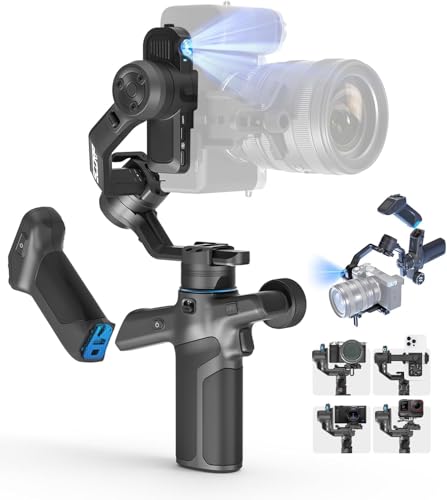
- Three-axis stabilization for handheld movement
- AI tracking and gesture control for self-recording
- Supports devices up to 2 kg with 14-hour battery life
Best For: Beginners prioritizing portable handheld stabilization
Best Integrated Motorized Pick
Konova G1 Wireless Carbon Slider

- Integrated motor simplifies setup
- App and physical-button controls
- Quiet motion with stored A/B points
Best For: Beginners wanting programmable, quiet slider movement
Best Advanced Automation Pick
iFootage Shark Nano II Motorized Slider

- Built-in touchscreen for independent control
- Up to eight programmable motion points
- AI face and object tracking via app
Best For: Creators who want advanced automated shooting features
Best Simple Manual Pick

- Compact tabletop design
- Supports linear and circular motion
- Works with cameras, phones, and camcorders
Best For: Beginners learning manual tabletop camera movement
Best Compact Starter
MovieMaker 2-in-1 Camera Slider

- App-free motorized sliding and panorama modes
- Works with phones, GoPros, and mirrorless cameras
- Compact design with ping-pong motion
Best For: Lightweight mobile and beginner camera setups
Best for Larger Rigs

- 17-inch travel with up to 11 lb horizontal payload
- Touchscreen, app, and eight-keyframe control
- Compatible with DJI RS stabilizers and tracking
Best For: Growing creators with heavier camera or gimbal setups
Best Smart-Controlled Option

- App and touchscreen control with eight keyframes
- AI face and object tracking for solo shooting
- Quiet motor with 7.7 lb payload capacity
Best For: Solo creators seeking automated, repeatable camera moves
Best Adjustable Track – Zecti 24-Inch Carbon Fiber Slider
For beginners choosing a camera slider for beginners setup, the Zecti 24-inch model offers a practical manual rail with adjustable legs, a bubble level, and several mounting options. Its longer 60 cm track provides more room for gradual camera moves while remaining portable enough for travel.
Best For: Beginners who want a versatile manual slider for cameras, phones, and action cameras.
Pros:
- 24-inch carbon fiber track with four precision bearings and a double interior rail system.
- Adjustable legs, non-skid feet, and a bubble level support setup on varied surfaces.
- Multiple 1/4-inch and 3/8-inch mounting holes allow horizontal, vertical, diagonal, and sideways use.
- Compatible with small cameras, smartphones, and action cameras, with a carrying bag included.
Cons:
- Manual movement may become noisy or less smooth if the screws are overtightened.
- Its 4.4-pound maximum load limits use with heavier camera rigs.
- It is not water resistant.
The 24-inch Zecti is a flexible starting point for learning controlled camera moves. Beginners should loosen the adjustment screws slightly if the carriage feels stiff, and stay within the stated weight limit.
Best Motorized Option – IFOOTAGE Pico Pro Motorized Slider
The IFOOTAGE Pico Pro is a strong choice for a camera slider for beginners who want automated movement instead of manually pushing a carriage. Its controls, app support, keyframes, and built-in battery make repeatable cinematic moves easier to plan.
Best For: Beginners creating repeatable slides, time-lapses, and multi-axis moves with compact cameras or phones.
Pros:
- Motorized slide and 360-degree pan functions simplify consistent camera movement.
- On-device controls, smartphone app, and Apple Watch support provide flexible operation.
- App-based shooting can use up to eight keyframes for planned automated moves.
- Built-in 5,000mAh battery provides up to seven hours of runtime, with 30W fast charging.
Cons:
- The 3.3-pound payload is lower than that of larger professional sliders.
- Some advanced four-axis functions require pairing with DJI Osmo Pocket 3 or 4.
- Motorized operation introduces more setup and charging requirements than a manual slider.
For beginners who value consistency, the Pico Pro can reduce the learning curve for repeatable moves. It is particularly practical for travel creators using phones, action cameras, or other lightweight setups.
Best Compact Manual Slider – Zecti 16-Inch Carbon Fiber Slider
For a camera slider for beginners kit that prioritizes portability, the Zecti 16-inch model keeps the core features of a manual rail in a shorter format. It includes adjustable legs, a bubble level, multiple mounting holes, and a carrying bag for straightforward setup on location.
Best For: Beginners who need a compact manual slider for travel, tabletop work, and lightweight camera rigs.
Pros:
- Compact 40 cm carbon fiber track weighs about 600 g and includes a carrying bag.
- Four precision bearings and a double interior rail system support stable movement.
- Adjustable legs, rubber feet, and a bubble level help with uneven surfaces.
- Multiple 1/4-inch and 3/8-inch screw holes support different mounting positions.
Cons:
- The shorter 16-inch track provides less travel than the 24-inch version.
- Manual movement may be noisy or uneven if the adjustment screws are overtightened.
- A phone holder is not included, despite smartphone compatibility.
The 16-inch Zecti is easier to pack than a longer slider and offers a simple way to learn manual tracking shots. Its shorter travel makes it best suited to compact scenes and close-range product or tabletop footage.
Best Handheld Stabilizer – FeiyuTech SCORP Mini 3 Pro
The FeiyuTech SCORP Mini 3 Pro is not a rail slider, but it can suit a camera slider for beginners roundup when the priority is smooth handheld movement. Its three-axis stabilization, AI tracking, quick vertical shooting, and broad device compatibility support moving shots without a separate track.
Best For: Beginners who want stabilized handheld video with smartphones, action cameras, compact cameras, or mirrorless cameras.
Pros:
- Three-axis stabilization supports smooth handheld camera movement.
- AI tracking and gesture control are designed for self-recording and changing scenes.
- Switches between horizontal and vertical shooting without rebalancing.
- Supports devices up to 2 kg and offers up to 14 hours of battery life.
Cons:
- It does not create the linear rail movement of a traditional camera slider.
- Advanced stabilization requires balancing and operating a handheld gimbal.
- It is not water resistant.
Choose the SCORP Mini 3 Pro if portability and handheld flexibility matter more than fixed, repeatable track moves. It is a useful alternative for beginners who shoot across several device types and need stabilization on the move.
Best Integrated Motorized Pick – Konova G1 Wireless Carbon Slider
The Konova G1 is a strong camera slider for beginners who want automated movement without assembling a separate motor system. Its integrated motor, mobile-device control, simple onboard buttons, and stored start-and-end points make it approachable for video, time-lapse, stop-motion, and panoramic work.
Best For: Beginners seeking quiet, programmable motion with support for cameras, phones, and camcorders.
Pros:
- Integrated motor requires no separate hardware setup.
- Bluetooth app control plus three physical operation buttons.
- Stores point A and B settings, even after the motor is powered off.
- Supports up to 5 kg horizontally and operates below 30 dB.
Cons:
- The 100 cm slider weighs 5.5 pounds, so it is not the most compact option.
- Vertical payload is limited to 1 kg.
- Shutter-release cable compatibility may require confirming the camera model.
With smooth carbon-fiber construction, broad shooting modes, and both app and button control, the G1 offers a beginner-friendly path into motorized camera movement. Its size and weight are worth considering if portability is a priority.
Best Advanced Automation Pick – iFootage Shark Nano II Motorized Slider
The iFootage Shark Nano II is a feature-rich camera slider for beginners who expect to grow into more advanced motion control. Its touchscreen, app, multi-point paths, subject tracking, and five shooting modes provide extensive creative control for tracking shots, panoramas, macro work, and time-lapse sequences.
Best For: Creators who want standalone controls and advanced automated movement, including AI-assisted tracking.
Pros:
- Built-in IPS touchscreen enables standalone operation.
- Supports up to eight customizable motion points per path.
- AI face and object tracking is available through the Moco app.
- Quiet brushless motor and stabilization algorithms help support smooth footage.
Cons:
- Its extensive features may be more than a first-time slider user needs.
- Full functionality may involve using the Moco app or compatible DJI equipment.
- The supplied details do not specify a maximum payload.
The Nano II is the most automation-focused option here. The touchscreen makes it usable without an external controller, while app-based paths and tracking offer room to advance beyond basic linear slides.
Best Simple Manual Pick – Holigie FY-01 Tabletop Slider
The Holigie FY-01 is a compact camera slider for beginners who prefer straightforward manual operation over motorized programming. Its small tabletop design, rubber wheels, articulated pulley, and 1/4-inch connection support linear or circular movement with cameras, phones, and small camcorders.
Best For: Beginners who want an inexpensive-feeling, portable tabletop setup for manual tracking and surround shots.
Pros:
- Compact folded size makes it easy to carry and store.
- Switches between linear and circular motion.
- Wear-resistant rubber wheels are designed for stable, accurate gliding.
- Standard 1/4-inch interface supports cameras, phones, and compatible accessories.
Cons:
- It is a manual slider, so it lacks motorized repeatability and automated time-lapse movement.
- Not water resistant.
- The supplied details do not specify a supported camera payload.
The FY-01 keeps the learning curve simple and the footprint small. It is a practical starting point for tabletop product clips and manual movement, but users seeking programmable or remote-controlled motion should choose a motorized model instead.
Best Compact Starter – MovieMaker 2-in-1 Camera Slider
If you want a simple camera slider for beginners, the GripGear MovieMaker keeps setup compact and approachable. Its included motor, slider tracks, panorama base, and phone mount support horizontal slides, panoramic movements, and automatic ping-pong motion without requiring an app.
Best For: Beginners using phones, GoPros, or lightweight mirrorless cameras for time-lapse, B-roll, interviews, and compact travel setups.
Pros:
- Combines a horizontal slider and panorama mount in one kit.
- Works with smartphones, GoPro, Insta360, and mirrorless cameras.
- Supports vertical, horizontal, and upside-down mounting.
- Includes a rechargeable battery rated for up to 2.5 hours.
Cons:
- Its 750 g maximum load limits heavier camera and lens combinations.
- Longer tracks up to 6 meters require separate purchases.
- It offers less travel and payload capacity than larger professional sliders.
The MovieMaker is a practical entry point for creators who value portability and straightforward automated motion. It is best suited to lightweight gear rather than demanding full-size camera rigs.
Best for Larger Rigs – Shark Slider Nano II 860
The iFootage Shark Slider Nano II 860 is a camera slider for beginners who want room to grow into more advanced motion-control work. Its 17-inch travel, touchscreen and app control, multiple shooting modes, and compatibility with DJI RS stabilizers make it a versatile choice for larger setups.
Best For: Creators using heavier cameras, gimbals, telephoto lenses, or multi-axis DJI RS systems for video, time-lapse, panorama, macro, and stop-motion work.
Pros:
- Provides 17 inches of travel and supports up to 11 lb horizontally.
- Supports up to eight keyframes through the touchscreen and app.
- Offers object and facial tracking, with expanded control when paired with DJI stabilizers.
- Includes USB-C PD charging, an NP-F970 battery option, and a carrying case.
Cons:
- Batteries are not included.
- The advanced feature set may be more than a first-time user needs.
- DJI multi-axis features require compatible stabilizer hardware.
With its extended travel and high payload rating, the Nano II 860 is a strong long-term option for beginners who expect to move into more sophisticated rigs. Its size and control features make it less minimalist than a basic manual or phone slider.
Best Smart-Controlled Option – Shark Slider Nano II-660
The iFootage Shark Slider Nano II-660 suits a camera slider for beginners who want automated, repeatable movements with room for advanced production work. Its app and IPS touchscreen support up to eight keyframes, while AI face and object tracking can simplify solo shooting.
Best For: Solo creators and small production teams making video, time-lapse, macro, panorama, or stop-motion footage with a camera, smartphone, or DJI RS stabilizer.
Pros:
- Offers precise motorized movement with 0.01 mm positioning accuracy.
- Provides six shooting modes and up to eight programmable keyframes.
- AI tracking supports faces and objects, with expanded five-axis tracking using compatible DJI RS gear.
- Runs below 20 dB and supports up to a 7.7 lb payload.
Cons:
- Advanced tracking features depend on compatible DJI stabilizers for full five-axis control.
- The 26-inch rail is less travel than the Nano II 860.
- Its extensive controls may involve a steeper learning curve than a basic slider.
The Nano II-660 balances a manageable rail size with sophisticated automation. It is a good fit when repeatable motion and subject tracking matter more than the simplest possible setup.
How We Picked the Best Camera Slider for Beginners
We focused on features that matter most when learning controlled camera movement: stability, setup simplicity, portability, usable travel length, payload support, and compatibility with common cameras, phones, tripods, and gimbals. The selection includes manual sliders for straightforward push shots, motorized models for repeatable motion and time-lapse work, and compact options for tabletop filming.
We also considered whether each design suits a specific beginner use case. A lightweight phone slider is not evaluated the same way as a longer carbon-fiber rail intended for a camera and motorized head. Before buying, verify the current specifications, included accessories, mounting hardware, and app or remote-control requirements.
Quick Comparison
| Slider type | Best for | Main advantage | Watch for |
|---|---|---|---|
| Manual tabletop | Phones and small cameras | Low cost and simple operation | Limited travel and payload |
| Manual carbon fiber | Beginner DSLR or mirrorless setups | Portable, quiet camera movement | Requires consistent hand speed |
| Motorized compact | Repeatable shots and time-lapse | Automated movement | Battery, app, and control learning curve |
| Long motorized slider | Product video and cinematic moves | Longer travel and programmable motion | Higher weight, cost, and setup needs |
Key Buying Factors for a Camera Slider for Beginners
Payload and Mounting Compatibility
Check the combined weight of your camera, lens, quick-release plate, fluid head, gimbal, and accessories. Stay comfortably below the stated payload rather than operating at the maximum. Confirm that the slider uses a standard tripod or camera mounting thread and works with your preferred head.
Travel Length and Shooting Space
A 15- to 16-inch slider is easier to use on a desk or in a small studio. Around 24 to 26 inches provides more noticeable parallax and product-video movement, while rails near 40 inches suit larger sets and deliberate cinematic moves. Longer travel generally means more space, support, and transport effort.
Manual Versus Motorized Control
Manual sliders are usually the best starting point for learning framing, speed, and camera balance. Motorized models are worthwhile when you need repeatable takes, time-lapse sequences, stop motion, panoramic movement, or automated tracking. App and touchscreen systems add flexibility but also require more setup.
Stability, Noise, and Portability
Look for rigid rails, smooth bearings, secure locks, and dependable feet or tripod support. For interviews and quiet scenes, check whether the motor or carriage is audible. Carbon fiber can reduce carrying weight, while a compact tabletop unit is easier to keep ready for spontaneous shots.
Who Should Buy Which Camera Slider for Beginners?
- Phone creators: Choose a compact phone slider or gimbal-compatible system that is quick to position and easy to carry.
- First-time camera users: Start with a short manual slider to learn smooth movement before investing in automation.
- Product and tabletop filmmakers: A compact motorized slider can provide repeatable passes, close-ups, and controlled time-lapse shots.
- Creators using mirrorless cameras or DSLRs: Select a rigid slider with enough payload capacity for the camera, lens, and head together.
- Advanced beginners: Consider a motorized model with programmable travel, pan control, or tracking if repeatable cinematic moves are central to your workflow.
For most beginners, the best choice is the simplest slider that supports the current camera and the shots you actually plan to make. Begin with stable support and manageable travel, then move to motorized control when repeatability or time-lapse work justifies the added complexity.