Choosing among the best computer cases for high-end PCs means balancing GPU clearance, cooling capacity, expansion room, noise, and build quality—not just appearance. The right enclosure should support your components today while leaving enough flexibility for future upgrades.
This roundup compares 10 promising cases across full-tower and mid-tower designs, including models with pre-installed fans, panoramic glass, dual-chamber layouts, and extensive radiator support.
Best 10 Computer Cases for High End PCs Picks for 2026
Maximum Airflow

- E-ATX full-tower design with 12-fan support
- Six PWM fans included
- Supports 420mm and 360mm radiators together
Best For: Large, heavily cooled enthusiast builds
Smart Display Build

- Built-in 9.16-inch customizable display
- Supports GPUs up to 420mm
- Eight 120mm fan mounting positions
Best For: ATX builds with a showcase display
Compact Airflow

- Compact dual-chamber ATX layout
- Three 120mm fans included
- Panoramic glass with airflow-focused panels
Best For: Clean, compact ATX gaming builds
Modular Customization

- FRAME system supports case customization
- Three ARGB PWM fans included
- Flexible InfiniRail fan mounting
Best For: Customizable ATX gaming and cooling builds
Best for GPU Cooling

- Supports eleven 140mm fans and three 420mm radiator positions.
- Dual-chamber airflow directs cool air toward the GPU.
- Curved glass and SimpliCable routing suit showcase builds.
Best For: High-end GPU-focused systems with extensive cooling plans
Best for Airflow and Style
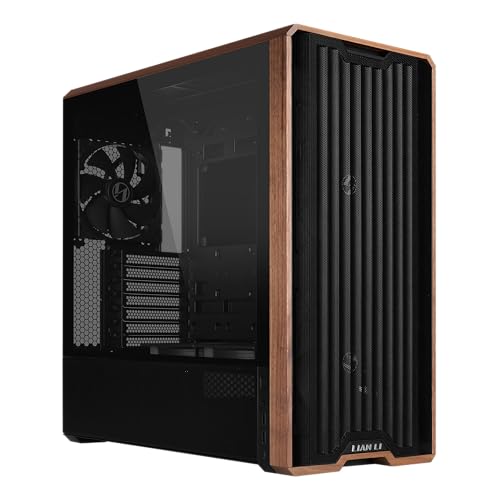
- Includes five PWM fans, including two large 170mm front fans.
- Supports adjustable fan placement and two PSU configurations.
- Wood accents and back-connect support create a tidy, distinctive build.
Best For: Air-cooled ATX gaming systems with a refined appearance
Best for RGB Showcases

- Full-tower ATX design supports high-end components and multiple GPUs.
- Modular layout accommodates multiple radiators, fans, and custom loops.
- Tempered glass and synchronized RGB lighting emphasize presentation.
Best For: Large, display-focused ATX builds with custom cooling
Best with Extra Features

- Eight included PWM ARGB fans
- Supports up to 420mm radiators
- 455mm GPU and E-ATX support
Best For: Large, heavily cooled showcase gaming builds
Style-Conscious Choice
Fractal Design North Charcoal Case

- Walnut front with tempered glass
- Two included 140mm PWM fans
- Supports GPUs up to 355mm
Best For: Refined ATX gaming and workstation setups
Showcase RGB Pick
MUSETEX Y6 Infinity Mirror Case

- Seven pre-installed Infinity Mirror fans
- 270-degree tempered-glass view
- 410mm GPU and 360mm radiator support
Best For: Colorful showcase gaming PCs with visible components
Maximum Airflow – Antec FLUX PRO Full-Tower
For demanding builds, the Antec FLUX PRO is one of the most substantial computer cases for high end pcs. Its full-tower layout supports E-ATX motherboards, extensive storage, up to 12 fans, and simultaneous 420mm and 360mm radiators.
Best For: Enthusiasts building large, heavily cooled E-ATX systems with multiple expansion cards, radiators, and storage drives.
Pros:
- Includes six PWM fans and supports up to 12 fans.
- Supports simultaneous 420mm and 360mm radiators.
- Offers an iShift 90° PSU mount and CPU/GPU temperature display.
- Includes removable cooling brackets and ten internal drive bays.
Cons:
- Its full-tower dimensions and 29-pound weight require considerable desk or floor space.
- The 800-watt maximum power-supply specification may limit some exceptionally power-hungry configurations.
The FLUX PRO prioritizes expansion and cooling capacity over compactness. Its mixed-material construction, walnut wood front panel, and monitoring display add visual distinction, while the spacious interior suits ambitious workstation or gaming builds.
Smart Display Build – Thermalright A70 Vision
The Thermalright A70 Vision combines a panoramic chassis design with a built-in 9.16-inch customizable display. For computer cases for high end pcs, it offers broad ATX compatibility, support for GPUs up to 420mm, and eight 120mm fan positions.
Best For: Builders who want a visually focused ATX system with an integrated display, strong airflow options, and support for large graphics cards.
Pros:
- 9.16-inch, 1920×480 magnetic display supports themes, images, video, and screen mirroring.
- Supports GPUs up to 420mm and CPU liquid-cooler tubing up to 400mm.
- Provides eight 120mm fan mounting positions and four-direction airflow.
- Includes a detachable, adjustable GPU support bracket.
Cons:
- The display requires TRCC software and a USB connection for operation.
- Its plastic enclosure may feel less substantial than metal-focused alternatives.
- The listed motherboard compatibility stops at ATX rather than E-ATX.
The A70 Vision stands out for builders who want their case to function as part of the system’s presentation. Its hidden cable-routing paths and GPU bracket help maintain a clean, supported build despite its highly visible interior.
Compact Airflow – NZXT H6 Flow
The NZXT H6 Flow is a compact dual-chamber option for builders who want clean presentation without moving to a full tower. Among computer cases for high end pcs, its panoramic glass, airflow-focused panels, and three included fans make it a practical ATX foundation.
Best For: Compact ATX gaming systems using standard components and graphics cards up to 365mm long.
Pros:
- Dual-chamber construction keeps the main interior visually clean and less crowded.
- Includes three pre-installed 120mm fans positioned for out-of-the-box cooling.
- Wraparound glass provides a broad view of internal components.
- Wide cable channels and straps simplify cable management.
Cons:
- Graphics card clearance is limited to 365mm.
- Only one internal 3.5-inch drive bay is listed.
- Its mid-tower format provides less expansion room than the full-tower options here.
The H6 Flow is a strong fit when appearance, airflow, and footprint matter equally. It delivers a tidy dual-chamber layout and useful included cooling, though builders with especially large GPUs or extensive storage should verify clearances first.
Modular Customization – CORSAIR 4000D RS ARGB
The CORSAIR 4000D RS ARGB brings a flexible mid-tower approach to computer cases for high end pcs. Its FRAME modular system, three included ARGB PWM fans, adjustable InfiniRail mounts, and support for dual 360mm radiators give builders room to tailor cooling and appearance.
Best For: ATX builders who want a customizable mid-tower with adjustable fan placement, integrated RGB, and upgradeable case components.
Pros:
- FRAME system allows changes such as alternative motherboard trays and front I/O panels.
- Includes three daisy-chainable RS ARGB PWM fans with Zero RPM mode.
- InfiniRail supports flexible front and roof fan positioning.
- Supports air cooling, liquid cooling, and dual 360mm radiators.
Cons:
- Its ATX mid-tower format offers less overall room than a full tower.
- The listed configuration includes three fans, so additional cooling hardware may be needed for some builds.
- Many modular customization options may add complexity compared with a simpler case.
The 4000D RS ARGB is aimed at builders who value adaptability rather than a fixed layout. Its adjustable rails and removable side cable-cover area let you prioritize cleaner presentation or additional airflow as the system evolves.
Best for GPU Cooling – HAVN HS 420 Dual-Chamber
For builders comparing computer cases for high end pcs, the HAVN HS 420 stands out with a dual-chamber layout focused on directing cool intake air toward the GPU. Its extensive radiator, fan, cable-routing, and component-support options make it a strong choice for powerful, showcase-oriented builds.
Best For: High-end systems that prioritize GPU airflow, liquid-cooling capacity, and a clean panoramic presentation.
Pros:
- Supports up to eleven 140mm fans and 420mm radiators on the top, right, and bottom.
- Dual-chamber hybrid design channels cool bottom intake air toward the centrally positioned GPU.
- Curved heat-formed glass provides a broad, low-distortion view of the components.
- SimpliCable routing, a PWM fan hub, adjustable GPU support, and vibration-isolated brackets improve build organization.
Cons:
- The extensive cooling and customization features may be more than a basic air-cooled build needs.
- Its showcase-focused design may require more planning during installation.
The HS 420 is a particularly capable option when thermal headroom and presentation matter equally. Its unusual airflow layout and generous radiator support make it well suited to demanding hardware, while the included routing and support features help keep a complex build tidy.
Best for Airflow and Style – Lian Li LANCOOL 217
The Lian Li LANCOOL 217 is a practical pick among computer cases for high end pcs when strong air cooling and distinctive styling are priorities. It arrives with five PWM fans, including oversized 170mm front fans, and adds genuine wood accents for a less conventional appearance.
Best For: ATX gaming builds using air cooling, large GPUs, and a clean setup with flexible fan and PSU placement.
Pros:
- Five included PWM fans provide a ready-to-use airflow setup.
- Large front fans can be repositioned to emphasize CPU or balanced CPU-and-GPU cooling.
- Back-connect motherboard support helps hide cables and maintain a tidy interior.
- Offers two PSU mounting configurations and real walnut or beech wood accents.
Cons:
- The supplied cooling approach is centered on air cooling rather than a stated radiator-focused design.
- Its mid-tower format and seven expansion slots may be less suitable for unusually large or expansion-heavy builds.
With five pre-installed fans and adjustable front-fan positioning, the LANCOOL 217 is an appealing option for builders who want effective airflow without assembling a fan package separately. The wood detailing and back-connect readiness add practical and visual polish.
Best for RGB Showcases – META PCS Night Reaper O11 EVO
For builders seeking computer cases for high end pcs with a dramatic presentation, the META PCS Night Reaper uses the Lian Li O11 Dynamic EVO platform as a full-tower ATX enclosure. Tempered glass, a modular layout, RGB lighting, and support for multiple cooling configurations make it suited to display-focused performance systems.
Best For: High-end ATX builds that need modular expansion space, visible components, customizable lighting, and liquid-cooling flexibility.
Pros:
- Full-tower layout supports high-end components, multiple GPUs, and standard storage drives.
- Designed for multiple radiators, fans, and custom-loop cooling configurations.
- Customizable RGB lighting zones can synchronize with motherboard software.
- Modular construction and advanced cable management support upgrade-ready builds.
Cons:
- The supplied details do not specify included fans or exact radiator sizes.
- Its full-tower format may occupy more space than a mid-tower case.
- The tempered-glass and RGB presentation may not suit understated builds.
The Night Reaper is best viewed as a flexible showcase chassis rather than a minimalist enclosure. Its full-tower capacity and modular cooling support give demanding builders room to plan, while the glass and RGB system put the finished hardware front and center.
Best with Extra Features – HYXN H2 Dual-Chamber ATX Case
For builders comparing computer cases for high end pcs, the HYXN H2 stands out with a spacious dual-chamber layout, extensive radiator support, and eight included PWM ARGB fans. Its large interior is designed for powerful components and cleaner cable routing.
Best For: High-end gaming builds needing strong cooling capacity, generous GPU clearance, and extensive RGB airflow.
Pros:
- Includes eight pre-installed 140mm and 120mm PWM ARGB fans.
- Supports 420mm and 360mm radiators, including multiple radiator configurations.
- Accommodates GPUs up to 455mm and E-ATX through Mini-ITX motherboards.
- Dual-chamber design provides extra space for power supplies, drives, and cable management.
Cons:
- Its large footprint may be excessive for compact desks or simpler builds.
- The transparent glass-heavy design requires regular cleaning to maintain its appearance.
The H2 is a feature-rich choice when cooling headroom and component space matter more than compact dimensions. It is especially well suited to showcase builds with large graphics cards and custom liquid cooling.
Style-Conscious Choice – Fractal Design North Charcoal Case
The Fractal Design North offers a more understated option among computer cases for high end pcs, combining a charcoal finish, tempered-glass side panel, and genuine walnut front accents. Its open mesh front and included 140mm fans support practical airflow without an overtly flashy appearance.
Best For: ATX builders who want a refined workstation or gaming setup with natural materials and straightforward airflow.
Pros:
- Distinctive walnut front panel and charcoal tempered-glass design.
- Includes two 140mm Aspect PWM fans.
- Supports ATX, Micro-ATX, and Mini-ITX motherboards.
- Offers GPU clearance up to 355mm, or 300mm with a 360mm front radiator.
Cons:
- GPU clearance is more limited when using a 360mm front radiator.
- Only two fans are included, so additional cooling may be needed for demanding hardware.
- Its listed drive capacity is more modest than that of larger dual-chamber cases.
The North prioritizes design flexibility and a clean, furniture-friendly appearance. It works well for high-performance systems when you prefer subtle styling and are comfortable planning cooling around its more moderate component clearances.
Showcase RGB Pick – MUSETEX Y6 Infinity Mirror Case
For builders seeking visually dramatic computer cases for high end pcs, the white MUSETEX Y6 combines 270-degree tempered-glass viewing with seven pre-installed Infinity Mirror ARGB fans. It also provides room for a 360mm top-mounted liquid cooler and graphics cards up to 410mm.
Best For: RGB-focused gaming builds that put component visibility, colorful lighting, and ready-made airflow at the forefront.
Pros:
- Seven included speed-adjustable Infinity Mirror ARGB fans create continuous gradient lighting.
- 270-degree dual tempered-glass panels provide a broad view of the components.
- Supports GPUs up to 410mm and top-mounted liquid coolers up to 360mm.
- Compatible with ATX, Micro-ATX, and Mini-ITX motherboards and includes a Type-C port.
Cons:
- CPU cooler height is limited to 160mm for air coolers.
- The case does not include a motherboard, graphics card, power supply, or radiator.
- Its highly visible glass and white finish may require frequent cleaning.
The Y6 is a strong choice for a centerpiece gaming PC, delivering extensive lighting and a wide viewing angle out of the box. Check air-cooler height and component dimensions before pairing it with especially large hardware.
How We Picked the Best Computer Cases for High End PCs
We focused on the features that matter most in demanding gaming, workstation, and enthusiast builds: motherboard compatibility, graphics-card clearance, airflow potential, fan and radiator support, cable-management space, front-panel connectivity, and ease of assembly. We also considered whether included fans or distinctive layouts add practical value rather than simply increasing visual appeal.
The selection covers full-tower models for expansive components and mid-tower cases for buyers who want strong cooling in a smaller footprint. Always verify current specifications before purchase, particularly GPU length, radiator thickness, power-supply clearance, and included accessories.
Quick Comparison
| Best For | Recommended Type | What to Look For |
|---|---|---|
| Large custom loops and workstation hardware | Full tower | E-ATX support, expansion room, and multiple radiator positions |
| High-airflow gaming builds | Airflow-focused mid tower | Mesh ventilation, several PWM fans, and unobstructed intake paths |
| Showcase builds | Panoramic or dual chamber | Tempered-glass visibility and separated cable routing |
| Compact high-performance systems | Compact ATX | Efficient internal layout and confirmed component clearances |
Key Buying Factors for Computer Cases for High-End PCs
Cooling and Airflow
High-wattage CPUs and GPUs benefit from unrestricted intake and exhaust paths. Mesh fronts generally prioritize thermal performance, while glass-heavy designs may need more careful fan placement. Check whether included fans are PWM models and whether the case supports the radiator size you plan to use.
Component Compatibility
Confirm support for your motherboard format, graphics-card length, CPU cooler height, power-supply size, and storage devices. E-ATX and oversized GPUs can reduce cable and radiator clearance, even in a large enclosure.
Layout and Cable Management
Dual-chamber cases can simplify routing by hiding the power supply and drives behind the motherboard tray. Look for generous rear clearance, removable panels, grommets, and practical access to motherboard power connectors.
Connectivity and Long-Term Flexibility
Front USB-C is useful for modern storage and peripherals. Also consider vertical GPU options, removable drive cages, dust filtration, fan hubs, and space for future cooling upgrades.
Who Should Buy Which Computer Cases for High End PCs?
- Choose a full tower if you are building with E-ATX hardware, multiple expansion cards, a custom loop, or several large radiators.
- Choose an airflow-oriented mid tower for a powerful gaming PC that needs effective cooling without a bulky enclosure.
- Choose a dual-chamber case if clean cable routing, showcase presentation, and flexible component placement are priorities.
- Choose a compact ATX case if desk space matters but you still need standard ATX components and substantial GPU support.
- Choose a design-led case when materials, panoramic glass, wood accents, or integrated lighting are important—provided ventilation and clearances meet your build requirements.
Before ordering, compare the case’s official specification sheet with every major component in your parts list. That final check helps prevent conflicts involving radiator placement, GPU thickness, front-panel connectors, and power-supply length.