Accurate color matters when you edit photos, design graphics, create video, or need prints and screens to agree. The right calibration tool can reduce guesswork and help a home-office display show more dependable color.
This roundup compares 10 options, including monitor colorimeters, camera color targets, white-balance charts, and portable color-matching tools. Use the buying guide below to narrow your choice by workflow, display type, and budget.
Best 10 Color Calibration Tools for Home Offices Picks for 2026
Best for Serious Photographers

- Calibrates displays in about five minutes
- Includes room-light monitoring
- Provides before-and-after and display-analysis tools
Best For: Photo editing and print-matching workflows
Best Easy-Setup Option

- Uses a guided Easy 1 2 3 workflow
- Supports up to two displays
- Includes brightness targets and before-and-after checking
Best For: Simple one- or two-monitor creative setups
Best Camera-Side Companion
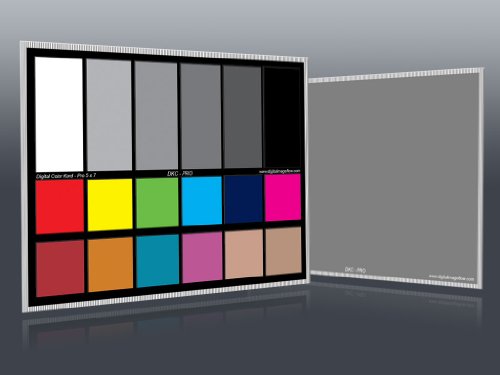
- Includes 12% and 18% gray references
- Adds 18 color patches for correction
- Comes with two cards and a frame stand
Best For: Photography white balance and post-production color correction
Complete Color Workflow

- Monitor calibrator supports OLED, mini-LED, and XDR displays
- Includes Spyder Cube for white-balance control
- Spyder Checkr 24 creates HSL color presets
Best For: Photographers seeking capture-to-display color consistency
Video Chart Pair

- Professional-grade chips support consistent calibration
- 16:9 layout is suited to video production
- Lightweight two-pack is portable for on-location use
Best For: Video creators needing compact color reference charts
Paint Matching Companion

- Wireless scanner pairs with the free Color Muse app
- Matches scanned surfaces to a broad paint library
- Reports multiple digital color values and comparisons
Best For: Home-office paint matching and physical color coordination
Best Camera-Workflow Kit
Passport Photo 2 Calibration Kit

- Four targets for exposure, white balance, profiling, and enhancement
- Portable case plus adjustable chart holder
- Supports custom DNG and ICC camera profiles
Best For: Photographers building a consistent capture-to-edit workflow
Best Beginner Monitor Calibrator

- Guided single-click calibration workflow
- Room-light monitoring and automatic profile changing
- Supports multiple laptop and desktop monitors
Best For: First-time users calibrating home-office displays
Best Advanced Display Tool

- Deeper grayscale calibration and broad display support
- Projector calibration, display analysis, and 3D LUT export
- USB-C connection with included USB-A adapter
Best For: Professional multi-monitor, photo, design, and video workflows
Best High-Brightness Pick – Display Pro HL
For demanding color calibration tools for home offices, the Calibrite Display Pro HL is designed for modern high-brightness displays. Its high-luminance sensor measures up to 3000 nits and works with LCD, mini-LED, OLED, Apple XDR displays, and compatible projectors.
Best For: Photographers, designers, and home-office users working with HDR, OLED, mini-LED, or multiple displays.
Pros:
- Measures high-brightness displays up to 3000 nits.
- PROFILER software offers Basic and Advanced calibration modes.
- Includes validation, uniformity, flare-correction, and multi-display tools.
- Works with Mac and Windows through USB-C, with a USB-A adapter included.
Cons:
- Advanced features may be more than casual users need.
- Requires a separate calibration process for achieving the best results.
This is the most capable option here for a modern creative workstation. Its broad display compatibility and detailed profiling controls make it a strong choice when consistent color and brightness accuracy matter.
Best for Serious Photographers – Spyder5PRO
Datacolor Spyder5PRO – Designed for Serious Photographers and Designers (S5P100)
Check Price On AmazonThe Datacolor Spyder5PRO is a practical choice among color calibration tools for home offices when you want reliable laptop and desktop display calibration without a lengthy setup. A full calibration takes about five minutes and includes room-light monitoring to help select a suitable monitor brightness.
Best For: Photographers and designers who want to match on-screen editing more closely with prints and shared images.
Pros:
- Calibrates laptop and desktop displays in about five minutes.
- Room-light monitoring helps determine an appropriate monitor brightness.
- Before-and-after evaluation uses your own photographs.
- Display Analysis compares the performance of multiple monitors.
Cons:
- Direct light should be kept off the display during calibration.
- The supplied notes do not specify a modern USB-C connection or broader display compatibility.
The Spyder5PRO focuses on a straightforward photography workflow, especially for users trying to reduce the print-edit-print cycle. Its room-light and display-analysis features add useful context beyond basic calibration.
Best Easy-Setup Option – Display 123
The Calibrite Display 123 makes color calibration tools for home offices approachable with a guided Easy 1 2 3 workflow. It is intended for creators who want more accurate color without navigating extensive manual settings, while still supporting calibration across two displays.
Best For: Photographers and home-office creators who want simple calibration for a one- or two-monitor setup.
Pros:
- Guided software workflow is designed for quick, simple setup.
- Supports calibration of up to two displays.
- Includes Native and Photo brightness target options.
- Before-and-after checking makes changes easy to review.
Cons:
- Offers fewer advanced controls than the Display Pro HL.
- Supports up to two displays, which may not suit larger workstations.
Display 123 is a sensible entry point for users who value ease of use over extensive customization. It covers the essentials for improving consistency across a compact creative workspace.
Best Camera-Side Companion – DKC-Pro Color Charts
The DKC-Pro set is a useful companion to color calibration tools for home offices, providing physical references for white balance, exposure, and post-production correction. The two 5-by-7-inch charts include 12% and 18% gray targets plus 18 color patches for use with software such as Adobe Photoshop and Lightroom.
Best For: Photographers who need consistent in-camera white balance and physical color references during editing.
Pros:
- Includes both 12% and 18% gray references.
- Provides 18 color patches for digital color correction.
- n-Chrome coating is designed for higher saturation, luminance, and accuracy.
- Includes two cards, a frame stand, and a user guide.
Cons:
- These are physical calibration charts, not monitor-measuring colorimeters.
- They do not directly profile a display.
- Best results still depend on compatible photo-editing software and an appropriate workflow.
This set cannot replace a monitor colorimeter, but it complements one by improving capture and editing references. It is particularly helpful for photographers who want a repeatable white-balance and color-correction target.
Complete Color Workflow – Spyder Celebration Kit
For photographers who need color calibration tools for home offices, the Datacolor Spyder Celebration Kit combines monitor calibration with camera-focused color tools. The 2024 Spyder calibrator supports OLED, mini-LED, and XDR Retina Display technologies, while the included Spyder Cube and Spyder Checkr 24 help establish dependable white balance and color presets.
Best For: Photographers and creators who want a broader capture-to-display color workflow rather than monitor calibration alone.
Pros:
- Combines a monitor calibrator, white-balance tool, and color-checker chart.
- Supports current display technologies including OLED, mini-LED, and XDR Retina Display.
- Spyder Cube defines white, black, and neutral gray values for contrast control.
- Spyder Checkr 24 supports HSL presets for image color correction.
Cons:
- More equipment than users seeking monitor-only calibration may need.
- The kit weighs 2.42 pounds and has a larger overall footprint than a standalone colorimeter.
This is the most comprehensive option in the roundup for users managing both camera capture and monitor output. Its broader toolkit makes it especially practical for a home photo or video workspace where consistency matters from the first shot through editing.
Video Chart Pair – Digital Kolor Pro 16:9 Charts
DGK Color Tools Digital Kolor Pro 16:9 Large Color Calibration and Video Chip Chart, 2-Pack
Check Price On AmazonThe Digital Kolor Pro 16:9 charts are straightforward color calibration tools for home offices built around video production. This two-pack uses professional-grade chips in a 16:9 layout to support consistent color adjustments across cameras and editing software, with a compact design suited to on-location work.
Best For: Video creators who need portable reference charts for camera and post-production color correction.
Pros:
- Designed for precise, repeatable color calibration in video workflows.
- 16:9 aspect ratio supports video-focused image adjustments.
- Two-chart pack provides a practical spare or multi-camera option.
- Compact, lightweight format measures approximately 14 by 7.88 inches and weighs 2.08 ounces.
Cons:
- Provides reference charts rather than an electronic monitor calibrator.
- The supplied notes do not identify additional software or accessories.
Choose this pair when portability and video framing are more important than an all-in-one calibration system. It offers a simple reference-based approach for creators who already have a preferred camera and editing workflow.
Paint Matching Companion – COLOR MUSE Colorimeter
The COLOR MUSE Colorimeter is a mobile color-matching tool rather than a traditional monitor calibrator, but it can complement color calibration tools for home offices used in interior design or creative planning. It scans flat surfaces wirelessly and works with the free Color Muse app to identify nearby paint matches and provide digital color values.
Best For: Home-office users matching wall colors, coordinating paint choices, or capturing paint-related RGB, CMYK, LAB, and other values.
Pros:
- Portable wireless design scans flat surfaces through the Color Muse app.
- Provides access to a large library of paint and product brands.
- Displays HEX, CMYK, RGB, LAB, LCH, LRV, HSB, and HSV values.
- Allows users to compare, save, coordinate, and share scanned colors.
Cons:
- It matches physical surfaces and does not calibrate a computer monitor.
- Best results require a smooth, flat surface.
- The supplied guidance does not recommend it for spot touch-ups.
COLOR MUSE is best viewed as a practical color-matching companion, not a replacement for display calibration. Its app integration and broad paint library make it useful when a home office project involves walls, décor, or physical color selection.
Best Camera-Workflow Kit – Passport Photo 2 Calibration Kit
The Calibrite ColorChecker Passport Photo 2 is one of the more specialized color calibration tools for home offices, aimed at improving consistency from camera capture through editing and output. Its four targets support exposure checks, custom white balance, camera profiling, and enhancement work.
Best For: Photographers who need portable, repeatable camera color references and custom DNG or ICC profiles.
Pros:
- Four targets cover exposure, white balance, profiling, and color enhancement.
- Portable folding case offers multiple positions and includes a lanyard.
- Included adjustable holder fits charts from 2.4 to 10.8 inches and has tripod-compatible mounting threads.
- Calibrite PROFILER supports custom DNG and ICC camera profiles.
Cons:
- It is designed for camera and editing workflows rather than direct monitor calibration.
- The adjustable holder may be more equipment than casual photographers need.
This kit is a strong choice when color accuracy starts at the camera. It can reduce correction time across larger projects, but monitor-focused users should consider a dedicated display calibrator instead.
Best Beginner Monitor Calibrator – Spyder X Pro
The Datacolor Spyder X Pro is a straightforward option among color calibration tools for home offices when the main goal is more accurate monitor color. Its lens-based color engine, room-light monitoring, and guided software are designed to make calibration approachable for first-time users.
Best For: Home-office photographers and creative users calibrating laptop or desktop displays without a steep learning curve.
Pros:
- Single-click calibration and a wizard workflow simplify setup.
- Offers 12 predefined calibration targets for more advanced accuracy.
- Room-light monitoring and automatic profile changing support changing environments.
- Can calibrate multiple laptops and desktop monitors.
Cons:
- It is intended for monitors, not camera profiling or physical color-chart reference.
- Advanced users may want more extensive display-analysis features.
For a first monitor calibrator, the Spyder X Pro balances guided operation with useful control over display color, shadow detail, and white balance. It is a practical fit for a single-monitor or small multi-display home setup.
Best Advanced Display Tool – SpyderPro Monitor Calibrator
The SpyderPro is an advanced choice among color calibration tools for home offices, especially for users managing demanding photo, design, video, or multi-monitor work. It supports deeper grayscale measurement, modern display types, extensive brightness settings, and display analysis.
Best For: Professionals and enthusiasts who need detailed monitor calibration, multi-display matching, or video-oriented color tools.
Pros:
- Standard calibration takes about 90 seconds, while Deeper Calibration measures more grayscale points.
- Supports Wide LED, OLED, QD-OLED, Mini LED, and Apple Liquid Retina XDR displays up to 12,000 nits.
- Includes projector calibration, display analysis, 3D LUT export, and StudioMatch for multi-monitor setups.
- Native USB-C connectivity includes a USB-A adapter.
Cons:
- Its extensive professional features may be unnecessary for basic office use.
- Advanced functions can require compatible video monitors or display hardware.
- It requires a nonstandard battery.
This is the most feature-rich option in the group for serious display work. Its broad display compatibility and analysis tools make it suitable for evolving setups, though simpler users may prefer the more approachable Spyder X Pro.
How We Picked the Best Color Calibration Tools for Home Offices
We selected tools that address the main color-control tasks in a home office: calibrating monitors, setting camera white balance, checking exposure, and matching physical colors. The list includes dedicated display colorimeters from Calibrite and Datacolor, as well as chart-based accessories for photographers and video creators.
Our comparison focuses on compatibility, ease of setup, software workflow, portability, measurement capability, and the type of work each tool supports. A monitor calibrator is generally the most useful starting point for screen-based editing, while charts and color targets complement it during image capture.
Quick Comparison
| Tool type | Best for | Main advantage |
|---|---|---|
| Monitor colorimeter | Photo, design, and video editing | Creates a display profile for more consistent screen color |
| Color checker or passport | Camera-based workflows | Provides a reference for white balance and color correction |
| Gray or white-balance chart | Exposure and lighting control | Offers a simple physical reference in the scene |
| Mobile colorimeter | On-the-go color matching | Helps identify and compare real-world colors |
Key Buying Factors for Color Calibration Tools for Home Offices
Monitor and Operating-System Compatibility
Check that the calibrator supports your monitor technology, connection type, and computer operating system. Newer LCD, Mini-LED, and OLED displays can benefit from tools designed to handle higher brightness and wider-gamut screens. USB-C connectivity may also simplify use with modern laptops and monitors.
Calibration Software and Workflow
Look for software that provides clear instructions, adjustable targets, and an automatic profiling process. Beginners may prefer a straightforward guided workflow, while photographers and designers may want control over white point, luminance, gamma, and ambient-light settings.
Display Brightness and HDR Support
If you use a bright monitor or HDR workflow, verify the tool’s measurement range and supported software features. A calibrator intended for standard office displays may not deliver the same results on a high-brightness professional panel.
Portability and Camera Support
Choose a compact color checker or foldable chart if you shoot away from your desk. For studio or product photography, a larger chart or stand can be easier to position and read consistently. These accessories do not replace monitor calibration, but they can improve color correction from the start.
Who Should Buy Which Color Calibration Tools for Home Offices?
Photographers and designers: Start with a dedicated monitor colorimeter, then add a portable color target if you photograph people, products, or artwork.
Video creators: Prioritize a calibrator suited to your display’s brightness and panel type. A large color chart can also help with camera matching and grading references.
Casual editors and home-office users: Choose an easy guided monitor solution rather than a complex professional workflow. It is usually the fastest way to improve consistency.
Traveling photographers and color-sensitive shoppers: A compact passport, chart, or mobile color-matching tool makes sense when portability matters more than full desktop profiling.