Accurate color is essential when your work moves from camera to monitor to client delivery. The right calibration tool can reduce screen-to-screen variation, improve editing decisions, and help ensure finished images or video look consistent.
This roundup compares 10 color calibration tools for professionals, including monitor colorimeters, camera reference targets, and capture-to-editing kits. Use the buying guide below to match the tool’s capabilities with your display, workflow, and budget.
Best 10 Color Calibration Tools for Professionals Picks for 2026
Quick Workflow Calibration

- Calibrates displays in about five minutes
- Monitors room light for brightness guidance
- Compares results using your own photos
Best For: Photographers and designers using laptop or desktop displays
Advanced Display Analysis

- Supports displays up to 12,000 nits
- Offers deep calibration and display analysis
- Exports 3D LUTs for video workflows
Best For: Advanced photo, design, video, and multi-monitor studios
On-Set Video Reference

- Supports camera and lens color matching
- Includes five specialized high-gloss cards
- Works with vector scopes and replaceable cards
Best For: Video production and hybrid photo-video workflows
Capture-to-Edit Kit

- Designed for color control from capture through editing
- Built for serious photographers and professionals
- Combines essentials in a single photo tool kit
Best For: Photographers seeking an integrated color workflow
Portable Camera Reference
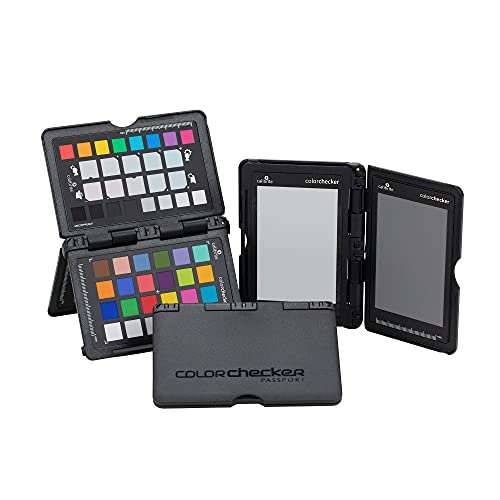
- Includes four targets for exposure and color control
- Creates custom DNG and ICC camera profiles
- Folds into a portable protective case
Best For: Location photographers and multi-camera workflows
Best Easy-Setup Option

- Guided 1 2 3 calibration workflow
- Supports up to two displays
- Includes a before-and-after accuracy check
Best For: Creators wanting simple dual-monitor calibration
Best for RAW Workflow

- Sets white balance and exposure references in RAW
- Uses a black trap and 3D surfaces for tonal control
- Applies adjustments across images in the same lighting
Best For: RAW photographers standardizing a photo series
High-Luminance Precision – Calibrite Display Pro HL
For professionals comparing color calibration tools for professionals, the Calibrite Display Pro HL is designed for modern high-brightness workflows. Its sensor measures displays up to 3000 nits and supports LCD, mini-LED, OLED, Apple XDR displays, and compatible projectors.
Best For: Photographers, designers, and creative teams working with HDR, high-brightness, or multiple displays.
Pros:
- Measures luminance up to 3000 nits for brighter modern displays.
- PROFILER software offers Basic and Advanced modes with custom white point, luminance, contrast, and gamma settings.
- Includes validation, uniformity, flare-correction, and multi-display workflow tools.
- USB-C connectivity, USB-A adapter, travel pouch, and built-in 1/4-inch mount thread are included.
Cons:
- Its advanced feature set may be more than casual users need.
- Compatibility with third-party software is described as supported rather than universal.
The Display Pro HL is a strong fit when accurate profiling across bright displays and varied workstation setups matters. Its custom patch and validation options add useful control for client-facing production work.
Quick Workflow Calibration – Datacolor Spyder5PRO
Datacolor Spyder5PRO – Designed for Serious Photographers and Designers (S5P100)
Check Price On AmazonThe Datacolor Spyder5PRO is a straightforward option among color calibration tools for professionals who want consistent laptop and desktop display results without a lengthy setup. Its full calibration takes about five minutes and includes room-light monitoring and display analysis.
Best For: Serious photographers and designers seeking fast monitor calibration for editing and print matching.
Pros:
- Full calibration takes about five minutes.
- Room-light monitoring helps determine suitable monitor brightness.
- Before-and-after comparisons use your own photographs.
- Display Analysis can evaluate and compare multiple laptop and desktop monitors.
Cons:
- The supplied notes do not list support for newer HDR, mini-LED, or OLED workflows.
- It requires two CR123 batteries.
- Direct light on the display can adversely affect calibration.
Spyder5PRO emphasizes an accessible, repeatable process for photographers and designers. It is especially useful for reducing the print-edit-print cycle when working with conventional laptop and desktop displays.
Advanced Display Analysis – SpyderPro Monitor Calibrator
The SpyderPro is a feature-rich choice among color calibration tools for professionals, combining fast standard calibration with deeper grayscale measurement. It supports current display technologies, high brightness levels up to 12,000 nits, projector calibration, and video-oriented 3D LUT export.
Best For: Photography, design, and video professionals managing advanced displays or multi-monitor studios.
Pros:
- Standard calibration takes about 90 seconds, while Deeper Calibration measures more grayscale points.
- Supports Wide LED, OLED, QD-OLED, Apple Liquid Retina XDR, and Mini LED displays up to 12,000 nits.
- Provides display analysis, uniformity checks, gamut assessment, tone response, and white-point checks.
- Exports 3D LUTs in .cube format for compatible video monitors and supports Rec.709, Rec.2020, and DCI-P3.
Cons:
- The broad professional feature set may require more time to learn.
- Battery requirements are listed as one nonstandard battery.
SpyderPro is the most expansive monitor-focused option in this group. Its display mapping, StudioMatch, ambient-light features, and video LUT support make it suitable for demanding color-managed environments.
On-Set Video Reference – Datacolor SpyderCheckr Video
The Datacolor SpyderCheckr Video is a camera-side reference rather than a monitor colorimeter, making it a useful complement to color calibration tools for professionals. Its cards help harmonize footage across cameras and lenses and simplify color correction during post-production.
Best For: Video crews, filmmakers, and hybrid photo-video teams standardizing camera color on set.
Pros:
- Works with vector scopes to support color consistency across cameras and lenses.
- Includes a Color Pattern Card with hues at two saturation levels.
- Five high-gloss cards cover color, grayscale, neutral gray, and focus reference needs.
- Cards are replaceable and interchangeable with SpyderCheckr Photo cards.
Cons:
- It is a capture-reference system, not a monitor calibration colorimeter.
- Glossy surfaces can reveal flare but may require careful handling under set lighting.
SpyderCheckr Video belongs in the acquisition and grading side of a color-managed workflow. It can provide a consistent visual and scope reference before footage reaches the calibrated editing display.
HDR Display Specialist – Display Plus HL
For professionals comparing color calibration tools for professionals, the Calibrite Display Plus HL is designed for modern, extremely bright displays. Its high-luminance sensor supports LCD, Mini LED, OLED, Apple XDR, and compatible projectors, while PROFILER software provides controls suited to photo, video, and multi-monitor workflows.
Best For: Video editors, colorists, and creative teams calibrating HDR-capable or super-bright displays.
Pros:
- Measures displays up to 10,000 nits for HDR calibration.
- Supports Rec.709, Rec.2020 workflows, and BT.1886 tone curves.
- Offers custom patch sets, shared presets, multi-monitor profiling, and validation checks.
- Includes USB-C connectivity, a USB-A adapter, storage pouch, and 1/4-inch mount thread.
Cons:
- Its advanced HDR-focused capabilities may be more than needed for basic SDR display calibration.
- Warranty registration is required within 30 days, and coverage applies to authorized purchases.
The Display Plus HL stands out when luminance range and repeatable validation matter. It is a particularly strong fit for professional HDR monitoring and teams that need matched displays across an editing setup.
Capture-to-Edit Kit – Spyder X Capture Pro
The Datacolor Spyder X Capture Pro is a bundled option for photographers seeking color calibration tools for professionals across the full workflow. It is positioned as a photo tool kit for managing color from capture through editing, rather than as a standalone monitor-focused device.
Best For: Serious photographers and professionals who want an integrated color-management kit for capture and editing.
Pros:
- Covers color control from image capture through editing.
- Designed as an all-in-one kit for serious photographers and professionals.
- Provides a consolidated approach to managing color within a photo workflow.
Cons:
- The supplied details do not specify the individual tools included in the kit.
- The supplied details do not list software features, supported operating systems, or connectivity.
Spyder X Capture Pro is worth considering when you prefer a packaged workflow solution over selecting separate color-management tools. Confirm the kit contents and software compatibility before purchase if your setup has specific requirements.
Portable Camera Reference – ColorChecker Passport Photo 2
The Calibrite ColorChecker Passport Photo 2 is a compact choice among color calibration tools for professionals who need consistency at the point of capture. Its four targets support exposure reference, custom white balance, camera profiling, and enhancement, with PROFILER software for DNG and ICC workflows.
Best For: Photographers and video creators working on location or matching color across cameras, lenses, and changing lighting.
Pros:
- Provides four targets for exposure, white balance, profiling, and enhancement.
- Supports custom DNG and ICC camera profiles through Calibrite PROFILER software.
- Folding case offers multiple positioning options and includes a lanyard for quick access.
- Portable design weighs 4.9 ounces and measures 7 x 5.25 x 0.65 inches.
Cons:
- It is a capture-reference kit, not a monitor colorimeter.
- Creating custom profiles adds a setup step to the shooting and editing workflow.
Passport Photo 2 is a practical field companion for reducing color corrections across a set of images. Choose it when camera consistency and portable reference targets are more important than direct display calibration.
Best Overall Monitor Calibrator – Spyder Display Calibrator
For professionals comparing color calibration tools for professionals, the Datacolor Spyder is a versatile monitor-focused option. It calibrates laptop and desktop displays, including OLED, mini-LED, and Apple Liquid Retina XDR screens, with a fast setup and customizable controls.
Best For: Photographers, designers, and editors who want fast monitor calibration with room-light monitoring and flexible settings.
Pros:
- Calibrates a broad range of modern display technologies.
- Provides an accurate starting point in about 90 seconds.
- Includes novice-friendly presets and customizable professional settings.
- Ambient light sensing can recommend or automate recalibration.
Cons:
- Its DevicePreview feature is identified as beta.
- Requires a nonstandard battery.
The Spyder is the strongest all-around choice when you need straightforward calibration across current display types and changing room conditions. Its combination of automation and customization suits both newer users and experienced professionals.
Best Easy-Setup Option – Calibrite Display 123
The Calibrite Display 123 is a practical pick among color calibration tools for professionals who want a guided workflow. Its Easy 1 2 3 software, USB-C connection, before-and-after check, and support for two displays keep the process simple and repeatable.
Best For: Photographers and creators who need approachable calibration across a dual-monitor editing setup.
Pros:
- Guided Easy 1 2 3 workflow reduces setup complexity.
- Supports calibration of up to two displays.
- Includes USB-C connectivity and an adjustable counterweight for screen placement.
- Before-and-after viewing makes calibration results easy to check.
Cons:
- Offers fewer explicitly described customization features than the Spyder.
- Its brightness targets are limited to the listed Native or Photo options.
Choose the Display 123 when ease of use and matched dual-screen viewing matter more than extensive manual controls. The comparison view is especially useful for confirming visible changes after calibration.
Best for RAW Workflow – SpyderCube RAW Color Tool
The Datacolor SpyderCube is a camera-scene reference tool rather than a monitor colorimeter. For professionals evaluating color calibration tools for professionals, it helps establish white balance, exposure, contrast, and black point in RAW files before applying consistent adjustments across a series.
Best For: RAW photographers who need a repeatable reference for images captured under the same lighting.
Pros:
- Supports white balance, exposure, contrast, and black-point adjustments.
- Three-dimensional design shows primary and secondary light sources.
- Black trap provides an absolute black reference.
- Settings can be applied as a preset to images from the same lighting.
Cons:
- It does not calibrate a computer monitor.
- Requires photographing the cube as part of the RAW workflow.
- Its usefulness depends on consistent lighting for batch application.
The SpyderCube complements, rather than replaces, a display calibrator. It is a specialized choice for photographers who want a physical reference to speed RAW processing and maintain consistent tonal decisions across a shoot.
How We Picked the Best Color Calibration Tools for Professionals
We focused on tools designed to improve color accuracy throughout professional photography, video, design, and post-production workflows. The selection includes display colorimeters for profiling monitors, reference targets for white balance and exposure, and combination kits that support both capture and editing.
We considered display compatibility, brightness range, support for modern LCD, Mini LED, and OLED panels, software usability, portability, workflow coverage, and the needs of users working with RAW files or color-critical video. A monitor calibrator and a camera reference target solve different problems, so the best choice depends on where color inconsistency enters your process.
Quick Comparison
| Tool type | Best suited to | Primary purpose |
|---|---|---|
| Monitor colorimeter | Photographers, designers, and editors | Creates an accurate display profile |
| Color checker card | Photo and video shooters | Establishes consistent color and white balance |
| RAW reference tool | Photographers using RAW workflows | Sets exposure and neutral reference points |
| Capture-to-editing kit | Professionals needing a complete workflow | Controls color from shooting through post-production |
Key Buying Factors for Color Calibration Tools for Professionals
Display Type and Brightness
Check whether the calibrator supports your monitor technology and peak brightness. Standard LCD displays may have different requirements from Mini LED, OLED, HDR, or very bright professional panels. If your display reaches high brightness levels, choose a sensor and software combination rated for that range.
Workflow Coverage
Choose a monitor colorimeter if your main issue is an inaccurate or inconsistent screen. Add a color checker or calibration cube when camera white balance, exposure, or matching multiple cameras is the larger concern. Professionals who need both may save time with a bundled capture and display solution.
Software and Repeatability
Calibration is most useful when it is easy to repeat. Look for clear profiling software, adjustable targets for brightness and white point, reminders or scheduling options, and compatibility with your operating system. Consistent measurements matter more than a one-time setup.
Portability and Connection
Studio users can prioritize sensor performance and control options, while location photographers and filmmakers should consider compact reference targets, protective cases, and a straightforward USB connection. Confirm connector requirements before buying, especially for newer USB-C systems.
Who Should Buy Which Color Calibration Tools for Professionals?
Photographers and designers: Start with a monitor colorimeter if accurate on-screen editing and print preparation are your priorities.
Video professionals: Consider a display tool with strong support for bright modern panels, and add a video color checker for repeatable grading references.
RAW photographers: A portable white-balance and exposure reference can improve consistency before the image reaches the editing monitor.
Complete professional workflows: Choose a capture-to-editing kit or pair a display calibrator with a camera reference target for end-to-end control.