Finding the right cooler means matching the design to your system, workload, and available space. This roundup covers computer air coolers under $200 for desktop CPUs and laptops, including compact budget options and feature-rich models.
Use the comparison and buying advice below to narrow down fan performance, compatibility, noise, clearance, and installation priorities before choosing.
Best 10 Computer Air Coolers Under 200 Picks for 2026
Premium Tower Cooling

- 250W TDP double-tower design
- Six heat pipes and dual 120mm PWM fans
- Broad AMD and Intel socket support
Best For: Overclocked desktops and demanding workstations
Adjustable Gaming Cooling

- Eight-fan cooling system
- Six height adjustments and LCD controls
- RGB lighting, two USB ports, and phone stand
Best For: Large gaming laptops and desk setups
High-Value CPU Cooling

- Seven 6mm heat pipes with AGHP 4.0
- Dual 120mm PWM fans
- Supports AMD AM4/AM5 and multiple Intel sockets
Best For: Performance-oriented desktop builds
Portable Laptop Cooling

- Three 1200 RPM fans
- USB-powered with dual USB ports
- Fits 12- to 17-inch laptops
Best For: Everyday laptop cooling and portable workstations
Best Value CPU Cooler
Thermalright Assassin X120 Refined SE

- 148mm height for medium-sized cases
- Four AGHP heat pipes with 120mm PWM fan
- Supports AMD AM4/AM5 and many Intel sockets
Best For: Mainstream desktop upgrades and compatible mid-sized cases
Best Laptop Cooling Stand
Kootek 5-Fan Laptop Cooling Pad

- Five selectable USB-powered fans
- Six adjustable height settings
- Fits 12- to 17-inch laptops
Best For: Laptop users needing adjustable cooling and extra USB connectivity
Best High-Performance Air Cooler

- Dual towers with eight heat pipes
- Specified for up to 300W thermal dissipation
- ARGB lighting and broad modern socket support
Best For: High-performance desktop builds with 167mm-plus cooler clearance
Best Display Cooler

- Dual-tower design with 7x6mm AGHP heat pipes
- 3.95-inch customizable IPS monitoring display
- Supports AM4, AM5, LGA1851, and LGA1700
Best For: Display-focused PC builders seeking high-airflow cooling
Best Quiet Mid-Height Cooler
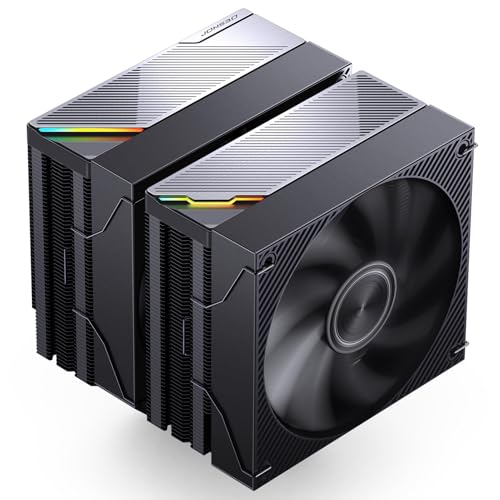
- 159mm dual-tower design for case flexibility
- Six copper heat pipes and 270W D-TDP rating
- Mute-series operation with 5V ARGB lighting
Best For: Quiet, performance-focused builds with moderate case clearance
Best Large Screen Cooler
Peerless Assassin 120 Vision MAX

- 5-inch customizable IPS display with TRCC support
- Twin-tower design with six copper heat pipes
- 2150 RPM fans with stated noise up to 27 dB(A)
Best For: Enthusiasts wanting a large system-monitoring display
Premium Tower Cooling – Pure Rock Pro 3 Black
For desktop builders comparing computer air coolers under 200, the be quiet! Pure Rock Pro 3 is a substantial double-tower option designed for demanding systems. It combines six 6mm copper heat pipes, a nickel-plated base, and two 120mm PWM fans, with support for both AMD and Intel platforms.
Best For: Overclocked systems, demanding workstations, and builders who want high cooling capacity with broad RAM and VRM compatibility.
Pros:
- 250W TDP rating with six high-performance copper heat pipes.
- Two 120mm PWM fans use optimized blades and a funnel-shaped outlet for focused airflow.
- Offset compact design improves RAM and VRM cooler compatibility.
- Supports current Intel and AMD sockets, including LGA1851, LGA1700, AM5, and AM4.
Cons:
- Its 6.1-inch height and 1,400g weight require a compatible case and sturdy installation.
- Maximum listed noise is 34.8 dB.
The Pure Rock Pro 3 is a strong choice when cooling headroom matters more than minimal size. Its adjustable front fan and AM5 offset mounting add useful installation flexibility, while the included mounting kit and thermal paste simplify setup.
Adjustable Gaming Cooling – K10 Eight-Fan Laptop Pad
For shoppers seeking computer air coolers under 200 for a gaming notebook, the ICE COOREL K10 adds active airflow beneath 15- to 17.3-inch laptops. Its eight fans, adjustable stand, LCD controls, and RGB lighting make it a feature-rich cooling pad for desk-based gaming.
Best For: Gamers using larger laptops who want adjustable height, visible fan-speed controls, and customizable RGB lighting.
Pros:
- Eight fans provide multiple cooling modes through vents in the top and bottom.
- Six height adjustments help create a more comfortable viewing angle.
- LCD display shows fan speed, while touch controls manage airflow and lighting.
- Includes two USB ports and a phone stand.
Cons:
- Designed for 15- to 17.3-inch laptops, so it may be oversized for smaller machines.
- At 1.12kg, it is less portable than a slim cooling pad.
The K10 is a practical pick when cooling features and ergonomics are equally important. Its eight-fan layout and adjustable controls suit gaming setups, while the six height positions can help reduce neck and back strain during longer sessions.
High-Value CPU Cooling – Phantom Spirit 120SE
The Thermalright Phantom Spirit 120SE is a compelling option among computer air coolers under 200 for desktop builders who want substantial cooling hardware without moving to liquid cooling. It uses seven 6mm heat pipes, a copper base, aluminum fins, and dual 120mm PWM fans.
Best For: Performance-focused AMD and Intel desktop builds that need high airflow and a relatively low listed noise level.
Pros:
- Seven heat pipes and AGHP 4.0 technology support a stated 105W to 280W TDP range.
- Dual TL-C12B V2 PWM fans deliver up to 66.17 CFM of airflow.
- Listed noise level is no more than 25.6 dB(A).
- 154mm height supports compatibility with a wide range of cases.
Cons:
- As a dual-fan tower cooler, it still requires adequate case clearance.
- Installation requires selecting the appropriate mounting hardware for the CPU socket.
The Phantom Spirit 120SE balances extensive heat-transfer hardware with quiet-rated fans and broad socket support. It is especially well suited to builders prioritizing sustained desktop performance and air cooling efficiency.
Portable Laptop Cooling – TECKNET Triple-Fan Pad
For portable computer air coolers under 200, the TECKNET laptop cooling pad offers a simple USB-powered way to move air beneath laptops from 12 to 17 inches. Three 110mm fans run at 1200 RPM, while the slim profile and adjustable stand suit everyday work and mobile gaming.
Best For: Laptop users who want a slim, USB-powered cooling pad with dual USB ports and basic angle adjustment.
Pros:
- Three fans provide airflow at a listed 1200 RPM.
- USB-powered design needs no external power adapter and includes a dedicated on/off switch.
- Two USB ports allow one port to remain available for peripherals.
- Supports laptops from 12 to 17 inches and offers two height settings.
Cons:
- Only two height adjustments are provided.
- The included cable is USB-A to USB-A, which may not suit every device setup.
- Its cooling hardware is less extensive than an eight-fan gaming pad.
The TECKNET is a straightforward choice for users who value portability and convenience over elaborate controls. Its mesh surface, rubber pads, LED indicator, and extra USB port make it practical for routine laptop use.
Best Value CPU Cooler – Thermalright Assassin X120 Refined SE
If you’re shopping for computer air coolers under 200, the Thermalright Assassin X120 Refined SE is a practical choice for compatible AMD and Intel desktop builds. Its compact 148mm height, four heat pipes, and 120mm PWM fan provide a straightforward balance of cooling performance, noise control, and case compatibility.
Best For: Mainstream desktop upgrades and medium-sized cases using AM4, AM5, or supported Intel sockets.
Pros:
- Supports Intel LGA 1150, 1151, 1155, 1156, 1200, 1700, 17XX, and 1851, plus AMD AM4 and AM5.
- Four 6mm AGHP heat pipes and a 66.17 CFM PWM fan support efficient air cooling.
- 148mm height suits many medium-sized computer cases.
- Rated noise output is up to 25.6dB(A), with a 4-pin PWM connection for fan-speed control.
Cons:
- It uses a single 120mm fan rather than a dual-fan design.
- Socket-specific mounting hardware must be matched to the CPU platform.
The Assassin X120 Refined SE is a sensible everyday cooler when you want better air cooling than a basic stock solution without moving to a larger dual-tower model. Check your case’s CPU-clearance specification and confirm the included mounting parts fit your socket before ordering.
Best Laptop Cooling Stand – Kootek 5-Fan Laptop Cooling Pad
For laptop-focused computer air coolers under 200, the Kootek cooling pad combines adjustable positioning with five USB-powered fans. It is designed for 12- to 17-inch laptops and can provide a more comfortable working or gaming setup while adding airflow beneath the computer.
Best For: Laptop users who want adjustable elevation, broad size compatibility, and selectable fan operation.
Pros:
- Five fans provide broad coverage, with separate controls for one, four, or all five fans.
- Six adjustable height settings help customize viewing and typing angles.
- Supports 12- to 17-inch laptops and includes front stoppers to help prevent slipping.
- Built-in dual USB hub adds connectivity for peripherals.
Cons:
- The pad requires USB power, and the manufacturer recommends a 5V 1A adapter for best performance.
- Its 1.16kg weight and 14.96-by-11.81-inch footprint make it less portable than a basic stand.
- Blue LED lighting may not suit every desk setup.
The Kootek is a versatile laptop stand and cooling accessory rather than a desktop CPU cooler. Its adjustable design and selectable fans are useful for long work or entertainment sessions, but plan for a larger desk footprint and use the recommended power arrangement.
Best High-Performance Air Cooler – PCCOOLER RZ820 Dual-Tower
Among computer air coolers under 200, the PCCOOLER RZ820 targets demanding desktop processors with a dual-tower heatsink, eight heat pipes, and two FDB-bearing fans. Its 165mm height and 300W stated thermal capacity make it a strong option for high-performance builds, provided your case and motherboard have enough room.
Best For: High-end AMD or Intel desktop builds in ATX mid-tower cases with at least 167mm CPU-cooler clearance.
Pros:
- Eight heat pipes and dual-tower fins are specified for up to 300W continuous thermal dissipation.
- Front and rear PWM fans provide up to 86.7 CFM and 71.9 CFM airflow, respectively.
- Supports Intel LGA1851, 1700, 1200, 115X, 20XX, and AMD AM5/AM4 sockets.
- Includes a pre-applied thermal paste, mounting hardware, and a steel L-shaped screwdriver.
Cons:
- At 165mm tall, it may not fit compact cases or cases limited to 160mm clearance.
- The 1,930g heatsink assembly can create installation and motherboard-clearance considerations.
- It may interfere with the first PCIe GPU slot on narrow mATX boards, and RAM clearance varies by height.
The RZ820 offers substantial air-cooling hardware for powerful processors, but its large dual-tower format demands careful compatibility checks. Verify case clearance, RAM height, and the gap to the first PCIe slot before choosing it for a compact or narrow build.
Best Display Cooler – Phantom Spirit 120 Vision EVO
For computer air coolers under 200, the Thermalright Phantom Spirit 120 Vision EVO stands out with a dual-tower design, high-speed fans, and a built-in 3.95-inch IPS display. Its 160mm height suits many medium and large cases, but case-clearance checks are still recommended.
Best For: Builders who want strong air cooling with customizable system monitoring and an integrated display.
Pros:
- Dual-tower cooler with 7x6mm AGHP heat pipes and up to 92 CFM airflow.
- 3.95-inch 480×480 IPS screen supports system data and custom backgrounds through TRCC software.
- Supports AM4, AM5, and several Intel sockets, including LGA1851 and LGA1700.
- 160mm height and clearance-focused design help accommodate many mainstream builds.
Cons:
- The display requires a motherboard 9-pin USB connection and SATA power.
- AMD installation requires the motherboard’s original backplate, which is not included.
- Its stated operating noise is up to 36 dB(A).
This is a feature-rich choice for buyers who want substantial tower cooling without giving up visual customization. Confirm your case supports a 160mm cooler and that the required display connections are available.
Best Quiet Mid-Height Cooler – JONSBO CA90 Black
The JONSBO CA90 Black is a practical option among computer air coolers under 200, pairing a 159mm dual-tower heatsink with six copper heat pipes and two PWM fans. Its advertised 270W D-TDP rating makes it suited to demanding desktop processors, provided your case and socket are compatible.
Best For: Performance-oriented builds that need a relatively quiet dual-tower cooler with ARGB lighting.
Pros:
- Dual-tower layout uses six copper heat pipes for heat transfer.
- Supports AM4, AM5, LGA115X, LGA1200, LGA1700, and LGA1851 sockets.
- 159mm height fits cases that cannot accommodate taller tower coolers.
- Mute-series design lists a 32.6 dB noise level, with 5V ARGB synchronization.
Cons:
- Its ARGB lighting requires a compatible 5V 3-pin motherboard connection.
- The listing provides less airflow detail than some competing models.
- Dual-tower dimensions may still limit access around tall memory modules in some builds.
With its moderate height, broad socket support, and quiet-operation focus, the CA90 Black is a sensible all-around option. Check the 159mm clearance and motherboard ARGB header before ordering.
Best Large Screen Cooler – Peerless Assassin 120 Vision MAX
For shoppers comparing computer air coolers under 200, the Thermalright Peerless Assassin 120 Vision MAX combines a twin-tower heatsink with two high-speed fans and a large 5-inch IPS display. It delivers a polished monitoring experience, though its 164mm height requires a case with suitable CPU-cooler clearance.
Best For: Enthusiasts who want a large customizable display alongside high-performance dual-tower air cooling.
Pros:
- Six copper heat pipes, a nickel-plated copper base, and dual fans support efficient cooling.
- 5-inch 480×854 IPS screen displays system information and supports custom backgrounds or video through TRCC.
- Rated at up to 2150 RPM with stated operating noise of no more than 27 dB(A).
- Supports AM4, AM5, LGA1851, LGA1700, and other listed Intel sockets.
Cons:
- At 164mm tall, it needs more case clearance than the other listed models.
- The screen requires a motherboard 9-pin USB connection and separate power connections.
- AMD installation uses the original motherboard backplate, which is not included.
The Vision MAX is the most display-forward option here, with a larger panel and a low stated noise rating. Choose it when your case can accommodate its 164mm height and you value on-screen system customization.
How We Picked the Best Computer Air Coolers Under 200
We selected models across the two main categories represented here: desktop CPU air coolers and laptop cooling pads. Our evaluation focuses on cooling capacity, heat-pipe or fan design, platform compatibility, adjustability, noise-related features, build quality, and practical installation considerations. Models with dual-tower heatsinks and multiple heat pipes are included for demanding desktop processors, while laptop pads are judged by size support, fan count, portability, height adjustment, and everyday usability.
Because specifications vary by processor, laptop chassis, and workload, stated TDP ratings and fan counts should be treated as comparison points rather than guarantees of a specific temperature.
Quick Comparison
For high-performance desktop cooling, dual-tower options such as the be quiet! Pure Rock Pro 3, Thermalright Phantom Spirit series, PCCOOLER RZ820, JONSBO CA90, and Peerless Assassin 120 Vision MAX offer the largest heatsink designs in this group. Single-tower choices such as the Thermalright Assassin X120 Refined SE are generally easier to fit and can suit mainstream builds.
Laptop users should look at the supported screen-size range and stand design first. The eight-fan gaming pad emphasizes airflow and adjustability, while the TECKNET and Kootek models prioritize a slimmer or simpler cooling-stand format.
Key Buying Factors
Compatibility and Clearance
Confirm your CPU socket, case cooler-height limit, RAM clearance, and graphics-card or motherboard layout before buying a desktop cooler. Large twin-tower radiators can obstruct tall memory modules or make installation more difficult. For laptop pads, measure the device and check that its vents align reasonably well with the pad’s fan area.
Cooling Capacity and Workload
Heavy rendering, compiling, gaming, and overclocking benefit from larger heatsinks, multiple heat pipes, and dual-fan or dual-tower layouts. A smaller cooler may be the better choice for a modest processor, compact case, or low-noise office system. Laptop pads can improve airflow beneath a warm notebook, but they cannot replace a clean internal heatsink or fix severe thermal throttling.
Noise, Controls, and Extras
Check fan size, PWM control, speed range, and whether lighting or display features matter to you. RGB and integrated IPS screens add visual appeal but may not improve temperatures. Adjustable laptop stands can improve posture and airflow, while extra fans may increase airflow at the cost of more potential noise.
Installation and Maintenance
Look for included mounting hardware and verify support for your platform. Keep desktop heatsink fins and laptop intake vents free of dust, and periodically inspect fans for buildup. Good case airflow is essential: even the best air cooler performs poorly when warm air cannot leave the chassis.
Who Should Buy Which Computer Air Coolers Under 200?
Choose a large dual-tower desktop cooler if you run a high-wattage CPU or regularly sustain demanding workloads. Pick a compact single-tower model for a smaller case, mainstream processor, or easier installation. Select a cooling pad with multiple fans and height adjustment for a gaming laptop that runs hot during extended sessions. For travel, study, or office use, a slim TECKNET-style pad may be more practical than a larger gaming stand.
Finally, prioritize verified socket and size compatibility over headline specifications. The best option among these Computer Air Coolers Under 200 is the one that fits your hardware, supports your workload, and provides useful cooling without sacrificing clearance or everyday convenience.