A great PC case does more than protect your components. It affects airflow, noise, upgrade flexibility, cable management, and the overall experience of building or upgrading your computer.
These 10 computer cases under $100 cover a range of needs, from compact Micro ATX systems and budget office builds to airflow-focused gaming PCs with tempered glass, ARGB lighting, and preinstalled fans.
Best 10 Computer Cases Under 100 Picks for 2026
Panoramic Cooling Pick

- Seven PWM ARGB fans included
- 400mm GPU and 360mm radiator support
- Dual tempered glass with Type-C
Best For: Showcase gaming builds with substantial cooling needs
Budget Utility Pick
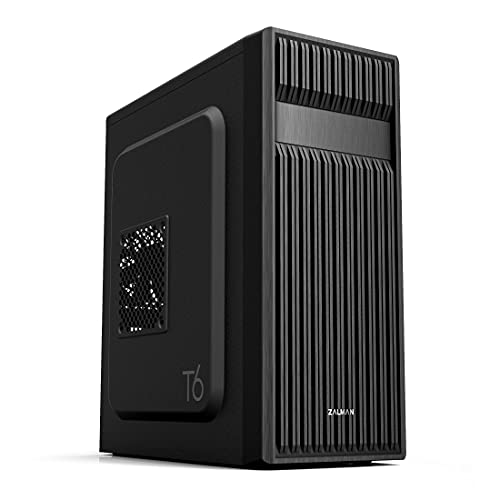
- Supports ATX, Micro-ATX, and Mini-ITX
- Includes one 120mm rear fan
- Has a 5.25-inch optical-drive bay
Best For: Simple builds using traditional drives or optical media
Compact Airflow Pick
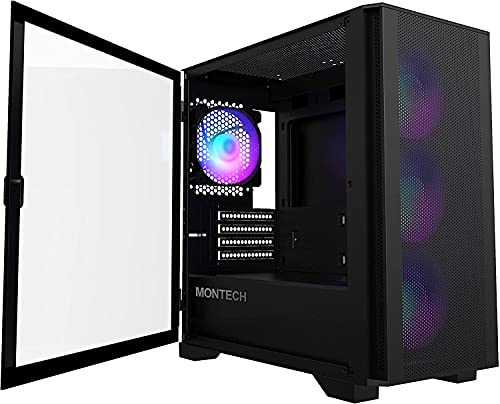
- Four 120mm ARGB fans included
- Supports Micro-ATX and Mini-ITX
- Mesh front with swivel glass panel
Best For: Compact, well-ventilated Micro-ATX gaming builds
Flexible Expansion Pick

- Supports up to eight 120mm fans
- Fits a front 360mm radiator
- Includes Type-C and magnetic dust filters
Best For: Upgradeable ATX builds with custom cooling plans
Showcase Airflow Pick
MONTECH TG3 Panoramic ATX PC Case

- Tiered interior display platform for custom accents
- Four included ARGB fans and up to nine fan positions
- 430 mm GPU and 180 mm cooler clearance
Best For: Showcase-focused gaming builds with extensive cooling needs
Flexible Premium Build Pick
Lian Li V100-ATX Mid-Tower PC Case

- Four PWM ARGB fans included with daisy-chain connectivity
- Fits GPUs up to 420 mm and top radiators up to 360 mm
- Tool-less panels, USB-C, dust filter, and GPU bracket
Best For: Customizable high-performance ATX and Micro-ATX builds
Mesh Airflow Value Pick

- Mesh front panel with four included 120 mm ARGB fans
- Supports ATX, Micro-ATX, and Mini-ITX motherboards
- Fits GPUs up to 340 mm and 360 mm radiators
Best For: Budget gaming builds using standard-sized components
Best Balanced Build
Zalman S3 Compact ATX Mid-Tower
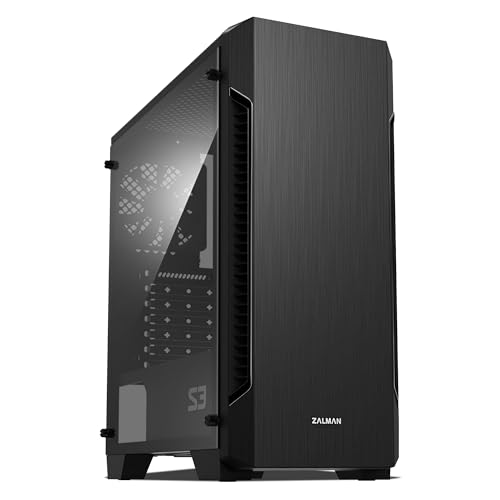
- Three pre-installed 120mm fans
- 330mm maximum GPU clearance
- Supports ATX, Micro-ATX, and Mini-ITX
Best For: Budget-conscious builders wanting flexible cooling and a restrained design
Best RGB Value
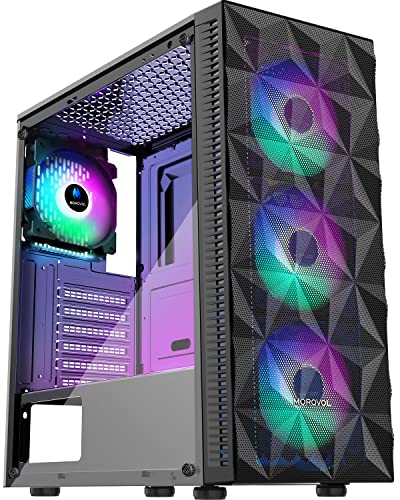
- Four pre-installed fixed-RGB fans
- Diamond-mesh airflow front panel
- Tempered-glass side panel
Best For: Entry-level gaming builds with visible RGB components
Best Fan Package

- Six pre-installed PWM ARGB fans
- Opening tempered-glass side door
- Supports air and water cooling
Best For: Gaming builders wanting customizable lighting and extensive included cooling
Panoramic Cooling Pick – MUSETEX K2 ARGB ATX Case
For shoppers comparing computer cases under 100, the MUSETEX K2 stands out by including seven pre-installed PWM ARGB fans. Its dual tempered-glass layout, Type-C connectivity, and generous hardware clearances make it a strong choice for a showcase gaming build.
Best For: Gaming builders who want included lighting, airflow, and room for larger components.
Pros:
- Includes seven adjustable-speed PWM ARGB fans, expandable to 10 total.
- Supports GPUs up to 400mm, CPU coolers up to 165mm, and top-mounted radiators up to 360mm.
- Features panoramic dual tempered glass and a front Type-C port.
Cons:
- The power-supply clearance is more limited when the hard-drive cage is installed.
- The case does not include a motherboard, graphics card, power supply, or radiator.
The K2 is a feature-rich option for a visually focused ATX build, particularly if you would otherwise need to purchase several case fans separately. Confirm your PSU and radiator dimensions before buying.
Budget Utility Pick – Zalman T6 ATX Mid-Tower Case
Among computer cases under 100, the Zalman T6 focuses on practical expandability and traditional drive support. Its mesh-patterned front and side panels, included 120mm rear fan, and support for ATX, Micro-ATX, and Mini-ITX boards suit straightforward home, office, or gaming builds.
Best For: Budget-conscious builders who need a 5.25-inch optical-drive bay and flexible motherboard compatibility.
Pros:
- Supports ATX, Micro-ATX, and Mini-ITX motherboards.
- Includes a pre-installed 120mm rear fan and room for up to four fans total.
- Offers a 5.25-inch external bay plus multiple 2.5-inch and 3.5-inch drive positions.
Cons:
- Only one fan is pre-installed.
- It will not fit ATX motherboards with side-facing SATA ports.
- Connectivity is limited to USB 3.0, USB 2.0, and separate audio ports.
The T6 is a sensible low-cost chassis for conventional components and storage layouts. Its optical-drive support is useful, but check your motherboard’s SATA-port orientation before committing.
Compact Airflow Pick – MONTECH AIR 100 ARGB Case
The MONTECH AIR 100 ARGB is a compact option for shoppers seeking computer cases under 100 without giving up included lighting. Designed for Micro-ATX and Mini-ITX builds, it combines a fine-mesh front, four pre-installed 120mm ARGB fans, dust filters, and a convenient swivel glass panel.
Best For: Space-conscious builders creating a compact Micro-ATX gaming PC.
Pros:
- Includes four 120mm ARGB fans and a lighting controller.
- Supports GPUs up to 330mm and CPU coolers up to 161mm.
- Provides a tool-free mesh front, swivel tempered-glass panel, and top and bottom dust filters.
Cons:
- It supports only Micro-ATX and Mini-ITX motherboards, not full-size ATX boards.
- Its compact dimensions may limit component choices compared with larger mid-towers.
The AIR 100 ARGB offers a well-rounded small-form-factor foundation with strong out-of-box cooling and easy access for maintenance. Verify GPU, cooler, radiator, and PSU measurements before assembling.
Flexible Expansion Pick – DARKROCK EC2 ATX Case
For buyers comparing computer cases under 100, the DARKROCK EC2 offers a flexible ATX layout with room for substantial cooling hardware. It supports up to eight 120mm fans, a front-mounted 360mm radiator, modern Type-C connectivity, and graphics cards up to 340mm.
Best For: Builders who want an adaptable ATX case for future cooling and graphics-card upgrades.
Pros:
- Supports ATX, Micro-ATX, and Mini-ITX motherboards.
- Accommodates up to eight 120mm fans and a front radiator up to 360mm.
- Includes tempered glass, magnetic top and bottom dust filters, and Type-C readiness.
Cons:
- Only one 120mm fan is pre-installed.
- It does not include the cooling hardware needed to fill its fan or radiator capacity.
- GPU clearance is limited to 340mm, so oversized cards require careful checking.
The EC2 is a useful blank canvas for a customized cooling setup, especially when you plan to add fans or liquid cooling later. Its broad motherboard support and 200mm PSU clearance add build flexibility.
Showcase Airflow Pick – MONTECH TG3 Panoramic ATX PC Case
For builders comparing computer cases under 100, the MONTECH TG3 stands out with a panoramic design, a tiered display platform, four included ARGB fans, and broad hardware clearance. It is designed to make the finished PC part of the desk setup while keeping expansion and cooling options flexible.
Best For: Showcase-focused gaming builds using ATX, Micro-ATX, Mini-ITX, or compatible back-connect motherboards.
Pros:
- Tiered interior platform provides dedicated space for collectibles and custom accents.
- Includes a GF360 U REV side intake and GF120 U rear exhaust for a simpler initial setup.
- Supports graphics cards up to 430 mm, CPU coolers up to 180 mm, and 360 mm radiators.
- Offers up to nine fan positions, Type-C connectivity, dust filtration, and back-connect motherboard support.
Cons:
- The showcase-oriented interior may not suit builders seeking a plain, understated case.
- Its ATX mid-tower dimensions require adequate desk and workspace room.
The TG3 is a strong choice when visual presentation matters as much as component compatibility. Its included cooling, large clearances, and rear-connect support give it room for ambitious builds, while the display platform adds a distinctive finishing touch.
Flexible Premium Build Pick – Lian Li V100-ATX Mid-Tower PC Case
Among computer cases under 100, the Lian Li V100 offers a polished feature set for builders who want included lighting, adaptable airflow, and support for high-end components. Four PWM-controlled ARGB fans, a tempered-glass presentation, and back-connect motherboard compatibility make it a flexible mid-tower option.
Best For: Clean, customizable ATX or Micro-ATX builds that need strong component clearance and convenient access.
Pros:
- Comes with four pre-installed PWM-controlled 120 mm ARGB fans with daisy-chain connectivity.
- Includes a 26-LED ARGB strip with motherboard-software synchronization.
- Supports GPUs up to 420 mm, CPU coolers up to 178 mm, and top radiators up to 360 mm.
- Tool-less side panels, USB-C, a dust filter, and an included GPU bracket simplify building and maintenance.
Cons:
- Its listed compatibility specifically emphasizes ATX, Micro-ATX, Mini-ITX, and back-connect ATX or Micro-ATX boards.
- The extensive lighting and display features may be unnecessary for minimalist builds.
The V100 balances appearance and practicality well. It arrives with a useful fan package, accommodates substantial GPUs and cooling hardware, and adds tool-less access for easier component work.
Mesh Airflow Value Pick – GAMDIAS AURA GC1 ELITE ARGB
For shoppers seeking computer cases under 100, the GAMDIAS AURA GC1 ELITE ARGB focuses on useful essentials: a mesh front panel, four built-in 120 mm ARGB fans, tempered-glass viewing, and broad motherboard support. Its mid-tower layout is aimed at accessible gaming builds with straightforward cooling.
Best For: Budget-conscious gaming PCs that prioritize front-panel airflow, included lighting, and standard component compatibility.
Pros:
- Mesh front panel and four pre-installed 120 mm ARGB fans support direct air intake.
- Tempered-glass side panel provides a clear view and uses tool-free installation.
- Supports ATX, Micro-ATX, and Mini-ITX motherboards with seven PCIe slots.
- Accommodates GPUs up to 340 mm, 360 mm radiators, and CPU coolers up to 160 mm.
Cons:
- Its 340 mm GPU limit is lower than the clearance offered by the other listed cases.
- Storage support is more limited, with two 3.5-inch or combined 2.5-inch/3.5-inch options plus two 2.5-inch trays.
The AURA GC1 ELITE ARGB is a practical value-oriented choice for a conventional gaming system. Its included fans and mesh intake reduce the need for immediate upgrades, while the component limits are best suited to standard-sized hardware.
Best Balanced Build – Zalman S3 Compact ATX Mid-Tower
If you want a practical computer case under 100, the Zalman S3 combines a clean brushed front panel with useful airflow features and broad motherboard compatibility. It includes three pre-installed 120mm fans, a full acrylic side panel, and room for graphics cards up to 330mm.
Best For: Budget-conscious builders who want a restrained design, easy component visibility, and flexible ATX support.
Pros:
- Supports ATX, Micro-ATX, and Mini-ITX motherboards.
- Includes three pre-installed 120mm fans and supports up to eight fans total.
- Features dual front ventilation, top and bottom dust filters, and a full acrylic side panel.
- Supports graphics cards up to 330mm and includes a USB 3.0 port.
Cons:
- The front radiator support is limited to 120mm.
- The side panel is acrylic rather than tempered glass.
- Storage capacity is limited to three internal bays.
The Zalman S3 is a sensible all-around option for a compact ATX build. Its cooling expandability and 330mm GPU clearance make it versatile, while the understated exterior suits builders who do not need elaborate lighting.
Best RGB Value – Morovol 621 Gaming Mid-Tower
Among computer cases under 100, the Morovol 621 stands out for its included lighting and airflow hardware. This mid-tower arrives with four fixed-RGB 120mm fans, a diamond-mesh front panel, and a tempered-glass side panel for displaying the build.
Best For: Entry-level gaming builds that prioritize included RGB fans, visible components, and straightforward cooling.
Pros:
- Comes with four pre-installed 120mm fixed-RGB fans.
- Diamond-mesh front panel is designed for strong airflow.
- Tempered-glass side panel makes components easy to display and access.
- Supports ATX, Micro-ATX, and Mini-ITX motherboards.
Cons:
- The RGB lighting is fixed and not addressable.
- Graphics card clearance is limited to 300mm.
- CPU cooler height is limited to 155mm.
The Morovol 621 offers a strong feature mix for a value gaming tower, especially if you want four fans without buying them separately. Check GPU and CPU cooler dimensions before ordering, since its clearances are more restrictive than some larger mid-towers.
Best Fan Package – MUSETEX NN8 ARGB Mid-Tower
The MUSETEX NN8 is a feature-heavy choice for shoppers comparing computer cases under 100. It includes six PWM ARGB fans, a polygonal mesh front, an opening tempered-glass side door, and support for both air and water cooling.
Best For: Gaming builders who want extensive included cooling, customizable ARGB lighting, and convenient access to internal components.
Pros:
- Includes six pre-installed PWM ARGB fans with adjustable speed.
- Addressable lighting can be controlled through a compatible 3-pin RGB motherboard connection.
- Opening tempered-glass side door provides convenient component access.
- Supports ATX, Micro-ATX, and Mini-ITX motherboards, with multiple storage configurations.
Cons:
- ARGB control requires a compatible 3-pin RGB motherboard connection.
- The supplied notes do not specify maximum GPU or CPU cooler clearance.
- The case does not include a motherboard, graphics card, power supply, or radiator.
The NN8 is the most enthusiast-oriented option here, pairing six adjustable fans with a highly accessible side door and broad storage flexibility. Confirm motherboard lighting compatibility and component dimensions before completing a build.
How We Picked the Best Computer Cases Under 100
We focused on practical value rather than appearance alone. Each case was evaluated for motherboard compatibility, cooling potential, included fans, front-panel connectivity, GPU and CPU cooler clearance, storage support, and ease of building. We also considered whether the design suits a specific type of buyer, such as a first-time builder, a compact-system user, or someone assembling a gaming PC.
Pricing can change, so confirm current cost and specifications before buying. Fan counts, included accessories, and supported hardware may vary by retailer or revision.
Quick Comparison
| Best For | Features to Prioritize | Good Match |
|---|---|---|
| High-airflow gaming | Mesh front, multiple fans, radiator support | Montech AIR 100 ARGB or GAMDIAS case |
| Panoramic showcase builds | Tempered glass, ARGB lighting, cable access | Montech TG3 or MUSETEX models |
| Compact Micro ATX systems | Shorter chassis, efficient interior layout | Montech AIR 100 ARGB |
| Basic budget builds | Simple layout, included fan, drive support | Zalman T6 or Zalman S3 |
| Modern connectivity | Front USB-C, accessible I/O panel | Type-C-ready models |
Key Buying Factors for Computer Cases Under 100
Motherboard and Component Compatibility
Check whether the case supports your motherboard size: ATX, Micro ATX, or Mini-ITX. Then verify maximum graphics-card length, CPU cooler height, and power-supply clearance. A case can technically support your motherboard while still being too tight for a large GPU or tower cooler.
Airflow and Cooling
A mesh front panel generally provides better intake than a solid panel, especially when paired with multiple fans. Look for at least one rear exhaust fan and room for additional front, top, or bottom fans. Preinstalled ARGB fans can improve value, but confirm their connector type and whether a controller is included.
Build Quality and Maintenance
Tempered-glass panels offer a better view of components but add weight and require careful handling. Tool-less panels, removable dust filters, spacious cable channels, and a hinged or easily removable side panel can make installation and cleaning substantially easier.
Front-Panel Features
USB-C is useful for newer phones, storage devices, and peripherals, but not every budget case includes it. Also check the exact USB standard, audio connections, fan-control options, and button placement before ordering.
Who Should Buy Which Computer Cases Under 100?
Choose a mesh-front model if temperatures and gaming performance matter most. Pick a tempered-glass ARGB case if you want a showcase build with lighting and visible components. A Micro ATX option makes more sense for a compact desk setup, while a traditional ATX mid-tower offers easier upgrades and more room for cable management.
For a low-cost office or general-purpose computer, prioritize straightforward construction, adequate ventilation, and drive compatibility over lighting. Enthusiasts planning a large graphics card, liquid cooler, or several storage drives should confirm every clearance measurement before purchase. The best computer case under $100 is the one that fits your hardware, cooling plan, and build style without requiring expensive add-ons.