A document camera with 4K output can make worksheets, books, small objects, and live demonstrations easier to see on a classroom display or video call. The best models combine sharp imaging with practical features such as autofocus, flexible connectivity, built-in lighting, and a design that fits your workspace.
We compared 10 standout options across image quality, capture area, connection types, portability, microphones, lighting, and classroom-friendly functions. Use the guide below to narrow the list based on how and where you plan to use your camera.
Best 10 Document Camera with 4K Output Picks for 2026
Best Value 4K-Ready Pick

- 8MP capture up to 3264 × 2448
- Up to 30 fps in Full HD
- Mac, Windows, and Chromebook support
Best For: USB-based teaching and presentations
Best for Large Materials

- 13MP sensor with 4K at 30 fps
- Captures documents up to A3 size
- Includes lighting and Documate software
Best For: Artwork, large documents, and classrooms
Best Dual-Connection Model
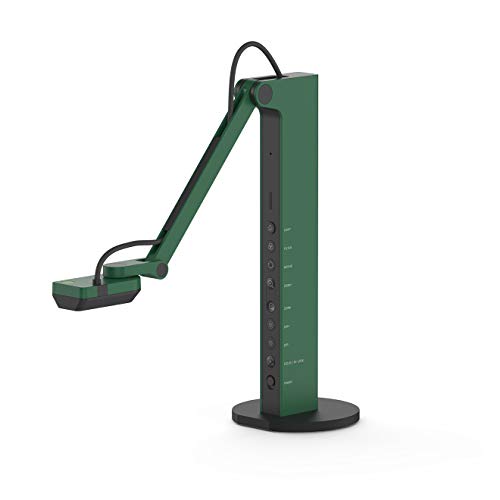
- USB capture up to 3264 × 2448
- Direct HDMI output up to 1080p
- Works as a webcam with built-in lighting
Best For: Projector, monitor, and computer flexibility
Best Portable 4K Design

- 13MP 4K capture at up to 30 fps
- Foldable 0.67-pound travel design
- Works as a document camera and webcam
Best For: Mobile teaching and compact workstations
Premium 4K Presenter

- 4K video at 30fps
- HDMI, RGB, and USB-C connectivity
- Lightweight foldable design
Best For: Portable, high-detail presentations
Flexible USB Visualiser

- 8MP capture up to 2448P at 30fps
- A3-size coverage with adjustable lighting
- USB-C plug-and-play with dual microphones
Best For: USB teaching and remote demonstrations
Direct-Output 4K Camera

- 4K at 30fps and 1080p at 60fps
- Direct HDMI/VGA output without a computer
- 13MP sensor with autofocus and 100x digital zoom
Best For: Classrooms using projectors or monitors
Best for Low-Light Classrooms

- 8MP Sony sensor with up to 3264 x 2448 capture
- Near-Ledger coverage with durable multi-joint arm
- AI pointer tracking and broad platform support
Best For: Teachers needing clear demonstrations in dim or mixed lighting
Best Wide-Angle Option

- 120° lens captures tabloid-size documents and larger objects
- 8MP Sony sensor with 2448p video at 30fps
- Plug-and-play support for computers and conferencing apps
Best For: Users who need broad document or object coverage
Best for Portable A3 Demonstrations

- 8MP, 2448p output at 30fps
- Foldable design with A3-size capture area
- Three-level LED lighting and dual microphones
Best For: Teachers needing portable large-format demonstrations
Best Value 4K-Ready Pick – IPEVO V4K
The IPEVO V4K is a practical choice if you want a document camera with 4K output capability for detailed live demonstrations, online teaching, or video conferencing. Its 8MP Sony CMOS sensor captures images up to 3264 × 2448 pixels, while autofocus and high frame rates help keep presentations responsive.
Best For: Teachers, presenters, and remote workers who need high-resolution USB capture across Mac, Windows, and Chromebook.
Pros:
- Captures Ultra HD images up to 3264 × 2448 pixels with an 8MP sensor.
- Streams at up to 30 fps in Full HD and uses fast autofocus for smoother demonstrations.
- Works with Mac, Windows, Chromebook, and a range of third-party applications.
- Multi-jointed stand and Sony CMOS processing support flexible, clearer imaging.
Cons:
- USB connectivity only; it does not offer direct HDMI output.
- Full-resolution capture runs at up to 15 fps rather than 30 fps.
- Computer performance requirements may be demanding for lag-free Full HD streaming.
The V4K balances strong image detail, responsive autofocus, and broad software compatibility. It is especially appealing when you primarily connect to a computer and want a capable document camera with 4K output without adding a separate display connection.
Best for Large Materials – INSWAN INS-2 4K
The INSWAN INS-2 is designed for buyers who need a document camera with 4K output for large documents, artwork, and classroom demonstrations. Its 13MP Sony sensor records 3840 × 2160 video at 30 fps, while the adjustable arm accommodates materials up to A3 size.
Best For: Professional educators, art instructors, and presenters displaying artwork, two-page spreads, or large-format materials.
Pros:
- Produces 4K Ultra HD video at 3840 × 2160 and 30 fps.
- A3 capture area suits large documents, artwork, and two-page layouts.
- Includes LED lighting, anti-glare sheet, brightness control, and dual-mode autofocus.
- Documate software adds annotation, recording, scanning, whiteboard, zoom, and OCR tools.
Cons:
- At 2.3 pounds, it is less portable than the foldable option in this roundup.
- Its USB connection may require an adapter for devices without compatible USB ports.
- Some listed compatibility depends on newer operating-system versions.
With its large capture area and presentation-focused software, the INS-2 is a strong fit for classrooms and exhibitions where coverage and clarity matter more than compact size. The built-in microphone and lighting also help create a more polished setup.
Best Dual-Connection Model – IPEVO VZ-R HDMI/USB
The IPEVO VZ-R stands out as a document camera with 4K output capability in USB mode while also offering direct HDMI connection for displays and projectors. It captures up to 3264 × 2448 through USB and up to 1920 × 1080 through HDMI, making it useful in both computer-based and standalone presentation setups.
Best For: Presenters and educators who want flexible HDMI projection plus USB webcam and conferencing support.
Pros:
- Supports both USB computer connection and direct HDMI output.
- Captures up to 3264 × 2448 in USB mode and streams up to 30 fps.
- Can function as a webcam with Mac, Windows PC, Chromebook, and conferencing software.
- Built-in LED light, tactile controls, fast focus, and a swiveling multi-jointed stand improve usability.
Cons:
- HDMI mode is limited to 1920 × 1080 rather than the camera’s maximum USB resolution.
- The package does not include an HDMI cable or wall power adapter.
- Its 2.2-pound build is less travel-friendly than a compact foldable camera.
The VZ-R is the most versatile choice when you need to switch between direct projector output and computer-based workflows. Be sure to budget for the missing HDMI cable and wall adapter if your setup requires them.
Best Portable 4K Design – INSWAN INS-Flip 4
The INS-Flip 4 is a document camera with 4K output built for mobility. Its 13MP Sony sensor delivers 3840 × 2160 video at up to 30 fps, while the foldable 0.67-pound body packs into a pencil-case-sized form for teaching, meetings, and demonstrations on the go.
Best For: Mobile educators, remote presenters, and users who want one compact device for document viewing and webcam calls.
Pros:
- Captures 4K video at up to 30 fps with a 13MP Sony sensor.
- Folds to approximately 8.58 × 2.46 × 0.68 inches and weighs about 0.67 pounds.
- Works as both a document camera and a webcam.
- Supports materials larger than B4 and macro shots from about 3.9 inches.
Cons:
- USB 2.0 Type-A connectivity may require an adapter with newer devices.
- Its lightweight foldable design may provide less stability than a heavier desktop base.
- It does not provide HDMI output for direct projector connection.
The INS-Flip 4 is a compelling option when portability is a priority without giving up 4K detail. Its dual-purpose design and included carry pouch make it particularly convenient for instructors and presenters who frequently change locations.
Premium 4K Presenter – ELMO MX-P3
The ELMO MX-P3 is a strong choice if you need a document camera with 4K output for detailed classroom instruction, presentations, or demonstrations. It combines 4K video at 30fps with one-push autofocus, broad connection options, and a lightweight foldable design.
Best For: Presenters who prioritize sharp 4K image quality, portability, and flexible HDMI, RGB, and USB connectivity.
Pros:
- Captures 4K Ultra HD video at 30fps for clear, detailed presentations.
- Offers HDMI, RGB, and USB Type-C connectivity for compatibility with varied setups.
- Foldable 1.2-pound design is convenient to transport and store.
- One-push autofocus and a 14.7 x 11.1-inch imaging area simplify demonstrations.
Cons:
- Its 4K output may require a compatible display or input device to take full advantage of the resolution.
- The listed dimensions and imaging area may be more than needed for small desk setups.
The MX-P3 stands out for buyers who want presentation-grade clarity without giving up portability. Its combination of 4K capture, autofocus, and multiple outputs makes it a versatile premium option.
Flexible USB Visualiser – Kitchbai KB-700
The Kitchbai KB-700 is a practical document camera with 4K output for USB-based teaching, web conferencing, and live demonstrations. Its 8MP sensor delivers up to 2448P at 30fps, while adjustable lighting, image reversal, and a foldable multi-joint design add flexibility.
Best For: Teachers and remote presenters who need a USB visualiser for A3-size materials, close-ups, and common Windows, macOS, or Chrome OS apps.
Pros:
- Covers documents and objects up to approximately A3 size with an area listed at 16.5 inches.
- Three-level brightness adjustment helps in darker or brighter environments.
- Manual image reversal supports left/right and up/down correction.
- Plug-and-play USB-C connection and built-in dual microphones suit online meetings and lessons.
Cons:
- Its listed 2448P resolution is below native 4K capture.
- USB connectivity may be less suitable for setups that require direct HDMI output.
- The extensive articulated design may take more setup than a simple fixed webcam.
The KB-700 is best viewed as a versatile USB visualiser rather than a native 4K camera. It offers useful classroom features, broad computer compatibility, and convenient lighting controls for live instruction.
Direct-Output 4K Camera – JOYUSING V500-4K
The JOYUSING V500-4K is designed for buyers who want a document camera with 4K output and multiple operating modes. It can stream at 4K 30fps or 1080p 60fps, connect directly to a display through HDMI or VGA, and operate with or without a computer.
Best For: Classrooms and presentation rooms that need direct projector or monitor output, strong zoom capability, and Windows or Mac software support.
Pros:
- 13MP CMOS sensor supports 4K at 30fps and 1080p at 60fps.
- HDMI and VGA output can connect directly to a TV, monitor, or projector without a computer.
- Autofocus and up to 100x digital zoom support detailed document and object viewing.
- Three-level dimmable LED lighting helps manage challenging lighting conditions.
Cons:
- At 2 kg, it is substantially less portable than lightweight foldable alternatives.
- Software must be downloaded separately from the manufacturer’s support site for computer-based features.
- The 100x zoom specification is digital rather than optical, so extreme magnification may reduce detail.
The V500-4K is a capable choice when direct display connectivity matters more than compact size. Its 13MP sensor, autofocus, lighting, and included HDMI cable make it well suited to fixed teaching or presentation setups.
Best for Low-Light Classrooms – OKIOCAM S2-4K
If you need a document camera with 4k output for teaching, presenting, or hybrid meetings, the OKIOCAM S2-4K combines an 8MP Sony Exmor R sensor with 30fps streaming and near-Ledger-size coverage. Its back-illuminated sensor is especially useful when classroom lighting is limited.
Best For: Teachers and presenters who want low-light clarity, broad document coverage, and AI-assisted pointer tracking.
Pros:
- Captures up to 3264 x 2448 pixels at up to 30fps.
- Near-Ledger coverage and a durable multi-joint arm suit classroom demonstrations.
- OKIOPoint AI tracking, annotation, recording, snapshots, and PIP add presentation flexibility.
- Supports Windows, Mac, iPadOS, Chromebook, interactive displays, and major conferencing platforms.
Cons:
- iPad use requires iPadOS 17 or above.
- The broad software feature set may be more than casual users need.
The S2-4K is a strong classroom-oriented choice when image quality in imperfect lighting and teaching-focused software matter more than a minimalist setup.
Best Wide-Angle Option – IPEVO V4K PRO 120
The IPEVO V4K PRO 120 is a document camera with 4k output designed for expansive views. Its 120-degree lens can show tabloid-size documents and larger objects, while the Sony CMOS sensor, built-in LED, and swift autofocus support clear presentations and webcam use.
Best For: Presenters, remote workers, and educators who need wide coverage for large documents, objects, or video calls.
Pros:
- 120-degree lens provides tabloid-size capture range and broad object coverage.
- 8MP Sony CMOS sensor records up to 2448p at 30fps.
- Swift autofocus, built-in LED lighting, and up to 12x digital zoom support flexible framing.
- USB plug-and-play compatibility works with Mac, Windows, Chromebooks, Zoom, Meet, Skype, and Teams.
Cons:
- The camera has no image stabilization.
- Its wide-angle design may be unnecessary for small, standard-size documents.
Choose the V4K PRO 120 if wide framing is a priority. It offers a practical balance of 4K-class detail, large-area coverage, and straightforward USB connectivity.
Best for Portable A3 Demonstrations – THUSTAR 8MP 4K
For shoppers seeking a document camera with 4k output and portable A3 coverage, the THUSTAR 8MP model offers a foldable design, 30fps live transmission, and adjustable lighting. Manual brightness controls and image-reversal functions make it adaptable for classroom demos and video calls.
Best For: Teachers and presenters who need foldable A3-size coverage, built-in lighting, and integrated microphones.
Pros:
- 8MP camera delivers up to 2448p output at 30fps.
- Captures an A3-size area and folds for easier storage and transport.
- Three-level LED lighting and manual brightness controls help with difficult lighting.
- Dual built-in microphones include noise-reduction support, and the camera works with Windows, macOS, and Chrome OS.
Cons:
- Uses a USB 2.0 interface.
- The supplied notes specify compatibility with Windows, macOS, and Chrome OS rather than iPadOS.
- Image adjustments such as reversal and brightness require manual control.
The THUSTAR is a useful value-oriented option for mobile teaching setups that benefit from A3 coverage, foldability, lighting controls, and built-in audio.
How We Picked the Best Document Camera with 4K Output
We focused on cameras capable of producing 4K or UHD output, while also considering the features that determine whether that resolution is useful in practice. Our comparison includes image sensors, autofocus performance, lens coverage, capture size, lighting, microphones, and compatibility with common computers and displays.
Connectivity was another priority. USB models are convenient for video calls and classroom software, while HDMI, VGA, or multi-mode cameras can connect directly to projectors, monitors, and interactive panels. We also considered foldable designs, adjustable arms, OCR, AI tracking, image rotation, and low-light performance where those features add meaningful value.
Quick Comparison
| Best For | Features to Prioritize | Most Suitable Design |
|---|---|---|
| Remote teaching and video calls | USB plug-and-play setup, autofocus, built-in microphone | Compact USB camera |
| Classroom projection | HDMI or VGA output, broad capture area, strong lighting | Multi-mode visual presenter |
| Books and large documents | A3 or near-ledger capture, wide lens, stable arm | Full-size overhead camera |
| Frequent travel | Foldable frame, low weight, integrated cable storage | Portable foldable model |
| Interactive lessons | AI tracking, OCR, image controls, fast autofocus | Feature-rich classroom model |
Key Buying Factors for a Document Camera with 4K Output
Resolution and Real-World Sharpness
4K output provides extra detail for fine print, diagrams, handwriting, and small objects, but sensor quality and lighting matter just as much. Look for fast autofocus and a clear lens, especially if you will switch between flat documents and three-dimensional demonstrations.
Capture Area and Lens Coverage
Check whether the camera covers letter, A4, A3, or near-ledger-size material. A wide field of view is useful for larger worksheets and textbooks, but an excessively wide lens may make small text appear smaller on screen.
Connections and Software Compatibility
USB is typically the simplest option for Windows, macOS, Chromebooks, and conferencing applications. HDMI and VGA outputs are valuable when you need direct connection to a projector or display without relying on a computer. Confirm the included cable and operating-system support before buying.
Lighting, Sound, and Controls
Built-in LED lighting can reduce shadows in dim rooms, while a microphone helps with basic presentation audio. Physical image controls such as rotation, inversion, exposure, and freeze can be more useful during lessons than a higher specification on paper.
Who Should Buy Which Document Camera with 4K Output?
Teachers who mainly present worksheets or books should prioritize a stable arm, a generous capture area, autofocus, and simple USB or HDMI operation. Remote instructors and meeting presenters will usually prefer a compact USB model with a built-in microphone and reliable plug-and-play compatibility.
Choose a foldable camera if portability and storage are important, particularly for shared classrooms or mobile workstations. Buyers connecting directly to professional displays should look for multi-output models with HDMI or VGA. If you regularly scan large documents or demonstrate objects, select a wide-view A3-capable camera with adjustable lighting and a sturdy base.