The best document cameras with built-in lighting make worksheets, books, handwritten notes, and physical demonstrations easier to show on screen. Integrated LEDs help reduce shadows and improve visibility when room lighting is uneven.
This roundup compares 10 USB models across resolution, capture area, autofocus, microphones, compatibility, and portability so you can choose the right camera for teaching, remote meetings, or live demonstrations.
Best 10 Document Cameras with Built in Lighting Picks for 2026
Best Large-Format 4K Pick

- 13MP Sony sensor with 4K video
- Captures documents up to A3 size
- Built-in LED and Documate software
Best For: Large documents, artwork, and professional classroom presentations
Best for Smooth Streaming
IPEVO V4K Ultra HD Document Camera

- 8MP Sony CMOS imaging
- Up to 30 fps at Full HD
- Fast autofocus and multi-jointed stand
Best For: Live teaching, web conferencing, and distance learning
Best Value with Built-In LED

- 8MP Sony camera with 30 fps video
- Built-in LED and brightness control
- Includes autofocus and Documate software
Best For: Everyday teaching, demonstrations, and online meetings
Best Wide-Angle Option

- 120-degree lens for tabloid-size views
- Built-in LED and swift autofocus
- AI noise reduction and webcam support
Best For: Large objects, expansive documents, and flexible video conferencing
Best Budget Classroom Pick
PAKOTOO 8MP USB Document Camera

- 3-level LED lighting and 10 exposure settings
- A3 coverage with autofocus and macro capture
- Foldable design with image-reversal buttons
Best For: Teachers needing an affordable, flexible USB document camera
Best Brand-Name Presenter
ELMO OX-1 1080p Visual Presenter

- 1080p USB video with an 8MP CMOS sensor
- One-push autofocus and A3 capture area
- Built-in microphone and 8x software zoom
Best For: USB presentations where dependable autofocus and audio matter
Best Feature-Rich 4K Option
THUSTAR 8MP 4K Document Camera

- 14-bead ring light with 3 brightness levels
- 4K-capable, 8MP video at up to 30fps
- Dual microphones and foldable A3-size design
Best For: Live teaching and demonstrations needing lighting, audio, and detail
Best Premium 4K Pick
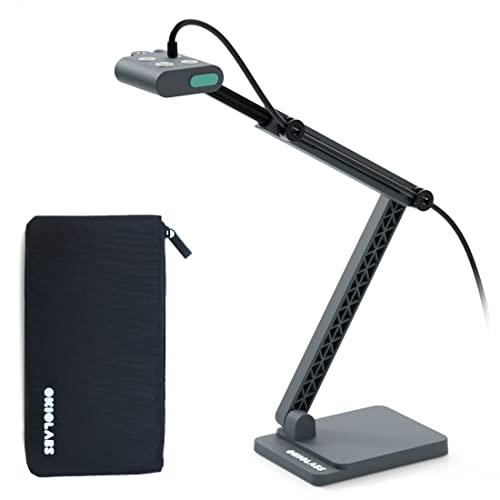
- 13MP sensor with 4K video at 30 fps
- Integrated LED light and autofocus
- OKIOPoint tracking with broad compatibility
Best For: High-detail teaching and professional presentations
Best Adjustable Lighting

- Three-level built-in LED brightness control
- A3-size coverage for larger materials
- Foldable design with dual microphones
Best For: Classrooms needing flexible lighting and broad coverage
Best Portable 1080p Option

- 1080p video at 30 fps with a 360-degree lens
- Foldable, travel-friendly USB design
- Dual noise-reduced microphones
Best For: Portable remote teaching and everyday video demonstrations
Best Large-Format 4K Pick – INS-2 UHD 4K Document Camera
The INSWAN INS-2 is a strong choice among document cameras with built in lighting when you need detailed, large-format visuals. Its 13MP Sony sensor records 4K video, while the adjustable arm accommodates documents and artwork up to A3 size.
Best For: Professional educators, art instructors, exhibitions, and presentations involving large documents, artwork, or two-page spreads.
Pros:
- 4K capture with a 13MP Sony sensor
- A3 capture area and flexible multi-joint arm
- Built-in LED, anti-glare sheet, autofocus, macro mode, and brightness control
- Documate software includes annotation, OCR, recording, scanning, and whiteboard tools
Cons:
- USB-A connectivity may require an adapter for some newer devices
- At 2.3 pounds, it is heavier than some compact document cameras
The INS-2 stands out when image detail and coverage matter most. It is especially well suited to classrooms or creative demonstrations where standard letter-size capture is limiting.
Best for Smooth Streaming – IPEVO V4K Ultra HD Document Camera
The IPEVO V4K combines 8MP Ultra HD imaging with high frame rates, making it a practical option among document cameras with built in lighting for live lessons and web conferencing. Its Sony CMOS sensor is designed to help preserve color and reduce noise in dimmer environments.
Best For: Teachers and presenters who prioritize responsive live streaming, fast focusing, and broad compatibility with Mac, Windows, and Chromebook systems.
Pros:
- 8MP capture up to 3264 × 2448 pixels
- Streams at up to 30 fps in Full HD
- Fast autofocus helps reduce interruptions between materials
- Multi-jointed stand and a 13.46 × 10.04-inch maximum shooting area
Cons:
- The supplied notes do not specify a built-in LED light
- No zoom function is listed
- Maximum capture area is smaller than some A3 or tabloid-capable models
The V4K is a sensible streaming-focused choice if quick focus and smooth Full HD video are more important than the highest resolution or expansive capture area.
Best Value with Built-In LED – INS-1 Classic Document Camera
The INSWAN INS-1 offers a useful balance of image quality, lighting, and presentation controls. As document cameras with built in lighting go, it is designed for everyday teaching and conferencing, with an 8MP Sony camera, built-in LED, anti-glare sheet, and USB plug-and-play setup.
Best For: Teachers, remote instructors, and home-office presenters who need a compact camera for documents, demonstrations, and online meetings.
Pros:
- 8MP capture up to 3264 × 2448 pixels
- Built-in LED and seven-step brightness control
- Autofocus, macro capability, and anti-glare sheet support close-up demonstrations
- Includes Documate software with annotation, rotation, recording, and snapshots
Cons:
- Uses USB-A connectivity
- Does not offer 4K capture
- The 14.72 × 11-inch viewing size is less expansive than A3-capable models
The INS-1 is a practical all-rounder for routine document sharing and close-up demonstrations. Its integrated light and software controls make it particularly convenient when room lighting is inconsistent.
Best Wide-Angle Option – IPEVO V4K PRO 120
The IPEVO V4K PRO 120 is a versatile pick among document cameras with built in lighting, combining a 120-degree lens with a 4K-capable design and adjustable arm. It can show tabloid-size documents, larger objects, or serve as a webcam for video calls and streaming.
Best For: Presenters who need an unusually broad field of view for oversized materials, group demonstrations, or flexible webcam use.
Pros:
- 120-degree wide-angle lens supports expansive views
- Built-in LED, Sony CMOS sensor, and swift autofocus
- AI noise reduction helps reduce ambient background noise
- USB plug-and-play compatibility with Mac, Windows, Chromebook, and major conferencing platforms
Cons:
- The supplied specifications list 8MP still resolution and 2448p video rather than a clearly stated 4K video mode
- Wide-angle viewing can be more than necessary for standard documents
- At 860 grams, it is less lightweight than the basic V4K
The V4K PRO 120 is the better fit when coverage and flexibility take priority. Its broad lens makes it useful beyond document capture, especially for larger objects and webcam-style presentations.
Best Budget Classroom Pick – PAKOTOO 8MP USB Document Camera
The PAKOTOO KB700 is a practical choice if you need document cameras with built in lighting for classroom demonstrations, remote lessons, or video calls. Its 3-level LED light, autofocus button, A3 capture area, and foldable multi-joint design cover common teaching needs, though setup requires selecting the USB camera manually on your computer.
Best For: Teachers and distance-learning users who want a foldable USB camera with adjustable lighting and image-reversal controls.
Pros:
- Three LED brightness levels plus 10 exposure levels help in dim or uneven lighting.
- 2448P resolution, one-push autofocus, and macro capture down to 3.94 inches.
- Captures A3-sized materials and folds for easier storage and transport.
- Supports Windows PCs, Macs, Chromebooks, Zoom, Teams, Google Meet, and Skype.
Cons:
- Does not support HDMI or zoom features.
- Not compatible with iPad according to the supplied notes.
- It is not plug and play; users must select “USB Camera” in the computer’s system.
The PAKOTOO stands out for combining built-in fill lighting, flexible positioning, and A3 coverage at a classroom-friendly size. It is a sensible fit when USB connectivity is sufficient and you do not need HDMI output or automatic system selection.
Best Brand-Name Presenter – ELMO OX-1 1080p Visual Presenter
The ELMO OX-1 is a streamlined option for buyers seeking document cameras with built in lighting from an established visual-presenter brand. It combines 1080p USB video, an 8MP CMOS sensor, one-push autofocus, a built-in microphone, and an A3 capture area in a foldable design.
Best For: Educators and presenters who prioritize straightforward 1080p USB operation, autofocus, and a built-in microphone.
Pros:
- Captures 1080p Full HD at up to 15fps or 720p at up to 30fps over USB.
- One-push autofocus and an A3 capture area support documents and larger teaching materials.
- Built-in microphone and up to 8x software-based digital zoom add presentation flexibility.
- Folds from its setup dimensions for more compact storage.
Cons:
- The supplied notes specify USB connectivity rather than HDMI output.
- 1080p capture is limited to 15fps.
- Digital zoom is software-based rather than optical.
The OX-1 is a polished choice for USB-based teaching and presentation workflows. Its built-in microphone, autofocus, and A3 support make it easy to use, while the included internal flash/light specification supports the need for illumination during capture.
Best Feature-Rich 4K Option – THUSTAR 8MP 4K Document Camera
The THUSTAR combines 4K-capable video, 8MP imaging, and document cameras with built in lighting features for live demonstrations and distance education. Its 14-bead ring light offers three brightness levels, while autofocus, dual microphones, A3 coverage, and a foldable arm make it versatile for classroom use.
Best For: Teachers and presenters who want high-resolution USB video, adjustable illumination, and built-in noise-reducing microphones.
Pros:
- 4K video specification with 8MP resolution and up to 30fps output.
- 14-bead ring light provides three brightness levels for dark or bright environments.
- One-push autofocus, 10 brightness adjustments, and macro capture from 3.94 inches.
- Foldable multi-joint design covers A3 materials and includes dual silicon microphones.
Cons:
- Uses USB 2.0 connectivity, which may limit flexibility compared with HDMI-equipped models.
- The supplied notes do not list iPad compatibility.
- Image-reversal adjustments are manual rather than automatic.
The THUSTAR is the strongest match here for buyers who want extensive built-in lighting controls alongside high-resolution capture. Its dual microphones and broad software compatibility also make it well suited to live online instruction, provided USB 2.0 meets your setup requirements.
Best Premium 4K Pick – OKIOCAM S2 Pro
If you want document cameras with built in lighting for polished lessons, demonstrations, or meetings, the OKIOCAM S2 Pro is a high-resolution option. Its 13MP sensor records 4K video at 30 fps, while autofocus and the integrated LED light help keep materials clear in varied lighting.
Best For: Teachers, presenters, and remote professionals who need detailed 4K capture, broad software compatibility, and interactive pointing features.
Pros:
- Captures 4K video at 30 fps with a maximum viewing area of 13.6 x 10.6 inches.
- Built-in LED light supports capturing materials in dim locations.
- Includes autofocus, OKIOPoint tracking, annotation tools, and compatibility with Windows, Mac, Chromebook, Zoom, Teams, and Google Meet.
Cons:
- Its 4K capabilities may be more than needed for basic document sharing.
- Requires a USB connection and compatible software for operation.
The S2 Pro stands out for image quality and presentation features. Its weighted metal base and reinforced arm are designed for durability, making it a strong choice for frequent classroom or office use.
Best Adjustable Lighting – Kitchbai KB-700
For buyers comparing document cameras with built in lighting, the Kitchbai KB-700 offers practical brightness control for classrooms and video calls. Its three-level LED light, adjustable image reversal, and A3-size coverage make it versatile for documents, objects, and demonstrations.
Best For: Teachers and presenters who need flexible lighting, large-area coverage, and a foldable design.
Pros:
- Three brightness levels help compensate for dark or bright environments.
- Captures up to A3-size materials across a maximum coverage area of 16.5 x 11.6 inches.
- Foldable multi-joint design, USB-C plug-and-play setup, and dual built-in microphones.
Cons:
- Its 8MP sensor provides less detail than the 13MP 4K model in this roundup.
- Focus is activated with a button rather than described as continuous autofocus.
The KB-700 is a flexible visualizer for everyday teaching. Its adjustable lighting and image orientation controls are particularly useful when room conditions or camera placement make a clean display difficult.
Best Portable 1080p Option – Gawervan USB Doc Camera
The Gawervan USB document camera is a compact choice for buyers seeking document cameras with built in lighting for everyday remote teaching and video calls. It captures 1080p video at 30 fps, uses a 360-degree adjustable lens, and folds for easier transport.
Best For: Teachers, homeschool users, and home-office presenters who prioritize portability, simple USB setup, and clear 1080p demonstrations.
Pros:
- Captures worksheets, live demonstrations, and 3D objects in 1080p at 30 fps.
- Foldable design and rotating lens support portable, multi-angle use.
- Built-in dual microphones are designed to reduce background noise, with compatibility across Windows, Mac, Chromebook, Zoom, Teams, and Skype.
Cons:
- Manual focus requires user adjustment for sharp images.
- It records at 1080p rather than 4K.
- The supplied notes do not specify an integrated LED light, so lighting performance may depend on the room setup.
The Gawervan is best viewed as a portable webcam-document-camera hybrid. It offers straightforward connectivity and useful audio features, but shoppers specifically requiring built-in illumination should verify the lighting configuration before buying.
How We Picked the Best Document Cameras with Built in Lighting
We focused on practical features that affect everyday classroom and presentation use: image resolution, autofocus performance, lighting controls, capture size, microphone quality, connection type, operating-system support, and foldability. Models with 8MP or higher sensors can provide detailed live views, while 4K-capable cameras may offer extra clarity when showing small text, diagrams, or objects.
Because product specifications vary by configuration, check the seller’s current listing for included cables, software support, warranty details, and exact resolution modes before buying.
Quick Comparison
| Priority | Look for | Best suited to |
|---|---|---|
| Maximum detail | 4K video and 13MP sensors | Fine print, art, science demonstrations, and professional presentations |
| Everyday teaching | 8MP capture, autofocus, LED illumination, and A3 support | Worksheets, books, handwriting, and classroom instruction |
| Remote meetings | USB webcam modes, a built-in microphone, and broad OS compatibility | Hybrid teaching, conferencing, and online tutoring |
| Portability | Foldable arms, compact construction, and one-cable USB setup | Mobile educators and shared workspaces |
Key Buying Factors for Document Cameras with Built-In Lighting
Resolution and Focus
Choose 4K or a high-megapixel sensor when you regularly display small text or detailed objects. Autofocus is useful for switching between flat documents and three-dimensional items, while one-push or swift autofocus can speed up demonstrations.
Lighting and Capture Area
Built-in LEDs are especially helpful for shadow reduction and consistent exposure. Adjustable brightness or multiple light levels give you more control over glossy pages and darker rooms. An A3 capture area is preferable if you need to show large worksheets, maps, textbooks, or craft projects; A4 coverage may be enough for standard paperwork.
Audio, Compatibility, and Controls
A built-in microphone can simplify video calls, but dedicated audio equipment may still sound better in noisy rooms. Confirm compatibility with your computer or Chromebook and the video apps you use. Image rotation, inversion, smart pointers, and software controls can also make live instruction more efficient.
Build and Setup
Look for a stable base, flexible positioning, and a foldable design if storage matters. USB plug-and-play operation reduces setup time, but verify whether the camera requires a particular USB port or proprietary software.
Who Should Buy Which Document Cameras with Built in Lighting?
Teachers who need a versatile everyday tool should prioritize an 8MP or higher USB camera with LED levels, autofocus, a microphone, and A3 coverage. Choose a 4K or 13MP model for detailed demonstrations, artwork, technical materials, or professional presentations. Buyers focused on hybrid meetings should select a webcam-compatible model with reliable microphone support and broad Mac, Windows, or Chromebook compatibility.
For frequent travel or shared classrooms, a foldable camera with simple USB setup is the most convenient choice. If precise framing matters, consider a wider field-of-view lens, but make sure it does not make text appear too small at your normal working distance. Finally, match the camera’s lighting controls and software features to your room, teaching style, and presentation platform rather than choosing on resolution alone.