The best document cameras with HDMI output make it easy to display books, worksheets, objects, experiments, and handwritten notes on a large screen without relying on complicated software. HDMI connectivity is especially useful for classrooms, meeting rooms, and hybrid teaching setups.
This roundup compares 10 models with practical differences in resolution, zoom, connectivity, portability, and ease of use. Whether you need a straightforward 1080p camera or a more advanced 4K model, the right choice depends on how and where you plan to present.
Best 10 Document Cameras with Hdmi Output Picks for 2026
Best 4K Versatility
JOYUSING V513 13MP Document Camera

- 13MP capture and 4K streaming at up to 30 fps
- HDMI/USB dual-mode operation
- Autofocus, LED light, and larger-than-A3 coverage
Best For: High-resolution classroom projection, recording, and distance learning
Best Simple HDMI Setup

- Full HD 1080p video capture
- Standard HDMI connection
- Built-in microphone and one-button recording
Best For: Straightforward classroom and presentation projection
Best Portable Dual-Mode Pick
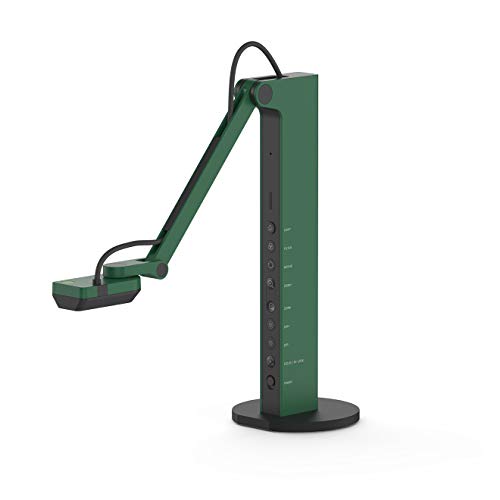
- Direct HDMI and plug-and-play USB modes
- Works with Mac, Windows, and Chromebook
- Portable stand, autofocus, LED light, and webcam use
Best For: Mobile teaching, hybrid presentations, and video conferencing
Best Zoom and Microscope Support
Epson DC-13 HD Document Camera

- 1080p HDMI output at up to 30 fps
- 16x digital zoom for detailed demonstrations
- Includes microscope adapter and broad connectivity
Best For: Science instruction, magnified materials, and classroom recording
Premium 4K Flexibility

- HDMI and USB dual-mode operation
- 13MP sensor with up to 4K HDMI video
- Autofocus, LED light, and tactile controls
Best For: Classrooms and presentations using interactive displays
High-Zoom Presentation Specialist

- HDMI output with built-in switcher
- 96x total optical and digital zoom
- Adjustable camera head and arm
Best For: Fixed presentation setups needing detailed close-ups
Versatile Three-Mode Value

- VGA, HDMI, and USB connectivity
- 8MP capture with autofocus and 100x digital zoom
- Dimmable LED lighting for challenging conditions
Best For: Flexible classroom and distance-learning setups
Best High-Definition Pick
AVer 300AFHD 5MP Document Camera

- 5MP sensor with autofocus
- HDMI output and 720p capture
- 16x zoom/pan with LED light
Best For: HDMI presentations requiring simple, responsive controls
Best Advanced Connectivity
ELMO TT-12F 4K Document Camera
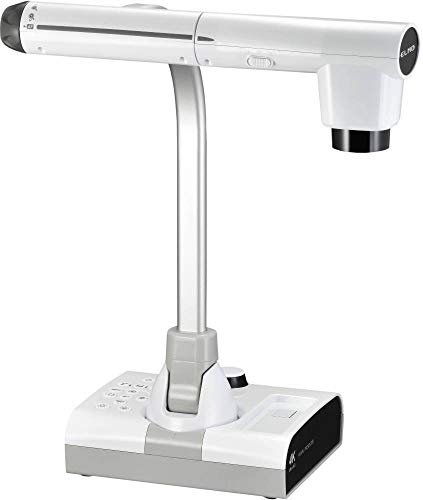
- HDMI, RGB/VGA, and USB 3.0
- Autofocus with optical and digital zoom
- Multiple image modes and SD card support
Best For: Multi-display classroom and lecture setups
Best Wireless Option

- HDMI, USB, VGA, and Wi-Fi
- 1080p video with an 8MP sensor
- Up to 6 hours on a 7200mAh battery
Best For: Wireless teaching and flexible hybrid presentations
Best 4K Versatility – JOYUSING V513 13MP Document Camera
For shoppers comparing document cameras with hdmi output, the JOYUSING V513 stands out for its 13MP sensor, autofocus, and dual-mode operation. It can stream up to 4K at 30 fps when connected to a computer, while also supporting computer-free use through HDMI.
Best For: Teachers, presenters, and distance-learning users who want high-resolution imaging and flexible computer or HDMI operation.
Pros:
- 13MP image capture supports up to 4160 x 3120 resolution with a PC.
- Supports lag-free 4K streaming at up to 30 fps.
- Autofocus, LED lighting, and a shooting area larger than A3 improve presentation flexibility.
- Multi-jointed stand and compatibility with Windows and Mac support regular classroom use.
Cons:
- Software must be downloaded from the manufacturer’s website for computer use.
- The 1.8 kg weight may be less convenient for frequent transport.
The V513 is a strong choice when image detail and connection flexibility matter most. Its PC-free HDMI capability is especially useful for direct projection, while its high-resolution USB mode suits recording and live streaming.
Best Simple HDMI Setup – Lumens DC170 Ladibug 1080p
If you want document cameras with hdmi output and straightforward controls, the Lumens DC170 Ladibug offers direct HDMI connectivity and Full HD 1080p video. Its built-in microphone and one-button recording make it practical for lessons, demonstrations, and presentations.
Best For: Educators and presenters who prioritize dependable HDMI projection, simple recording, and professional image quality.
Pros:
- Standard HDMI interface delivers high-quality digital video.
- 1080p video capture provides clear Full HD output.
- Built-in microphone and one-button recording simplify audio/video capture.
- Supports SD, SDHC, and SDXC cards for extra storage.
Cons:
- Its listed optical zoom is 2x, which is less extensive than some digital-zoom models.
- At 4 pounds, it is not the lightest option for mobile setups.
The DC170 focuses on ease of use rather than unusually high resolution. It is a sensible HDMI-first option for users who want Full HD output, onboard recording, and a professional image sensor without relying on complicated controls.
Best Portable Dual-Mode Pick – IPEVO VZ-R 8MP Visual Tool
The IPEVO VZ-R is a portable option for buyers seeking document cameras with hdmi output that can also connect to a computer over USB. It supports direct connection to a TV, monitor, or projector, doubles as a webcam, and includes a swiveling head, adjustable stand, and LED light.
Best For: Mobile teachers, remote presenters, and users who need one camera for projection, video calls, and computer-based capture.
Pros:
- HDMI and USB dual-mode connectivity works with displays and computers.
- Compatible with Mac, Windows PC, Chromebook, and third-party software.
- 8MP camera, autofocus, noise reduction, and color reproduction support clear images.
- Portable reinforced stand, built-in controls, and LED lighting suit flexible setups.
Cons:
- The package does not include an HDMI cable or wall power adapter.
- HDMI mode is limited to up to 1920 x 1080, despite higher USB-mode capture capability.
The VZ-R is particularly appealing when portability and versatility outweigh maximum HDMI resolution. Its webcam functionality and Chromebook compatibility broaden its usefulness beyond traditional document projection.
Best Zoom and Microscope Support – Epson DC-13 HD Document Camera
Epson DC-13 High-Definition Document Camera with HDMI, 16x Digital Zoom and 1080p Resolution,White
Check Price On AmazonFor buyers evaluating document cameras with hdmi output for detailed demonstrations, the Epson DC-13 combines 1080p video with 16x digital zoom. HDMI, USB, VGA, and SD card support provide multiple connection and recording options, while the included microscope adapter expands its teaching applications.
Best For: Classrooms, science demonstrations, and presenters who need strong magnification and microscope compatibility.
Pros:
- HDMI output delivers 1080p video at up to 30 fps.
- 16x digital zoom helps display small text and fine details.
- Included microscope adapter supports many standard microscopes.
- Built-in microphone, one-touch A/V recording, and multiple interfaces add flexibility.
Cons:
- At 5.6 pounds, it is relatively heavy for portable use.
- The listed photo sensor resolution is 2MP, lower than several higher-resolution document cameras.
The DC-13 is a practical choice for users who value magnification, microscope work, and broad connectivity. Its 1080p HDMI output is adequate for live instruction, while the included accessories support a more complete presentation setup.
Premium 4K Flexibility – IPEVO VZ-R Ultra
For shoppers comparing document cameras with HDMI output, the IPEVO VZ-R Ultra stands out with both direct HDMI connectivity and USB operation. Its 13MP Sony CMOS sensor supports up to 4K video in HDMI mode, while autofocus, built-in lighting, and tactile controls make it well suited to live demonstrations.
Best For: Classrooms, hybrid teaching, and presentations to interactive panels, TVs, monitors, or projectors without a computer.
Pros:
- HDMI and USB dual-mode connectivity
- 13MP imaging with up to 4K HDMI video
- Autofocus, LED lighting, and real-time image controls
- Durable, portable stand with three-year manufacturer warranty
Cons:
- USB mode and HDMI mode have different maximum resolutions
- Optional scanning features require a separate upgrade module
The VZ-R Ultra is a strong all-around choice when direct display connections and high image detail matter. Its dual-mode design also keeps it useful for computer-based online instruction.
High-Zoom Presentation Specialist – ELMO TT-12ID
The ELMO TT-12ID is a presentation-focused option among document cameras with HDMI output. It combines HDMI connectivity, a 3.4MP CMOS sensor, smooth 30 fps video, and an extensive 96x optical-and-digital zoom range for showing details from different viewing angles.
Best For: Presenters and educators who need powerful zoom, adjustable positioning, and built-in presentation tools.
Pros:
- HDMI connectivity with built-in switcher
- 96x total optical and digital zoom
- Adjustable free-angle camera head and arm
- Includes remote control, USB cable, RGB cable, and Image Mate software media
Cons:
- Heavy 11.1-pound design
- Manual focus and manual exposure require more adjustment
- 3.4MP resolution is lower than newer high-resolution models
The TT-12ID prioritizes reach and presentation control over portability. It makes the most sense for a permanent or semi-permanent teaching setup where its large zoom range is more valuable than a compact footprint.
Versatile Three-Mode Value – JOYUSING V508
The JOYUSING V508 offers a practical three-mode setup for buyers seeking document cameras with HDMI output. It supports VGA, HDMI, and USB connections, captures up to 8MP images, and can project directly to a monitor or projector without requiring computer software.
Best For: Teachers and distance-learning users who want flexible connections, autofocus, and adjustable lighting at a practical feature level.
Pros:
- VGA, HDMI, and USB connectivity
- 8MP sensor with up to 3264 x 2448 capture
- Autofocus, 100x digital zoom, and video recording
- Three-level dimmable LED lighting and included HDMI cable
Cons:
- Digital zoom may provide less detail than optical zoom
- Software must be downloaded from the manufacturer
- One-year manufacturer guarantee is shorter than some competing coverage
The V508 is a flexible choice for mixed classroom equipment because it supports both direct projection and computer use. Its adjustable light and broad connection range are especially useful when setup conditions vary.
Best High-Definition Pick – AVer 300AFHD 5MP Document Camera
The AVer 300AFHD is a practical choice among document cameras with HDMI output when you want a dedicated high-definition unit with straightforward controls. Its 5MP sensor, autofocus, HDMI connectivity, LED lighting, and 16x zoom support clear presentations of documents and objects.
Best For: Classrooms, training rooms, and presenters who prioritize HDMI connectivity, autofocus, and simple operation.
Pros:
- 5MP sensor for clear image quality
- HDMI connectivity and 720p video capture
- Autofocus, 16x zoom/pan, and fast response time
- Built-in LED light and one-button recording
Cons:
- Video capture resolution is listed as 720p
- At 4.5 pounds, it is less suited to frequent portability
The 300AFHD emphasizes dependable presentation features rather than wireless flexibility. It is a strong fit if HDMI output and responsive, well-lit close-ups are your main requirements.
Best Advanced Connectivity – ELMO TT-12F 4K Document Camera
The ELMO TT-12F stands out among document cameras with HDMI output by combining HDMI and RGB/VGA connectivity with USB 3.0 and extensive image controls. Its autofocus, optical and digital zoom, multiple shooting modes, and SD card support make it adaptable for different presentation setups.
Best For: Schools, lecture halls, and presenters who need multiple display connections and flexible image modes.
Pros:
- Supports HDMI, RGB/VGA, and USB 3.0 interfaces
- Autofocus with optical and digital zoom
- Multiple shooting modes, including emphasis and black-and-white
- Supports SD card media and JPEG/MP4 files
Cons:
- Listed video capture resolution is 480p despite the 4K-focused product title
- Package weight is listed at 11.4 pounds
- It is not water resistant
The TT-12F offers the broadest connection and presentation-control set of these options. Review the supplied resolution specifications carefully, but consider it when compatibility with existing classroom or conference equipment matters most.
Best Wireless Option – JOYUSING 8MP Four-Mode Camera
The JOYUSING four-mode model is a versatile option among document cameras with HDMI output, adding Wi-Fi, USB, and VGA connections to its HDMI interface. Its 8MP sensor, 1080p video, autofocus/manual focus, battery operation, and broad device compatibility suit both in-person and online teaching.
Best For: Teachers, distance-learning users, and presenters who need wireless operation, multiple outputs, and extended battery life.
Pros:
- HDMI, USB, VGA, and Wi-Fi connectivity
- 1080p video at 30 fps with an 8MP sensor
- 7200mAh battery provides up to 6 hours of continuous use
- Compatible with Windows, macOS, Chromebook, and Android systems
Cons:
- Software must be downloaded from the manufacturer’s website
- Fixed aperture and no flash may limit lighting flexibility
- It is listed as waterproof, but the supplied notes do not describe an IP rating or usage limits
The JOYUSING is the most flexible choice for mixed wired and wireless workflows. Its battery and compatibility range are particularly useful when presenting away from a fixed desk or combining classroom and web-conferencing tools.
How We Picked These Document Cameras with Hdmi Output
We focused on models that include HDMI connectivity and are designed for live document, object, or demonstration display. The selection covers classroom-focused cameras, portable dual-mode units, wireless options, and higher-resolution models for users who want sharper detail.
We compared resolution, autofocus, zoom capability, lighting, connection options, compatibility, portability, and the types of screens each camera can support. Because specifications and included accessories can vary, check the current listing before purchase—especially for HDMI cables, power requirements, and software features.
Quick Comparison
| Feature | What to look for | Best suited to |
|---|---|---|
| Resolution | 1080p for everyday display; 4K for fine text and detailed objects | Classrooms, labs, art, and demonstrations |
| Connections | HDMI for direct display; USB for computers and recording | Flexible teaching and presentation setups |
| Zoom | Optical zoom preserves detail better; digital zoom is convenient but may soften images | Distance viewing and close-up work |
| Portability | Foldable designs, dual modes, or battery operation | Mobile instructors and shared rooms |
| Lighting | Built-in LED illumination helps with dim rooms and close-ups | Documents, specimens, and small objects |
Key Buying Factors for Document Cameras with Hdmi Output
Resolution and Image Quality
1080p is generally sufficient for worksheets, books, and handwriting on classroom displays. Choose a 4K-capable model if viewers need to inspect small print, artwork, scientific specimens, or intricate physical demonstrations. A higher megapixel rating can help, but lens quality and lighting also affect clarity.
HDMI Setup and Compatibility
HDMI lets you connect directly to a projector, monitor, television, or interactive display, often with less setup than a computer-based workflow. Confirm whether the camera provides HDMI output, whether your display accepts the supported resolution, and whether the required cable is included. USB is valuable when you also want video conferencing, recording, or computer control.
Focus, Zoom, and Positioning
Autofocus is convenient for switching between pages and objects, while manual controls can be preferable for stable demonstrations. Consider the zoom range and camera arm flexibility if the unit will show objects from a distance or capture close-up details.
Portability and Power
For shared classrooms or traveling presentations, prioritize a foldable body, modest weight, and simple controls. Battery-powered or wireless models can reduce cable clutter, but wired cameras may provide a more dependable signal for long sessions.
Who Should Buy Which Document Cameras with Hdmi Output?
For everyday classroom teaching: Choose a reliable 1080p HDMI model with autofocus, built-in lighting, and straightforward controls.
For hybrid or remote instruction: Look for dual HDMI/USB connectivity so you can display directly on a screen or use the camera with conferencing software.
For detailed demonstrations: A 4K model with strong zoom and a flexible camera arm is the better fit for fine print, artwork, lab work, and small objects.
For mobile presenters: Consider a portable, foldable, or battery-equipped camera that can move easily between rooms without a complicated setup.