If you want faster filing, cleaner digital archives, and less setup friction, document scanners with touchscreen controls make everyday scanning much easier.
Below, we focus on models that balance speed, wireless connectivity, duplex scanning, and simple onboard controls for home offices and small teams.
Best 10 Document Scanners with Touchscreen Picks for 2026
High-Speed Touchscreen Productivity

- 4.3-inch color touchscreen with ScanWay scanning
- Up to 45 ppm duplex scanning
- 100-sheet feeder with Wi-Fi and USB
Best For: High-volume users who want fast, touchscreen-driven scanning
Compact Wireless Simplicity

- 2.8-inch color touchscreen
- Up to 30 ppm with duplex scanning
- Wireless plus USB-C connectivity
Best For: Home offices that want a compact touchscreen scanner
Touchscreen ScanSnap Convenience
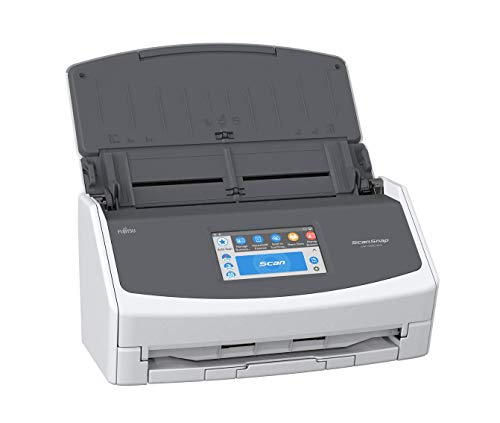
- 4.3-inch touchscreen with easy destination scanning
- Handles documents, receipts, photos, and cards
- Up to 30 ppm with a 50-page ADF
Best For: Mixed-use users who want easy touchscreen destination scanning
Security-Focused Office Control

- 2.8-inch color touchscreen control
- Up to 40 ppm with 60-page capacity
- Triple-layer security and multiple connections
Best For: Small offices that need fast, secure touchscreen scanning
Space-Saving Everyday Scanner
ScanSnap iX1300 Wireless or USB Double-Sided Color Document Scanner

- Compact design saves desk space
- One-touch scanning with auto cleanup
- Works with USB, Wi-Fi, and cloud apps
Best For: Home and small-office users who need an easy, compact scanner for mixed documents
Touchscreen Wireless Workhorse
Epson Workforce ES-580W Wireless Color Duplex Desktop Document Scanner

- 4.3-inch touchscreen for easy control
- 100-sheet ADF handles larger batches
- Wireless scanning works without a computer
Best For: Busy home offices and small businesses that want touchscreen control and batch scanning
Premium High-Speed Touchscreen Scanner
ScanSnap iX2500 Premium Wireless or USB High-Speed Document Scanner

- Large touchscreen with personalized profiles
- Fast 45 ppm double-sided scanning
- 100-sheet feeder with Wi-Fi 6 and USB-C
Best For: Power users and busy offices that need speed, customization, and touchscreen control
AI-Ready Receipt Pro

- 4.3-inch touchscreen with ScanWay computer-free scanning
- Up to 45 ppm duplex speed with 100-sheet ADF
- AI extraction and financial software integration
Best For: Receipt-heavy users who want fast touchscreen scanning and organization
Most Advanced ScanSnap

- Large touchscreen with personalized scan profiles
- 45 ppm duplex speed and 100-sheet feeder
- Wi‑Fi 6, USB-C, and cloud-ready workflow
Best For: Multi-device users who want customizable touchscreen scanning
Best Simple Pick

- Large touchscreen with customizable profiles
- 45 ppm duplex scanning and 100-sheet feeder
- Wi‑Fi 6, USB-C, and automatic file sorting
Best For: Buyers who want the ScanSnap touchscreen workflow in white
High-Speed Touchscreen Productivity – Epson WorkForce ES-590W
If you want document scanners with touchscreen controls for a busy desk, the Epson WorkForce ES-590W is built for throughput and convenience. It combines a large 4.3-inch color touchscreen, wireless scanning, and a 100-sheet feeder with fast duplex capture up to 45 ppm, making it a strong fit for people who scan a lot of paperwork and want fewer steps.
Best For: High-volume users who want wireless, touchscreen-driven scanning and fast duplex performance.
Pros:
- Large 4.3-inch color touchscreen supports ScanWay computer-free scanning to email, cloud storage, or USB flash drives.
- Fast single-pass double-sided scanning up to 45 ppm with a 100-sheet automatic document feeder.
- Built-in Wi-Fi and USB connectivity for flexible use from a computer or mobile device.
- AI-ready scanning is designed to convert documents into smart, AI-ready data.
Cons:
- Requires a bit more desk space than ultra-compact scanners.
- Its feature set is geared toward productivity, so casual users may not need all the extras.
The ES-590W stands out as a practical pick if you value speed, a larger touchscreen, and direct-to-destination scanning. It is especially appealing when you want a desktop scanner that can handle regular office workloads without feeling slow or clunky.
Compact Wireless Simplicity – Brother ADS-1800W
For shoppers comparing document scanners with touchscreen controls in a smaller footprint, the Brother ADS-1800W focuses on simple operation and solid everyday speed. Its 2.8-inch color touchscreen, wireless scanning, and USB-C connection make it easy to fit into a home office or a lightweight work setup without giving up useful workflow features.
Best For: Home offices and small workspaces that need a compact scanner with a touchscreen and wireless support.
Pros:
- Built-in 2.8-inch color touchscreen helps enhance scanned documents, photos, and receipts.
- Wireless scanning with the Brother Mobile Connect app plus included USB-C connectivity.
- Up to 30 ppm scanning with single-pass double-sided capture and a 20-page ADF.
- Can handle small items like business cards, ID badges, and plastic cards through the card slot.
Cons:
- 20-page automatic document feeder is smaller than higher-capacity models.
- Not the fastest option in this roundup for bigger batch jobs.
The ADS-1800W is a sensible choice when space is tight but you still want touchscreen control and flexible connectivity. It balances speed, convenience, and compact design well for everyday scanning needs.
Touchscreen ScanSnap Convenience – Fujitsu ScanSnap iX1500
The Fujitsu ScanSnap iX1500 is a versatile option for buyers looking at document scanners with touchscreen controls and broad everyday use. Its large 4.3-inch touch screen, Wi-Fi and USB connectivity, and built-in software make it easy to scan documents, business cards, receipts, and photos to common destinations like cloud services or desktop folders.
Best For: Users who want a touchscreen scanner for mixed document types and simple destination-based scanning.
Pros:
- Large 4.3-inch touch screen makes destination-based scanning easy to use.
- Supports documents, business cards, receipts, photos, and ID cards.
- Scans up to 30 ppm with a 50-page automatic document feeder.
- Built-in software can organize and clean up scans with automatic cropping and blank page deletion.
Cons:
- Renewed unit with a 90-day limited warranty.
- Not as fast as the highest-throughput models here.
This model is a strong fit if you want a friendly touchscreen interface and a flexible scanner for mixed office paperwork. It is especially practical when your scanning routine includes more than just standard documents.
Security-Focused Office Control – Brother ADS-3350W
Brother ADS-3350W Wireless High-Speed Desktop Scanner | 2.8-inch Touchscreen | Scans Up to 40ppm1
Check Price On AmazonIf you need document scanners with touchscreen controls and stronger office security features, the Brother ADS-3350W is a compelling desktop choice. It pairs a 2.8-inch color touchscreen with fast scan speeds up to 40 ppm, a 60-page feeder, and multiple connectivity options for users who want quick, controlled scanning in a small office or work-from-home setup.
Best For: Small offices and remote workers who want fast scanning, touchscreen control, and security-minded features.
Pros:
- 2.8-inch color touchscreen gives users direct on-device control.
- Fast single- and dual-sided scanning up to 40 ppm with a 60-page capacity.
- Multiple connection options include wireless, Ethernet, USB, and Brother Mobile Connect support.
- Triple-layer security is designed to help safeguard sensitive documents and device connections.
Cons:
- Touchscreen is smaller than the larger 4.3-inch displays on some rivals.
- Its advanced security focus may be more than casual users need.
The ADS-3350W is a balanced pick for offices that want speed, secure connectivity, and touch-based control in one compact unit. It is especially attractive if handling sensitive paperwork is part of your scanning routine.
Space-Saving Everyday Scanner – ScanSnap iX1300 Wireless or USB Double-Sided Color Document Scanner
If you want a document scanner with touchscreen-level simplicity, the ScanSnap iX1300 is built for fast everyday use in a compact footprint. It handles documents, photos, cards, and thick items, and the one-touch workflow makes it easy to start scanning without driver setup.
Best For: Home or small-office users who want a compact scanner that is easy to use and flexible enough for mixed document types.
Pros:
- Space-saving design fits small desks and stays out of the way.
- One-touch scanning with automatic de-skew, color optimization, and blank page removal.
- Wireless or USB connectivity for Mac, PC, mobile devices, cloud services, and Chromebook via app.
- Handles documents, photos, cards, and thick items in one device.
Cons:
- 20-sheet standard capacity is smaller than larger ADF models.
- Designed more for convenience than high-volume office throughput.
The iX1300 is a strong pick if you value simplicity, compact size, and reliable results without much setup. It is especially appealing for mixed home scanning tasks where ease of use matters more than maximum feeder size.
Touchscreen Wireless Workhorse – Epson Workforce ES-580W Wireless Color Duplex Desktop Document Scanner
The Epson WorkForce ES-580W is a practical choice if you want document scanners with touchscreen control and strong wireless convenience. Its 4.3-inch touchscreen, 100-sheet ADF, and duplex scanning make it well suited to everyday paperwork and office digitizing.
Best For: Busy home offices and small businesses that want a wireless scanner with a built-in touchscreen and a large feeder.
Pros:
- 4.3-inch touchscreen makes scanning and destination selection simple.
- 100-sheet ADF supports larger batch jobs.
- Wireless scanning can send files to a phone, tablet, computer, USB, email, or cloud services without a computer.
- Includes OCR for searchable PDFs and editable Word or Excel files.
Cons:
- More of a desktop workhorse than a compact space-saver.
- Resolution is listed at 300 dpi, which may not suit users prioritizing maximum detail.
If you want a scanner that feels closer to an office appliance than a simple accessory, the ES-580W fits well. The touchscreen and large feeder make it especially useful for repetitive document workflows.
Premium High-Speed Touchscreen Scanner – ScanSnap iX2500 Premium Wireless or USB High-Speed Document Scanner
For shoppers comparing document scanners with touchscreen interfaces, the ScanSnap iX2500 stands out with a large touchscreen, fast duplex scanning, and a 100-sheet feeder. It is designed for users who want speed, wireless flexibility, and quick profile-based workflows from the scanner itself.
Best For: Power users and busy offices that want a fast, highly configurable scanner with touchscreen controls and broad device support.
Pros:
- Large touchscreen supports personalized profiles directly on the scanner.
- Fast 45 ppm double-sided scanning speeds up document workflows.
- 100-sheet feeder and Wi-Fi 6 or USB-C connectivity add flexibility.
- Handles documents, receipts, photos, business cards, and ID or insurance cards.
Cons:
- More premium than basic home scanning needs may require.
- Heavier and larger than the compact iX1300.
The iX2500 is the most feature-rich option here, especially if you want speed, customization, and wireless reliability in one scanner. It is a strong fit for people who scan often and want the workflow to stay organized from the start.
AI-Ready Receipt Pro – Epson RapidReceipt RR-620W
If you want a document scanner with touchscreen for receipts, invoices, and everyday paperwork, the Epson RapidReceipt RR-620W leans hard into speed and automation. It combines a 4.3-inch color touchscreen, Wi‑Fi, USB, duplex scanning, and AI-ready extraction to turn stacks of paper into organized digital data.
Best For: Small offices and home users who want fast, touchscreen-driven scanning with receipt and financial software integration.
Pros:
- 4.3-inch color touchscreen supports ScanWay computer-free scanning to email, cloud storage, or USB drives
- Up to 45 ppm duplex scanning and a 100-sheet automatic document feeder help handle bigger batches quickly
- AI PRO Technology is designed to extract and convert receipts and documents into smart data
- Works with QuickBooks, TurboTax, Excel, and more for financial organization
Cons:
- Best fit is narrower if you do not need receipt and financial workflow features
- Windows minimum system requirements are listed, so platform fit should be checked carefully
This model stands out when your scanning needs go beyond simple file capture and into workflow automation. For buyers comparing document scanners with touchscreen, it offers a strong mix of speed, guided operation, and cloud-ready convenience.
Most Advanced ScanSnap – ScanSnap iX2500 Black
The ScanSnap iX2500 is built for buyers shopping for document scanners with touchscreen who want quick setup, profile-based workflows, and dependable batch scanning. Its large touchscreen, Wi‑Fi 6, USB-C, and 100-sheet feeder make it a flexible pick for home offices and busy desks.
Best For: Users who want customizable, touchscreen-driven scanning across PC, Mac, mobile devices, and cloud services.
Pros:
- Large touchscreen lets you choose personalized profiles directly on the scanner
- Fast 45 ppm double-sided scanning with a 100-sheet document feeder
- Built-in Wi‑Fi 6 and USB-C provide stable wireless or wired connection options
- Automatic optimization, naming, and sorting help manage documents, receipts, photos, and business cards
Cons:
- Cloud and app-heavy workflow may be more than casual users need
- Best value depends on whether you will use the touchscreen profiles and automation regularly
Overall, the iX2500 is the most feature-rich pick in this group for people who want a touchscreen scanner that feels polished and flexible. It is especially appealing if you want one device to handle scanning and file organization across multiple platforms.
Best Simple Pick – ScanSnap iX2500 White
This white ScanSnap iX2500 delivers the same touchscreen-centric scanning experience for buyers who want document scanners with touchscreen in a lighter color finish. It focuses on fast double-sided scans, simple profile selection, and automatic organization for documents, receipts, photos, and business cards.
Best For: People who want the iX2500’s touchscreen workflow in a white finish for mixed paper and digital organization.
Pros:
- Large touchscreen supports customizable profiles and quick access to scan destinations
- Up to 45 ppm duplex scanning with a 100-sheet document feeder
- Wi‑Fi 6 and USB-C support flexible wireless or wired use
- Automatic optimization, naming, and sorting simplify document management
Cons:
- Feature set is broad enough that casual users may not use everything
- White color is mainly an aesthetic choice rather than a functional difference
The white iX2500 is best viewed as a style variation on a very capable scanner platform. If you want touchscreen control plus fast batch scanning and cloud-friendly organization, it brings the same core strengths as the black model.
How We Picked the Best Document Scanners with Touchscreen
We prioritized Document Scanners with Touchscreen controls that are easy to navigate, quick to set up, and practical for real-world scanning. Key factors included scan speed, duplex support, wireless and USB connectivity, feeder reliability, and the usefulness of the touchscreen for starting jobs or saving presets.
Quick Comparison
In this category, the main tradeoffs are speed versus compact size, and premium controls versus basic simplicity. Faster desktop models are better for shared offices and heavy batches, while smaller scanners suit users who scan occasionally and want a lighter footprint. Touchscreen-equipped models are especially helpful when multiple people need to use the same scanner without opening software first.
Key Buying Factors for Document Scanners with Touchscreen
Scan Speed and Duplexing
Look for a rated pages-per-minute figure that matches your workload, but also check duplex scanning. Two-sided scanning saves time and helps keep contracts, invoices, and forms organized.
Touchscreen Usability
A larger, clearer screen makes it easier to choose scan destinations, manage presets, and start workflows directly on the device. If multiple users will share the scanner, intuitive touchscreen menus matter more than raw specs alone.
Paper Handling and Document Types
Check the automatic document feeder size, supported paper thickness, and whether the scanner handles receipts, cards, or mixed stacks without constant refeeding. This is especially important for offices that scan varied paperwork.
Connectivity and Software
Wireless models are convenient for shared spaces, while USB remains valuable for stable direct connections. Cloud and app support can streamline saving to email, folders, and storage services, but only if the software is easy to use.
Who Should Buy Which Document Scanners with Touchscreen?
Choose a high-speed touchscreen scanner if you process frequent batches and want quick one-touch operation. Pick a compact model if desk space is limited and your scanning needs are moderate. If you handle receipts alongside documents, a receipt-friendly scanner can reduce sorting and manual entry. For multi-user offices, prioritize the most straightforward touchscreen workflow and dependable wireless performance over extras you may never use.