A Lightning to USB camera adapter can help connect a card reader, camera, flash drive, or other USB accessory to a compatible iPhone or iPad. The right choice depends on what you want to plug in—and whether you need to charge your device at the same time.
These six options include Apple’s adapter and third-party models with different port layouts. Use the guide below to narrow down the features worth paying for before you buy.
Best 6 Lightning to USB Camera Adapter Picks for 2026
Best for Everyday Transfers
RICHUPON Lightning USB Camera Adapter

- Plug-and-play photo imports
- Charging port for longer sessions
- Connects card readers and other USB accessories
Best For: Everyday iPhone and iPad photo transfers with charging
Apple Pick for iPad Pro
Apple Lightning to USB 3 Camera Adapter

- Photos app import workflow
- JPEG, RAW, and supported video formats
- USB 3 on specified iPad Pro models
Best For: iPad Pro camera imports and powered USB peripherals
Versatile Accessory Pick
Untvie Lightning to USB 3.0 Adapter

- Connects several USB accessory types
- Listed support for RAW and JPEG
- Conflicting connector notes need checking
Best For: Multiple USB accessories, after confirming compatibility
Broad Peripheral Support
Wahbite Lightning USB Camera Adapter

- No app required
- Works with listed storage and input devices
- Files app access for flash drives
Best For: Connecting varied USB peripherals to a Lightning device
Charging While Connected
Microwoo Lightning USB Camera Adapter
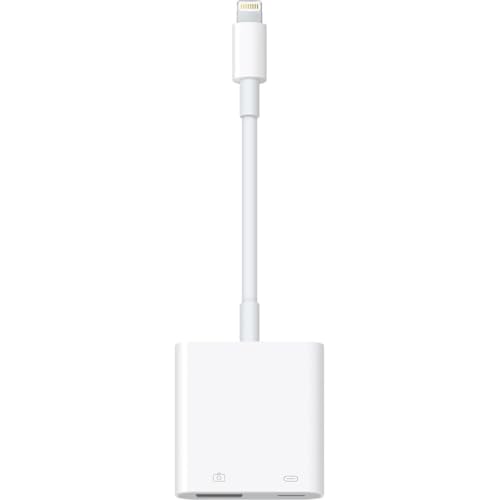
- Adds a charging port
- No app required
- Supports listed USB peripherals
Best For: Camera imports during longer, charging-enabled sessions
Files App Transfers

- Two-way Files transfers on iOS 13+
- Plug-and-play camera imports
- Lists a peripheral power limit
Best For: Photo imports and Files app transfers on Lightning devices
Best for Everyday Transfers – RICHUPON Lightning USB Camera Adapter
This lightning to usb camera adapter gives Lightning-equipped iPhones and iPads a USB connection for importing camera photos and videos. Its separate charging port is useful when a transfer takes longer than expected.
Best For: iPhone or iPad users who want straightforward photo imports while keeping their device charged.
Pros:
- Plug-and-play operation requires no additional app.
- Charging port lets you power the device during transfers.
- Also supports connections to accessories such as card readers, keyboards, and MIDI devices.
Cons:
- Not intended for use with a Mac or PC.
- The supplied details do not specify a USB transfer-speed rating.
Choose this one for its practical mix of charging and USB accessory support, rather than for a specified speed advantage.
Apple Pick for iPad Pro – Apple Lightning to USB 3 Camera Adapter
Apple’s lightning to usb camera adapter is geared toward importing photos and videos from a digital camera to an iPad Pro. Once connected, the iPad Pro opens Photos so you can select imports and organize them into albums.
Best For: iPad Pro owners who want Apple’s camera-import workflow and support for powered USB peripherals.
Pros:
- Supports JPEG and RAW photos plus H.264 and MPEG-4 video.
- Can connect hubs, Ethernet adapters, audio/MIDI interfaces, and card readers when powered with a USB Power Adapter.
- Supports USB 3 transfer speeds on the listed 12.9-inch and 10.5-inch iPad Pro models.
Cons:
- The 9.7-inch iPad Pro transfers at USB 2 speeds.
- Expanded peripheral use calls for a USB Power Adapter.
The key distinction is model-dependent speed: check your iPad Pro generation if USB 3 transfers are a priority.
Versatile Accessory Pick – Untvie Lightning to USB 3.0 Adapter
This lightning to usb camera adapter is described as an MFi-certified, plug-and-play option for connecting USB accessories to compatible Lightning iPhones and iPads. Its listed uses go beyond camera imports to flash drives, card readers, keyboards, and MIDI gear.
Best For: Lightning-device users considering one adapter for camera files and several types of USB accessory.
Pros:
- Listed support includes JPEG and RAW photos and H.264 and MPEG-4 video.
- Includes a charging port and a compact cable design.
- Reinforced connector and cable are described as built for frequent bending.
Cons:
- The supplied notes conflict about whether the adapter fits Lightning or USB-C devices.
- Despite “USB 3.0” in the title, no device-specific transfer speeds are provided.
Its accessory range is appealing, but confirm the connector and device compatibility with the seller before ordering; the listing’s own notes disagree.
Broad Peripheral Support – Wahbite Lightning USB Camera Adapter
This lightning to usb camera adapter is a practical pick if you want to connect more than a camera to a Lightning iPhone or iPad. Wahbite lists support for flash drives, card readers, keyboards, mice, hubs, and several music and audio devices, with no app required.
Best For: Lightning-device owners who want one adapter for file access and a variety of USB peripherals.
Pros:
- Plug-and-play setup without a separate app.
- Supports cameras, storage devices, and listed MIDI and audio peripherals.
- Compatible with the listed Lightning iPhone and iPad models running iOS 9.2 or later.
Cons:
- No charging port is listed.
- A connected flash drive may require opening Browse in the Files app rather than appearing automatically.
Choose this for its broad stated peripheral support, but check your device and workflow before buying. The listing mentions both USB 3.0 support and a separate 25–30 MB/s transfer figure, so it does not establish one speed for every setup.
Charging While Connected – Microwoo Lightning USB Camera Adapter
This lightning to usb camera adapter stands out for its additional charging port. Microwoo says you can charge a compatible iPhone or iPad while viewing photos or videos through the USB connection, making it useful for longer import sessions.
Best For: Importing camera media while keeping a Lightning iPhone or iPad charged.
Pros:
- Separate charging port allows charging during photo or video viewing.
- Plug-and-play operation without an app.
- Lists support for cameras, flash drives, keyboards, mice, MIDI keyboards, and gamepads.
Cons:
- Requires a compatible Lightning device; check the listed models before ordering.
- No specific transfer-speed figure is provided in the notes.
Its charging port is the clearest reason to choose it over a simpler USB-only adapter. The product is advertised as Apple MFi certified, but the supplied notes do not independently verify that certification.
Files App Transfers – Lightning USB Camera Adapter
This lightning to usb camera adapter is geared toward both camera imports and file handling on compatible Lightning iPhones and iPads. Its notes describe importing photos through Photos and, on iOS 13 or later, transferring supported files in both directions through the Files app.
Best For: Users who want camera imports plus Files app transfers on iOS 13 or later.
Pros:
- Plug-and-play camera connection without removing the camera’s memory card.
- Lists two-way transfers through Files on iOS 13 and later.
- Supports listed peripherals including card readers, flash drives, USB headphones, guitars, and MIDI keyboards.
Cons:
- The notes set a peripheral power limit, which may rule out some USB devices.
- No charging port is listed.
This is worth considering if Files app transfers matter more to you than simultaneous charging. The listing quotes a 16–18 MB/s transfer range and a peripheral limit expressed as “500 mAh”; check your accessory’s power needs, since that unit does not clearly specify a current rating.
How We Picked These Lightning to USB Camera Adapters
We focused on the distinctions that affect everyday use: an additional Lightning port for power, the stated USB connection type, MFi certification claims, and whether the listing describes support for common accessories. Product names alone cannot establish transfer speeds or guarantee that every USB device will work, so check the current specifications and compatibility information before ordering.
Quick Comparison
For a first-party option: Apple’s Lightning to USB 3 Camera Adapter includes a USB port and a Lightning port for power. For a simpler connection: a USB-only adapter may be enough if your accessory works without extra power. For charging while connected: compare the third-party models that explicitly list a charging port, paying attention to which port accepts power and whether a charger is included. Several listings use similar names, so confirm the product photos and port layout rather than relying on the title.
Key Buying Factors for a Lightning to USB Camera Adapter
Power and Port Layout
A charging port is especially useful for longer imports or accessories that draw more power. Even then, the connected accessory may require its own power source or a powered USB hub. Check whether the adapter accepts a Lightning charging cable and whether it can charge the iPhone or iPad during USB use; those are details to verify separately.
Device and Accessory Compatibility
Make sure your iPhone or iPad has a Lightning port; these adapters are not the right connector for USB-C models. For photos, check that your camera or card reader uses a format supported by your device’s import workflow. Flash drives may need a compatible file system and the Files app. Keyboards and some other USB accessories can work, but compatibility varies by accessory, app, and iOS or iPadOS version.
Speed, Certification, and Build
“USB 3.0” in a listing does not promise USB 3 transfer speeds on every iPhone or iPad. Actual performance depends on the adapter, host device, accessory, and files being transferred. Apple-branded hardware offers a clear first-party choice; if choosing a third-party adapter, verify any MFi certification claim through the seller’s documentation. Also consider connector fit, cable length, and whether a short cable would put less strain on your device’s Lightning port.
Who Should Buy Which Lightning to USB Camera Adapter?
Choose Apple’s Lightning to USB 3 Camera Adapter if you want the first-party option with a power input. Choose a clearly specified third-party adapter with a charging port if simultaneous power is your priority and its stated compatibility covers your device and accessory. A compact USB-only design suits occasional, low-power connections when you do not need charging. If you regularly connect power-hungry peripherals, budget for a powered hub instead of assuming an adapter alone will run them.